

 home-assistant
Quick Search button available to non-admin users
Checklist
- [X] I have updated to the latest available Home Assistant version.
- [X] I have cleared the cache of my browser.
- [X] I have tried a different browser to see if it is related to my browser.
Describe the issue you are experiencing
The quick search button added to the top menu bar in 2022.5 is available to non-admin users.
Describe the behavior you expected
Quick search button not be available to non-admin users, like the Entity Filter and Command Palette Quick Bar is not available to non-admin users.
Steps to reproduce the issue
- Be running 2022.5
- Log in as a non-admin users
- Click quick search button on top menu bar
What version of Home Assistant Core has the issue?
2022.5
What was the last working version of Home Assistant Core?
<2022.5
In which browser are you experiencing the issue with?
Firefox 100.0
Which operating system are you using to run this browser?
Windows 11
State of relevant entities
No response
Problem-relevant frontend configuration
No response
Javascript errors shown in your browser console/inspector
No response
Additional information
No response

The same for me. The Quick Search button brings non-admins access to all entities. This is a security issue for me. My users only have limited dashboards to view. The Quick Search button overturns my restricted access for non-admins.

This is a major security and functional issue. This gives non-admins access to everything in the system and makes HA unusable as informational dashboard display. There have already been five releases since this was added and this still has not been removed!

There hasn't been any activity on this issue recently. Due to the high number of incoming GitHub notifications, we have to clean some of the old issues, as many of them have already been resolved with the latest updates. Please make sure to update to the latest Home Assistant version and check if that solves the issue. Let us know if that works for you by adding a comment 👍 This issue has now been marked as stale and will be closed if no further activity occurs. Thank you for your contributions.
![github-actions[bot] avatar](https://avatars.githubusercontent.com/in/15368?v=4 "Published by a pub.dev verified publisher")
There hasn't been any activity on this issue recently. Due to the high number of incoming GitHub notifications, we have to clean some of the old issues, as many of them have already been resolved with the latest updates. Please make sure to update to the latest Home Assistant version and check if that solves the issue. Let us know if that works for you by adding a comment 👍 This issue has now been marked as stale and will be closed if no further activity occurs. Thank you for your contributions.
Still a major security issue. This makes HA basically unusable for anything public facing.
@kristjanbjarni I think you misunderstood the user features there, please check the documentation, which is very clear about that:
https://www.home-assistant.io/docs/authentication/#user-accounts
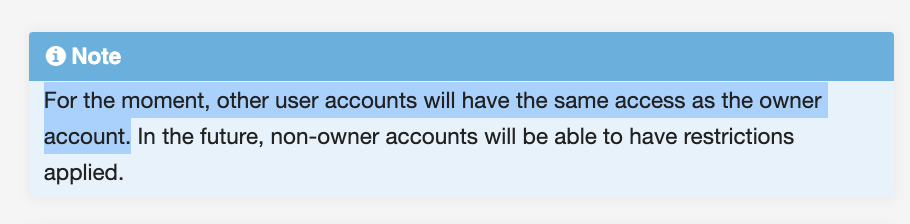
This is not a security issue, as it is the same as it always has been, as described in the documentation.

@kristjanbjarni I think you misunderstood the user features there, please check the documentation, which is very clear about that:
https://www.home-assistant.io/docs/authentication/#user-accounts
This is not a security issue, as it is the same as it always has been, as described in the documentation.
Well this documentation will probably have this caveat text forever, so it's not very useful. This doesn't change the fact that there where some security in place, for example for management endpoints as specified in the new user dialog:
The user group feature is a work in progress. The user will be unable to administer the instance via the UI.
We're still auditing all management API endpoints to ensure that they correctly limit access to administrators.
Before this search feature was added there where at least some limitation on what a standard user could do through the UI, but now any standard user has access to all entities, scripts and automations. Limiting access to what can be done through the UI is very useful for publicly facing panels. I understand that limiting this search will not lock everything down in HA but at least it will limit some access for standard users.
It doesn't limit, nor did it ever limit access. There is no such security feature, yet you try to say there is. There simply isn't.
There are currently feature requests open on our community forums that request such features to be added in the future. Feel free to vote on that and join the conversation there.
../Frenck
I don't want to argue about semantics. All I am saying is that before there was no easy direct access from the UI to all entities. If you only have panel or kiosk mode access to HA then this feature can actually limit your access. All that is needed is simply to hide this icon for standard users.
There hasn't been any activity on this issue recently. Due to the high number of incoming GitHub notifications, we have to clean some of the old issues, as many of them have already been resolved with the latest updates. Please make sure to update to the latest Home Assistant version and check if that solves the issue. Let us know if that works for you by adding a comment 👍 This issue has now been marked as stale and will be closed if no further activity occurs. Thank you for your contributions.
There hasn't been any activity on this issue recently. Due to the high number of incoming GitHub notifications, we have to clean some of the old issues, as many of them have already been resolved with the latest updates. Please make sure to update to the latest Home Assistant version and check if that solves the issue. Let us know if that works for you by adding a comment 👍 This issue has now been marked as stale and will be closed if no further activity occurs. Thank you for your contributions.
There hasn't been any activity on this issue recently. Due to the high number of incoming GitHub notifications, we have to clean some of the old issues, as many of them have already been resolved with the latest updates. Please make sure to update to the latest Home Assistant version and check if that solves the issue. Let us know if that works for you by adding a comment 👍 This issue has now been marked as stale and will be closed if no further activity occurs. Thank you for your contributions.