

 home-assistant
Add Helper Dialog box inconsistant UI experience
Checklist
- [X] I have updated to the latest available Home Assistant version.
- [X] I have cleared the cache of my browser.
- [X] I have tried a different browser to see if it is related to my browser.
Describe the issue you are experiencing
With the addition of the extra helpers in 2022.4, there are now 2 different experiences depending on which helper you add.
If you add one of the older/tradtional/legacy helpers (such as button, text, timer), the dialog that pops up has "back" and "create" buttons down the bottom. And when you press "back" it takes you back to the add helper dialog.
If you add one of the newer helpers (such as group, threshold, switch as x), the dialog that pops up only has a "submit" button down the bottom, and an "X" at the top. And when you press the "X" it takes you all the way back to your list of existing helpers (not the add helper dialog).
Describe the behavior you expected
I would have expected both the older helper dialogs, as well as the newer dialogs, to both follow the same UI look and dialog flow. Personally I find it nicer when you cancel adding a specific typer of helper (either by pressing the X or the back button) to take you back to the add helper dialog (in case you clicked on the wrong type of helper to add). But it doesnt really matter I would just expect the behaviour to be consistent.
Steps to reproduce the issue
- Open your HA dash board
- Go to Configuration -> Automations & Scenes -> Helpers
- Click on Add Helper
- Select Button
- Note the presence of a Back and Submit buttons
- Press Back
- Note the UI goes back to the Add Helper Dialog
- Select Change device type of a switch
- Note the presence of only a Submit button and an X at the top of the dialog
- Press X
- Note the UI returns to the list of configured helpers, rather than the Add Helper dialog. ...
What version of Home Assistant Core has the issue?
core-2022.4.1
What was the last working version of Home Assistant Core?
n/a
In which browser are you experiencing the issue with?
Firefox 98.0.1 and Chrome 100.0.4896.75
Which operating system are you using to run this browser?
Win 10
State of relevant entities
No response
Problem-relevant frontend configuration
No response
Javascript errors shown in your browser console/inspector
No response
Additional information
No response

Found this when I was poking around a bunch of different input helpers in the UI and noticed for some of the new ones there wasn't a "back" button. Just wanted to emphasize that particular aspect being fairly visible, perhaps particularly to new users since they might poke around these different inputs as I was.

There hasn't been any activity on this issue recently. Due to the high number of incoming GitHub notifications, we have to clean some of the old issues, as many of them have already been resolved with the latest updates. Please make sure to update to the latest Home Assistant version and check if that solves the issue. Let us know if that works for you by adding a comment 👍 This issue has now been marked as stale and will be closed if no further activity occurs. Thank you for your contributions.
![github-actions[bot] avatar](https://avatars.githubusercontent.com/in/15368?v=4 "Published by a pub.dev verified publisher")
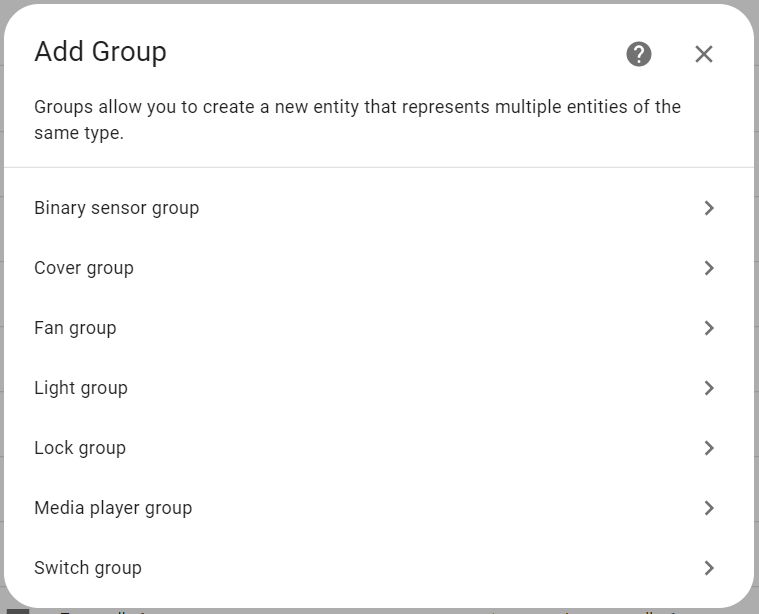

This other issue is a duplicate https://github.com/home-assistant/frontend/issues/15692
Yes, this issue still remains

I looked at this once briefly but it did not seem very easy to fix. There seem to be two broad classes of helpers, some which have their dialogs designed in the frontend (and have a back button), and others that use config flow where the backend defines the dialogs and flow. So it's may not be as simple as just adding an extra button to make them consistent, since both flows seem to have different kinds of design, some of which may go through multiple dialogs and is not designed to go backwards. Anyway just my 2¢.

There hasn't been any activity on this issue recently. Due to the high number of incoming GitHub notifications, we have to clean some of the old issues, as many of them have already been resolved with the latest updates. Please make sure to update to the latest Home Assistant version and check if that solves the issue. Let us know if that works for you by adding a comment 👍 This issue has now been marked as stale and will be closed if no further activity occurs. Thank you for your contributions.
There hasn't been any activity on this issue recently. Due to the high number of incoming GitHub notifications, we have to clean some of the old issues, as many of them have already been resolved with the latest updates. Please make sure to update to the latest Home Assistant version and check if that solves the issue. Let us know if that works for you by adding a comment 👍 This issue has now been marked as stale and will be closed if no further activity occurs. Thank you for your contributions.
There hasn't been any activity on this issue recently. Due to the high number of incoming GitHub notifications, we have to clean some of the old issues, as many of them have already been resolved with the latest updates. Please make sure to update to the latest Home Assistant version and check if that solves the issue. Let us know if that works for you by adding a comment 👍 This issue has now been marked as stale and will be closed if no further activity occurs. Thank you for your contributions.