
frontend
 frontend copied to clipboard
 home-assistant
Device selector acts differently when deselecting devices (design website)
Checklist
- [X] I have updated to the latest available Home Assistant version.
- [X] I have cleared the cache of my browser.
- [X] I have tried a different browser to see if it is related to my browser.
Describe the issue you are experiencing
Browsing the design website (https://design.home-assistant.io/#components/ha-selector) I've noticed that the Device picker acts differently than the Entity and Area picker.
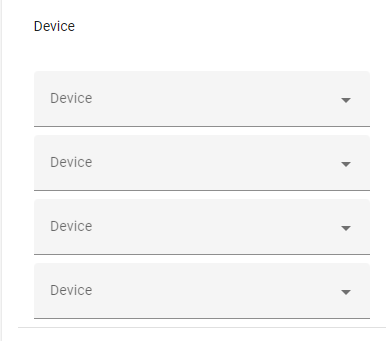
You can select all the devices, but when you deselect a device the dropdown (select) stays visible:
Describe the behavior you expected
When we deselect a device the component should behave the same way as Entity and Area selectors.
Steps to reproduce the issue
- Go to https://design.home-assistant.io/#components/ha-selector
- Select all devices in
Multiplessection - Deselect all (using
X)
What version of Home Assistant Core has the issue?
https://design.home-assistant.io/#components/ha-selector
What was the last working version of Home Assistant Core?
No response
In which browser are you experiencing the issue with?
No response
Which operating system are you using to run this browser?
No response
State of relevant entities
No response
Problem-relevant frontend configuration
No response
Javascript errors shown in your browser console/inspector
No response
Additional information
No response

I am seeing the same issue using multiple devices in my blueprint. This is causing me to not be able to delete devices from the list. It does not register that they have been removed.
Before

After Remove (Save does not show up)


This still seems to be an issue. I'm trying to create a blueprint and coming across the same problem that zackbcom reported. Misiu's steps to reproduce still causes the same result in the Home Assistant design website as well as my live 2022.6.6 instance (I know I'm a few versions behind now, so if it's been fixed, I'll update and this issue could be closed).

