

 home-assistant
ONVIF: TP-Link Tapo Camera Motion not working after firmware upgrade
The problem
Hello.
I have 2 different cameras: 1 C200 running on 1.3.5 Build 230307 Rel.6847n(4555) contains string 'hol' in it's name 1 C210 running on 1.3.0 Build 220830 Rel.69909n(4555) contains string 'living' in it's name
For some time, the motion sensor from C200 is not working. Usually when I had this issue, it was fixed after a restart of HA or reboot of the camera. The C210 one is still working as expected.

I have enabled the debug on the two entities and got the attached log. I cannot see any ERRORS, maybe you can spot something that it shouldn't be there.
This has already been discussed in the Tapo Control issues : https://github.com/JurajNyiri/HomeAssistant-Tapo-Control/issues/312
What version of Home Assistant Core has the issue?
core-2023.4.5
What was the last working version of Home Assistant Core?
core-2023.4.5
What type of installation are you running?
Home Assistant OS
Integration causing the issue
ONVIF
Link to integration documentation on our website
https://www.home-assistant.io/integrations/onvif/
Diagnostics information
home-assistant_2023-04-19T10-04-13.732Z.log
Example YAML snippet
No response
Anything in the logs that might be useful for us?
Please check https://github.com/JurajNyiri/HomeAssistant-Tapo-Control/files/11270254/home-assistant_2023-04-19T07-20-50.421Z.log for more logs.
Additional information
Might not be ONVIF fault, maybe it's a bad firmware from TP-Link?

Hey there @hunterjm, mind taking a look at this issue as it has been labeled with an integration (onvif) you are listed as a code owner for? Thanks!
Code owner commands
Code owners of onvif can trigger bot actions by commenting:
-
@home-assistant closeCloses the issue. -
@home-assistant rename Awesome new titleRenames the issue. -
@home-assistant reopenReopen the issue. -
@home-assistant unassign onvifRemoves the current integration label and assignees on the issue, add the integration domain after the command.
(message by CodeOwnersMention)
onvif documentation onvif source (message by IssueLinks)
![home-assistant[bot] avatar](https://avatars.githubusercontent.com/in/97978?v=4 "Published by a pub.dev verified publisher")
Make sure the custom component is up to date as older versions pin the onvif library to the wrong version
If that’s not it try unplugging the camera for a minute and plugging it back in. Reasoning for this detailed here https://github.com/home-assistant/core/pull/91485

Thanks for the replies. I can confirm that the custom component is up to date. Tried multiple troubleshooting methods, restarted HA, rebooted camera, unplugged / plugged it, nothing works.
As mentioned, the only difference between the camera that is working and the one that doesn't is the firmware version so the problem might be actually by TP-Link Tapo, but not sure if something can be done on ONVIF side also.
Can you please let me know how can I set up the onvif custom integration after copying the files to custom_components/onvif ? I only get the original one while searching for Integrations.
I found this in the logs though:
2023-04-19 13:24:18.145 ERROR (SyncWorker_2) [homeassistant.loader] The custom integration 'onvif' does not have a version key in the manifest file and was blocked from loading. See https://developers.home-assistant.io/blog/2021/01/29/custom-integration-changes#versions for more details
This looks to be tied to the firmware version, I have a C210 with firmware 1.3.3 and my motion doesn't work. I added a version: 1 to the manifest.json just to be able to load ONVIF as a custom_module (as per bdraco's comment) but motion is still not working
Edit: Interesting, I can now see errors are gone and I can see the motion working!

I turned on the Diagnostics of the faulty camera and extracted this log that was generated while I was moving in front of the camera.
I see a lot of errors but not sure if any of these are relevant but this one looks relevant:
[__tev__CreatePullPointSubscription:5994]: the amount of MD threads is up to limit :3
If needed, I can run a full diagnostic on the camera, if you think this would tell something.
I forgot to add the version key to the manifest when I made it a custom component. Please try pulling again
mkdir -p /config/custom_components
cd /config/custom_components
git clone https://github.com/bdraco/onvif
cd /config/custom_components/onvif
git pull
git log -1
Restart
The git log -1 should should 7c65f84f1269b814bf9b61eba116eaf04d0e13cb
Motion detection works reliably with this pull re. But, I get this error:
2023-04-20 09:39:09.611 DEBUG (MainThread) [custom_components.onvif] Tapo_Camera_8A28: Device does not support notification service or too many subscriptions: illegal status line: bytearray(b'POST /onvif/service\x00HTTP/1.1\x00\x00Host\x00 192.168.0.129:2020\x00\x00Accept\x00 */*\x00\x00Accept-Encoding\x00 gzip, deflate, br\x00\x00Connection\x00 keep-alive\x00\x00User-Agent\x00 ZeHTTP/1.1 500 Internal Server Error')
Looks somewhat related (both have 500 Internal Server Error) with https://github.com/home-assistant/core/issues/85902.
Here are the full logs

I tried this, had it run over night. On my side the motion detection for the new firmware still doesn't work and the one which works gets stuck on 'detected'.
Logs attached: home-assistant_2023-04-20T06-48-51.857Z.log
Will try some HA/camera restarts to see if this changes.
2023-04-20 09:39:09.611 DEBUG (MainThread) [custom_components.onvif] Tapo_Camera_8A28: Device does not support notification service or too many subscriptions: illegal status line: bytearray(b'POST /onvif/service\x00HTTP/1.1\x00\x00Host\x00 192.168.0.129:2020\x00\x00Accept\x00 */*\x00\x00Accept-Encoding\x00 gzip, deflate, br\x00\x00Connection\x00 keep-alive\x00\x00User-Agent\x00 ZeHTTP/1.1 500 Internal Server Error')
Thats not good. It looks like there might be a bug in the firmware
I tried this, had it run over night. On my side the motion detection for the new firmware still doesn't work and the one which works gets stuck on 'detected'.
Logs attached: home-assistant_2023-04-20T06-48-51.857Z.log
Will try some HA/camera restarts to see if this changes.
Anything interesting in the camera diagnostics ? Its almost like the camera is crashing and restarting
Performed the following steps:
- Stopped HA entirely (shut down)
- Unplugged both cameras and then waited some minutes, plugged back
- Started HA
First observation: the 'Starting ONVIF, not everything will be available until it is finished.' message was there for a while. Had to restart again because the message 'Home Assistant is starting, not everything will be available until it is finished.' didn't go away for a while. ONVIF motion sensor on the camera which was working before isn't detecting anything. Nothing in the HA logs. home-assistant_2023-04-20T07-15-33.419Z.log
After restart: The following integrations and platforms could not be set up: onvif ([Show logs](http://homeassistant.local:8123/config/logs?filter= But nothing is displayed in the logs. home-assistant_2023-04-20T07-19-33.838Z.log onvif))

Motion sensor is still unavailable for the new firmware, old one works good. Attaching the broken camera diagnose. diagnose_log.log
At this point I tend to believe that it's a firmware issue that cannot be fixed on our side.
At this point I tend to believe that it's a firmware issue that cannot be fixed on our side.
Based on the above, I agree.
2023-04-20 09:39:09.611 DEBUG (MainThread) [custom_components.onvif] Tapo_Camera_8A28: Device does not support notification service or too many subscriptions: illegal status line: bytearray(b'POST /onvif/service\x00HTTP/1.1\x00\x00Host\x00 192.168.0.129:2020\x00\x00Accept\x00 */*\x00\x00Accept-Encoding\x00 gzip, deflate, br\x00\x00Connection\x00 keep-alive\x00\x00User-Agent\x00 ZeHTTP/1.1 500 Internal Server Error')Thats not good. It looks like there might be a bug in the firmware
I updated the firmware on my C320WS and now I have the same problem. If I find a workaround, I'll post it, but I think we have to wait for them to fix the firmware at this point.
I have sent an email to local TP-Link support email [email protected]
I'll get back if I get any replies.
I have the same problem with my C320WS. Maybe you need some help with the investigation?

From my emails to TP-Link, the Tapo developers are stating that there is no change on the ONVIF part of the cameras in the latest 1.3.x firmware. Looks like there was a fix found in this topic : https://github.com/JurajNyiri/HomeAssistant-Tapo-Control/issues/312
Given this, looks like it's an issue on Home Assistant side, as the ONVIF is working with other software like iSpy as per these instructions on the official TP-Link website https://www.tp-link.com/en/support/faq/2680/
Thats strange since all the 320s I have on the newer firmware throw 500 internal errors and returns back data that looks like its been corrupted in memory.
Its certainly possible that the memory corruption has nothing to do with the onvif implementation in the camera and its happening deeper in the stack.
Looks like there was a fix found in this topic : JurajNyiri/HomeAssistant-Tapo-Control#312
If the issue is not in firmware, it will need to be fixed here -- in HA onvif. My last updates just implement the new onvif version introduced in the latest dev versions. If you would like to help further, enable debug logs for onvif with latest DEV version of HA and post them here. Make sure to disable tapo integration and use only onvif, to prevent noise or wrong implementation in Tapo custom integration.

Also events do work fine for me on the 320s with pull point. Its only the notification subscriptions (webhooks) that throw the 500 errors.
I don't have a 200 to test with so its possible there is another issue but without logs I can only tell you what I see with the 320
I don't have a 200 to test with so its possible there is another issue but without logs I can only tell you what I see with the 320
I've got a C200 a since yesterday and was stupid enough to update it out of the box to the latest firmware: 1.3.4 Build 230424 Rel.76394n(4555). I tried the custom Tapo component and ran into the same issue as others, motion detection not working.
To maybe help debug the issue I updated to the dev branch of homeassistant, removed the tapo component and added the official ONVIF component. After a few minutes a binary_sensor.camera_cell_motion_detection sensor pops up, but it looks like it's stuck in "Detected" state.
Here's a few snippets from the logs:
2023-04-30 09:26:20.234 DEBUG (MainThread) [homeassistant.components.onvif] catfinder: Failed to unsubscribe PullPoint subscription; This is normal if the device restarted: Device sent empty error
2023-04-30 09:26:20.234 DEBUG (MainThread) [homeassistant.components.onvif] catfinder: Unsubscribing from webhook
2023-04-30 09:26:20.286 DEBUG (MainThread) [zeep.transports] HTTP Response from http://192.168.24.159:2020/onvif/service (status: 200):
2023-04-30 09:26:20.287 DEBUG (MainThread) [onvif] Closing service ('subscription', 'PullPointSubscription') with http://192.168.24.159:1024/event-1024_1024
2023-04-30 09:26:20.287 DEBUG (MainThread) [onvif] Creating service ('subscription', 'PullPointSubscription') with http://192.168.24.159:1025/event-1025_1025
2023-04-30 09:26:20.287 DEBUG (MainThread) [onvif] Closing service ('pullpoint', 'PullPointSubscription') with http://192.168.24.159:1024/event-1024_1024
2023-04-30 09:26:20.288 DEBUG (MainThread) [onvif] Creating service ('pullpoint', 'PullPointSubscription') with http://192.168.24.159:1025/event-1025_1025
2023-04-30 09:26:20.308 DEBUG (MainThread) [homeassistant.components.onvif] catfinder: Unregistering webhook onvif_32d119873a67ddd1423f17ebcc3f2852
2023-04-30 09:26:20.312 DEBUG (MainThread) [onvif] Creating service ('devicemgmt', None) with http://catfinder.lan:2020/onvif/device_service
2023-04-30 09:26:20.314 DEBUG (MainThread) [zeep.transports] HTTP Post to http://catfinder.lan:2020/onvif/device_service:
2023-04-30 09:26:20.351 DEBUG (MainThread) [zeep.transports] HTTP Response from http://catfinder.lan:2020/onvif/device_service (status: 200):
2023-04-30 09:26:20.354 DEBUG (MainThread) [homeassistant.components.onvif] catfinder: Setting up the ONVIF device management service
2023-04-30 09:26:20.354 DEBUG (MainThread) [homeassistant.components.onvif] catfinder: Retrieving current device date/time
2023-04-30 09:26:20.355 DEBUG (MainThread) [zeep.transports] HTTP Post to http://catfinder.lan:2020/onvif/device_service:
2023-04-30 09:26:20.356 DEBUG (MainThread) [homeassistant.components.onvif] catfinder: SetSynchronizationPoint: None
2023-04-30 09:26:20.382 DEBUG (MainThread) [zeep.transports] HTTP Response from http://catfinder.lan:2020/onvif/device_service (status: 200):
2023-04-30 09:26:20.383 DEBUG (MainThread) [homeassistant.components.onvif] catfinder: Device time: {
2023-04-30 09:26:20.384 DEBUG (MainThread) [homeassistant.components.onvif] catfinder: Device date/time: 2023-04-24 14:45:40+00:00 | System date/time: 2023-04-30 07:26:20.354528+00:00
2023-04-30 09:26:20.384 WARNING (MainThread) [homeassistant.components.onvif] The date/time on catfinder (UTC) is '2023-04-24 14:45:40+00:00', which is different from the system '2023-04-30 07:26:20.354528+00:00', this could lead to authentication issues
2023-04-30 09:26:20.385 DEBUG (MainThread) [zeep.transports] HTTP Post to http://catfinder.lan:2020/onvif/device_service:
2023-04-30 09:26:20.404 DEBUG (MainThread) [zeep.transports] HTTP Response from http://catfinder.lan:2020/onvif/device_service (status: 200):
2023-04-30 09:26:20.406 DEBUG (MainThread) [zeep.transports] HTTP Post to http://catfinder.lan:2020/onvif/device_service:
2023-04-30 09:26:20.426 DEBUG (MainThread) [zeep.transports] HTTP Response from http://catfinder.lan:2020/onvif/device_service (status: 200):
2023-04-30 09:26:20.427 DEBUG (MainThread) [homeassistant.components.onvif] Camera catfinder info = DeviceInfo(manufacturer='tp-link', model='Tapo C200', fw_version='1.3.4 Build 230424 Rel.76394n(4555)', serial_number='', mac='')
2023-04-30 09:26:20.427 DEBUG (MainThread) [onvif] Creating service ('media', None) with http://192.168.24.159:2020/onvif/service
2023-04-30 09:26:20.429 DEBUG (MainThread) [zeep.transports] HTTP Post to http://192.168.24.159:2020/onvif/service
2023-04-30 09:26:20.435 DEBUG (MainThread) [zeep.transports] HTTP Response from http://192.168.24.159:2020/onvif/service (status: 200):
2023-04-30 09:26:20.436 DEBUG (MainThread) [onvif] Creating service ('imaging', None) with http://192.168.24.159:2020/onvif/service
2023-04-30 09:26:20.437 DEBUG (MainThread) [homeassistant.components.onvif] catfinder: Starting PullPoint manager
2023-04-30 09:26:20.437 DEBUG (MainThread) [onvif] Creating service ('events', None) with http://192.168.24.159:2020/onvif/service
2023-04-30 09:26:20.438 DEBUG (MainThread) [zeep.transports] HTTP Post to http://192.168.24.159:2020/onvif/service:
2023-04-30 09:26:20.452 DEBUG (MainThread) [zeep.transports] HTTP Response from http://192.168.24.159:2020/onvif/service (status: 200):
2023-04-30 09:26:20.453 DEBUG (MainThread) [onvif] Creating service ('subscription', 'PullPointSubscription') with http://192.168.24.159:1026/event-1026_1026
2023-04-30 09:26:20.468 DEBUG (MainThread) [homeassistant.components.onvif] catfinder: SetSynchronizationPoint: None
2023-04-30 09:26:20.469 DEBUG (MainThread) [homeassistant.components.onvif] catfinder: Starting webhook manager
2023-04-30 09:26:20.469 DEBUG (MainThread) [homeassistant.components.onvif] catfinder: Registering webhook: onvif_32d119873a67ddd1423f17ebcc3f2852
2023-04-30 09:26:20.469 DEBUG (MainThread) [homeassistant.components.onvif] catfinder: Registered webhook: onvif_32d119873a67ddd1423f17ebcc3f2852
2023-04-30 09:26:20.469 DEBUG (MainThread) [homeassistant.components.onvif] catfinder: Creating webhook subscription
2023-04-30 09:26:20.469 DEBUG (MainThread) [onvif] Creating service ('notification', None) with http://192.168.24.159:2020/onvif/service
2023-04-30 09:26:20.471 DEBUG (MainThread) [zeep.transports] HTTP Post to http://192.168.24.159:2020/onvif/service:
2023-04-30 09:26:20.594 DEBUG (MainThread) [zeep.transports] HTTP Response from http://192.168.24.159:2020/onvif/service (status: 200):
2023-04-30 09:26:20.595 DEBUG (MainThread) [onvif] Creating service ('pullpoint', 'NotificationConsumer') with http://192.168.24.159:2020/event-0_2020
2023-04-30 09:26:20.595 DEBUG (MainThread) [onvif] Creating service ('subscription', 'NotificationConsumer') with http://192.168.24.159:2020/event-0_2020
2023-04-30 09:26:20.617 DEBUG (MainThread) [homeassistant.components.onvif] catfinder: Webhook subscription created
2023-04-30 09:26:20.617 DEBUG (MainThread) [homeassistant.components.onvif] Camera catfinder capabilities = Capabilities(snapshot=False, events=True, ptz=True, imaging=True)
2023-04-30 09:26:20.618 DEBUG (MainThread) [zeep.transports] HTTP Post to http://192.168.24.159:2020/onvif/service:
2023-04-30 09:26:20.671 DEBUG (MainThread) [zeep.transports] HTTP Response from http://192.168.24.159:2020/onvif/service (status: 200):
2023-04-30 09:26:20.678 DEBUG (MainThread) [onvif] Creating service ('ptz', None) with http://192.168.24.159:2020/onvif/service
2023-04-30 09:26:20.679 DEBUG (MainThread) [zeep.transports] HTTP Post to http://192.168.24.159:2020/onvif/service:
2023-04-30 09:26:20.712 DEBUG (MainThread) [zeep.transports] HTTP Response from http://192.168.24.159:2020/onvif/service (status: 200):
2023-04-30 09:26:20.715 DEBUG (MainThread) [zeep.transports] HTTP Post to http://192.168.24.159:2020/onvif/service:
2023-04-30 09:26:20.736 DEBUG (MainThread) [zeep.transports] HTTP Response from http://192.168.24.159:2020/onvif/service (status: 200):
2023-04-30 09:26:20.738 DEBUG (MainThread) [homeassistant.components.onvif] Camera catfinder profiles = [Profile(index=0, token='profile_1', name='mainStream', video=Video(encoding='H264', resolution=Resolution(width=1920, height=1080)), ptz=PTZ(continuous=True, relative=True, absolute=True, presets=['1', '2', '3', '4', '5', '6', '7', '8']), video_source_token='raw_vs1'), Profile(index=1, token='profile_2', name='minorStream', video=Video(encoding='H264', resolution=Resolution(width=640, height=360)), ptz=PTZ(continuous=True, relative=True, absolute=True, presets=['1', '2', '3', '4', '5', '6', '7', '8']), video_source_token='raw_vs1')]
2023-04-30 09:26:21.489 DEBUG (MainThread) [homeassistant.components.onvif] catfinder: Pulling PullPoint messages timeout=0:01:00 limit=100
2023-04-30 09:27:22.022 DEBUG (MainThread) [homeassistant.components.onvif] catfinder: continuous PullMessages: no events
2023-04-30 09:27:22.773 DEBUG (MainThread) [homeassistant.components.onvif] catfinder: Pulling PullPoint messages timeout=0:01:00 limit=100
2023-04-30 09:27:50.635 DEBUG (MainThread) [homeassistant.components.onvif] catfinder: Renewed Webhook subscription
2023-04-30 09:28:16.800 DEBUG (MainThread) [homeassistant.components.onvif] catfinder: continuous PullMessages: 1 event(s)
2023-04-30 09:28:16.805 DEBUG (MainThread) [homeassistant.components.onvif] catfinder: Renewed PullPoint subscription
2023-04-30 09:28:17.551 DEBUG (MainThread) [homeassistant.components.onvif] catfinder: Pulling PullPoint messages timeout=0:01:00 limit=100
2023-04-30 09:28:43.993 DEBUG (MainThread) [zeep.transports] HTTP Post to http://192.168.24.159:2020/onvif/service:
2023-04-30 09:28:44.011 DEBUG (MainThread) [zeep.transports] HTTP Response from http://192.168.24.159:2020/onvif/service (status: 200):
2023-04-30 09:29:47.558 DEBUG (MainThread) [homeassistant.components.onvif] catfinder: Failed to fetch PullPoint subscription messages: Device sent empty error
2023-04-30 09:29:47.558 DEBUG (MainThread) [homeassistant.components.onvif] catfinder: PullPoint renew already in progress
2023-04-30 09:29:48.309 DEBUG (MainThread) [homeassistant.components.onvif] catfinder: Pulling PullPoint messages timeout=0:01:00 limit=100
2023-04-30 09:08:13.527 DEBUG (MainThread) [onvif] Creating service ('subscription', 'NotificationConsumer') with http://192.168.24.159:2020/event-0_2020
I removed the SOAP messages from the logs, let me know if you need more info.

Tapo C200 by tp-link Firmware: 1.3.3 Build 230228 Rel.79740n(5553)

I bought a C200 and it has the above firmware and it worked out of box with 2023.5.0b6
Tapo C200 by tp-link Firmware: 1.3.3 Build 230228 Rel.79740n(5553)
I bought a C200 and it has the above firmware and it worked out of box with 2023.5.0b6
You don't have a update pending for 1.3.4? If so, could you check if that breaks it?
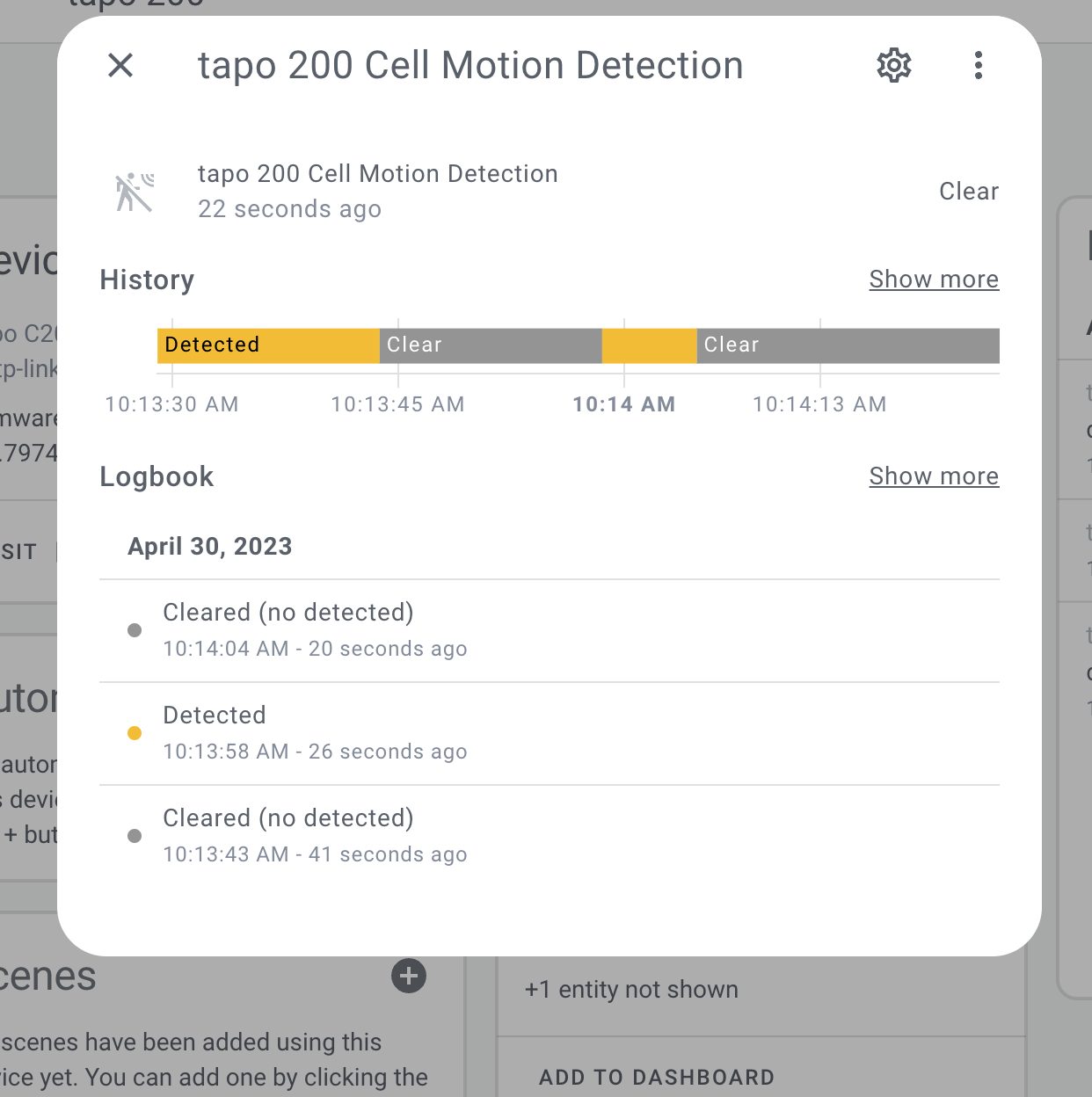
Also checked on an instance that had https so no webhook which falls back to pull point

If only there was a way to download the firmware from their site and roll back the update... Thanks for checking
Maybe other Hardware version ?! My C200 is Hardware Version 1.0 with Firmware Version 1.3.5.
TP-Link suggestion was to factory reset the camera and check if it works after. I would not do this as I might break my automations and other stuff (not sure HA will keep the same id if I register it again). @bdraco : Maybe you don't care about this on your C320WS and can factory reset it to test this ?
Maybe other Hardware version ?! My C200 is Hardware Version 1.0 with Firmware Version 1.3.5.
TP-Link suggestion was to factory reset the camera and check if it works after. I would not do this as I might break my automations and other stuff (not sure HA will keep the same id if I register it again). @bdraco : Maybe you don't care about this on your C320WS and can factory reset it to test this ?
Factory reset doesn't work, sensor is now not even showing up anymore after resetting the device and removing/adding the integration from HA.