

 home-assistant
ZHA does not rename disabled entities when device is renamed
The problem
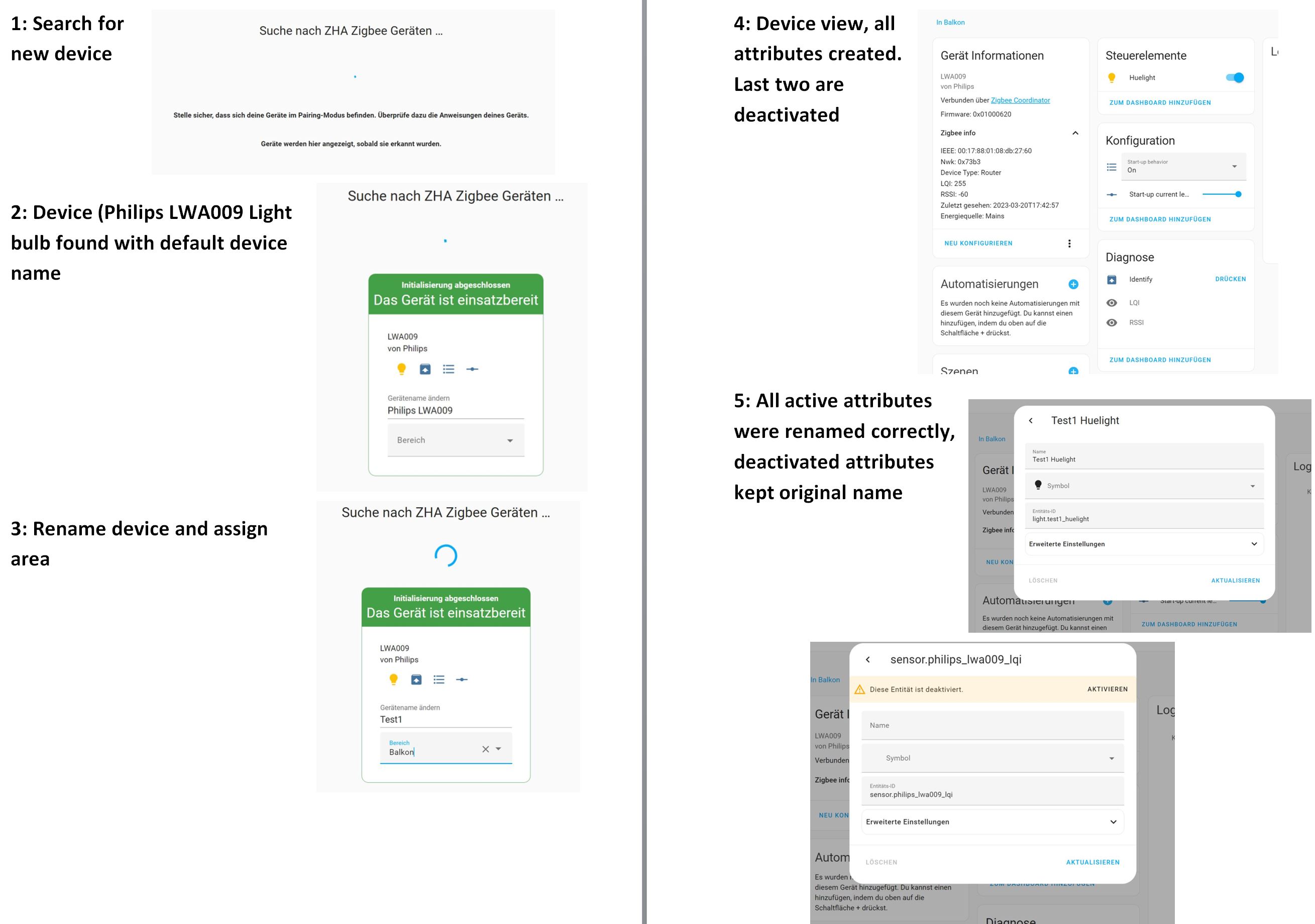
I am currently setting up a new ZHA network with SkyConnect. When adding a device, it is discovered with its technical description. So I directly rename it on the "add device" screen.
What is great, is that most device attributes like light on/off, on-level, identify are mostly automatically renamed.
Unfortunately the by default disabled attributes LQI and RSSI are not renamed as the other attributes, so to have all of them following same naming convention, they need to be renamed manually for each device.

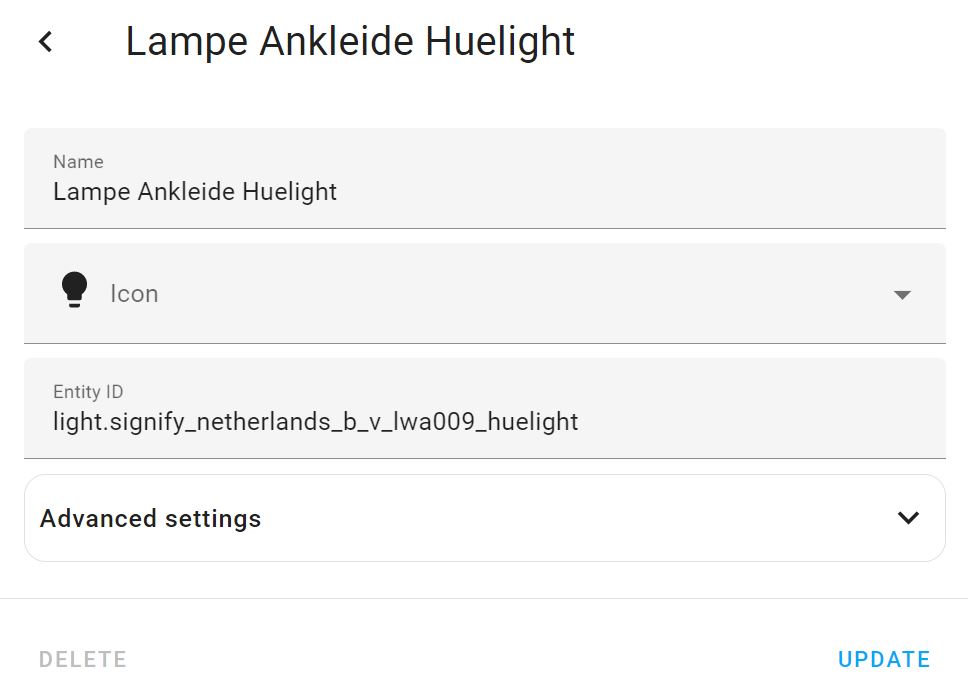
I also noticed that for some devices (e.g. some Signify device) attribute names are not renamed at all. I assume it might be because they have a special character "." as part of the technical name initially.
What version of Home Assistant Core has the issue?
Home Assistant 2023.3.4
What was the last working version of Home Assistant Core?
No response
What type of installation are you running?
Home Assistant OS
Integration causing the issue
ZHA
Link to integration documentation on our website
https://www.home-assistant.io/integrations/zha/
Diagnostics information
No response
Example YAML snippet
No response
Anything in the logs that might be useful for us?
No response
Additional information
No response

Hey there @dmulcahey, @adminiuga, @puddly, mind taking a look at this issue as it has been labeled with an integration (zha) you are listed as a code owner for? Thanks!
Code owner commands
Code owners of zha can trigger bot actions by commenting:
-
@home-assistant closeCloses the issue. -
@home-assistant rename Awesome new titleRenames the issue. -
@home-assistant reopenReopen the issue. -
@home-assistant unassign zhaRemoves the current integration label and assignees on the issue, add the integration domain after the command.
(message by CodeOwnersMention)
zha documentation zha source (message by IssueLinks)
![home-assistant[bot] avatar](https://avatars.githubusercontent.com/in/97978?v=4 "Published by a pub.dev verified publisher")
In my testing, it also always renames disabled entities.
The device name basically needs to match the prefix in the entity ID though. So in your case, try renaming the device name to osram_surface_light_w_c_lightify first (without clicking rename in the second prompt), then rename the device to whatever you want, click "rename" in the prompt, and all entity IDs should be correctly renamed.
Underscores and spaces should be somewhat equivalent, but this might be an issue if the manufacturer name is Signify Netherlands B.V. for example (notice the dots). I think the entity id/device name matching breaks in that case. Not sure that's a ZHA issue though.
Since you did not upload a diagnostics file for that light: what's the manufacturer + model ID + original device name?

Hi, thanks a lot for looking into this.
I did encounter this behavior with multiple devices now. In the screen shot above it is an OSRAM LIGHTIFY Surface Light W23 ceiling lamp. But I encountered same behavior with two types of Philips Hue White Bulb A67 E27 1600lm LWA009.
From the Philips light, I have multiple ones. Some show "Philips LWA009" as device name, some show "Signify Netherlands B.V. LWA009". For the second type from Signify Netherlands B.V., no attribute is renamed at all. For the Signify LWA009, only the deactivated attributes are not renamed.
See flow of steps below.
 I also uploaded diagnostic file for both LWA009 types.
zha-Philips LWA009.json.txt
zha-Signify Netherlands B.V. LWA009.json.txt
I also uploaded diagnostic file for both LWA009 types.
zha-Philips LWA009.json.txt
zha-Signify Netherlands B.V. LWA009.json.txt
Just to add that I have discovered this behavior too, LQI & RSSI are not renamed. I have been renaming devices as I add them and all other entities appear to be correctly renamed. I have observed this for all device classes I use (motion, smoke, bulb & socket).

There hasn't been any activity on this issue recently. Due to the high number of incoming GitHub notifications, we have to clean some of the old issues, as many of them have already been resolved with the latest updates. Please make sure to update to the latest Home Assistant version and check if that solves the issue. Let us know if that works for you by adding a comment 👍 This issue has now been marked as stale and will be closed if no further activity occurs. Thank you for your contributions.
![issue-triage-workflows[bot] avatar](https://avatars.githubusercontent.com/u/13844975?v=4 "Published by a pub.dev verified publisher")