
core
 core copied to clipboard
 home-assistant
Philips Hue Motion SML001 device becomes unavailable with ZHA.
The problem
Note! Please keep this issue on topic and concerning only Hue SML001 sensors becoming unavailable in ZHA.
This has been split off from https://github.com/home-assistant/core/issues/86231#issuecomment-1454922708 at the request of @puddly.
Around 2 weeks ago I switched from a Philips Hue hub based setup (using the integration) to a ZHA one using the Sonoff-E dongle.
Previously the Hue hub based system worked great - I've had the system running for multiple years, and for 1 year in my current house, I had no known issues with devices dropping off the network. In that time I didn't know about or attempt to address issues with Zigbee interference and had the hub was in a very sub-optimal location.
I have 38 hue bulbs / lightstrips / playbars on this system with 14 SML001 motion sensors, 6 SML003 motion sensors and a handful of smart buttons. The house is 300m2 across 2 floors with brick & concrete construction (typical European construction).
Since moving to ZHA I'm dealing with (almost?) all SML001 devices disconnecting and becoming unavailabe. This often coincides with a change in motion state. The device will then be stuck in that state until I press the repair button and re-add the device in ZHA. I'm noticing it affect all SML001 devices, irrespective of location in the house.
The SML003 devices have no similar issues, I don't think I've noticed any times when an SML003 becomes unavailable, even when used in the same room as unstable SML001 devices.
The dongle is on a 2m USB2 shielded cable about 1m from floor height and connected to the USB2 port. HA OS is running on a Pi4 and is up to date.
So far I've tried the following things to fix the issue:
- moving the co-ordinator
- from a similar location to where the happy hue hub was to one more inline with the usual recommendations (higher up, away from sources of EMF, more central to the network, fewer solid walls between the coordinator and the network), but the position is still not optimum.
- changing to channel 20 (this is what the Hue hub was previously running on)
- I did this by making a backup in ZHA, modifying the json and migrating the coordinator to the backup, after restarting ZHA it shows the updated channel and I then manually reset all of the devices and re-pair. To reset the bulbs I re-pair to Hue hub using the serial number and then delete them from the Hue hub to put them back into a pairing state, so a lot of work!
- Changing to channel 25
- Used the same method as above
- I chose 25 after inspecting the Wifi channel usage using
wifi explorerapp and noticing that all of my 2.4 ghz traffic was on wifi channels 1-7 (I have an Eero Pro 6 mesh network which doesn't allow changing the wifi channes, but usually uses channel 1 for 2.4Ghz, the mesh network consists of 5 access points). - I also only have 2 close neighbours so local Wifi traffic is minimal, usually I barely see any other wifi networks available to connet to other than mine.
- Shutting down the network when all devices are connected to force Zigbee to heal
- This didn't help, I saw dropoffs within 10 mins of bringing the network backup
- Changing the batteries in all of the devices.
- I read that Hue doesn't actually support rechargeable batteries, and I realised that my stable SML003 devices also had the stock batteries (since they were more recent purchases), so to test the hypothesis and eliminate batteries being the problem I purchased 30 Energizer max plus batteries and replaced all SML001 batteries. No changes.
- Interference from baby monitors
- I have 2 baby monitors in the house, I turned both off for a while, but still saw dropouts during this time.
I'm now at a loss about how to proceed. I've gone from a rock-solid Hue setup (I only migrated away to optimise speed of automations by having everything on one device with fewer intermediaries) to an un-usable ZHA setup - all of my lighting is automatic based on these motion sensors.
@TheJulianJes
You requested the following info in the thread I branched this issue from:
sw_build_id = 6.1.1.27575
current_file_version = 1107323831
I also have the following logs from when a sensor dropped off, the folowing are snippets form what seem to be key events, but I also attached the full log showing events just before and after the device becoming un-available.
The device which went offline is 0x9d47
2023-03-05 10:52:38.443 DEBUG (MainThread) [bellows.ezsp.protocol] Application frame received sendUnicast: [<EmberStatus.SUCCESS: 0>, 200]

2023-03-05 10:52:38.444 DEBUG (MainThread) [bellows.ezsp.protocol] Application frame received messageSentHandler: [<EmberOutgoingMessageType.OUTGOING_DIRECT: 0>, 50546, EmberApsFrame(profileId=260, clusterId=768, sourceEndpoint=11, destinationEndpoint=11, options=<EmberApsOption.APS_OPTION_NONE: 0>, groupId=0, sequence=200), 73, <EmberStatus.DELIVERY_FAILED: 102>, b'']

2023-03-05 10:52:38.444 DEBUG (MainThread) [bellows.zigbee.application] Received messageSentHandler frame with [<EmberOutgoingMessageType.OUTGOING_DIRECT: 0>, 50546, EmberApsFrame(profileId=260, clusterId=768, sourceEndpoint=11, destinationEndpoint=11, options=<EmberApsOption.APS_OPTION_NONE: 0>, groupId=0, sequence=200), 73, <EmberStatus.DELIVERY_FAILED: 102>, b'']

2023-03-05 10:52:38.446 DEBUG (MainThread) [bellows.ezsp.protocol] Application frame received changeSourceRouteHandler: [0x470b, 0x009d, <Bool.false: 0>]

2023-03-05 10:52:38.446 DEBUG (MainThread) [bellows.zigbee.application] Received changeSourceRouteHandler frame with [0x470b, 0x009d, <Bool.false: 0>]

2023-03-05 10:52:38.447 DEBUG (bellows.thread_0) [bellows.uart] Data frame: b'74f8b1a9d42abcf5c480ad7e'

2023-03-05 10:52:38.447 DEBUG (bellows.thread_0) [bellows.uart] Sending: b'8070787e'

2023-03-05 10:52:38.450 DEBUG (MainThread) [bellows.ezsp.protocol] Application frame received incomingRouteErrorHandler: [<EmberStatus.SOURCE_ROUTE_FAILURE: 169>, 0x9d47]

2023-03-05 10:52:38.450 DEBUG (MainThread) [bellows.zigbee.application] Received incomingRouteErrorHandler frame with [<EmberStatus.SOURCE_ROUTE_FAILURE: 169>, 0x9d47]

2023-03-05 10:52:38.450 DEBUG (MainThread) [bellows.zigbee.application] Processing route error: status=EmberStatus.SOURCE_ROUTE_FAILURE, nwk=0x9d47
Then one second later this happens:
2023-03-05 10:52:38.935 DEBUG (MainThread) [bellows.ezsp.protocol] Application frame received trustCenterJoinHandler: [0x9d47, 00:17:88:01:08:67:2d:c4, <EmberDeviceUpdate.STANDARD_SECURITY_UNSECURED_REJOIN: 3>, <EmberJoinDecision.DENY_JOIN: 2>, 0xddcd]

2023-03-05 10:52:38.935 DEBUG (MainThread) [bellows.zigbee.application] Received trustCenterJoinHandler frame with [0x9d47, 00:17:88:01:08:67:2d:c4, <EmberDeviceUpdate.STANDARD_SECURITY_UNSECURED_REJOIN: 3>, <EmberJoinDecision.DENY_JOIN: 2>, 0xddcd]

2023-03-05 10:52:38.974 DEBUG (bellows.thread_0) [bellows.uart] Data frame: b'47ffb1a90d2ad86f19888c2dabdd85495c82269fadd4bc7e'

2023-03-05 10:52:38.975 DEBUG (bellows.thread_0) [bellows.uart] Sending: b'8520dd7e'

2023-03-05 10:52:38.977 DEBUG (MainThread) [bellows.ezsp.protocol] Application frame received incomingRouteRecordHandler: [0xddcd, 00:17:88:01:08:c6:1c:40, 192, -52, [0x4034]]

2023-03-05 10:52:38.978 DEBUG (MainThread) [bellows.zigbee.application] Received incomingRouteRecordHandler frame with [0xddcd, 00:17:88:01:08:c6:1c:40, 192, -52, [0x4034]]

2023-03-05 10:52:38.978 DEBUG (MainThread) [bellows.zigbee.application] Processing route record request: (0xddcd, 00:17:88:01:08:c6:1c:40, 192, -52, [0x4034])

2023-03-05 10:52:39.029 DEBUG (bellows.thread_0) [bellows.uart] Data frame: b'57ffb1a9702a522f9db92d2dabdd85499e4dea7660317e'

2023-03-05 10:52:39.029 DEBUG (bellows.thread_0) [bellows.uart] Sending: b'8610be7e'

2023-03-05 10:52:39.039 DEBUG (MainThread) [bellows.ezsp.protocol] Application frame received trustCenterJoinHandler: [0x9d47, 00:17:88:01:08:67:2d:c4, <EmberDeviceUpdate.DEVICE_LEFT: 2>, <EmberJoinDecision.NO_ACTION: 3>, 0xddcd]

2023-03-05 10:52:39.040 DEBUG (MainThread) [bellows.zigbee.application] Received trustCenterJoinHandler frame with [0x9d47, 00:17:88:01:08:67:2d:c4, <EmberDeviceUpdate.DEVICE_LEFT: 2>, <EmberJoinDecision.NO_ACTION: 3>, 0xddcd]

2023-03-05 10:52:39.040 INFO (MainThread) [zigpy.application] Device 0x9d47 (00:17:88:01:08:67:2d:c4) left the network

2023-03-05 10:52:39.040 DEBUG (MainThread) [homeassistant.components.zha.core.device] [[0x9D47](https://github.com/home-assistant/core/issues/SML001)](https://SML001): Update device availability -  device available: True - new availability: False - changed: True

2023-03-05 10:52:39.040 DEBUG (MainThread) [homeassistant.components.zha.core.device] [[0x9D47](https://github.com/home-assistant/core/issues/SML001)](https://SML001): Device availability changed and device became unavailable
Later in the logs (1second later) the device again joins and gets kicked off, you can find those in the attached log file here.
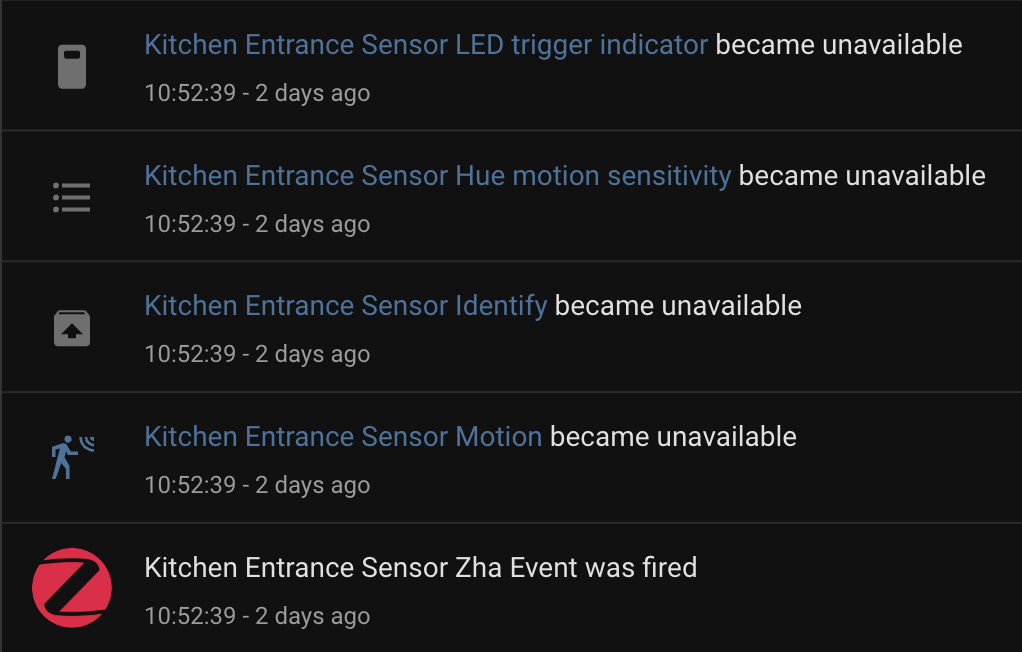
I also attached the Logbook entry for when the device went unavailable.
Note! Please keep this issue on topic and concerning only Hue SML001 sensors becoming unavailable in ZHA.
What version of Home Assistant Core has the issue?
core-2023.3.1
What was the last working version of Home Assistant Core?
No response
What type of installation are you running?
Home Assistant OS
Integration causing the issue
ZHA
Link to integration documentation on our website
https://www.home-assistant.io/integrations/zha/
Diagnostics information
Example YAML snippet
No response
Anything in the logs that might be useful for us?
No response
Additional information
No response

Hey there @dmulcahey, @adminiuga, @puddly, mind taking a look at this issue as it has been labeled with an integration (zha) you are listed as a code owner for? Thanks!
Code owner commands
Code owners of zha can trigger bot actions by commenting:
@home-assistant closeCloses the issue.@home-assistant rename Awesome new titleRenames the issue.@home-assistant reopenReopen the issue.@home-assistant unassign zhaRemoves the current integration label and assignees on the issue, add the integration domain after the command.
(message by CodeOwnersMention)
zha documentation zha source (message by IssueLinks)
![home-assistant[bot] avatar](https://avatars.githubusercontent.com/in/97978?v=4 "Published by a pub.dev verified publisher")
Thank you for the detailed debug info! I have one of these sensors arriving tomorrow so hopefully I'll be able to reproduce this with the SkyConnect running similar firmware.

After reading this, I am in exactly the same situation. I have a fairly large network (60 devices) the is struggling. In particular my Hue Motion Sensors keep dropping out (but off topic my Zigbee Downlights are failing to respond). Even my 4 button Hue lights take three or four button presses to trigger. They used to work fine.
Is there a way I can share logs or something to help with this?


One user that was running Z2M with Ti coordinator with 100+ devices was jumping ZHA and SC and was having some problems and the last thing for getting it working good was disabling source routing.
Try putting source_routing: false in your (Z)HA config and restarting HA.
If some devices is not doing the routing request / response the system cant finding the requested device and you is getting SOURCE_ROUTE_FAILURE and commands is being lost in the network.

Thanks @MattWestb, I've disabled source routing using the following config, but I still see source routing errors in my latest logs:
zha:
  zigpy_config:
    source_routing: false
    network:
      channel: 25 # What channel the radio should try to use.
      channels: [15, 20, 25] # Channel mask
2023-03-08 10:38:05.057 DEBUG (MainThread) [zigpy.zcl] [0x0B3E:11:0x0006] Sending request: Read_Attributes(attribute_ids=[0])
2023-03-08 10:38:05.058 DEBUG (MainThread) [bellows.zigbee.application] Sending packet ZigbeePacket(src=AddrModeAddress(addr_mode=<AddrMode.NWK: 2>, address=0x0000), src_ep=11, dst=AddrModeAddress(addr_mode=<AddrMode.NWK: 2>, address=0x0B3E), dst_ep=11, source_route=None, extended_timeout=False, tsn=85, profile_id=260, cluster_id=6, data=Serialized[b'\x00U\x00\x00\x00'], tx_options=<TransmitOptions.NONE: 0>, radius=0, non_member_radius=0, lqi=None, rssi=None)
2023-03-08 10:38:05.059 DEBUG (MainThread) [bellows.ezsp.protocol] Send command sendUnicast: (<EmberOutgoingMessageType.OUTGOING_DIRECT: 0>, 0x0b3e, EmberApsFrame(profileId=260, clusterId=6, sourceEndpoint=11, destinationEndpoint=11, options=<EmberApsOption.APS_OPTION_ENABLE_ROUTE_DISCOVERY: 256>, groupId=0, sequence=85), 86, b'\x00U\x00\x00\x00')
2023-03-08 10:38:05.070 DEBUG (MainThread) [bellows.ezsp.protocol] Application frame received sendUnicast: [<EmberStatus.SUCCESS: 0>, 5]
2023-03-08 10:38:05.097 DEBUG (MainThread) [bellows.ezsp.protocol] Application frame received incomingRouteRecordHandler: [0x4234, 00:17:88:01:0c:3e:d8:4f, 160, -60, [0x9781]]
2023-03-08 10:38:05.098 DEBUG (MainThread) [bellows.zigbee.application] Received incomingRouteRecordHandler frame with [0x4234, 00:17:88:01:0c:3e:d8:4f, 160, -60, [0x9781]]
2023-03-08 10:38:05.098 DEBUG (MainThread) [bellows.zigbee.application] Processing route record request: (0x4234, 00:17:88:01:0c:3e:d8:4f, 160, -60, [0x9781])
2023-03-08 10:38:05.102 DEBUG (MainThread) [bellows.ezsp.protocol] Application frame received changeSourceRouteHandler: [0x340b, 0x0040, <Bool.false: 0>]
2023-03-08 10:38:05.103 DEBUG (MainThread) [bellows.zigbee.application] Received changeSourceRouteHandler frame with [0x340b, 0x0040, <Bool.false: 0>]
2023-03-08 10:38:05.112 DEBUG (MainThread) [bellows.ezsp.protocol] Application frame received incomingRouteErrorHandler: [<EmberStatus.SOURCE_ROUTE_FAILURE: 169>, 0x4034]
2023-03-08 10:38:05.112 DEBUG (MainThread) [bellows.zigbee.application] Received incomingRouteErrorHandler frame with [<EmberStatus.SOURCE_ROUTE_FAILURE: 169>, 0x4034]
2023-03-08 10:38:05.113 DEBUG (MainThread) [bellows.zigbee.application] Processing route error: status=EmberStatus.SOURCE_ROUTE_FAILURE, nwk=0x4034
Also, from what I see, source routing defaults to disabled anyway?
https://github.com/zigpy/zigpy/blob/master/zigpy/config/defaults.py#L23
Look on the network map wot device 0x4034 is having as parent and the neighbors of it back to the coordinator then some router is not playing nice (Like OSRAM plugs and so on).
Thanks @MattWestb I'll check this 👍.
But FWIW, every device is a Hue one, it's a 100% Hue network.
If not new HUE routers with BLE but the old ones they have some bad undocumented futures (bug) like not updating the neighbor table so they is reporting devices that have left or changing its parent and that is braking the source routing in the network. I dont knowing if the source routing is stop making strange things or if the network is still try using it all the time then you have disabling it (i have not trying disabling it).
If not new HUE routers with BLE but the old ones they have some bad undocumented futures (bug) like not updating the neighbor table so they is reporting devices that have left or changing its parent and that is braking the source routing in the network.
Ok, thanks - that gives me a new angle to try. I'll identify and turn off all of my older (pre BLE) lights & smart plugs and see if I get the same behaviour. Although this would mean I'm super unlucky because the SML003 Motion sensors and ROM001 smart buttons don't have any issues, so it would imply both SML001 and old bulbs are both buggy. Also, I would expect to have seen an issue with SML001 and older bulbs using my Hue hub?
I dont knowing if the source routing is stop making strange things or if the network is still try using it all the time then you have disabling it (i have not trying disabling it).
Are you certain that source routing is enabled by default? The link I posted above suggests not and from what I've seen it requires some custom config (current device count + expected new devices calculations etc) to setup, which doesn't seem possible if it's enabled by default?
I've had an SML001 (firmware 0x420049e0, sw_build_id = 6.1.0.18912) running for about three hours now joined through an IKEA router and it is working fine for me. I'll update if I can get it to get kicked off the network.
@lougreenwood can you post a startup log for your coordinator? I'm interested in the lines that look like this (at the beginning of the log):
2023-03-08 15:34:22.864 DEBUG (MainThread) [bellows.ezsp.protocol] Send command version: (4,)
2023-03-08 15:34:22.867 DEBUG (MainThread) [bellows.uart] Sending: b'004221a850ed2c7e'
2023-03-08 15:34:22.870 DEBUG (MainThread) [bellows.uart] Data frame: b'0142a1a85e2805c0999c7e'
2023-03-08 15:34:22.870 DEBUG (MainThread) [bellows.uart] Sending: b'8160597e'
2023-03-08 15:34:22.871 DEBUG (MainThread) [bellows.ezsp.protocol] Application frame received version: [10, 2, 29200]
2023-03-08 15:34:22.874 DEBUG (MainThread) [bellows.ezsp] Switching to EZSP protocol version 10
2023-03-08 15:34:22.876 DEBUG (MainThread) [bellows.ezsp.protocol] Send command version: (10,)
2023-03-08 15:34:22.878 DEBUG (MainThread) [bellows.uart] Sending: b'7d314221a9542a1fac9d7e'
2023-03-08 15:34:22.880 DEBUG (MainThread) [bellows.uart] Data frame: b'1242a1a9542a1fb049e63e477e'
2023-03-08 15:34:22.880 DEBUG (MainThread) [bellows.uart] Sending: b'82503a7e'
2023-03-08 15:34:22.880 DEBUG (MainThread) [bellows.ezsp.protocol] Application frame received version: [10, 2, 29200]
2023-03-08 15:34:22.882 DEBUG (MainThread) [bellows.ezsp] EZSP Stack Type: 2, Stack Version: 7210, Protocol version: 10
I think there is some bug with parsing. This:
changeSourceRouteHandler frame with [0x340b, 0x0040, <Bool.false: 0>]
Should be:
incomingNetworkStatusHandler frame with [EmberStackError.ROUTE_ERROR_SOURCE_ROUTE_FAILURE, 0x4034]
So there is no source routing going on, it's just a command that changed names between firmware versions. Neither command is actually handled so it doesn't make a difference but the parsing is being done incorrectly for whatever version of EZSP your Sonoff stick is reporting it supports.
Just to also share this info here: To my knowledge, both the older Hue dimmers (RWL020, RWL021) and older Hue motion sensors (SML001, SML002) run very similar firmware (and have a similar issue with disconnecting for some). I think the older stuff is all ATmel based (including most pre-Bluetooh bulbs). Newer sensors, dimmers, and bulbs are all Silabs based IIRC.

I have 2 SML001 and both is using IKEA 3 gen as routers but on the other side the apartment and have many better in the near :-((.
Firmware: 0x42006bb7 = SW 6.1.1.27575.
They is normally working well but have periods they is jumping around and finding very bad routers as parent.
@puddly Is source routing stopping if setting it to false in the (Z)HA settings with EZSP or must reforming the network for getting the network not using it ?
I believe source routing (if you've explicitly enabled it!) will be disabled again when you remove it from your config and restart.
The SML001 switches parents instantly for me if I take its current parent offline and trigger it, as far as I can tell it works normally. How long does it take for your device to go offline? Can you see what exact parent router it's using via the visualization?
@lougreenwood can you post a startup log for your coordinator? I'm interested in the lines that look like this (at the beginning of the log):
Thanks @puddly - here's the startup log, I just captured everything until zha stuff stopped and other addons started initalising. Probably more than you need, but maybe there's something useful in there...
The SML001 switches parents instantly for me if I take its current parent offline and trigger it, as far as I can tell it works normally. How long does it take for your device to go offline? Can you see what exact parent router it's using via the visualization?
It's late here now and i'm about to go to sleep, but I can look into this for you tomorrow. But from memory I've not noticed a parent going offline or that being a trigger for the SML001 to drop off. I've seen it drop off within 6 mins of starting ZHA, but I don't think that's what you mean by "how long does it take..." and instead I suspect your question was "how soon after teh parent goes offline does teh SML001"?
I didn't get a chance to do any debugging today, but I did trawl through some logs this evening to look for clues. Not sure I found much of substance yet other than one of the sensors going off-line was connected to a Hue BLE bulb which is 3m away from the coordinator with line of sight... however it's probably the worst parent for the SML001 since it's on a different floor of the house and on the other side of the building - about as far and difficult of a connection to maintain (multiple brick walls & reinforced concrete support beams between them).
@puddly i checked about 12 hours of logs and noticed that changeSourceRouteHandler was present many times, but there were 0 references to incomingNetworkStatusHandler.
Could i simply do a find / replace in the zigpy dependency to attempt a quick and dirty fix? (I'm a typescript dev, but assume Python has something similar to node_modules where I can patch dependencies?)
Also - as a side note, I'm considering buying a sky connect in a few days to see if that improves anything (also, native FW updates in HA is appealing!)
worst parent for the SML001 since it's on a different floor of the house and on the other side of the building
Heard this multiple times for all the old ATmel stuff now. They even seem to jump to worse parents. Could you try only allowing joins through one router that's near it ("allow joins via this device" on the router's device page), then reset the sensor, so it re-pairs? Maybe it'll then stay on that router.
Also note that the ZHA network visualization isn't "live". You can trigger a refresh on the page (will take some time depending on your network size, but it should be finished after like half an hour (refresh then)). Otherwise, the map is refreshed every 24 hours or so.
native FW updates in HA is appealing
Do note that they aren't yet available. There's already a nice web updater here: https://skyconnect.home-assistant.io/firmware-update (but native firmware updates will come later)
Could you try only allowing joins through one router that's near it ("allow joins via this device" on the router's device page), then reset the sensor, so it re-pairs? Maybe it'll then stay on that router.
Thanks @TheJulianJES - I'll give that a try - however IIRC when indirect setup the network I did try that and devices were dropping off from the beginning (although maybe inward unlucky and all of the "manual parent pairs" were SML003....)
However I'm still confused why none of this affected my previous Hue network. All that changed was Hue Hub > Sonoff E/ZHA.... 🤔. Can the coordinator "steer" end devices to specific parents. I guess if it were possible then ZHA would be doing that, but if Hue Hub is doing any magic, then it's private API for their specific devices and not part of the Zigbee spec? If neither - why was Hue hub solid... 🤯
My experience is that they is jumping to one new worse router then joining them with one "god one" but its importing that they have some to jumping 2 if they like.
Z2M have one marathon thread with leaving in and outdoor version of the motion sensor and if having one outside and only one router in the range they is leaving and if you have more around its likely they is only jumping to one new good router (from the device point . . .). Also on the network card you can getting more lines (end devices can only have one parent = one line) if one old HUE router have not deleting it then its having jumping to one new router.
By Zigbee standard is the mesh network self healing and its up to the routers algorithm doing the network manage and trying forcing source routing (that technical possible) the network cant heal and is crashing if somthing is happening. And the same its the end device that is finding its best parent and we cant forcing it staying if they like to jump to one other. Users with old OSRAM plugs have night meres with Xiaomi / Aqara sensors that is not jumping they only leaving then the OSRAM plus i loosing packages to them.
Yesterday I turned off all of the old devices so I only had BLE routers on my network, within a few mins my SML001 went unavailable.
Out of desperation, I decided to just switch to Zigbee2MQTT... today I finished pairing the routers and moved onto sensors, and after a few mins, SML001 started dropping off again. 🤯
So, now I can only assume that the issue is with the sonoff, so I'm returning it. I did consider trying one of the newer community firmwares, but it seems like there's a transition to ezsp v9 happening and I can't find a link to a reliable firmware to try that will be compatible.
I also see reports of Skyconnect having similar issues :
- https://m.facebook.com/groups/HomeAssistant/posts/3442596686011677/
- https://www.reddit.com/r/homeassistant/comments/102g7bf/philips_hue_motion_sensor_skyconnect_issue/
- https://github.com/home-assistant/core/issues/86231
So I'm also not considering Skyconnect as an alternative. Instead I've ordered a Sonoff V2 dongle (P version) - let's see if that addresses the issue, if not, I'm just going to go back to the Hue hub.
As a side question, can anyone suggest a stable community firmware I could use for the Sonoff Dongle E before I return it next week? Thanks
Yesterday I turned off all of the old devices so I only had BLE routers on my network, within a few mins my SML001 went unavailable.
If you is shutting down one or more routers the network is needing some time for finding new routers for all device in the network (healing) so its expected in your case.
Better wold being forming one new network and adding good routers from the coordinator and out so the mesh can linking all nice and then all routers is in place adding end devices at there final position and have good routes to the coordinator.
Still one bad device can degrading the hole or parts of the mesh network and bad routers is something that cant being fixed with new coordinator (type / family) or updated firmware in it then its not the source of the problem. Source routing can helping it being better or also making it worse from the experience i have seen for some brave users with 100 ++ devise systems.
Thanks @MattWestb - yes, I left the network overnight and then turned off the network for an hour before restarting it and letting it also heal.
But I think you're also possibly missing the point I'm implying - Zigbee2MQTT has the same issue as ZHA and I never had any issue with these sensors on the Hue hub over the last 5 years as I've built up a 70 device network - all whilst I was paying no attention to zigbee interference and coordinator position.
So, between the Hue hub & ZHA/Z2MQTT setups there are 2 variables:
- coordinator
- software stack
If ZHA & Z2MQTT exhibit the same issue, that kinda narrows it down to the coordinator.... 🤞.
I'm hoping that this post is a positive glimmer of hope that the problem is EFR32MG21 based coordinators not liking SML001.
Its one large different between Philips HUE and ZHA/Z2M the the last 2 forming one Zigbee 3 network and the HUE is doing one Zigbee Light Link network and its working in very different way and all Philips devises is made working with there hub and have functions and bugs that is not Zigbee 3 compatible. Latest CSA-IOT cert HUE hub https://csa-iot.org/csa_product/philips-hue-bridge-v2-39/
I have the same issue, it started today a few hours after I updated the HA core.
I have only two Zigbee devices, both SML001, connected to a Sonoff Zigbee 3.0 USB Dongle attached to my HA Raspberry Pi 4 working fine for 13 months.
While trying to make the one that failed to work, I also reset the other one, only to propagate the issue to the second device too. The only thing that works is the "Identify" button from HA, which makes a light blink to the appropriate SML001.

Its one large different between Philips HUE and ZHA/Z2M the the last 2 forming one Zigbee 3 network and the HUE is doing one Zigbee Light Link network and its working in very different way and all Philips devises is made working with there hub and have functions and bugs that is not Zigbee 3 compatible.
Latest CSA-IOT cert HUE hub https://csa-iot.org/csa_product/philips-hue-bridge-v2-39/
@MattWestb From what I see, the hub V2 gained Zigbee 3 compatibility in 2018. From how I read that statement, since Z3 is backwards compatible with ZLL, and Hub V2 supports Z3 devices then Hue must be making a Z3 mesh to allow both ZLL & Z3 devices to join?
But yeah, there is the benefit that Hue Hub can use private API or build on top of Z3 to add stability for their individual devices.... but given that there seem to be no tangible solutions on the table, trying a different coordinator is the simplest next step for me to try. 🤞
I have the same issue, it started today a few hours after I updated the HA core.
I have only two Zigbee devices, both SML001, connected to a Sonoff Zigbee 3.0 USB Dongle attached to my HA Raspberry Pi 4 working fine for 13 months.
While trying to make the one that failed to work, I also reset the other one, only to propagate the issue to the second device too. The only thing that works is the "Identify" button from HA, which makes a light blink to the appropriate SML001.
@saxtus Which version of HA core were you on previously and what did you upgrade to?
Also, which version of the Sonoff dongle do you have, V1 or 2? On
I also have the issue. It worked for years but a few hours ago one of my two SML001 stopped working. It’s like all stuff is stuck and only the identify button is working and leads to green flashing LED. Removing, Resetting, Readding the SML001 is not changing anything. Even replacing the batteries has no effect.
I have not changed anything.
My second SML001 is running normally.
I have the Sonoff Zigbee 3.0 USB Dongle Plus.
Using 2023.3.3 HA as HAOS installation.

@Saxtus Which version of HA core were you on previously and what did you upgrade to? Also, which version of the Sonoff dongle do you have, V1 or 2? On
This is the About page of HA:
Home Assistant 2023.3.3
Supervisor 2023.03.1
Operating System 9.5
Frontend 20230309.0 - latest
Where do I find the rest of the information you requested?