

 home-assistant
Motion Blinds integration discovers invalid devices
The problem
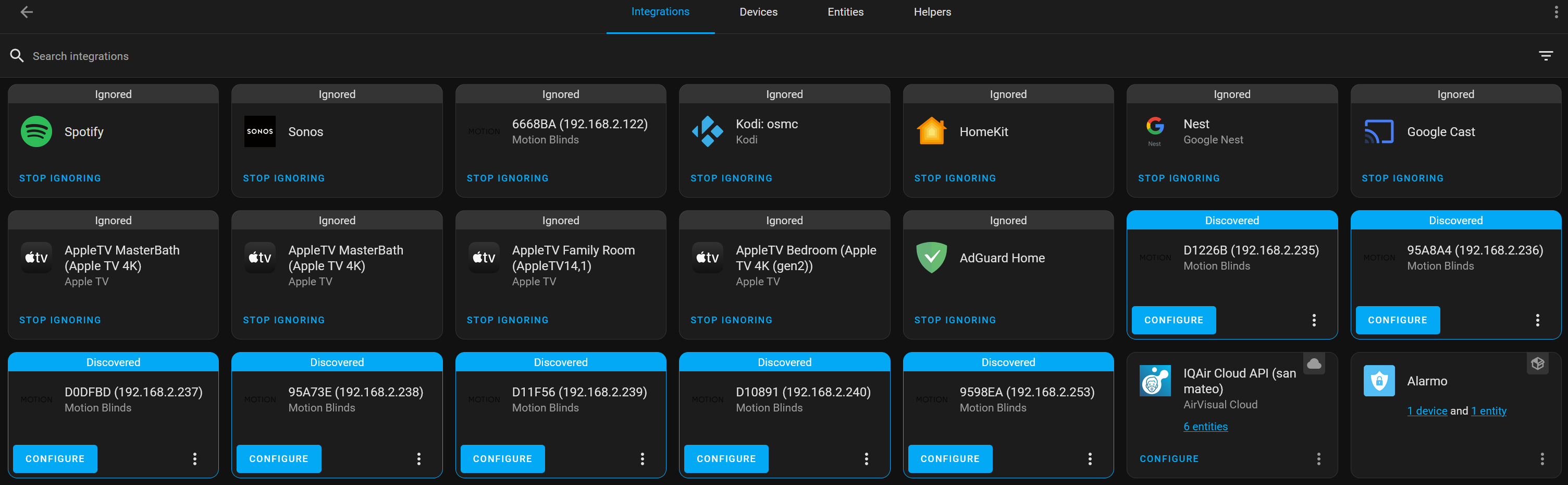
The Motion Blinds integration continually discovers Motion Blinds devices in my environment, despite not having any. In fact, many of the devices it says I have are already tied to ESPHome or other integrations. The integration's manifest.json suggests that the integration is supposed to perform dhcp discovery, matching three hostname prefixes with wildcards (i.e. motion_*, brel_*, connector_*), but none of my device hostnames fit these patterns. The closest is a device named "esp-motion-kitchen.local".
I know I can ignore specific devices, but over several weeks, it continues to find more and more devices, all of which are actual valid IP addresses in my environment, but are not motion blinds. I would disable the integration altogether, however, I can't seem to do that either because I don't have a working motion blind that would allow me to enable the integration such that an integration card is visible in the UI.
What version of Home Assistant Core has the issue?
2023.2.5
What was the last working version of Home Assistant Core?
No response
What type of installation are you running?
Home Assistant OS
Integration causing the issue
motion_blinds
Link to integration documentation on our website
https://www.home-assistant.io/integrations/motion_blinds/
Diagnostics information
No response
Example YAML snippet
No response
Anything in the logs that might be useful for us?
No response
Additional information
No response

Hey there @starkillerog, mind taking a look at this issue as it has been labeled with an integration (motion_blinds) you are listed as a code owner for? Thanks!
Code owner commands
Code owners of motion_blinds can trigger bot actions by commenting:
@home-assistant closeCloses the issue.@home-assistant rename Awesome new titleRenames the issue.@home-assistant reopenReopen the issue.@home-assistant unassign motion_blindsRemoves the current integration label and assignees on the issue, add the integration domain after the command.
(message by CodeOwnersMention)
motion_blinds documentation motion_blinds source (message by IssueLinks)
![home-assistant[bot] avatar](https://avatars.githubusercontent.com/in/97978?v=4 "Published by a pub.dev verified publisher")
This looks like a issue with dhcp discovery instead of the motion blinds code. @bdraco you are the codeowner of the DHCP integration, could you tag this issue for DHCP?
@gourdo1 could you provide a list of the Hostnames and full mac adresses of the devices that are wrongly discoverd as motion blinds devices?


Please enable debug logs for 'homeassistant.components.dhcp' in configuration.yaml, restart, let it run until you get an unexpected discovery.
@bdraco So I enabled debugging and after restarting, it immediately re-discovered all my esphome devices as Motion Blinds again. The devices were at one point all named motion_ something, so I had previously changed the hostnames through the facility provided by esphome and it recompiled and uploaded firmware to each one. I confirmed that the new hostnames work and the old ones don't at least from a networking perspective. However, it seems that Home Assistant must keep track of the old hostnames somewhere, because the debug log shows the old hostnames are still being detected, which is likely the reason why these devices are still being detected:
2023-02-27 00:40:29.214 DEBUG (MainThread) [homeassistant.components.dhcp] Processing updated address data for 192.168.2.237: mac=E8DB84D0DFBD hostname=motion_sensor_dining 2023-02-27 00:40:29.215 DEBUG (MainThread) [homeassistant.components.dhcp] Matched {'macaddress': 'e8db84d0dfbd', 'hostname': 'motion_sensor_dining'} against {'domain': 'esphome', 'registered_devices': True} 2023-02-27 00:40:29.216 DEBUG (MainThread) [homeassistant.components.dhcp] Matched {'macaddress': 'e8db84d0dfbd', 'hostname': 'motion_sensor_dining'} against {'domain': 'motion_blinds', 'hostname': 'motion_*'}
Is there anyway to purge HA's hostname cache and re-detect the new hostnames of these devices?
It looks like the dhcp matcher for motion_blinds is too generic. We should either an an OUI to it or a verification step that aborts before the flow presents if its not a motion blinds devices.
Ex https://github.com/home-assistant/core/blob/73c7ee4326ba51a8ba92bd951993d6ab20f03402/homeassistant/components/motion_blinds/config_flow.py#L95 is missing something like:
https://github.com/home-assistant/core/blob/73c7ee4326ba51a8ba92bd951993d6ab20f03402/homeassistant/components/wiz/config_flow.py#L63
https://github.com/home-assistant/core/blob/73c7ee4326ba51a8ba92bd951993d6ab20f03402/homeassistant/components/doorbird/config_flow.py#L116
@bdraco This make sense.
In the meantime, is there a way to access the hostname cache that HA maintains? I've looked around config/.storage, but none of the files seem to refer to any hostnames. I've deleted the devices from ESPHome, and even deleted ESPHome itself including all its config directories, but the hostnames persist somehow. I fear it's in the db which makes it difficult to reset.
@bdraco thank you for helping out and discovering what was wrong. This PR schould take care of the issue: https://github.com/home-assistant/core/pull/88919