

 home-assistant
Unifi Network - Device trackers & other entities disappear after a reboot of HA or after reload of integration & not all devices synced
The problem
Observed Behaviour Unifi Device trackers disappear when HA restarts or when Unifi integration is reloaded. This happens for devices that are not connected to the Unifi Network at the time of reloading/restarting. Related issue seems that when enabling the integration, not all devices are synced to HA, only the devices that are connected are visible, but OLD devices that are not connected for a while are not seen in the HA integration. Even when just one day old.
If a device was synced & the entities were created, they entities become unavailable (AND the device tracker entity even gets deleted).
Expected behaviour All devices that are known in the Unifi Network Application should be created in HA & should have the corresponding entities available. Especially the device_tracker entities should be created for ALL known devices in Unifi & have the state not_home if not connected to the nework. Devices that were synced & connected should keep all entitites & device_tracker entities when the device disconnects from unifi. The device_tracker should remain "note_home" forever, or until the configuration is deleted on the Unifi console. These entities should also survive restarts.
Research
I did already do some checks & tested the unifi API & it is returning 46 devices
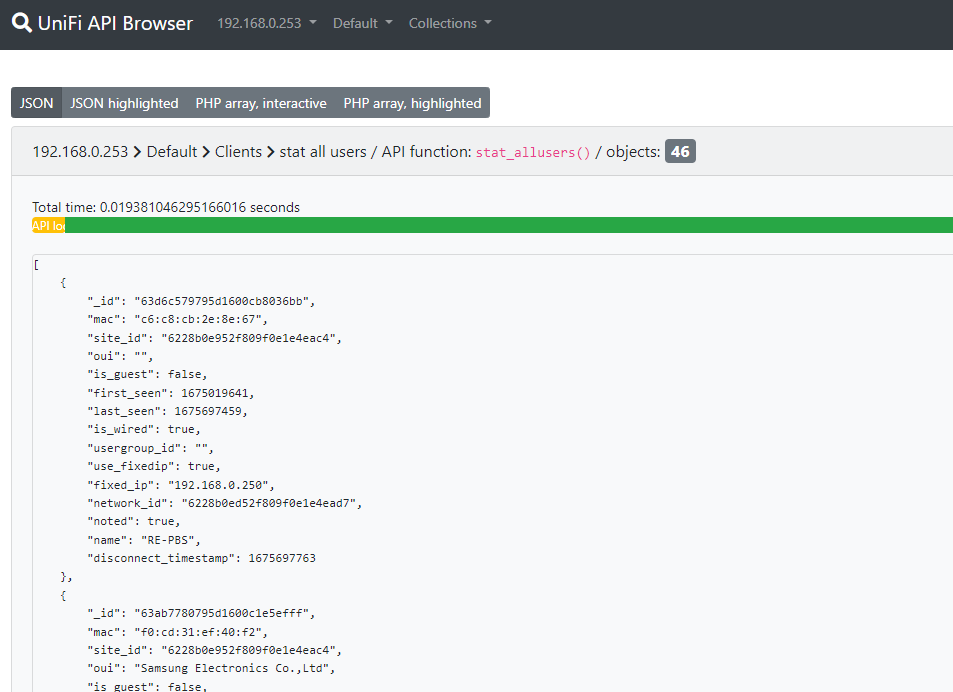 But there are only 38 in HA
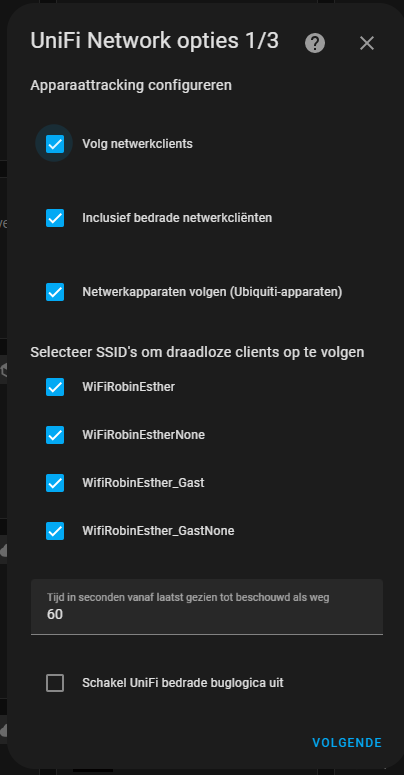
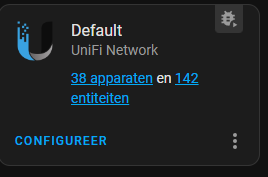 Settings of the integration
What version of Home Assistant Core has the issue?
Home Assistant 2023.2.2
What was the last working version of Home Assistant Core?
?
What type of installation are you running?
Home Assistant OS
Integration causing the issue
Unifi Network
Link to integration documentation on our website
https://www.home-assistant.io/integrations/unifi
Diagnostics information
[home-assistant_unifi_2023-02-06T10-10-40.372Z.log](https://github.com/home-assistant/core/files/10662016/home-assistant_unifi_2023-0 config_entry-unifi-930f16f58468f1072f4fffaa10aa7e16.json (1).txt config_entry-unifi-930f16f58468f1072f4fffaa10aa7e16.json.txt 2-06T10-10-40.372Z.log)
Example YAML snippet
No response
Anything in the logs that might be useful for us?
No response
Additional information
No response

Hey there @kane610, mind taking a look at this issue as it has been labeled with an integration (unifi) you are listed as a code owner for? Thanks!
Code owner commands
Code owners of unifi can trigger bot actions by commenting:
-
@home-assistant closeCloses the issue. -
@home-assistant rename Awesome new titleChange the title of the issue. -
@home-assistant reopenReopen the issue. -
@home-assistant unassign unifiRemoves the current integration label and assignees on the issue, add the integration domain after the command.
(message by CodeOwnersMention)
unifi documentation unifi source (message by IssueLinks)
![home-assistant[bot] avatar](https://avatars.githubusercontent.com/in/97978?v=4 "Published by a pub.dev verified publisher")
My guess is that there are two issues here:
-
The clients that are not associated to an SSID at the moment of adding the integration, are not imported because of the settings in the configureation. e.g. I have device that is offline, and I wan't all users tracked connected to a certain SSID -> because device is offline, we cannot know to what SSID it's connected, so it's not added. Suggestion -> Add a toggle in the configuration to track devices not connected to a certain SSID.
-
Clients that were tracked before, are going offline & when integration reloads, the device_tracker gets deleted -> This is clearly not the way it should be. Device_Trackers should persist reloads/restarts
What Unifi devices do you have? I only have the UDM Pro and don't seem to see the same behavior.

Unifi usg3 and 3 ap's. Using the unifi network application on Ubuntu.
I see the same issue as well. I use 5 switches and 1 AP.
device_trackers are pretty much useless at this point for me because they disappear after a reload or reboot.
They should persist instead and should have an Away state.
EDIT: I selected the None-suffixed counterparts of my real SSIDs as well and now I see all client devices being synced properly.

