

 home-assistant
Revamp whole Torque integration
Breaking change
Torque integration needs to be re-setup
Proposed change
The whole integration changes, sensors now are remembered after reboots, it has a setup ui now, and includes a device tracker. I don't remember all the changes as i wrote this code months ago.
Type of change
- [ ] Dependency upgrade
- [ ] Bugfix (non-breaking change which fixes an issue)
- [ ] New integration (thank you!)
- [x] New feature (which adds functionality to an existing integration)
- [ ] Deprecation (breaking change to happen in the future)
- [ ] Breaking change (fix/feature causing existing functionality to break)
- [x] Code quality improvements to existing code or addition of tests
Additional information
- This PR fixes or closes issue: fixes https://github.com/home-assistant/home-assistant.io/issues/24615
- This PR is related to issue:
- Link to documentation pull request:
Checklist
- [x] The code change is tested and works locally.
- [ ] Local tests pass. Your PR cannot be merged unless tests pass
- [ ] There is no commented out code in this PR.
- [ ] I have followed the development checklist
- [ ] The code has been formatted using Black (
black --fast homeassistant tests) - [ ] Tests have been added to verify that the new code works.
If user exposed functionality or configuration variables are added/changed:
- [ ] Documentation added/updated for www.home-assistant.io
If the code communicates with devices, web services, or third-party tools:
- [x] The manifest file has all fields filled out correctly.
Updated and included derived files by running:python3 -m script.hassfest. - [ ] New or updated dependencies have been added to
requirements_all.txt.
Updated by runningpython3 -m script.gen_requirements_all. - [ ] For the updated dependencies - a link to the changelog, or at minimum a diff between library versions is added to the PR description.
- [ ] Untested files have been added to
.coveragerc.
To help with the load of incoming pull requests:
- [ ] I have reviewed two other open pull requests in this repository.

Hi skyborgff
It seems you haven't yet signed a CLA. Please do so here.
Once you do that we will be able to review and accept this pull request.
Thanks!
![home-assistant[bot] avatar](https://avatars.githubusercontent.com/in/97978?v=4 "Published by a pub.dev verified publisher")
@marcelodavanzo @vmonkey @nathan-curtis @dshokouhi
The code is here, testing and final touches are needed (like proper migration from old to new toque)
Hi skyborgff
It seems you haven't yet signed a CLA. Please do so here.
Once you do that we will be able to review and accept this pull request.
Thanks!
When clicking the config flow I get this
This device can not be added from the UI You can add this device by adding it to your 'configuration.yaml'. See the documentation for more information.
What needs to be added to configuration.yaml?

Also, manifest needed the "version" key else it wouldn't load as a custom component.
When clicking the config flow I get this
This device can not be added from the UI You can add this device by adding it to your 'configuration.yaml'. See the documentation for more information.
What needs to be added to configuration.yaml?
Are you sure you are using the new one and not the old? I can add it on the UI without issues. is there anything on the logs that may help? I'll try to spin a new instance of hass this week and see if i get the same issue. I wrote this code in july, so i'm a bit rusty and forgetful with it.
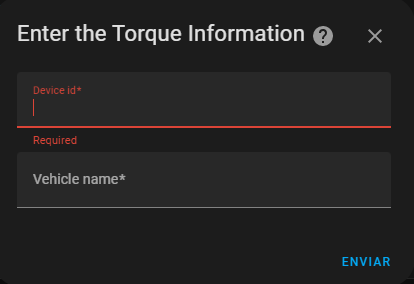
For me - I downloaded your component, added the version key into manifest, and placed everything into custom components folder. After restart of HA, my logs suggest the new integration is loaded.
Logger: homeassistant.components.sensor Source: helpers/entity_platform.py:198 Integration: Senzor (documentation, issues) First occurred: 27. ledna 2023 15:57:46 (1 occurrences) Last logged: 27. ledna 2023 15:57:46
The torque platform for the sensor integration does not support platform setup. Please remove it from your config.
Yes, I removed the yaml part afterwards. Yet I am unable to Add integration -> Torque.
(This device can not be added from the UI You can add this device by adding it to your 'configuration.yaml'. See the documentation for more information.)
I do not have any prior experience with testing updated inbuilt integrations, so please accept my apology if I did something incorrectly.

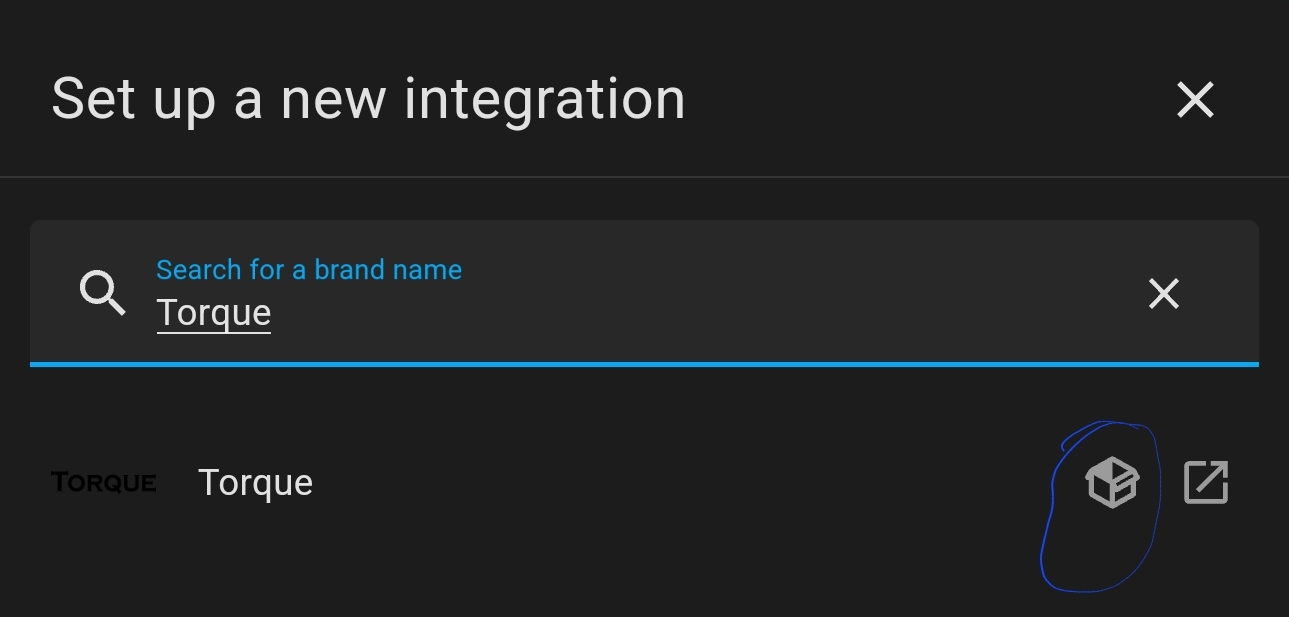 Yep the icon suggests it's a custom component
(This device can not be added from the UI You can add this device by adding it to your 'configuration.yaml'. See the documentation for more information.)
Adding "config_flow": true to manifest.json allows me to add the integration from the UI.
The config flow now asks for "Device ID" which I grabbed from the Torque app under Settings > Show your Torque ID. This is different from the previous version of the integration which relied on an email address. This change would need to be in the updated docs.
After completing the config flow I could see my tracker under the integration but no data coming in. I then restarted and data started to flow, but so far I only have the main car tracker with attributes for GPS coordinates, bearing, altitude, satellites, accuracy, but no other sensors are flowing in. This is only a test I did at home with the phone inside the house so will have to see if it works next time I drive and the phone connects to the OBD reader.
@skyborgff is the new integration only supposed to display values from the ECU when new values come in?
If that's the case, I think the integration could at least upload the sensors related to the Android device such as "device battery level" and "GPS speed" which are missing right now.

Adding to my previous comment I now see the sensors coming in despite not being connected to the car (chose for the app to sync regardless of begin connected to the OBD reader). All entities are Unavailable which is understandable. One thing I notice is that the entity names have no reference to the vehicle they apply to. Example: sensor.accelerator_pedalposition_d. I think it would be beneficial for entity names to be prefixed with the vehicle they refer to as sensor.<vehicle_name>_accelerator_pedalposition_d otherwise it will be difficult for users with multiple vehicles to discern entities.
Apart from that I'm yet to test the integration on a drive but so far it all looks good to me.
@vmonkey @totalitarian try to add "config_flow": true to manifest.json like marcelo suggested and see if it works.
@marcelodavanzo Yes, it will only create new entities as they appear, it wont create them by default. Also, each car will be a different device now, i'll also add that to make them easier to distinguish, but keep tye names normal, as i see other integrations do.
@vmonkey @totalitarian try to add "config_flow": true to manifest.json like marcelo suggested and see if it works.
@marcelodavanzo Yes, it will only create new entities as they appear, it wont create them by default. Also, each car will be a different device now, i'll also add that to make them easier to distinguish, but keep tye names normal, as i see other integrations do.
Great, thanks
Get no sensor. Not sure why
This error originated from a custom integration.
Logger: custom_components.torque Source: custom_components/torque/init.py:202 Integration: Torque First occurred: 14:39:30 (5 occurrences) Last logged: 14:39:30
New Sensor: 2238483 - k222813 - [FORD]Left front tyre pressure - bar New Sensor: 2238485 - k222815 - [FORD]Left rear tyre pressure - bar New Sensor: 2238484 - k222814 - [FORD]Right front tyre pressure - bar New Sensor: 2238486 - k222816 - [FORD]Right rear tyre pressure - bar New Sensor: 2229579 - k22054b - Oil Life Remaining - %
I finally managed to test the integration. Unfortunately, I do not get any entity except for the device tracker (which works well by the way). No entities show up even if I force to send data in Torque without ECU connected. Also, no data coming when driving. The original integration worked for me. What is the best way to debug this?
The config flow now asks for "Device ID" which I grabbed from the Torque app under Settings > Show your Torque ID. This is different from the previous version of the integration which relied on an email address. This change would need to be in the updated docs.
The config flow now asks for "Device ID" which Is grabbed from the Torque app under Settings > Show your Torque ID. This is different from the previous version of the integration which relied on an email address. Did you put the id or the email address?
I don't have any Settings -> Show your Torque ID in the app, weird. Instead, I have Settings -> Data Logging & Upload -> Show your Torque ID. It's content is a 6-letter string. This is what I have used for the configuration
Edit: this just appeared in my logs (after update to 2023.2.0) Tato chyba pochází z vlastní integrace.
Logger: aiohttp.server Source: custom_components/torque/torque_entity.py:24 Integration: Torque First occurred: 21:51:06 (1 occurrences) Last logged: 21:51:06
Error handling request Traceback (most recent call last): File "/usr/local/lib/python3.10/site-packages/aiohttp/web_protocol.py", line 435, in _handle_request resp = await request_handler(request) File "/usr/local/lib/python3.10/site-packages/aiohttp/web_app.py", line 504, in _handle resp = await handler(request) File "/usr/local/lib/python3.10/site-packages/aiohttp/web_middlewares.py", line 117, in impl return await handler(request) File "/usr/src/homeassistant/homeassistant/components/http/security_filter.py", line 60, in security_filter_middleware return await handler(request) File "/usr/src/homeassistant/homeassistant/components/http/forwarded.py", line 227, in forwarded_middleware return await handler(request) File "/usr/src/homeassistant/homeassistant/components/http/request_context.py", line 28, in request_context_middleware return await handler(request) File "/usr/src/homeassistant/homeassistant/components/http/ban.py", line 80, in ban_middleware return await handler(request) File "/usr/src/homeassistant/homeassistant/components/http/auth.py", line 236, in auth_middleware return await handler(request) File "/usr/src/homeassistant/homeassistant/components/http/view.py", line 145, in handle result = await result File "/config/custom_components/torque/init.py", line 230, in get sensor = TorqueSensor(hass, self, self.id, pid, sensor_data[0], sensor_data[1], sensor_data[2]) File "/config/custom_components/torque/torque_entity.py", line 24, in init self.data = hass.data[DOMAIN][coordinator._entry.entry_id] KeyError: '858068cd90c17c8f770f0d8cc8d31295'
I have configured "config_flow": true to manifest.json and "version" key. And also configured id and name, everything ok.... but I have this error:
Logger: homeassistant.setup Source: setup.py:251 First occurred: 23:52:27 (1 occurrences) Last logged: 23:52:27 Setup failed for custom integration torque: No setup or config entry setup function defined.

One more feedback: in HA logs, I also have this:
Logger: homeassistant.helpers.frame Source: helpers/frame.py:77 First occurred: 3. února 2023 21:12:06 (1 occurrences) Last logged: 3. února 2023 21:12:06
Detected integration that called async_setup_platforms instead of awaiting async_forward_entry_setups; this will fail in version 2023.3. Please report issue to the custom integration author for torque using this method at custom_components/torque/init.py, line 52: hass.config_entries.async_setup_platforms(entry, PLATFORMS)
It was my fault, related to an improperly named init.py Resolving the naming fixed the issue for me. And the integration is loaded correctly!!
@vmonkey same error for me:
Logger: homeassistant.helpers.frame Source: helpers/frame.py:77 First occurred: 09:02:32 (1 occurrences) Last logged: 09:02:32 Detected integration that called async_setup_platforms instead of awaiting async_forward_entry_setups; this will fail in version 2023.3. Please report issue to the custom integration author for torque using this method at custom_components/torque/init.py, line 52: hass.config_entries.async_setup_platforms(entry, PLATFORMS)
@skyborgff Suddenly, it started to work (actually after an update to 2023.2.2 without any change). Also, I can see the history of the states when the torque entities were not visible, so probably some weird problem with the database reading at the frontend. Many thanks for the work.
I tested out the new integration this weekend during a trip and can confirm it's all working correctly. Sensors are coming in while driving, values are maintained across reboots, and all sensors are now under the Torque integration which are massive improvements over the existing integration.
One weird bug I'm coming across is my sensors that should be in miles (and the units in the HA sensors do show miles / mph) are actually being sent in km. So I am getting the values in km, but the units saying miles. I double checked the settings in the Torque app and it's set to output in miles. When logging to a file I do get the correct values, and only see this issue in web logging. I notice that changing units between miles to km in the app does not update the units in the Torque integration.
Another interesting thing I noticed is that the device_tracker element has its state reset to "Unknown" on reboot instead of persisting the last location. Is this by design? I presumed it would maintain its last seen state since that can be useful as a way to keep track of where the vehicle is parked.
Apart from those two points everything looks great – thanks for all the work on this integration @skyborgff!
@marcelodavanzo Glad that it's working good (mostly) for you. The issue with the units should be related to this "hack" https://github.com/home-assistant/core/pull/86756/files#diff-4cb321a058cf5cf3715e22327a4ed626529ce6fc05a58157dc839b2cd9207d14 I haven't yet put the imperial units there, so i'm not shocked they aren't showing correctly.
That device tracker bug is not by design, i'll check on it as well.
One thing that i]ve noticed in mine is that when i start the car, the consumption spikes to very high values, or low, ones, making the history look weird. but this may be just how my car sends the values. did you notice anything like that?
when i start the car, the consumption spikes to very high values, or low, ones, making the history look weird. but this may be just how my car sends the values. did you notice anything like that?
I didn't see the same issue to be honest, the values to my sensors all seem reasonably stable across trips so far
@skyborgff Two more sensors: '16320955': ['[TYDV] Injector Duty Cycle', '%', 'mdi:car'], '16716293': ['Trip average MPG', 'mpg', 'mdi:car'],
The first one is from Toyota Torque plugin, the second one is standard but missed in the list.
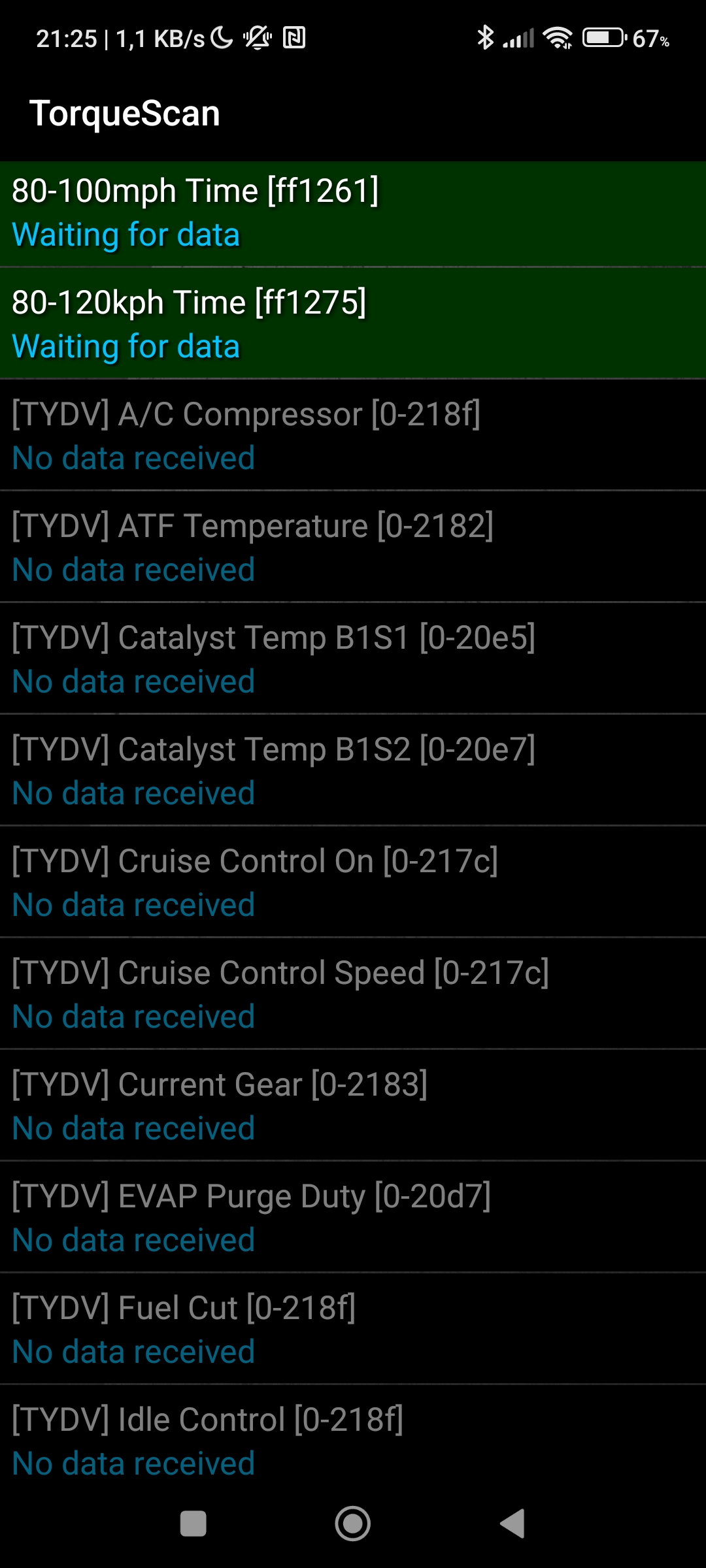
EDIT: I am also missing other TYDV sensors, but I am not sure how to reference them in the const file. PIDs are, e.g., '0-218f', see the attached screen. These sensors do not show in HA logs.
Hi i would love to get Torque to work but i can't, so i found this post. As i have just started with HA, if someone could point me in the direction of how to load this new Torque up in HA would be appreciated.

Updated to 2023.5 and started getting this error, preventing the custom integration from starting:
Logger: homeassistant.config_entries
Source: custom_components/torque/__init__.py:52
Integration: Torque
First occurred: 22:47:12 (1 occurrences)
Last logged: 22:47:12

Error setting up entry Honda CRV for torque
Traceback (most recent call last):
  File "/usr/src/homeassistant/homeassistant/config_entries.py", line 387, in async_setup
    result = await component.async_setup_entry(hass, self)
  File "/config/custom_components/torque/__init__.py", line 52, in async_setup_entry
    hass.config_entries.async_setup_platforms(entry, PLATFORMS)
AttributeError: 'ConfigEntries' object has no attribute 'async_setup_platforms'
Updated to 2023.5 and started getting this error, preventing the custom integration from starting:
Logger: homeassistant.config_entries
Source: custom_components/torque/__init__.py:52
Integration: Torque
First occurred: 22:47:12 (1 occurrences)
Last logged: 22:47:12

Error setting up entry Honda CRV for torque
Traceback (most recent call last):
  File "/usr/src/homeassistant/homeassistant/config_entries.py", line 387, in async_setup
    result = await component.async_setup_entry(hass, self)
  File "/config/custom_components/torque/__init__.py", line 52, in async_setup_entry
    hass.config_entries.async_setup_platforms(entry, PLATFORMS)
AttributeError: 'ConfigEntries' object has no attribute 'async_setup_platforms'
I'm not sure if this is the right approach but I got it working (mindlessly using GPT4) by replacing the following in __init__.py:
hass.config_entries.async_setup_platforms(entry, PLATFORMS)
With:
for platform in PLATFORMS:
    hass.async_create_task(
        hass.config_entries.async_forward_entry_setup(entry, platform)
    )

I would like to try this new torque integration. Can someone please give pointers on how to do that prior to getting merged?
