

 home-assistant
Unable to use service calls for LaMetric Time Clock
The problem
Hi,
Just successfully integrated my LaMetrix Time Clock into HA. I see the device and entities and the clock works well with the LaMetric app.
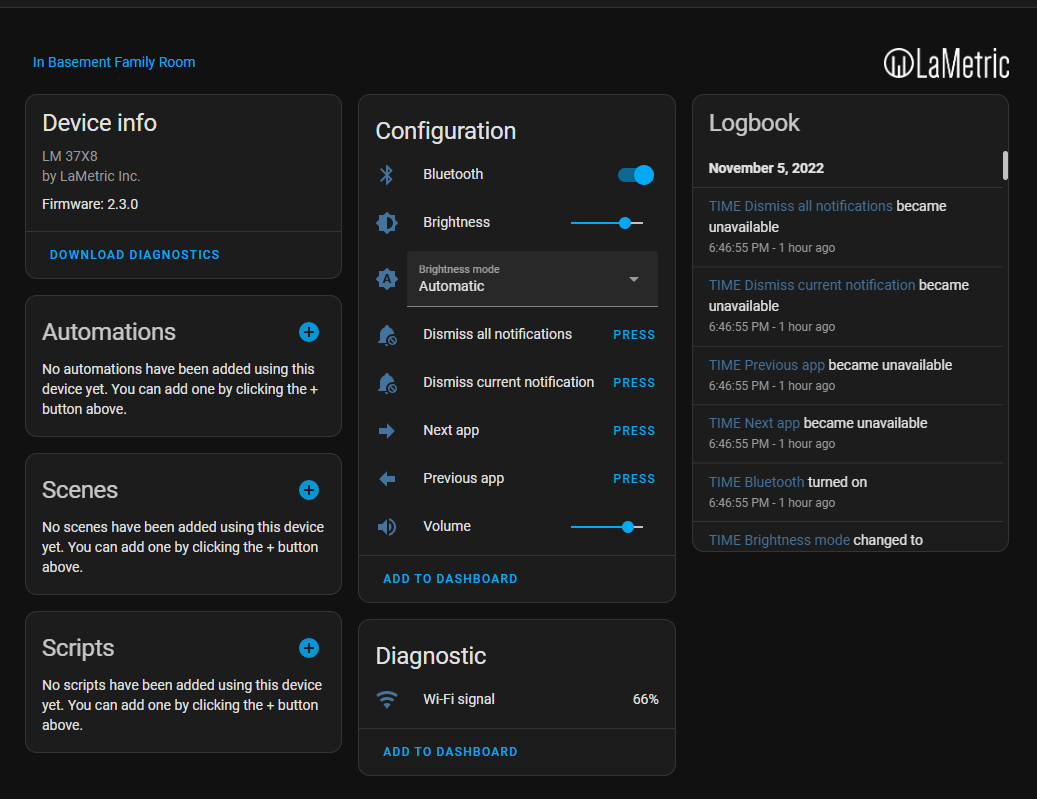
However, when I try to use the lametric.message or the notify.time call service, it leads to errors with no messages sent to the clock itself. Device is called "time".
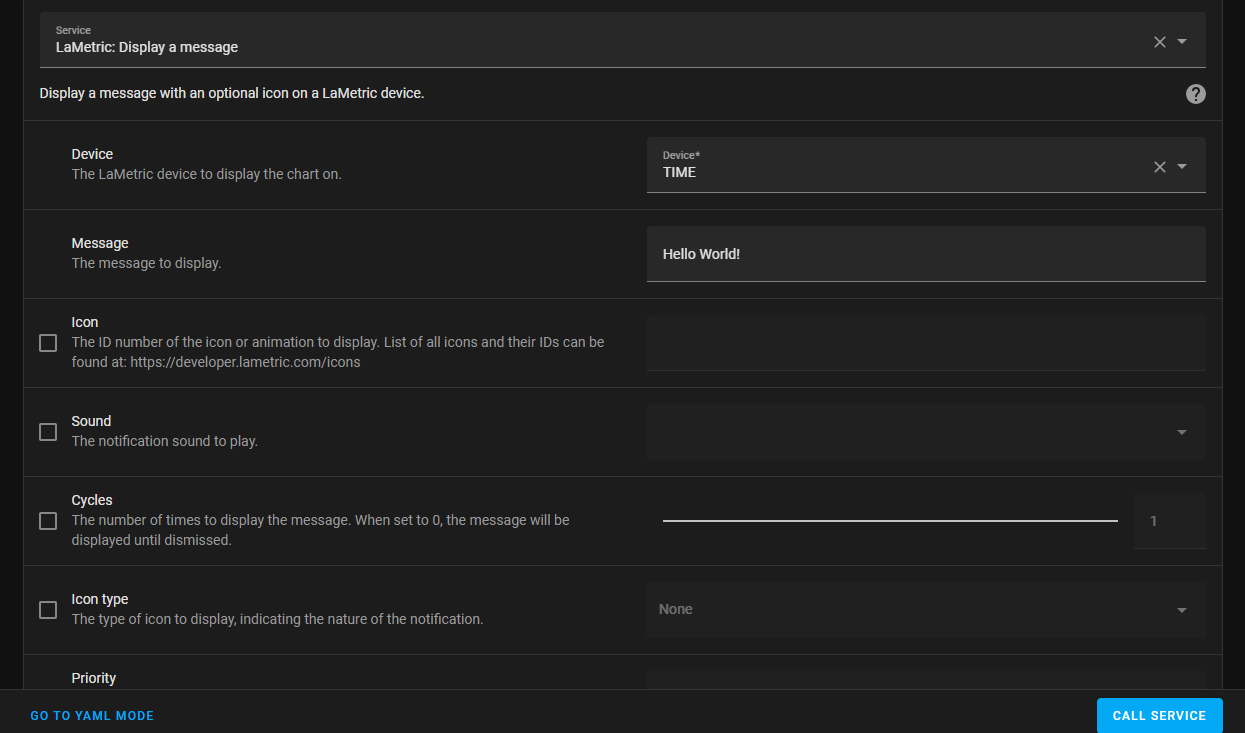
and
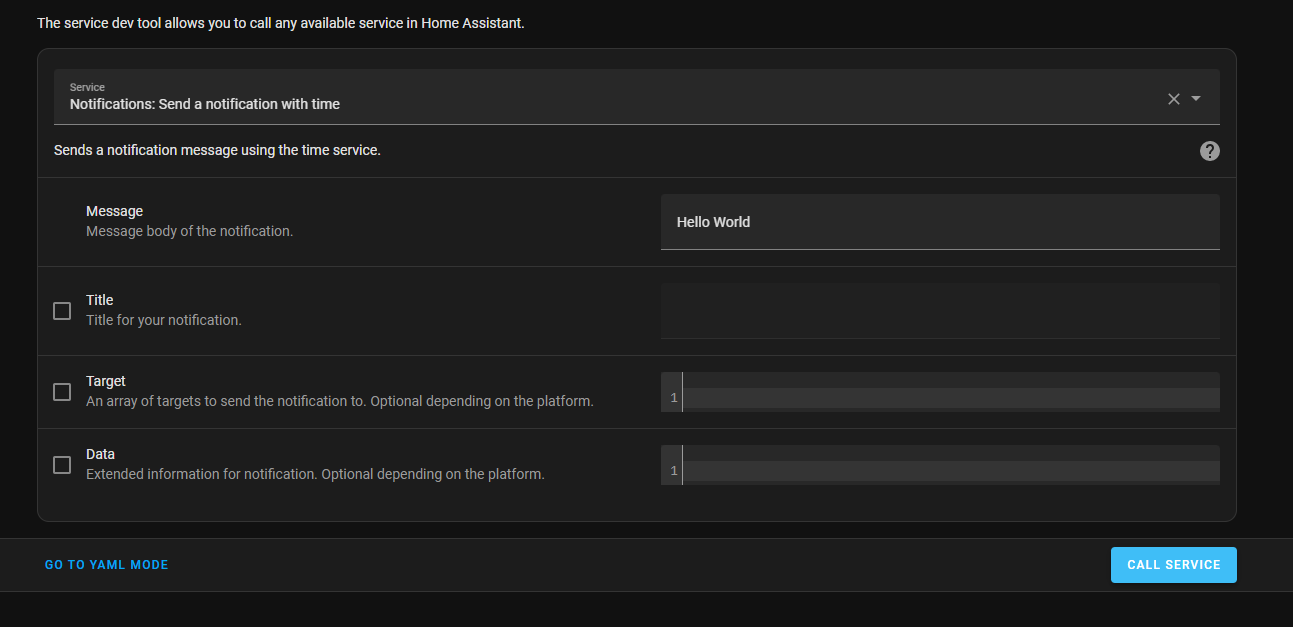
leads to the error messages below:
Logger: homeassistant.components.websocket_api.http.connection
Source: components/websocket_api/connection.py:150
Integration: Home Assistant WebSocket API (documentation, issues)
First occurred: 4:59:28 PM (14 occurrences)
Last logged: 7:49:47 PM

[546645085440] Error handling message: Could not send LaMetric notification (unknown_error) from 192.168.1.166 (Mozilla/5.0 (Linux; Android 9; G8343 Build/47.2.A.11.228; wv) AppleWebKit/537.36 (KHTML, like Gecko) Version/4.0 Chrome/107.0.5304.91 Mobile Safari/537.36 Home Assistant/beta-2862-66bc2603-2862 (Android 9; G8343))
[546030576128] Error handling message: Could not send LaMetric notification (unknown_error) from 192.168.1.166 (Mozilla/5.0 (Linux; Android 9; G8343 Build/47.2.A.11.228; wv) AppleWebKit/537.36 (KHTML, like Gecko) Version/4.0 Chrome/107.0.5304.91 Mobile Safari/537.36 Home Assistant/beta-2862-66bc2603-2862 (Android 9; G8343))
[545974491680] Error handling message: Could not send LaMetric notification (unknown_error) from 192.168.1.119 (Mozilla/5.0 (Windows NT 10.0; Win64; x64) AppleWebKit/537.36 (KHTML, like Gecko) Chrome/107.0.0.0 Safari/537.36)
[545973959888] Error handling message: Could not send LaMetric notification (unknown_error) from 192.168.1.171 (Mozilla/5.0 (Windows NT 10.0; Win64; x64) AppleWebKit/537.36 (KHTML, like Gecko) Chrome/107.0.0.0 Safari/537.36)
[546539490896] Error handling message: Could not send LaMetric notification (unknown_error) from 192.168.1.171 (Mozilla/5.0 (Windows NT 10.0; Win64; x64) AppleWebKit/537.36 (KHTML, like Gecko) Chrome/107.0.0.0 Safari/537.36)
and
Logger: homeassistant.helpers.script.websocket_api_script
Source: helpers/script.py:409
First occurred: 4:59:28 PM (14 occurrences)
Last logged: 7:49:47 PM

websocket_api script: Error executing script. Error for call_service at pos 1: Could not send LaMetric notification
just wondering if I did something wrong. thanks
What version of Home Assistant Core has the issue?
2022.11.1
What was the last working version of Home Assistant Core?
No response
What type of installation are you running?
Home Assistant OS
Integration causing the issue
LaMetric Time
Link to integration documentation on our website
https://www.home-assistant.io/integrations/lametric/
Diagnostics information
No response
Example YAML snippet
No response
Anything in the logs that might be useful for us?
No response
Additional information
No response

Hey there @robbiet480, @frenck, @bachya, mind taking a look at this issue as it has been labeled with an integration (lametric) you are listed as a code owner for? Thanks!
Code owner commands
Code owners of lametric can trigger bot actions by commenting:
@home-assistant closeCloses the issue.@home-assistant rename Awesome new titleChange the title of the issue.@home-assistant reopenReopen the issue.@home-assistant unassign lametricRemoves the current integration label and assignees on the issue, add the integration domain after the command.
(message by CodeOwnersMention)
lametric documentation lametric source (message by IssueLinks)
![home-assistant[bot] avatar](https://avatars.githubusercontent.com/in/97978?v=4 "Published by a pub.dev verified publisher")
Please set debug-level logs for home assistant.components.lametric and demetriek, run the service again, and post any relevant logs.

Thanks @bachya
Sorry, could you please provide the snippet yaml that I need to place in my config.yaml to enable this logging? I'm unsure how to do this.
thanks, I tried
# Example configuration.yaml entry
logger:
  default: info
  logs:
    homeassistant.components.lametric: debug
    homeassistant.components.demetriek: debug
restarted HA, and ran a few services calls, but didn't see anything more than the error logs above. I tried general core debugging
logger:
  default: info
  logs:
    homeassistant.core: debug
after restarting HA again, ran a few services calls (which failed of course)
Logger: homeassistant.components.websocket_api.http.connection
Source: components/websocket_api/connection.py:150
Integration: Home Assistant WebSocket API (documentation, issues)
First occurred: 12:16:42 PM (1 occurrences)
Last logged: 12:16:42 PM

[547000257264] Error handling message: Could not send LaMetric notification (unknown_error) from 192.168.1.171 (Mozilla/5.0 (Windows NT 10.0; Win64; x64) AppleWebKit/537.36 (KHTML, like Gecko) Chrome/107.0.0.0 Safari/537.36)
and
Logger: homeassistant.helpers.script.websocket_api_script
Source: helpers/script.py:409
First occurred: 12:16:42 PM (1 occurrences)
Last logged: 12:16:42 PM

websocket_api script: Error executing script. Error for call_service at pos 1: Could not send LaMetric notification
searched the full log for lametric mentions/debugs and found these:
2022-11-06 12:15:05.267 INFO (MainThread) [homeassistant.setup] Setting up lametric
2022-11-06 12:15:05.268 DEBUG (MainThread) [homeassistant.core] Bus:Handling <Event service_registered[L]: domain=lametric, service=chart>
2022-11-06 12:15:05.268 DEBUG (MainThread) [homeassistant.core] Bus:Handling <Event service_registered[L]: domain=lametric, service=message>
2022-11-06 12:15:05.268 INFO (MainThread) [homeassistant.setup] Setup of domain lametric took 0.0 seconds
2022-11-06 12:15:12.030 INFO (MainThread) [homeassistant.components.button] Setting up button.lametric
2022-11-06 12:15:12.037 INFO (MainThread) [homeassistant.components.number] Setting up number.lametric
2022-11-06 12:15:12.046 INFO (MainThread) [homeassistant.components.select] Setting up select.lametric
2022-11-06 12:15:12.055 INFO (MainThread) [homeassistant.components.sensor] Setting up sensor.lametric
2022-11-06 12:15:12.062 INFO (MainThread) [homeassistant.components.switch] Setting up switch.lametric
2022-11-06 12:15:13.455 DEBUG (MainThread) [homeassistant.core] Bus:Handling <Event component_loaded[L]: component=lametric>
2022-11-06 12:15:13.572 INFO (MainThread) [homeassistant.components.notify] Setting up notify.lametric

**2022-11-06 12:16:42.910 ERROR (MainThread) [homeassistant.helpers.script.websocket_api_script] websocket_api script: Error executing script. Error for call_service at pos 1: Could not send LaMetric notification
2022-11-06 12:16:42.940 ERROR (MainThread) [homeassistant.components.websocket_api.http.connection] [547000257264] Error handling message: Could not send LaMetric notification (unknown_error) from 192.168.1.171 (Mozilla/5.0 (Windows NT 10.0; Win64; x64) AppleWebKit/537.36 (KHTML, like Gecko) Chrome/107.0.0.0 Safari/537.36)**

2022-11-06 12:16:47.333 DEBUG (MainThread) [homeassistant.core] Bus:Handling <Event state_changed[L]: entity_id=number.time_volume, old_state=<state number.time_volume=80; min=0, max=100, step=1, mode=auto, icon=mdi:volume-high, friendly_name=TIME Volume @ 2022-11-06T12:15:12.465613-07:00>, new_state=<state number.time_volume=unavailable; restored=True, min=0, max=100, step=1, mode=auto, icon=mdi:volume-high, friendly_name=Volume, supported_features=0 @ 2022-11-06T12:16:47.333150-07:00>>
2022-11-06 12:16:47.334 DEBUG (MainThread) [homeassistant.core] Bus:Handling <Event state_changed[L]: entity_id=select.time_brightness_mode, old_state=<state select.time_brightness_mode=auto; options=['auto', 'manual'], device_class=lametric__brightness_mode, icon=mdi:brightness-auto, friendly_name=TIME Brightness mode @ 2022-11-06T12:15:12.467251-07:00>, new_state=<state select.time_brightness_mode=unavailable; restored=True, options=['auto', 'manual'], device_class=lametric__brightness_mode, icon=mdi:brightness-auto, friendly_name=Brightness mode, supported_features=0 @ 2022-11-06T12:16:47.333898-07:00>>
2022-11-06 12:16:47.334 DEBUG (MainThread) [homeassistant.core] Bus:Handling <Event state_changed[L]: entity_id=sensor.time_wi_fi_signal, old_state=<state sensor.time_wi_fi_signal=66; state_class=measurement, unit_of_measurement=%, icon=mdi:wifi, friendly_name=TIME Wi-Fi signal @ 2022-11-06T12:15:12.468978-07:00>, new_state=<state sensor.time_wi_fi_signal=unavailable; restored=True, state_class=measurement, icon=mdi:wifi, friendly_name=Wi-Fi signal, supported_features=0, unit_of_measurement=% @ 2022-11-06T12:16:47.334660-07:00>>
2022-11-06 12:16:47.338 DEBUG (MainThread) [homeassistant.core] Bus:Handling <Event state_changed[L]: entity_id=switch.time_bluetooth, old_state=<state switch.time_bluetooth=on; icon=mdi:bluetooth, friendly_name=TIME Bluetooth @ 2022-11-06T12:15:12.471878-07:00>, new_state=<state switch.time_bluetooth=unavailable; restored=True, icon=mdi:bluetooth, friendly_name=Bluetooth, supported_features=0 @ 2022-11-06T12:16:47.338618-07:00>>

2022-11-06 12:16:47.826 INFO (MainThread) [homeassistant.components.button] Setting up button.lametric
2022-11-06 12:16:47.827 INFO (MainThread) [homeassistant.components.number] Setting up number.lametric
2022-11-06 12:16:47.828 INFO (MainThread) [homeassistant.components.select] Setting up select.lametric
2022-11-06 12:16:47.829 INFO (MainThread) [homeassistant.components.sensor] Setting up sensor.lametric
2022-11-06 12:16:47.830 INFO (MainThread) [homeassistant.components.switch] Setting up switch.lametric

2022-11-06 12:16:47.883 DEBUG (MainThread) [homeassistant.core] Bus:Handling <Event state_changed[L]: entity_id=number.time_volume, old_state=<state number.time_volume=unavailable; restored=True, min=0, max=100, step=1, mode=auto, icon=mdi:volume-high, friendly_name=Volume, supported_features=0 @ 2022-11-06T12:16:47.333150-07:00>, new_state=<state number.time_volume=80; min=0, max=100, step=1, mode=auto, icon=mdi:volume-high, friendly_name=TIME Volume @ 2022-11-06T12:16:47.883697-07:00>>
2022-11-06 12:16:47.885 DEBUG (MainThread) [homeassistant.core] Bus:Handling <Event state_changed[L]: entity_id=select.time_brightness_mode, old_state=<state select.time_brightness_mode=unavailable; restored=True, options=['auto', 'manual'], device_class=lametric__brightness_mode, icon=mdi:brightness-auto, friendly_name=Brightness mode, supported_features=0 @ 2022-11-06T12:16:47.333898-07:00>, new_state=<state select.time_brightness_mode=auto; options=['auto', 'manual'], device_class=lametric__brightness_mode, icon=mdi:brightness-auto, friendly_name=TIME Brightness mode @ 2022-11-06T12:16:47.885783-07:00>>
2022-11-06 12:16:47.887 DEBUG (MainThread) [homeassistant.core] Bus:Handling <Event state_changed[L]: entity_id=sensor.time_wi_fi_signal, old_state=<state sensor.time_wi_fi_signal=unavailable; restored=True, state_class=measurement, icon=mdi:wifi, friendly_name=Wi-Fi signal, supported_features=0, unit_of_measurement=% @ 2022-11-06T12:16:47.334660-07:00>, new_state=<state sensor.time_wi_fi_signal=66; state_class=measurement, unit_of_measurement=%, icon=mdi:wifi, friendly_name=TIME Wi-Fi signal @ 2022-11-06T12:16:47.887581-07:00>>
2022-11-06 12:16:47.890 DEBUG (MainThread) [homeassistant.core] Bus:Handling <Event state_changed[L]: entity_id=switch.time_bluetooth, old_state=<state switch.time_bluetooth=unavailable; restored=True, icon=mdi:bluetooth, friendly_name=Bluetooth, supported_features=0 @ 2022-11-06T12:16:47.338618-07:00>, new_state=<state switch.time_bluetooth=on; icon=mdi:bluetooth, friendly_name=TIME Bluetooth @ 2022-11-06T12:16:47.889877-07:00>>

2022-11-06 12:16:47.941 DEBUG (MainThread) [homeassistant.core] Bus:Handling <Event state_changed[L]: entity_id=button.time_previous_app, old_state=<state button.time_previous_app=unavailable; restored=True, icon=mdi:arrow-left-bold, friendly_name=Previous app, supported_features=0 @ 2022-11-06T12:16:47.504864-07:00>, new_state=<state button.time_previous_app=unknown; icon=mdi:arrow-left-bold, friendly_name=TIME Previous app @ 2022-11-06T12:16:47.941236-07:00>>
2022-11-06 12:16:47.942 DEBUG (MainThread) [homeassistant.core] Bus:Handling <Event state_changed[L]: entity_id=button.time_dismiss_current_notification, old_state=<state button.time_dismiss_current_notification=unavailable; restored=True, icon=mdi:bell-cancel, friendly_name=Dismiss current notification, supported_features=0 @ 2022-11-06T12:16:47.506278-07:00>, new_state=<state button.time_dismiss_current_notification=unknown; icon=mdi:bell-cancel, friendly_name=TIME Dismiss current notification @ 2022-11-06T12:16:47.942225-07:00>>
2022-11-06 12:16:47.943 DEBUG (MainThread) [homeassistant.core] Bus:Handling <Event state_changed[L]: entity_id=button.time_dismiss_all_notifications, old_state=<state button.time_dismiss_all_notifications=unavailable; restored=True, icon=mdi:bell-cancel, friendly_name=Dismiss all notifications, supported_features=0 @ 2022-11-06T12:16:47.507837-07:00>, new_state=<state button.time_dismiss_all_notifications=unknown; icon=mdi:bell-cancel, friendly_name=TIME Dismiss all notifications @ 2022-11-06T12:16:47.943562-07:00>>
2022-11-06 12:16:47.971 INFO (MainThread) [homeassistant.components.notify] Setting up notify.lametric
Quick suggestion: instead of homeassistant.components.demetriek, just use demetriek (since that's the name of the library).
thanks for the suggestion. Here's what I did next, placed this in my config.yaml and restarted HA.
# Example configuration.yaml entry
logger:
  default: info
  logs:
    homeassistant.components.lametric: debug
    demetriek: debug
Then I ran a couple of service calls to my lametric clock, all ended in error. Went to the logs "load full logs" and searched for demetriek, nothing shows up. Searched for LaMetric, about 80 entries show up, but are all what I posted in the previous post.
No new error message, just the same error message as in my first post appears.
Is it possible that its not the LaMetric library but something to do with the websocket api as the error suggests?
Thanks for checking for me, @Anto79-ops.
FWIW, I just spun up a fresh HASS and connected my LaMetric Time to it. All of these service calls:
service: notify.lametric_time
data:
  message: Test
  title: Test
service: lametric.message
data:
  device_id: ID
  message: Hello
  sound: alarm10
  priority: warning
service: lametric.chart
data:
  device_id: 58b921b2f1f01b49c7a75955b1b418cb
  data:
    - 1
    - 2
    - 3
    - 2
    - 1
  sound: negative3
  cycles: 2
...appeared on the device, and no errors were logged.
Do these errors happen to you every time, or do the service calls sometimes succeed? Is your Time on the same network as your HASS?
@bachya you are the superman of Home assistant!
It's because I didn't have a title just a message.
As soon as I put a title with the message then it works properly.
Just out of curiosity try sending the message without a title you'll get the same error?
Hmm, interesting – I just tried this:
service: notify.basement_desk
data:
  message: This is a test
...and it worked as expected. If you try that same service call, does it fail?
well, ok, you know what I just tried it without the title and now it works? this is so strange it was not working before.
also, I tried all 3 of your examples above, and they all worked with no error messages.
I'm not sure what happened, but it is working now?
Fascinating! Thanks for testing. Let's close this for now, but if you encounter further issues, don't hesitate to post back here. 👍🏻
Just wanted to provide an update yesterday I was actually having quite a bit of fun with this clock everything is working perfectly as per our conversation above. But, unfortunately this morning it's back to the same issue I had that I first reported: the service calls not working anymore (with or without titles in the message), with the same error messages about a websocket api.
You think it's a connection issue however when the service calls are not working I can still communicate with the clock for example I can easily change the volume using the slider in the Integrations tile and the clock immediately updates the volume reflect the change. And to answer your previous question the clock is indeed connected to the same network as HA.
I don't know if you have any other suggestions I can look in to, thanks.
@bachya I think I found what is happening....when the clock is sleeping (i.e. when it is just showing the time and in its dimmed state) the call service does NOT work....but when the clock is awake and shows the time with a green check mark....the call services work. This also explains the intermittent behavior of the issue.
Does this make sense to you?
@Anto79-ops When the clock is in screensaver or kiosk mode, it will only accept critical notifications. Others are refused by the clock.

ok! thank you very much, this explains it. In that case, there is no problem just perhaps me missing this in the documentation. Good to know! Cheers
Good find, @Anto79-ops! We should make it so the logging in that case is less opaque (and doesn't sound like some sort of error occurred).