
core
 core copied to clipboard
 home-assistant
Shelly Switch physical switch reporting delay
The problem
Running Shelly 1 on a wall switch to control lights on same and other shelly 1 enable circuits. Upgraded Home Assistant to latest and greatest ( Home Assistant 2022.7.7 Supervisor 2022.07.0 Operating System 8.4 Frontend 20220707.1 - latest )- now there is a huge lag in physical switch recognition in HA. Using Siri through the Homebridge integration, works great, controlling the switch from the front end and through automation, works great. Physically toggling the switch works for the immediate circuit (Shelly is fine), HA does not see the command for 18 seconds. Tried everything on the Shelly side, turning off eco mode, rebooting, but nothing works. I think a change was made in HA Core or Operating System.....I am not a coder, I take what all you great guys and gals do everyday and impress my wife with home automation.
What version of Home Assistant Core has the issue?
2022.7.7
What was the last working version of Home Assistant Core?
No response
What type of installation are you running?
Home Assistant OS
Integration causing the issue
Shelly
Link to integration documentation on our website
https://www.home-assistant.io/integrations/shelly/
Diagnostics information
No response
Example YAML snippet
No response
Anything in the logs that might be useful for us?
No response
Additional information
No response

Hey there @balloob, @bieniu, @thecode, @chemelli74, mind taking a look at this issue as it has been labeled with an integration (shelly) you are listed as a code owner for? Thanks!
(message by CodeOwnersMention)
shelly documentation shelly source (message by IssueLinks)
![probot-home-assistant[bot] avatar](https://avatars.githubusercontent.com/in/36093?v=4 "Published by a pub.dev verified publisher")
Hi @ChadGnad, please add the following to configuration.yaml , restart HA, and post the log:
logger:
  default: warning
  logs:
    homeassistant.components.shelly: debug
    aioshelly: debug
Note: it is better to drag the log into the comment (which will add it as an attachment) and not copy paste as it is hard to read logs in GitHub.
And add diagnostics (menu configuration -> integration -> shelly -> download diagnostics )

I am running into the same issue. I tried rolling back but I clean up my backups and the oldest I still maintained was from 2022.7.7. I changed the state of 3 different shelly device types; 2.5, Dimmer 2, 1PM; waiting for them to change state in the UI then turned them off in reverse order. Install is fully updated as of 2022/8/8 on a Pi 4 B+.
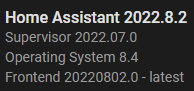
Hope this helps and let me know me know if you need anything else.
Forgot the Diagnostics report: config_entry-shelly-6c6c7e1504790e93c35489d48f09978d.json.txt

You may already notice this in the logs but, I set up PowerShell to watch the tail of the logs as I changed device states. When I change the state of the device from outside of home assistant, I don't see any log activity. The one thing I do see is the state in HA appears to only be updating on the periodic polling of the devices.
You may already notice this in the logs but, I set up PowerShell to watch the tail of the logs as I changed device states. When I change the state of the device from outside of home assistant, I don't see any log activity. The one thing I do see is the state in HA appears to only be updating on the periodic polling of the devices.
You should not see polling messages in the log, polling means push updates are not working and the integration fallback to polling.
Please first setup unicast as explained in the docs: https://www.home-assistant.io/integrations/shelly#shelly-device-configuration-generation-1
Also note that HA and the devices must be on the same network, multiple VLANs or isolated networks are not supported.

Just saw this request for the config file, I will add when I get home.....
Please first setup unicast as explained in the docs: https://www.home-assistant.io/integrations/shelly#shelly-device-configuration-generation-1
This did fix the reporting issue for the device I have been testing with. This device is DC powered and easy to reboot with out disturbing any one.
So the question is why is multicast CoIoT no longer working for some (all?) devices as it did prior.
Before reading this I did some data gathering. If either of you would find it useful I can provide it. The switch I have the HA Pi wired to supports port mirroring. Using Wireshark I have captured some conversations between HA and the device. I have in separate files reloading the integration and rebooting the device. Coming from a networking background this came natural. :-)
I also have a capture from rebooting the device after changing the CoIoT peer to unicast as requested. I was headed here to provide the first 2 captures when I saw the request.
There hasn't been any activity on this issue recently. Due to the high number of incoming GitHub notifications, we have to clean some of the old issues, as many of them have already been resolved with the latest updates. Please make sure to update to the latest Home Assistant version and check if that solves the issue. Let us know if that works for you by adding a comment 👍 This issue has now been marked as stale and will be closed if no further activity occurs. Thank you for your contributions.
![github-actions[bot] avatar](https://avatars.githubusercontent.com/in/15368?v=4 "Published by a pub.dev verified publisher")
Has any progress been made as to why multicast CoIoT no longer functions? This appears to be the issue causing the reporting delay.
Edit: yes latest version of HA still has the issue.
There hasn't been any activity on this issue recently. Due to the high number of incoming GitHub notifications, we have to clean some of the old issues, as many of them have already been resolved with the latest updates. Please make sure to update to the latest Home Assistant version and check if that solves the issue. Let us know if that works for you by adding a comment 👍 This issue has now been marked as stale and will be closed if no further activity occurs. Thank you for your contributions.