

 home-assistant
Automation fails to trigger -- makes warm beer :beer:
The problem
I use an automation (below) to trigger a smart plug to turn on and off at a set point. It monitors a sensor I have inside my kegorator and allows me to set the temperature via the UI. This is a more sophisticated revision than my automations before which just used hard-coded values, but the idea is the same. Both have worked very well .... but every say 6 months or so it fails somehow. See the following temperature from my failure recently:

This has happened maybe 3 times in 18 months.
The sensor is an esphome based sensor, and that's what the above graph is showing. I see no gaps indicating an availability issue with the esphome device. The smartswitch is also an esphome device, and below is its availability graph for the same time period. I don't see any gaps:

In zooming in to the time when this occurred, I also see no issues.
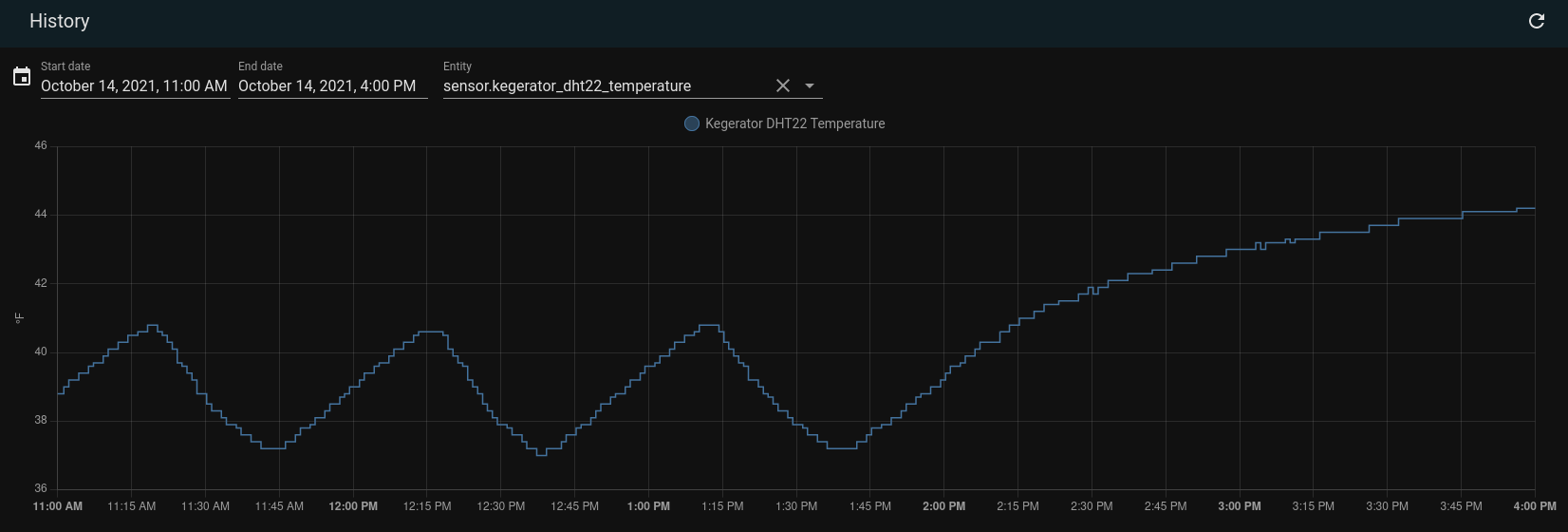

The only possibility I can think of is that I applied an update then and I don't remember if I did or not. What is causing this?
In further support of this being a strange bug I manually triggered the esp relay to turn on the kegerator, it cooled down, and the automations picked back up as if there was never a problem.
What is version of Home Assistant Core has the issue?
2021.10.4
What was the last working version of Home Assistant Core?
No response
What type of installation are you running?
Home Assistant OS
Integration causing the issue
No response
Link to integration documentation on our website
No response
Example YAML snippet
- id: "1590371142598"
  alias: Kegerator Off
  description: ""
  trigger:
    - platform: template
      value_template:
        "{{ states('input_number.kegerator_target_temp')|float - 1.5
        > states('sensor.kegerator_dht22_temperature')|float }}"
  condition: []
  action:
    - data: {}
      entity_id: switch.kegerator_sonoff_relay
      service: switch.turn_off
  mode: single
- id: "1590371341424"
  alias: Kegerator On
  description: ""
  trigger:
    - platform: template
      value_template:
        "{{ states('input_number.kegerator_target_temp')|float + 1.5
        < states('sensor.kegerator_dht22_temperature')|float }}"
  condition: []
  action:
    - data: {}
      entity_id: switch.kegerator_sonoff_relay
      service: switch.turn_on
Anything in the logs that might be useful for us?
No response
Additional information
:fire: :beer: :cry:

I highly doubt this is an issue with the Home Assistant software Check out either the Home Assistant Discord or create a post on the Home Assistant Forums to get support with your issue

@ikifar2012 Can you give some insight into your reasoning? I'd be more included to agree this is a user error if it didn't work correctly thousands of times and then fail exactly once and never recover (as the temperature rose).
One thing I don't understand is why assistant doesn't evaluate the trigger condition with each data point it receives. The graph shows it clearly receiving data. The automation should be triggering it as it did thousands of times before. Why doesn't it act here until I took a manual action? I see no explanation to this except for there being a bug.
@ikifar2012 Can you give some insight into your reasoning? I'd be more included to agree this is a user error if it didn't work correctly thousands of times and then fail exactly once and never recover (as the temperature rose).
One thing I don't understand is why assistant doesn't evaluate the trigger condition with each data point it receives. The graph shows it clearly receiving data. The automation should be triggering it as it did thousands of times before. Why doesn't it act here until I took a manual action? I see no explanation to this except for there being a bug.
Do you see any errors in the log?
When it happens do you see any sign at all that the automation attempted to trigger? The UI should tell you when it was last triggered
I highly doubt this is an issue with the Home Assistant software Check out either the Home Assistant Discord or create a post on the Home Assistant Forums to get support with your issue
@bmbouter - please cross-post a link if you pursue these options. I am interested in learning more about the possible causes.
Have had similar experience in the past and created a watchdog binary_sensor + automation that re-triggers the primary automation should it fail to run.

I wonder if it has anything to do with the automation changes a while back, maybe that introduced a bug https://www.home-assistant.io/blog/2020/07/22/release-113/#automations--scripts-running-modes
If you can find anyway to reproduce this bug reliably that would be extremely helpful however, as you have described it, it seems random and thus hard to track down
maybe that introduced a bug
The linked post describes fixing a bug, not introducing one. The described bug involves calling a running script in versions prior to 0.113.
The scripting changes introduced in 0.113 address the issue of calling a script (or automation) that is busy processing the previous call. When that happens, the mode option indicates how the situation should be handled.
The examples in this Issue are mode: single so they ignore subsequent calls to the automation while it's busy. The odds of this actually happening here are low to none because the automation's action is very simple and is executed very quickly (i.e. it's busy for mere milliseconds). If it does happen, there will be a warning message in the log indicating the automation attempted to trigger while a previous instance of itself was still running.
What may shed some light here is to remember how a Template Trigger works. It triggers when the template's result changes from false to true. It won't trigger again until it first evaluates to false and then to true. Ideally, one should examine the automation's trace when the undesirable behavior occurs to see the state of the previous trigger.

I went to see what I could learn from the logs and automation traces. Unfortunately I missed my opportunity to learn more from the trace info since only the last 5 traces are stored.
I did learn something very interesting though. I believe the logs tell me I restarted home assistant at 2021-10-14 14:11:17. I can see this because my home-assistant.log file starts at that time with startup statements like 2021-10-14 14:11:17 INFO (MainThread) [homeassistant.setup] Setting up http. This is very interesting because that is almost the exact time that this automation to turn on the kegorator should have run but did not!
For those more familiar with the hass code, can you give some insight into what would happen to my template trigger when a restart occurs right around when it should have been triggered? What do you expect to happen? What could be happening instead?
As @tdejneka wrote, if the template evaluated as false before the restart and as true after the restart, the transition would have been (rightly) missed by HomeAssistant. You might want to add an automation running at HomeAssistant start to check what the initial state of your smart plug should be.

Thank you for explaining all this to me. That makes sense given what you've told me about how template triggers evaluate and the logic. This does not make sense from a user perspective though, so let me share that perspective.
As a user, when I configured this automation I want the smart switch to be in the on state whenever the kegerator is higher than say 41 F. It's very simple declaration of intent (in my mind at least). As a user, I'm not expressing a desire to have the state transition from one thing to another and then take action. That has to do with how it's implemented. Specifically with a hass restart or outage, this detail puts the reliability of almost any user expectation and automation at risk and seems wrong.
I realize now this is not what the current situation is in home assistant, but I believe it should be. In the interest of brainstorming with no commitment to do any change at all, what could be done to have hass just "get it right" instead of me making automation to check on the automations I already wrote.
Maybe you didn't use the right tool for this. You can easily design an automation:
- which triggers at system start
- which triggers at template change
- which evaluates the template again and acts accordingly
You can even use a template binary sensor to avoid duplication.
But more importantly have you considered using a generic thermostat which seems to correspond to what you're building?
- which triggers at template change
Do you have an example of this?
But more importantly have you considered using a generic thermostat which seems to correspond to what you're building?
Does the generic thermostat suffer the same fate as OP's original automation? If the threshold is crossed during a reboot then a startup check is still needed?
- which triggers at template change
Do you have an example of this?
https://www.home-assistant.io/docs/automation/trigger/#template-trigger
But more importantly have you considered using a generic thermostat which seems to correspond to what you're building?
Does the generic thermostat suffer the same fate as OP's original automation? If the threshold is crossed during a reboot then a startup check is still needed?
Not in my experience.
Ah ok, I thought it might have been something different being suggested. (I'm new to HA, sorry).
I have lots of template triggered automations and have suffered the same fate as OP when template state changes between reboots (or lots of automation authoring updates).
How does the generic thermostat avoid this?
Is it crazy to have a trigger of "state" but not indicate any on/off and then 'choose' action with further evaluations so that every single update of a temp sensor is then evaluated?
Seems the logbook might get a little cluttered..
On Fri, Oct 22, 2021 at 5:30 PM Samuel Tardieu @.***> wrote:
- which triggers at template change
Do you have an example of this?
https://www.home-assistant.io/docs/automation/trigger/#template-trigger
But more importantly have you considered using a generic thermostat https://www.home-assistant.io/integrations/generic_thermostat/ which seems to correspond to what you're building?
Does the generic thermostat suffer the same fate as OP's original automation? If the threshold is crossed during a reboot then a startup check is still needed?
Not in my experience.
— You are receiving this because you commented. Reply to this email directly, view it on GitHub https://github.com/home-assistant/core/issues/58130#issuecomment-949970607, or unsubscribe https://github.com/notifications/unsubscribe-auth/AASNI4ZPEEG7IZCSBLWJH3DUIHJYNANCNFSM5GMOORIQ . Triage notifications on the go with GitHub Mobile for iOS https://apps.apple.com/app/apple-store/id1477376905?ct=notification-email&mt=8&pt=524675 or Android https://play.google.com/store/apps/details?id=com.github.android&referrer=utm_campaign%3Dnotification-email%26utm_medium%3Demail%26utm_source%3Dgithub.
I appreciate these workaround suggestions. The thermostat suggestion sounds good for my use case, but this issue affects all template triggers. Home assistant not handling this generally is concerning. For example, consider a template trigger to turn on/off a heat lamp for a snake, if I reboot home assistant at the wrong time, the snake could die with the light being left on. :snake: :zap: Or what if my template wants my outside lights to be on between specific hours for safety when someone comes home from work.
Why can't home assistant evaluate template triggers on startup? What if there was an optional way to specify that a trigger should be evaluated on startup? What I'm observing is that if everytime I use a template trigger, I also have to create additional triggers like on-boot or template change, the template trigger feature is incomplete.
I have much thanks :pray: and love :heart: for hass and everyone who makes it; please accept my apologies if this sounds harsh. My interest is to help improve this situation, so that what is happening to me (and apparently other users) is solved generally.
the template trigger feature is incomplete.
This is likely a little misguided since the scenario you describe applies to all triggers, not just templates.
Even if your template sensor is correctly evaluated upon state change and HA commands the heat lamp to turn off - that is a best-effort attempt. It happens a single time, and if there is any error in the downstream integration or wifi/zigbee/zwave that causes the heat lamp to stay on; your snake dies.
One alternative is to therefore NOT evaluate only upon a single state-change where a threshold can be missed due to any number of errata.
If your snake heat lamp was being triggered by a template or numeric state above a certain temperature sensor value; you change this trigger to the sensor and provide no value. Therefore every single temperature sensor value update triggers the automation and the action then contains the condition if it should act. This will clutter your logbook but provided repeated evaluation of the current logic and repeated attempts to resolve the situation.
Without further guidance per my earlier question if this is crazy or not. The impact appears to be a cluttered logbook and the benefit is repeated attempts to ensure the automation executes as desired.
Someone please tell me if this is crazy - I am new to HA and merely thinking out loud.
In the interest of brainstorming
Be advised that an Issue is for reporting a bug. In this case, there's no bug but a problem caused by a misunderstanding of how Home Assistant processes a Template Trigger.
If you wish to brainstorm, I suggest opening a topic in the community forum where more people can participate and benefit from it.
Be advised that an Issue is for reporting a bug. In this case, there's no bug but a problem caused by a misunderstanding of how Home Assistant processes a Template Trigger.
I disagree, not only is there a bug, I'm realizing that there is really no reasonable way to have hass provide outage-reliable automation except by calling your automation all the time. Does the resolution of a bug typically happen in the community forum?
The post from crlogic makes the most sense to me. I'm interested in the answer to the questions from crlogic?
not only is there a bug
I don't know if you noticed but this Issue has been open for 4 days and it hasn't even been categorized, or assigned a reviewer, let alone received a response from a member of the development team. Meanwhile, Issues involving real bugs are getting attention.
Good luck.
Good luck.
This is not a serious matter, but to be clear, your comment is passive aggressive and inconsistent with the home assistant code of conduct.
your comment is passive aggressive
Actually, wishing someone luck complies with the first guideline of the Code of Conduct:
Demonstrating empathy and kindness toward other people
If you thought I was being sarcastic, then you were being cynical; I genuinely hope you resolve the problem. It's just unlikely to happen in this thread.
I hope I don't step on toes here.
What I think I have observed is that OP is frustrated about the lack of developer direction on how to address HA's lack of automation end-to-end resiliency.
It appears that HA's best effort approach is accepted and therefore community opinion isn't likely to help. Asking for developer guidance seems reasonable. Others, including myself, have been impacted by the non-deterministic nature of HA.
If there are thoughts on how to mitigate the impact from those that are more experienced, we would like to hear from you.
Because even if HA works perfectly and the darn REST call magically fails due to wifi and unicorns, my wife complains the motion lighting didn't work!
I would love to hear how others have addressed this.
On Sun, Oct 24, 2021, 11:20 PM tdejneka @.***> wrote:
your comment is passive aggressive
Actually, wishing someone luck complies with the first guideline of the Code of Conduct:
Demonstrating empathy and kindness toward other people
If you thought I was being sarcastic, then you were being cynical; I genuinely hope you resolve the problem.
— You are receiving this because you commented. Reply to this email directly, view it on GitHub https://github.com/home-assistant/core/issues/58130#issuecomment-950490965, or unsubscribe https://github.com/notifications/unsubscribe-auth/AASNI4Y6KNB5QBT5VHCQBNLUITEGVANCNFSM5GMOORIQ . Triage notifications on the go with GitHub Mobile for iOS https://apps.apple.com/app/apple-store/id1477376905?ct=notification-email&mt=8&pt=524675 or Android https://play.google.com/store/apps/details?id=com.github.android&referrer=utm_campaign%3Dnotification-email%26utm_medium%3Demail%26utm_source%3Dgithub.
I'll weigh in as a warm beer concerned brother.
Consider changing the trigger to something time-recurrent like:
trigger:
  platform: time_pattern
  minutes: '/20'
  seconds: '7'
Then make your current Trigger a Condition. I have any number of these automation triggers configured not to overlap and I don't use template triggers at all. (Yes, it seems wasteful of cycles and inelegant to have time pattern triggers, but, well, OK).
If HA misses a trigger due to a restart or power outage, another will fire soon after HA is up again.
Your beer won't care that it's temperature only gets looked at every so many minutes (and, based on your charting, you could find an appropriate trigger time interval).
OT - I use Inkbird WIFI 308s in my keezer and fermenteezer for heating and cooling and cooling restart time delays for compressor health (although I long for an HA integration for Inkbirds). Cheers!

Thank you both for the replies. I'll use this, and I suspect this is the best we can do without a developer resolution to this.
As a side-note, what's great about this is that it creates reliability even though zwave, zigbee, 3rd-party communication can be unreliable. Kind of like how TCP is so great for creating reliable communication over unreliable networks. It would be nice if this pattern were somehow adopted into the feature set of hass somehow in a way that doesn't clutter the logs and logbook.
One idea would be to have hass not log about an automation unless an action is taken maybe? Perhaps make that an optional setting for an automation? There are probably way better ideas than this one.
Also the Inkbirds look cool.
There hasn't been any activity on this issue recently. Due to the high number of incoming GitHub notifications, we have to clean some of the old issues, as many of them have already been resolved with the latest updates. Please make sure to update to the latest Home Assistant version and check if that solves the issue. Let us know if that works for you by adding a comment 👍 This issue has now been marked as stale and will be closed if no further activity occurs. Thank you for your contributions.
![github-actions[bot] avatar](https://avatars.githubusercontent.com/in/15368?v=4 "Published by a pub.dev verified publisher")
There hasn't been any activity on this issue recently. Due to the high number of incoming GitHub notifications, we have to clean some of the old issues, as many of them have already been resolved with the latest updates. Please make sure to update to the latest Home Assistant version and check if that solves the issue. Let us know if that works for you by adding a comment 👍 This issue has now been marked as stale and will be closed if no further activity occurs. Thank you for your contributions.
I would still like to see some way to have home assistant assert something is true and if not trigger an automation without logging endlessly to the logbook. The logbook on my system is basically unusable because of so many logs from this workaround.
The logbook on my system is basically unusable because of so many logs from this workaround.
Just add this to configuration.yaml
recorder:
  exclude:
    entities:
      - automation.kegerator_on
This is a very helpful workaround! I'm wondering if this pattern of (check often and silence the logging) is documented anywhere? I could likely contribute these docs, but I'm not sure where would be the right place. Any suggestion?