

 home-assistant
Video Gif attachment on Notifications not showing an icon
Home Assistant Android version: beta-2510-f9ceeb0d-full Android version: Android 12 Phone model: Samsung S20+ Home Assistant version: 2022.7.7 Last working Home Assistant release (if known): N/A
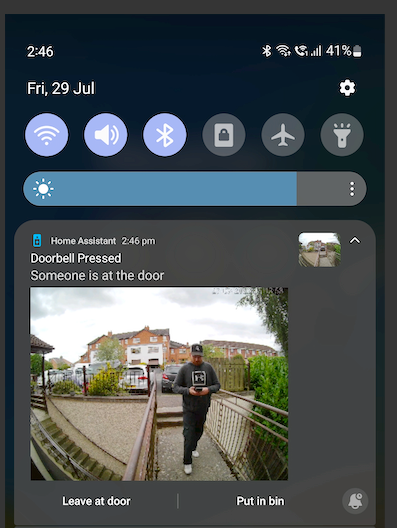
Description of problem: When firing a notification with a video attachment, I don't get an icon showing up as per this screenshot:

Only when I pull down the notification to expand it, do I see the video gif:
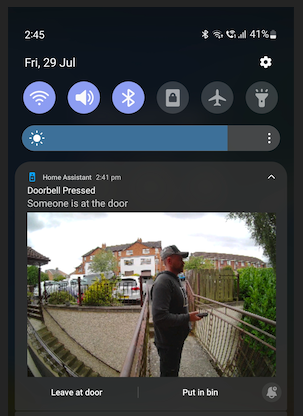
If I add an extra 'image' field to the notification, I get a static icon/thumbnail:
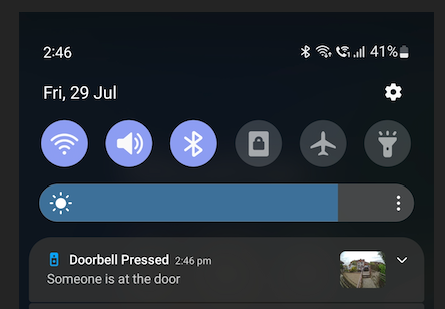
But then when I expand the notification, the desirable main gif is smaller and pushed to the left while the image stays in the top right corner of the notification:

My proposed solution is that the video gif displays the same way regular images do on notifications, with an icon displayed which fades away when you pull down the notification to expand it. Even if this icon image cannot be dynamic, is there a way it can pull a static image from the gif?
Traceback (if applicable, to get the logs you may refer to: https://companion.home-assistant.io/docs/troubleshooting/faqs/#android-crash-logs):
N/A
Additional information:
Code with extra 'image' field added to force display an icon:
service: notify.mobile_app_ss
data:
  title: Doorbell Pressed
  message: Someone is at the door
  data:
    image: /local/snapshots/amcrest_snapshot.jpg
    video: "http://192.168.X.X:5000//api/events/XXXXXXX.015244-bk6sxl/clip.mp4"
    ttl: 0
    priority: high
    tag: doorbell-pressed
    notification_icon: mdi:doorbell-video
    channel: Doorbell Press
    actions:
      - action: BINS_OUT
        title: Leave at door
      - action: BINS_OUT
        title: Put in bin

The icon field is it's own field for you as the user to add whatever other image you want. It's meant to be separate and not related so you can use anything.
Please also see this note about using both image and video tags in the same notification.
https://companion.home-assistant.io/docs/notifications/notification-attachments#parameters

Please also see this note about using both image and video tags in the same notification.
https://companion.home-assistant.io/docs/notifications/notification-attachments#parameters
Yeah I'm aware of that, I was just showing above that if I add the additional image field it sends both the image & the video gif at the same time (with the image as the icon/thumbnail). But this 'hack' doesn't visually look great when expanded:
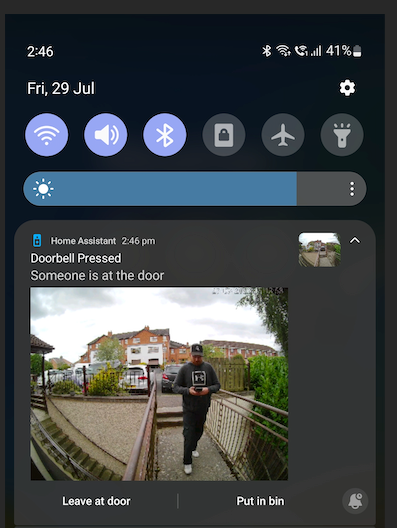
Apologies if I'm not explaining clearly but essentially what I'd like here is for video gif attachments to show an icon/thumbnail automatically like the screenshot below:
service: notify.mobile_app_ss
data:
  title: Doorbell Pressed
  message: Someone is at the door
  data:
    video: "http://192.168.X.X:5000//api/events/XXXXXXX.015244-bk6sxl/clip.mp4"
    ttl: 0
    priority: high
    tag: doorbell-pressed
    notification_icon: mdi:doorbell-video
    channel: Doorbell Press
    actions:
      - action: BINS_OUT
        title: Leave at door
      - action: BINS_OUT
        title: Put in bin
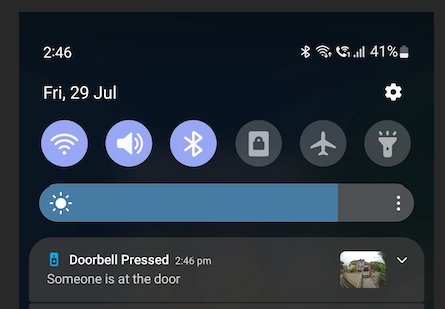
Eg. exhibit the same behavior as when sending just an image on it's own.
The way the fields are designed is meant to keep them separate so you as a user can add whatever you want for maximum flexibility for your own unique use cases. You should take your own snapshot and show that instead of asking the app to perform that. You were already able to replicate your desired behavior so that is not a hack, thats how its meant to work.
Okay, I guess I was just hoping that we could have video gif notifications auto-display the thumbnail/icon the same way sending a static image does:
https://user-images.githubusercontent.com/57415184/181788247-06d41d3b-3ec6-4bb6-af35-b9492c5d1f73.mp4
Notice how the 'icon'/thumbnail shows up and then disappears when the notification is expanded.
. .
service: notify.mobile_app_ss
data:
  title: Doorbell Pressed
  message: Someone is at the door
  data:
    image: /local/snapshots/amcrest_snapshot.jpg
    ttl: 0
    priority: high
    notification_icon: mdi:doorbell-video
You can try setting the icon_url to see if that is more desirable
https://companion.home-assistant.io/docs/notifications/notifications-basic/#notification-icon
ok I see what you are saying, we can probably look into adding a setting to disable showing the image when its expanded but it will probably still be up to you as a user to provide that image
Great, that would work for me! 🥳 Thanks for all your awesome work on this app!
hey @dshokouhi any possibility for this request? 🙂
we can probably look into adding a setting to disable showing the image when its expanded but it will probably still be up to you as a user to provide that image