

 home-assistant
Support Cloudflared Zero Trust protected instance from App
Is your feature request related to a problem? Please describe. I use Cloudflared Zero Trust to protect my Home Assistance. To access my Home Assistant instance, I have to log in using oAuth. When I do this via the Home Assistant app, the process ends in Chrome rather than the Home Assistant App.
Actual Results:
- Open HA App
- App opens Chrome to login to Zero Trust
- After login, HA is shown in Chrome,
Describe the solution you'd like
- Open HA App
- Zero Trust login shown in HA App
- After login, HA is shown in HA App
Describe alternatives you've considered, if any Zero Trust also supports Service Tokens, an alternative could be to allow custom headers to be attached to requests (this could potentially allow for a solution to other providers).
Another alternative is to use warp for login, buy this isn't feasible on my corporate phone.
Additional context

I like this idea! 👍
However, a problem came to my mind: A Cloudflare Zero Trust session can last 1 month at most, see the documentation here. When the session expires, suddenly the app will start to silently fail, and you won't get push notifications. That could be unpleasant at times when you want to be notified about some important smart home event.
Service Tokens can be a solution to this problem, see the documentation here. They can be >1 year long, if I understood the documentation correctly.

Isn't this the same as #1438, just with a different service? Or am I missing something?
When the session expires, suddenly the app will start to silently fail, and you won't get push notifications.
This won't be a problem for most users because push notifications are delivered using Firebase.

Isn't this the same as #1438, just with a different service? Or am I missing something?
Yes it looks the same (although potentially part of that issue is to do with their nginx config). Maybe a generic feature request is required?

Seems I searched for Cloud flare rather than Cloudflare when looking for previous issues :facepalm:
I have the same setup and use Cloudflare Zerotrust to protect my home-assistant. I got this to work by only protecting the auth subfolder auth/authorize. I've been using it for some time and everything has been working flawlessly until today when I tried logging in from a new device. On the new device I see the same aforementioned useragent error, meanwhile my old device continues working with out issue.

After disabling ZeroTrust and authenticating on the new device it works. After the device has been authenticated I can re-enable ZeroTrust and everything continues to work just like it has on my original device.
Hope that helps
I have a small addition to make: It works fine in the initial setup, seemingly using an internal WebView to display the auth prompt and it completes. Once the token expires or is revoked, I get redirected to the default web browser, where I then do not get redirected back into the app.

@kingamajick Maybe you could reclassify this as a bug, as it seems to be intended to work. It also works fine on iOS.
@kingamajick Maybe you could reclassify this as a bug, as it seems to be intended to work. It also works fine on iOS.
this is not a bug, the feature is just not supported yet.
Here to give this a bump with same problem. Redirected from the CloudFlared git: https://github.com/brenner-tobias/addon-cloudflared/issues/287#issuecomment-1366551953

Having the same issue. Have to delete the app and reinstall every month. Why does initial setup work fine? Why cant it just open external links in the app instead of chrome?

I tried to add this, but I am not a kotlin expert, so I gave up after 6 hours, but maybe I will try again. What I would like is to add the 2 request headers to all http calls to the home server.

@kingamajick Maybe you could reclassify this as a bug, as it seems to be intended to work. It also works fine on iOS.
this is not a bug, the feature is just not supported yet.
Definitely a bug: either the bug is that 3rd party login is working on the initial setup, or the bug is that it is not working afterwards.. So the app is not consistent in its behavior and please fix this..

Would a possible solution here to move to a Trusted Web Activity rather than a webview, which would keep the same full screen experience, but have the advantage of sharing the chrome cookie jar, which would work for cloudflared, and anything similar.
To be honest, I implemented this to a forked branch, but in an uncomplicated way, only for myself. I cannot work with kotlin and with fronted, so I had to hardcode the two header values.
In the \HomeAssistantAndroid\common\src\main\java\io\homeassistant\companion\android\common\data\HomeAssistantApis.kt
change this:
                it.request()
                    .newBuilder()
                    .header(USER_AGENT, USER_AGENT_STRING)
                    .build()
to this:
                it.request()
                    .newBuilder()
                    .header(USER_AGENT, USER_AGENT_STRING)
                    .addHeader("CF-Access-Client-Secret","eaaaaaaaaaaaaaaaaaaaaaaaaaaaaaaaaaaaaaaaaaaaa370138")
                    .addHeader("CF-Access-Client-Id","5aaaaaaaaaaaaaaaaaaade32.access")
                    .build()
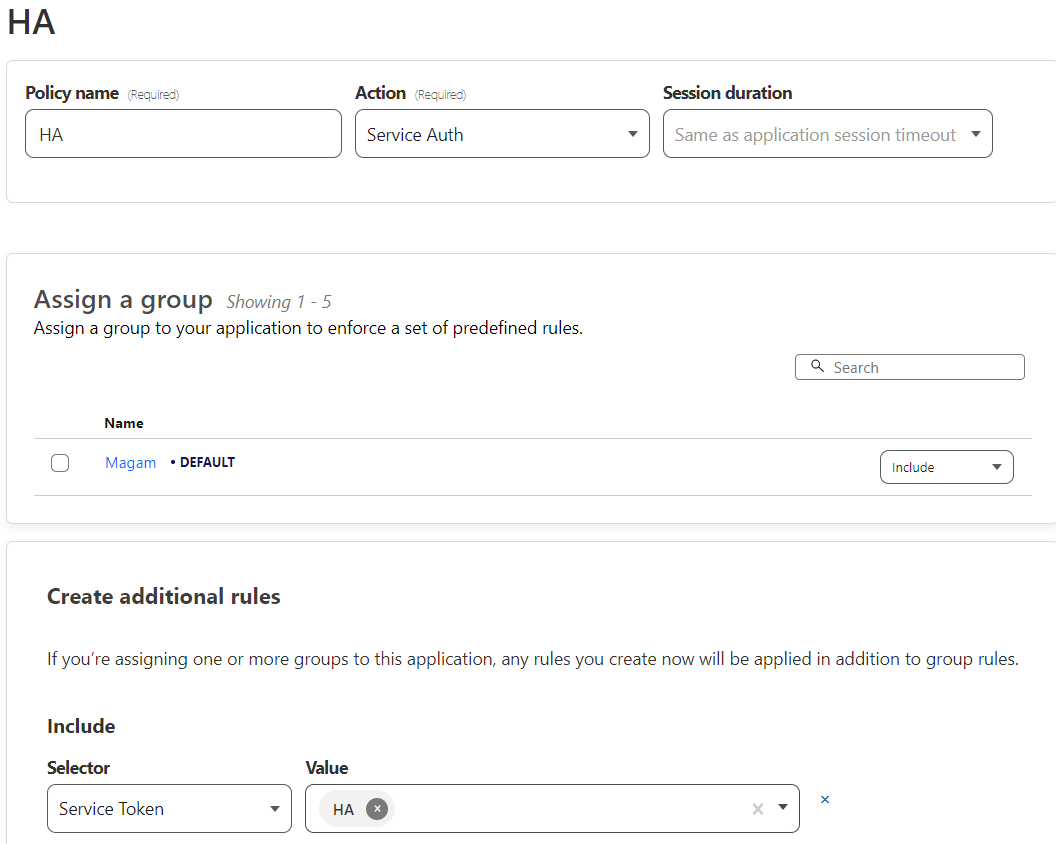
Of curse, you should use the Cloudflare generated in Cloudflare in the /access/service-auth menu. You must create a new policy for your app (so you should have 2 policies, one for your email for example), and this new policy should be Service Auth, and the Service Token should be added.
FYI next Friday I plan to implement a feature for adding custom headers from the settings UI (I'm an Android developer) 🙂
With this, any authentication method can be used which is based on long-lived tokens, such as Cloudflare Access' Service Tokens.
FYI next Friday I plan to implement a feature for adding custom headers from the settings UI (I'm an Android developer) 🙂
Ok, if you need help to test. write me directly, I am from Hungary too, so I can help you.
FYI next Friday I plan to implement a feature for adding custom headers from the settings UI (I'm an Android developer) 🙂
That would be awesome. I am using Cloudflare + additional Protection layer. And beeing able to use some service tokens for my smartphone would be a huge improvement!
I would realy like to test that out! So if you need an test user just write me.

FYI next Friday I plan to implement a feature for adding custom headers from the settings UI (I'm an Android developer) 🙂
With this, any authentication method can be used which is based on long-lived tokens, such as Cloudflare Access' Service Tokens.
@marazmarci Hi, did you have the opportunity for such development?

I see two possible solutions for this issue here. It would be excellent that official developers allow one of them.
For the use of the Service Settings, we could add an option like “External Connection Headers” after “Internal Connection URL” in the settings.
There are thousands of Home Assistant instances exposed to the Web. This would be a wonderful way to help users to keep access to their self-hosted away, and, not expose to the entire internet.
aw man im looking really forward to that feature, at first I didnt understand why it wont work, drove me crazy

I created a version with this feature. To be honest, first, you have to set up with your local server, because the settings is under the Server settings, but then, you can use this: https://github.com/Meister1977/home-assistant-android
The master is created from the original home assistant code.
I built an APK too, but use only if you want to test this, and if you trust me. If it possible, please build your own version. https://drive.google.com/drive/folders/14m_UiiSpZ0ZNQ_V65JxXvmHsGEssINZ6?usp=share_link (If you use this build, the Android will not upgrade the app from the Google Play anymore. So, you must check back for newer release from me later, and I do not want to be a maintainer in the future.)
To test: Open app, go to Settings, Mobile Application, Click on the server name, scroll down to Additional Http Headers. Enter name1: CF_Access_Client-Id Enter value1: xxxxxxxxxxxxxx.access (copy from Cloudflare) Enter name1: CF_Access_Client-Secret Enter value1: xxxxxxxxxxxxxxyyyyyyyyyyyyyyyyy (copy from Cloudflare)
ps.: this is the commit: https://github.com/Meister1977/home-assistant-android/commit/c4f36a95b618db34e8e15c71334ec7c2aa61dda4
FYI next Friday I plan to implement a feature for adding custom headers from the settings UI (I'm an Android developer) :slightly_smiling_face:
With this, any authentication method can be used which is based on long-lived tokens, such as Cloudflare Access' Service Tokens.
Hi all! @Meister1977, @panzerknacker20111, @npestana, sorry for replying this late, I was struggling to find the time...
On that Friday, I gave this a shot, and unfortunately, I concluded that there's one big blocker that prevents implementing the custom HTTP headers feature (without frontend modifications). While you can easily add headers to an OkHttpClient's HTTP requests, the problem is that Android's WebView doesn't allow adding arbitrary headers to all its HTTP requests. (See the technical details at the end of my comment)
(FYI for those who don't know: the WebView is used for displaying the frontend, just like if you opened your HA instance in your browser. For everything else, an OkHttpClient is used: sensor updates, widget controls, device controls, quick setting toggles, and persistent connection, so basically everything that happens when the app is in the background, and there may be other things I didn't list.)
However, it's possible to only add the custom headers to the OkHttpClient (just as @Meister1977 did it in #3510), and let the WebView "do its own authentication", so you get a CF login screen inside the WebView where you can log in with your email address and copy-paste the 6-digit code you received in e-mail. You cannot use Google or Facebook to authenticate, because they both prohibit logging in from a WebView. Currently, because of this very issue (#2650) I'm writing the comment on (and #3205 is also related), you can log in when you set up the app, but when your session expires (1 month is the maximum session duration CF Access allows you to set), you will be redirected to a browser, and cannot authenticate CF Access for the HA app, and AFAIK the only solution in this state is to clear the app's data and set it up again.
Technical details:
See WebViewClient::shouldInterceptRequest. If you want to modify the WebView's HTTP requests, you have to make the HTTP request yourself from the application code, with eg. using an OkHttpClient, but the WebViewClient API won't give you the request body, which makes it practically useless for POST requests, because those almost always have a body. Not to mention WebSocket requests, as they're 100% not interceptable, and there's currently no Android API for them.
@marazmarci : No, you missunderstood my solution. Please see https://github.com/home-assistant/android/issues/2650#issuecomment-1460754065, because with the headers you can add "service tokens". You can use this kind of tokens for years. So, in this case you never be asked for reauthenticate with google or facebook. The token is generated once in Cloudflare.
Yes, I did exactly that (added the Service Token) when testing your PR :smile:
See my comment on the PR for more info: https://github.com/home-assistant/android/pull/3510#issuecomment-1534509652
This has gone off the rails. Losing sight of the original problem: When the 1 month token expires, any future attempts at authentication fail. Forcing you to delete Home-Assistant from the phone and reinstalling. Initial Authentication works... just not when it expires.
@spacebares please read https://github.com/home-assistant/android/pull/3510#issuecomment-1534509652, as it may probably solve your problem.
TL;DR: try turning off the Enable Binding Cookie setting for your CF Access application! (the initial auth should also happen with this setting turned off!)
EDIT: You don't need to build and install #3510 for this. Just use the released version.
EDIT 2: Keep in mind that the so-called Binding Cookie is a security feature. Sorry for suggesting turning it off without first giving a warning.
@marazmarci Yes, of course there's a way to do this with a service token - but that's an entire different topic to the original issue as @spacebares correctly pointed out.
Not everyone wants to make all their family etc. enter tokens into the app - we want the CF access login screen to appear in-app and work when necessary to follow the normal auth procedure, whether you use email codes or OAuth.
The reason I thought of it as more of a bug than a missing feature was that it works for the first login, but afterwards the WebView redirects you out of the app into your default browser when it encounters an unknown URL, instead of just staying in the WebView.
It doesn't seem impossible to me, and I've tried to find the issue as well but I'm unfortunately not well versed enough in current Android apps to keep up, so any help solving the original issue would be much appreciated :)
Sorry guys for causing confusion.
Not everyone wants to make all their family etc. enter tokens into the app ...
Yes, very good point. (I was so fixated on the Service Token way because I knew that when not using Service Tokens, the session will expire, and then sensor updates will stop working, and in case of persistent connection, notifications also, which I really didn't want. Service Tokens will keep these working, even when the frontend needs re-authentication.)
What I suggested in my previous comment is I think a potential workaround that doesn't require code changes. I would really appreciate it if someone would volunteer to try it out with their config! But to be honest, I don't exactly understand why it works. 😅 When you open the app after the session expires, you will be greeted with an Unable to connect to Home Assistant. ... Retrying in xx seconds... message. You just have to click on Retry now, and poof, you're in. You won't even see a CF login page. And I don't think my CF Access app is misconfigured, as I only changed the Enable Binding Cookie setting, and while it was enabled, I could 100% reproduce the original issue (being redirected to the browser infinitely and having to reinstall the app)