

 holzschu
Explanation for instructions
I am trying to manually build Blink so I can use python but get a build failure when trying to build from xcode. I must be doing something wrong and I think its this part of the instructions:
“Just extract this package in your Framework folder and build Blink.”
What needs to be extracted and what Framework folder are you referring to after running the git command?
Sorry if Im being dense

Hi,
I believe this line in the instruction refers to the two lines of code afterwards. The last element in the lines of code (./get_frameworks.sh) downloads the frameworks and places them in the Frameworks folder.
This being said, if your only goal is to have Python, a-Shell is available on the AppStore and has Python included.

Great. Thank you for the help so far. I will use a-Shell in the meantime but I would really like to be able to build Blink with Python so I have Mosh and all the other tools in one app. I am very very new to Xcode and cant seem to get past these errors:
"Showing All Issues No profiles for 'Com.CarlosCabanero.BlinkShell' were found: Xcode couldn't find any iOS App Development provisioning profiles matching 'Com.CarlosCabanero.BlinkShell'.
There are no accounts registered with Xcode. Add your developer account to Xcode"
I do have an Apple developer account and I am signed in with it in Xcode. Any help on this? I know this is specific to Xcode and not your project but any help would be greatly appreciated.
Thank you in advance
You need edit the project to enter your Apple developer account, under "Signing and Capabilities". This is a step that cannot be automatised.
Thanks for the info. I was able to adjust that and build Blink thru Xcode which installed the app on my iPad. From there I downloaded the release.tar.gz file, extracted it, then moved the bin, bin3, lib directories to the Library folder. When I try to run pip or python I get a python3: command not found error. I can see the folders moved to the Library directory are populated.
Any ideas?
The simplest solution is: before the call to initializeEnvironment(), set sideLoading = true.
(explanation: ios_system ships by default with sideLoading = false and defines a smaller set of commands that is guaranteed to be AppStore compatible. You need to tell it that you are not the AppStore by setting sideLoading = true).
That should work.
Ok we are getting much closer... I redid it all with the suggested change and my error now when trying to run python is:
Failed loading python from Python_ios.framework/Python_ios, cause = (null)
Hi, This is weird. I've updated the project on the repository, can you update and try again?
To make python3 available, you need two things:
- that the python3 frameworks are embedded inside the App (see image)
- that python3 is defined in one the the
*commandDictionary.plistfiles and that this file is loaded.
I thought I had done it in the released project, but apparently not.
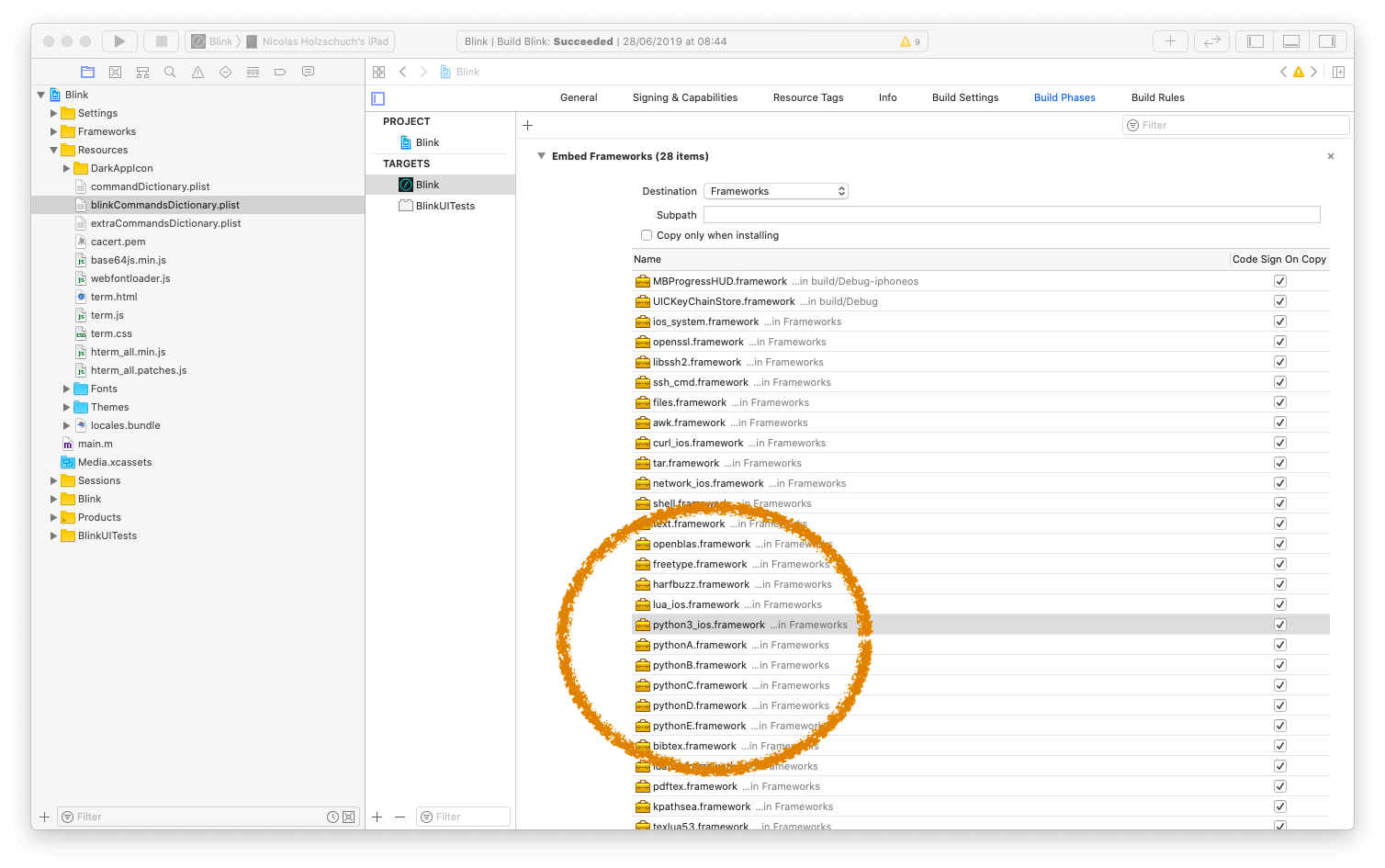
I went thru all the steps again and still the same issue. I deleted the Blink project folder and cloned from git again, changed signing info, rebuilt, and then downloaded the release.tar.gz file, extracted and moved to Library.
Is it working for you? I also dont see python3 in the embedded frameworks as in your picture above. I only have 13 items there, not 28...
I cloned your fork and I now have the 28 frameworks but get this error upon building:
Build input file cannot be found: '/Users/xxxxx/xxxxx/ios_system/curl/curl/src/tool_main.c'
Seems like this fork is incomplete because the ios_system directory isnt there
Thank you for this extensive testing. The fork is complete but the instructions were missing one important step (and the project file was pointing to the wrong directory). I've updated both the README and the project. Can you give it another try?
We are getting much closer:
/Users/xxxxx/xxxxx/blink/Frameworks/freetype.framework: No such file or directory
/Users/xxxxx/xxxxx/blink/Frameworks/harfbuzz.framework: No such file or directory
/Users/xxxxx/xxxxx/blink/Frameworks/harfbuzz.framework: No such file or directory
This is odd, because these frameworks are definitely included in the release that should be downloaded by get_frameworks.sh. Looking at the file, I see that it does contain a call to sh ./get_sources.sh so that line should not have been necessary, but I also that get_frameworks.sh downloads the Blink version of the frameworks, not mine.
If you download and unpack https://github.com/holzschu/ios_system/releases/download/v2.4/release.tar.gz you should be able to run Blink with Python. I'm going to edit and test the script file.
Should I download that from inside Blink?
I will have to download the app store version though since this one wont build and I dont think that will work since sideloading would be set to false
I mean, inside the source directory you have already forked, in the Frameworks directory, download and unpack https://github.com/holzschu/ios_system/releases/download/v2.4/release.tar.gz It contains all the frameworks you need, including freetype.framework and harfbuzz.framework.
Then you should be able to compile and install.
Ok I did that and then had to rename texlua52.framework and texlua52.framework/texlua52 to 53 and the build succeeded. Running 'python' shows the same error as previously but running 'python3' now errors:
Fatal Python error: initfsencoding: unable to load the file system codec ModuleNotFoundError: No module named 'encodings'
Getting closer!
I forgot to download the release file from Blink before my previous note. I downloaded that, extracted it, and mv the directories to Library. Now when I run 'python3' there are no errors or anything but it doesnt appear to do anything either.
'python' has same error as previous
pip3 freeze appears to work as expected
So, the "Fatal Python error" meant that python3 started, but it did not find the python files where it was looking for them. By downloading them, you have solved the first issue.
I'm not certain we ever managed to do interactive commands in Blink, or local feedback when the user types commands. Try typing a python command (blindly) and see if you have a response.
Since pip3 freeze works, python3 followed by the name of a python file works too. Interactive python is more complicated.
Doesnt appear to do anything. I created a file with a print command and nothing happened when calling it.
That is odd, because pip3 freeze is translated (internally) as python3 pip3 freeze, so if it works python3 myfile.py should work too.
I did another complete clone/build/reinstall and it works! Not interactive but I am able to write scripts and execute them. Thats huge progress!