

 holoviz
Date Picker not overflowing the sidebar
ALL software version info
(this library, plus any other relevant software, e.g. bokeh, python, notebook, OS, browser, etc should be added within the dropdown below.)
Software Version Info
Panel 1.4.5
Description of expected behavior and the observed behavior
Hi team,
The datepicker does not seem to overflow the sidebar like the other widgets. Feels like a bug but is there any quick CSS fix for this?
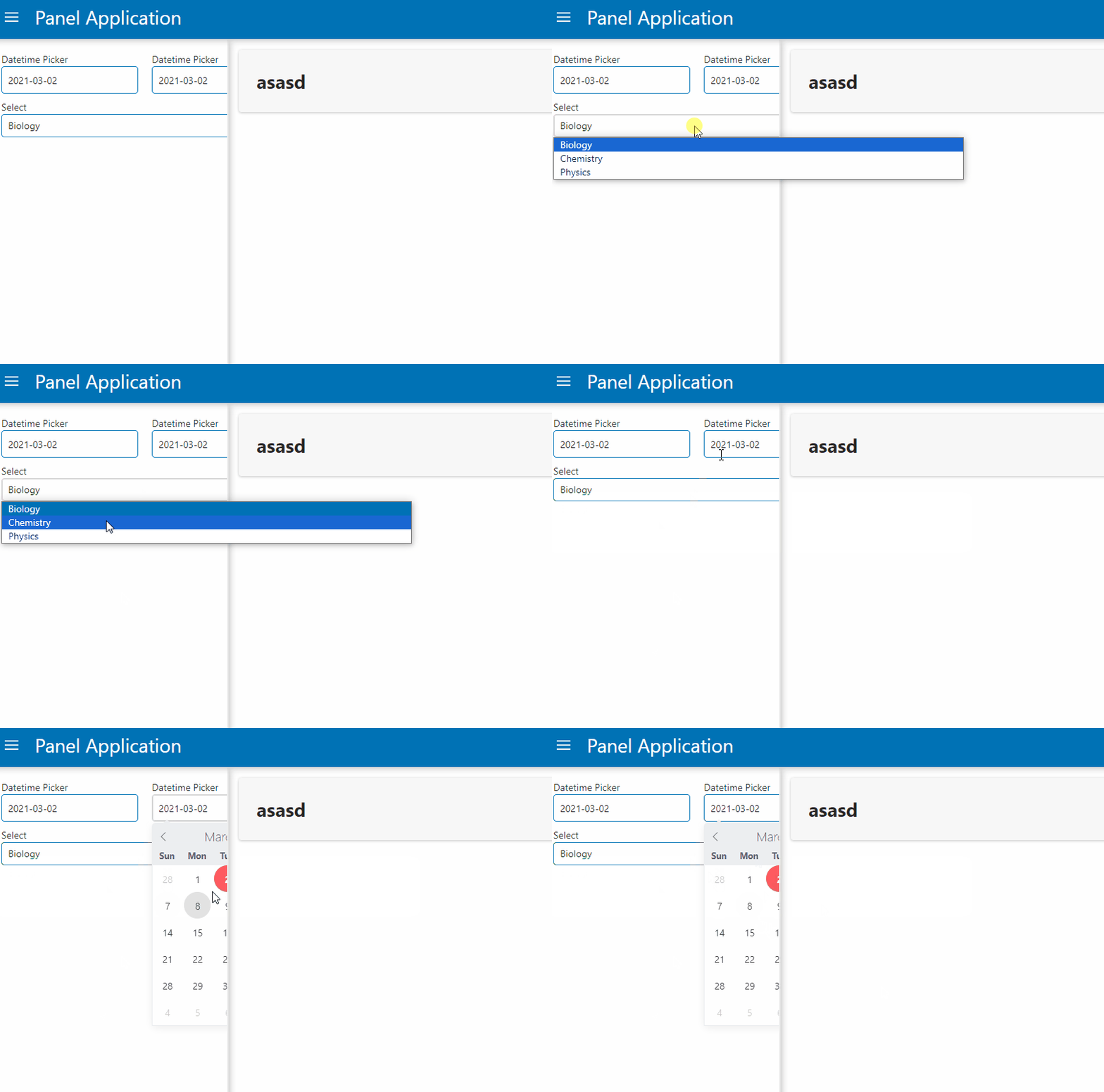
Complete, minimal, self-contained example code that reproduces the issue
import panel as pn
from deshaw.djs.panel import DJSTemplate
from datetime import datetime

app = pn.template.FastListTemplate()

datewidget1 = pn.widgets.DatePicker(
    name='Datetime Picker', value=datetime(2021, 3, 2), width=200
)
datewidget2 = pn.widgets.DatePicker(
    name='Datetime Picker', value=datetime(2021, 3, 2), width=200
)

selectwidget = select = pn.widgets.Select(name='Select', options=['Biology', 'Chemistry', 'Physics'], width=600)

app.sidebar.append(pn.Row(datewidget1, datewidget2))
app.sidebar.append(selectwidget)
app.main.append("# asasd")

app.servable()
Stack traceback and/or browser JavaScript console output
No errors
Screenshots or screencasts of the bug in action
- [ ] I may be interested in making a pull request to address this

Potentially modifying the stylesheet of the DatePicker calendar's zIndex, similar to https://github.com/holoviz/holoviews/pull/6297

Changing just z-index here does not help because the containing block of the picker element is limited by position: relative on parent elements.
I think that the cleanest solution would be using the Popover API which mounts the element in top layer (or Dialog API though semantically popover fits better here).
Alternatively, one could:
- use
position: fixedto mount the picker in viewport and add logic to positions it correctly - attach it higher up in the DOM tree

Thanks @krassowski, will take a look at the popover API. @mattpap Is that something we can use at the Bokeh level?

Is that something we can use at the Bokeh level?
Given this is managed by a third party library, then currently no. If this used bokeh's drop down pane, then this would work just fine. As a part of my CSS theming work, I'm redesigning all bokeh's widgets to use bokeh's components, so eventually this will work correctly and consistently.

This issue has been reported in the past #5800 .
A workaround is to pass the following CSS rule to FastListTemplate :
pn.template.FastListTemplate(
    ...
    raw_css = ["""  #sidebar { overflow-y: visible; } """]
    ...
)

@pierrotsmnrd The workaround given in https://github.com/holoviz/panel/issues/7254#issuecomment-2490404214 will cause all the components to overflow out the sidebar which doesn't look pretty.
One thing to note is that the month select modal is working as expected as shown below.

Hi there, gave this a check and I think the missing element to apply the CSS workaround and prevent the widgets overflowing is to also set a sidebar width. Updating the example code by setting some widths + the custom CSS, so running something like:
import panel as pn
from datetime import datetime

app = pn.template.FastListTemplate(sidebar_width=450, raw_css=["""  #sidebar { overflow-y: visible; } """])

datewidget1 = pn.widgets.DatePicker(
    name='Datetime Picker', value=datetime(2021, 3, 2), width=200
)
datewidget2 = pn.widgets.DatePicker(
    name='Datetime Picker', value=datetime(2021, 3, 2), width=200
)

selectwidget = select = pn.widgets.Select(name='Select', options=['Biology', 'Chemistry', 'Physics'], width=420)

app.sidebar.append(pn.Row(datewidget1, datewidget2))
app.sidebar.append(selectwidget)
app.main.append("# asasd")

app.servable()
You can get something like the following:
https://github.com/user-attachments/assets/13b37851-18f3-4026-add5-6a7556fb8100
Edit: Changed the preview to be a video since the previous .gif was showing a little shadow (unrelated to Panel or the workaround)
