

 holoviz
Tabulator style does not update when inside an accordion ?
Hi everyone!
I tried to update the style of a dataframe embeded in a Tabulator which is inside a Accordion. When I update the style, it doesn't change anything when the tabulator is inside the accordion, but if I show it outside it will work... I'm sure I'm doing some stuff wrong, but I will be happy to get some help :) Here's some code example :
GPUdfPanel = pn.widgets.Tabulator(sizing_mode="stretch_both", max_height=270) #Empty for now, I will put a dataframe later
#Also I have to set max_height since when I put the new dataframe inside, the height is not updated correctly...
accordeonDataFrame = pn.Accordion(("GPU Information", self.GPUdfPanel))

#Later in a function....
GPUdfPanel.value = gpudf
GPUdfPanel.style.apply(lambda x: ['background: lightgreen' if x.name in [selectedgpu] else '' for i in x], axis=1)
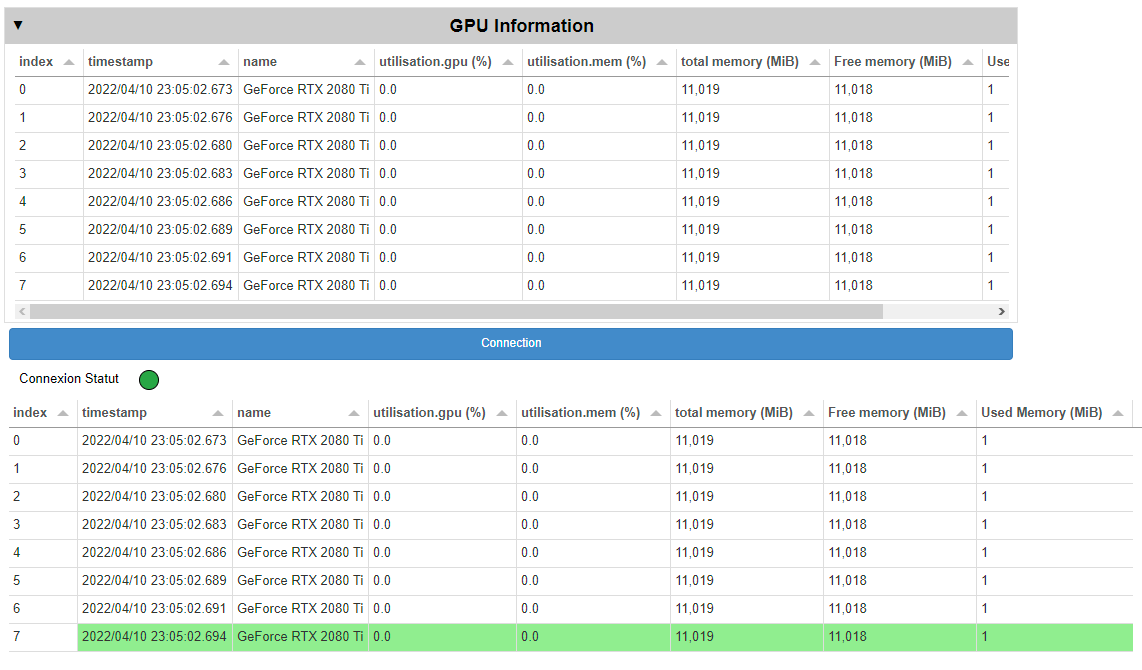
And here's a screenshot. The First Tabulator is inside the accordion, the otherone is ploted again with ssh.GPUdfPanel.servable() at the end of my code.
Thank you for your help :)

Could you check if this is still an issue with current dev releases? You can install it with pip install --pre panel or conda install -c pyviz/label/dev panel.

Thank you for your feedback !
Unfortunatly the version panel-0.13.0rc10 doesn't fix it...
I made a minimal code to reproduce the issue (tested on 0.13.0rc10):
import numpy as np
import pandas as pd


df1 = pd.DataFrame() # First empty frame
dfwidget = pn.widgets.Tabulator(df1) # Tabulator object
accordion = pn.Accordion(("test", dfwidget)) # Accordion that will contain the tabulator
accordion.servable() # Make it servable

# Now modification of the dataframe in the tabulator object
df2 = pd.DataFrame(np.random.randint(0,10,size=(10, 4)), columns=list('ABCD')) # Random dataframe
dfwidget.value=df2 # Change the displayed dataframe (WORK)
colorline = 7 #We will color line 7
dfwidget.style.apply(lambda x: ['background: lightgreen' if x.name in [colorline] else '' for i in x], axis=1) # Change the color of line 7

dfwidget.servable() # <-- If we display it again line 7 is colored, but not the first instance of our tabular object (contained in the accordion)
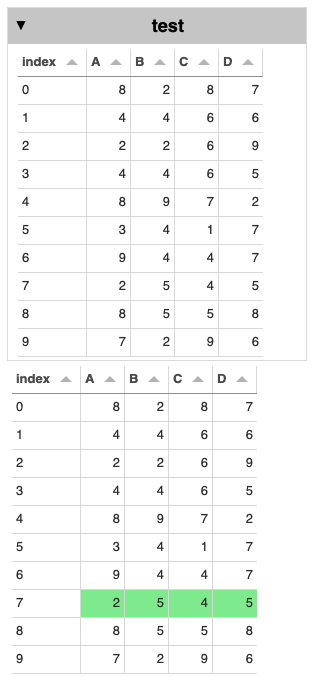
So I have the tabulator object (dfwidget) in the accordion, but I also display it after to check the coloring. As you can see on the screenshot bellow, dfwidget is not colored when inside the accordion, but color when I call it again...
Thanks :-)
Actually I'm not sure to which extent this is a bug. Don't we recommend not to modify in place the objects of an Accordion?

Don't follow entirely. You should be able to update any object and the example looks valid to me, so I would expect this to work.
This actually doesn't have anything to do with it being an Accordion, the problem is that the .servable() call instantiates the model that gets rendered and .style.apply does not generate an event that updates the model. To fix this we'd have to subclass the Styler to intercept any changes.