

 holoviz
add a temp name for an xarray DataArray
Is your feature request related to a problem? Please describe.
xr.DataArray(plot).hvplot gives DataError: xarray DataArray does not define a name and Dataset does not define a default value dimension. Give the DataArray a name or supply an explicit vdim.
Describe the solution you'd like
for hvplot() to name the DataArray with a temporary name e.g. "array"
Additional context
I understand this takes away from best practices for a user but I would like to use hvplot for rapid interactive visualization. It could give a warning such as creating a temporary name. especially if it is a dim_0, dim_1, etc. array
The current traceback is quite long and may steer people away from using hvplot
import hvplot.xarray
import numpy as np
import xarray as xr
xr.DataArray(np.ones((2, 2))).hvplot()
gives
DataError                                 Traceback (most recent call last)
File ~/miniforge3/envs/main/lib/python3.9/site-packages/hvplot/converter.py:1224, in HoloViewsConverter.__call__(self, kind, x, y)
   1223 try:
-> 1224     dataset = Dataset(data, self.indexes)
   1225 except Exception:

File ~/miniforge3/envs/main/lib/python3.9/site-packages/holoviews/core/data/__init__.py:338, in Dataset.__init__(self, data, kdims, vdims, **kwargs)
    337 validate_vdims = kwargs.pop('_validate_vdims', True)
--> 338 initialized = Interface.initialize(type(self), data, kdims, vdims,
    339                                    datatype=kwargs.get('datatype'))
    340 (data, self.interface, dims, extra_kws) = initialized

File ~/miniforge3/envs/main/lib/python3.9/site-packages/holoviews/core/data/interface.py:254, in Interface.initialize(cls, eltype, data, kdims, vdims, datatype)
    253 try:
--> 254     (data, dims, extra_kws) = interface.init(eltype, data, kdims, vdims)
    255     break

File ~/miniforge3/envs/main/lib/python3.9/site-packages/holoviews/core/data/xarray.py:117, in XArrayInterface.init(cls, eltype, data, kdims, vdims)
    116 else:
--> 117     raise DataError("xarray DataArray does not define a name "
    118                     "and %s does not define a default value "
    119                     "dimension. Give the DataArray a name or "
    120                     "supply an explicit vdim." % eltype.__name__,
    121                     cls)
    122 if not packed:

DataError: xarray DataArray does not define a name and Dataset does not define a default value dimension. Give the DataArray a name or supply an explicit vdim.

XArrayInterface expects gridded data, for more information on supported datatypes see http://holoviews.org/user_guide/Gridded_Datasets.html

During handling of the above exception, another exception occurred:

DataError                                 Traceback (most recent call last)
Cell In [10], line 1
----> 1 xr.DataArray(np.ones((2, 2))).hvplot()

File ~/miniforge3/envs/main/lib/python3.9/site-packages/hvplot/plotting/core.py:130, in hvPlotBase.__call__(self, x, y, kind, **kwds)
    127         plot = self._get_converter(x, y, kind, **kwds)(kind, x, y)
    128         return pn.panel(plot, **panel_dict)
--> 130 return self._get_converter(x, y, kind, **kwds)(kind, x, y)

File ~/miniforge3/envs/main/lib/python3.9/site-packages/hvplot/converter.py:1226, in HoloViewsConverter.__call__(self, kind, x, y)
   1224         dataset = Dataset(data, self.indexes)
   1225     except Exception:
-> 1226         dataset = Dataset(data)
   1227     dataset = dataset.redim(**self._redim)
   1228 obj = method(x, y)

File ~/miniforge3/envs/main/lib/python3.9/site-packages/holoviews/core/data/__init__.py:338, in Dataset.__init__(self, data, kdims, vdims, **kwargs)
    335 kdims, vdims = kwargs.get('kdims'), kwargs.get('vdims')
    337 validate_vdims = kwargs.pop('_validate_vdims', True)
--> 338 initialized = Interface.initialize(type(self), data, kdims, vdims,
    339                                    datatype=kwargs.get('datatype'))
    340 (data, self.interface, dims, extra_kws) = initialized
    341 super(Dataset, self).__init__(data, **dict(kwargs, **dict(dims, **extra_kws)))

File ~/miniforge3/envs/main/lib/python3.9/site-packages/holoviews/core/data/interface.py:254, in Interface.initialize(cls, eltype, data, kdims, vdims, datatype)
    252     continue
    253 try:
--> 254     (data, dims, extra_kws) = interface.init(eltype, data, kdims, vdims)
    255     break
    256 except DataError:

File ~/miniforge3/envs/main/lib/python3.9/site-packages/holoviews/core/data/xarray.py:117, in XArrayInterface.init(cls, eltype, data, kdims, vdims)
    111         raise DataError("xarray DataArray does not define a name, "
    112                         "and the default of '%s' clashes with a "
    113                         "coordinate dimension. Give the DataArray "
    114                         "a name or supply an explicit value dimension."
    115                         % vdim.name, cls)
    116 else:
--> 117     raise DataError("xarray DataArray does not define a name "
    118                     "and %s does not define a default value "
    119                     "dimension. Give the DataArray a name or "
    120                     "supply an explicit vdim." % eltype.__name__,
    121                     cls)
    122 if not packed:
    123     vdims = [vdim]

DataError: xarray DataArray does not define a name and Dataset does not define a default value dimension. Give the DataArray a name or supply an explicit vdim.

XArrayInterface expects gridded data, for more information on supported datatypes see http://holoviews.org/user_guide/Gridded_Datasets.html

perhaps this can be closed.
import holoviews as hv
hv.Image(np.ones((2, 2)))
may be better for a quick plot
Hi @raybellwaves,
Sorry for the late reply. Another way to avoid the error is to specify that you want an image using hvPlot's API:
xr.DataArray(np.ones((2, 2))).hvplot.image()
I think the issue lies down into the default behavior of hvPlot that differs from xarray's default:
da = xr.DataArray(np.ones((2, 2)), name='test')

da.plot()

While hvPlot in this case returns a histogram, not really pretty given this dataset :)
da.hvplot()
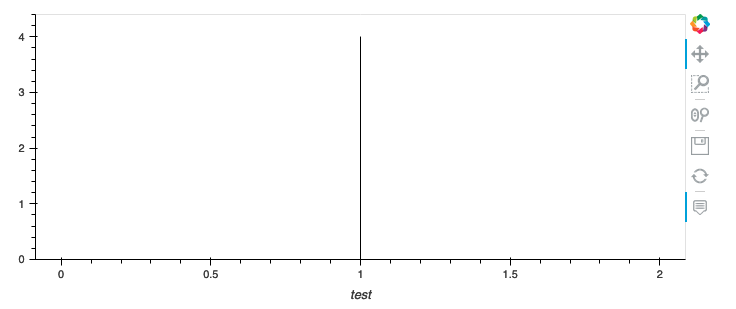
So I'd say that at least in this case changing hvPlot's default behavior make sense and should return an Image.
