
DearPyGui

DearPyGui copied to clipboard
 hoffstadt
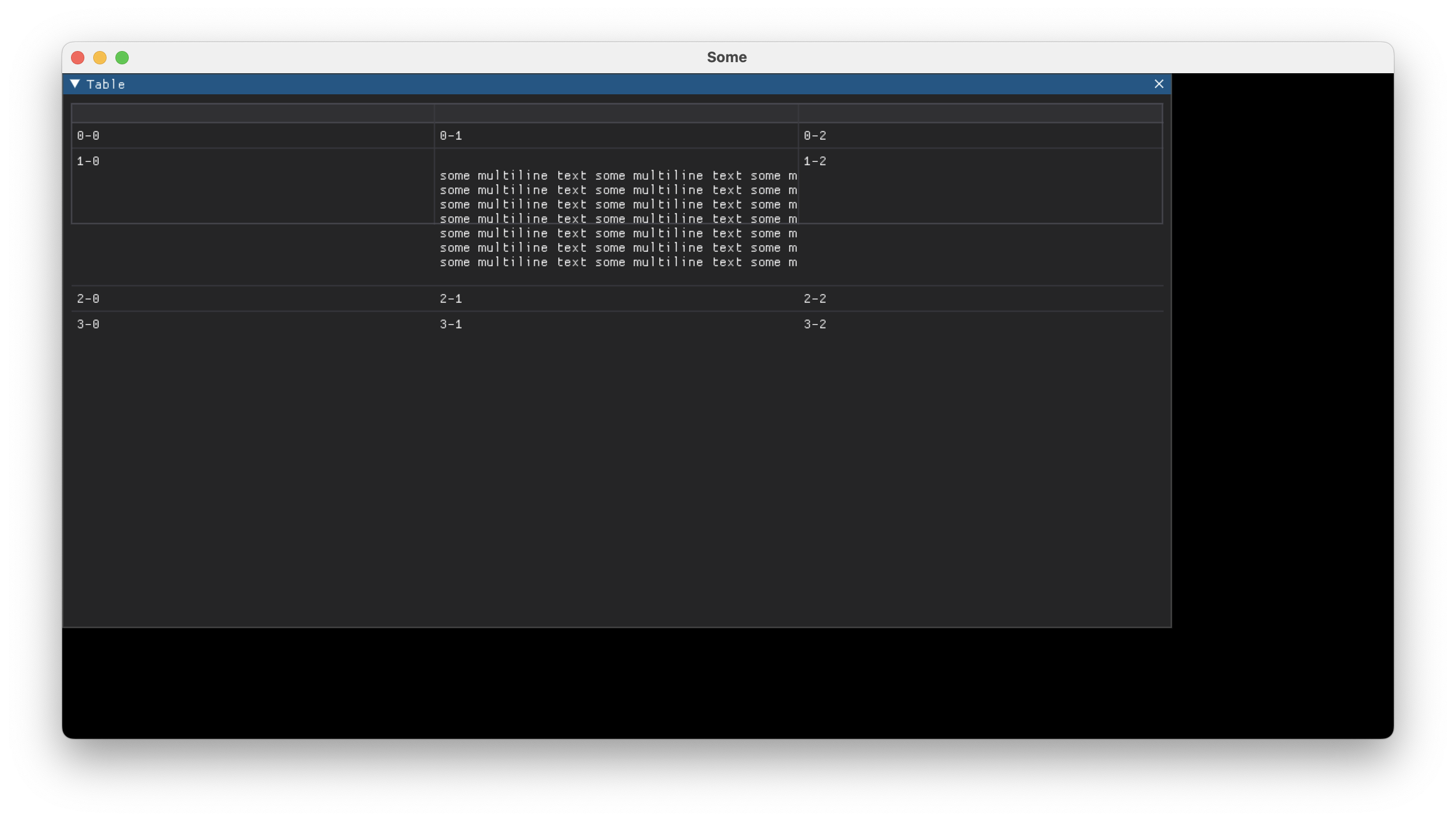
Multiline text overflows a table cell/row vertically
Version of Dear PyGui
- version: 1.7.1
- operating system:
- Mac OS 12.6 (Intel-based), Python 3.9.14
- Windows 10 21H1, Python 3.10.5
My issue
When a table has clipper and borders_outer* properties set to True, then a multiline text content vertically "overflows" the cell/row. Moreover, in long tables it prevents those tables from scrolling beyond the problematic row.
To reproduce
Steps to reproduce the behavior:
- Create a
dpg.tableobject withclipperandborders_outer*properties set toTrue - Set one of the cells content to a text content with many lines of text
- The cell content "overflows" or "goes out" of the cells borders vertically
Expected behavior
The cell and its borders are sized to the text content.
Screenshot
Standalone, minimal, complete and verifiable example
import dearpygui.dearpygui as dpg

dpg.create_context()

addHorizontalScroll = False
with dpg.window(label="Table", width=1000, height=500):
    columnsCount = 3
    rowCount = 4
    with dpg.table(
       borders_outerH=True,
       borders_innerV=True,
       borders_innerH=True,
       borders_outerV=True,
       clipper=True
    ):
        for i in range(columnsCount):
            dpg.add_table_column()
        for i in range(rowCount):
            with dpg.table_row():
                for j in range(columnsCount):
                    if i == 1 and j == 1:
                        dpg.add_text(
                            """
some multiline text some multiline text some multiline text
some multiline text some multiline text some multiline text
some multiline text some multiline text some multiline text
some multiline text some multiline text some multiline text
some multiline text some multiline text some multiline text
some multiline text some multiline text some multiline text
some multiline text some multiline text some multiline text
                            """
                        )
                    else:
                        dpg.add_text(f"{i}-{j}")

dpg.create_viewport(title="Some", width=1200, height=600)
dpg.setup_dearpygui()
dpg.show_viewport()
dpg.start_dearpygui()
dpg.destroy_context()

To keep this updated, I can still reproduce the issue with version 2.0.0.
It's not to annoy you, just some of the other bugs that I had got resolved in 2.0.0 release, so I went to check this one too, just in case.