

 hoffstadt
draw_circle(...) does not scale as expected with the new Transform feature.
Version of Dear PyGui
Version: 1.1 Operating System: Windows 10
My Issue/Question
draw_circle(...) does not scale as expected with the new Transform feature. I expect all elements in a node to scale proportionally ie. the overall drawing in the node should still look the same.
PS. draw_text(...) has the correct new position but the lettering 'size' is unscaled (I am not expecting a proper font size change!)
To Reproduce
Steps to reproduce the behavior:
- See the attached minimal example code and screenshot.
- I create two identical drawing nodes for comparison purposes
- I scale one node by a factor
- however the size of the circle remains the same while other elements scale as expected.
Expected behavior
draw_circle(...) should scale similar to draw_rect(...) or draw_arrow(...)
Screenshots/Video
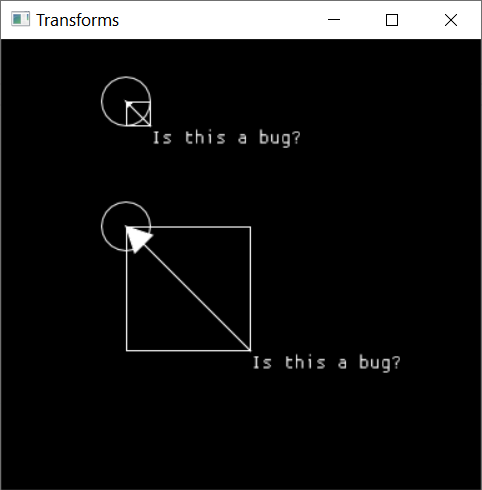
Standalone, minimal, complete and verifiable example
import dearpygui.dearpygui as dpg

dpg.create_context()
dpg.create_viewport(title="Transforms", width=400, height=400)
dpg.setup_dearpygui()

with dpg.viewport_drawlist(front=True, tag="vpf"):
    with dpg.draw_node(tag="node1"):
        dpg.draw_rectangle((0, 0), (20, 20))
        dpg.draw_circle((0, 0), 20)
        dpg.draw_text((20, 20), "Is this a bug?", size=16)
        dpg.draw_arrow((0, 0), (20, 20))
    with dpg.draw_node(tag="node2"):
        dpg.draw_rectangle((0, 0), (20, 20))
        dpg.draw_circle((0, 0), 20)
        dpg.draw_text((20, 20), "Is this a bug?", size=16)
        dpg.draw_arrow((0, 0), (20, 20))

dpg.apply_transform("node1", dpg.create_translation_matrix((100, 50)))
dpg.apply_transform("node2", dpg.create_translation_matrix((100, 150)) * dpg.create_scale_matrix((5, 5)))

dpg.show_viewport()
dpg.start_dearpygui()
dpg.destroy_context()

We did know about this but were not sure the best way to handle it yet. We multiply the transform with the individual points. For the circle, there is only the center point. We could possibly make some assumptions and modify the radius as well. i.e. create a fake points [radius, 0] and use that.

I too am encountering this problem. Either users must special case scaling the radius (which is what I'm doing now), or this needs to be handled behind the scenes. In the meantime, is there a way to implement the suggested workaround? Namely, creating an invisible point whose location can be obtained to compute the radius for drawing the circle. I would prefer to implement things this way so that if this bug is fixed in the future, I don't have to remember to remove the extra radius scaling.
