
SnagitImgur
 SnagitImgur copied to clipboard
 hmemcpy
Crashes, Windows 10 double upload
Hi,
With SnagIt 12, plugin crashes on Windows 10,
Conditions to crash
- Should be your second upload to imgur on same session. (So does not crash at first upload)
- Options should be: Copy image URL to clipboard - YES (Checked) Open the browser with the image - NO (Unchecked) Show notification window on success - YES (checked)
Not sure which of these options are avaiable, but when I say "Open the browser" as checked, it is fixed, however, options reset every reboot.

Hey i've created a fix to what sounds like your problem (I had the same one). Until the developer addresses the problem directly you can install the current version he has released with the bug and use these instructions to update it with my changes after installing.
- Download my branch by going here and pressing download zip - https://github.com/ebmp19/SnagitImgur/tree/FixedWindows10Crash
- Extract the zip and run the file build.cmd (press more info then run anyway if there's a security error)
- Close Snagit
- Browse to the /output/Release folder and copy everything to %userprofile%\AppData\Local\TechSmith\SnagIt\Accessories{EDA9F1DD-85B9-44F6-9D3C-125B2DD1109D}

@ebmp19 I'm attempting to implement your fix here, but everytime I run the build.cmd (even "as administrator") there is nothing in the /output/Release folder. Suggestions?

I'm having the same issue described by OP and the fix by @ebmp19 worked for me but the plugin location wasn't %userprofile%\AppData\Local\TechSmith\SnagIt\Accessories{EDA9F1DD-85B9-44F6-9D3C-125B2DD1109D}
I browsed %userprofile%\AppData\Local\TechSmith\SnagIt\ folders to find the one that referenced imgur. Thanks!

@illgitthat Glad to hear it! Can you provide a modified version of @ebmp19 's instructions that worked for you? (As you can see from my comment, I didn't have anything in the /output/Release folder after running build.cmd)
@derekantrican I only modified step 4. It didn't require running as administrator for me (I have user account control disabled so I didn't get that prompt either).
Since it's not working for you, maybe try running the commands one at a time to see if you get any errors from build.cmd
- Open command prompt and change directory to the same directory as build.cmd
- paste in these commands one line at a time
`set config=%1 if "%config%" == "" ( set config=Release )
set nuget= if "%nuget%" == "" ( set nuget=src.nuget\nuget.exe )
%nuget% restore src\SnagitImgur.sln %WINDIR%\Microsoft.NET\Framework\v4.0.30319\msbuild src\SnagitImgur.sln /t:Rebuild /p:Configuration="%config%" /m /v:M /fl /flp:LogFile=msbuild.log;Verbosity=Normal /nr:false ` 3. See if you get any relevant errors.
(For my last comment, I was running in the wrong directory - so I deleted the comment)
Ok, @illgitthat here's the results: http://pastebin.com/0QNNU6mh
@derekantrican sorry about that I'm actually not sure if running it line by line like that will work. Line 14 is giving an error but you should have nuget.exe in src.nuget\nuget.exe.
Hmm, what happens when you run it? It creates the output/Release folder but there is nothing in it? Sorry I couldn't be of more help.
@illgitthat Yes, I have a nuget.exe in src\.nuget
Yes, just creates output/Release with nothing in it (screen recording for reference: https://youtu.be/nY5ZxzN52Ko )
@derekantrican from the video it looks like the error is from not having Microsoft.NET\Framework\v4.0.30319 (if you play back the video it shows version 30319 not available for... error)
I think the next step is either changing that version number in build.cmd to the build you have installed or by downloading that version of Microsoft.NET
@illgitthat So I checked for the path that is listed in build.cmd and it does exist on my computer (screenshot: http://i.imgur.com/W8zRszV.png ). Though I did check Control Panel and these are the versions it lists as installed: http://i.imgur.com/MwGmtfb.png
I am a software developer that programs in Visual Studio and C# daily - is there anything "advanced" that I can try?
@derekantrican your experience is probably much greater than mine then. For the record your msbuild directory and version installs look the same as mine, http://i.imgur.com/ln6GOLi.png
I'm not sure why it's not recognizing it. Sorry I couldn't be of more help.
Even though I haven't put any more effort into it since my last comment, the plugin is no longer crashing for me now!
Step 4: Missing a \ in your path, so users copy / pasting will probably error.
Please update to:
%userprofile%\AppData\Local\TechSmith\SnagIt\Accessories\{EDA9F1DD-85B9-44F6-9D3C-125B2DD1109D}
EDIT: Also, thank you so much for this fix! 3 years later and I couldn't figure out why SnagIt 13 was crashing.... who knows if SnagIt 2018 will work. I can't believe they don't have native imgur support.
EDIT2: For anyone else, on Windows 10 (v1709 b16299.125), I got several warning MSB3XXX.
One was probably not having .NET 4.5, the remaining two looked to be arch related (x64 vs x86, amd64 vs vs MSIL).
However, the built files in output/Release still worked just fine.
Here are the errors I received for reference of future readers:
PS C:\Users\USER\Downloads\SnagitImgur-FixedWindows10Crash> .\build.cmd
Installing 'Exceptionless.Portable 3.0.1337'.
Installing 'JsonFx 2.0.1209.2802'.
Installing 'RestSharp 105.1.0'.
Installing 'Exceptionless 3.0.1337'.
Successfully installed 'Exceptionless 3.0.1337'.
Successfully installed 'Exceptionless.Portable 3.0.1337'.
Successfully installed 'RestSharp 105.1.0'.
Successfully installed 'JsonFx 2.0.1209.2802'.
Microsoft (R) Build Engine version 4.7.2556.0
[Microsoft .NET Framework, version 4.0.30319.42000]
Copyright (C) Microsoft Corporation. All rights reserved.

Project file contains ToolsVersion="12.0". This toolset may be unknown or missing, in which case you may be able to res
olve this by installing the appropriate version of MSBuild, or the build may have been forced to a particular ToolsVers
ion for policy reasons. Treating the project as if it had ToolsVersion="4.0". For more information, please see http://g
o.microsoft.com/fwlink/?LinkId=291333.
C:\Windows\Microsoft.NET\Framework\v4.0.30319\Microsoft.Common.targets(983,5): warning MSB3644: The reference assemblie
s for framework ".NETFramework,Version=v4.5" were not found. To resolve this, install the SDK or Targeting Pack for thi
s framework version or retarget your application to a version of the framework for which you have the SDK or Targeting
Pack installed. Note that assemblies will be resolved from the Global Assembly Cache (GAC) and will be used in place of
 reference assemblies. Therefore your assembly may not be correctly targeted for the framework you intend. [C:\Users\st
atic\Downloads\SnagitImgur-FixedWindows10Crash\src\SnagitImgur\SnagitImgur.csproj]
C:\Windows\Microsoft.NET\Framework\v4.0.30319\Microsoft.Common.targets(1605,5): warning MSB3270: There was a mismatch b
etween the processor architecture of the project being built "MSIL" and the processor architecture of the reference "C:
\Windows\Microsoft.NET\Framework\v4.0.30319\mscorlib.dll", "x86". This mismatch may cause runtime failures. Please cons
ider changing the targeted processor architecture of your project through the Configuration Manager so as to align the
processor architectures between your project and references, or take a dependency on references with a processor archit
ecture that matches the targeted processor architecture of your project. [C:\Users\USER\Downloads\SnagitImgur-FixedWi
ndows10Crash\src\SnagitImgur\SnagitImgur.csproj]
C:\Windows\Microsoft.NET\Framework\v4.0.30319\Microsoft.Common.targets(1605,5): warning MSB3270: There was a mismatch b
etween the processor architecture of the project being built "MSIL" and the processor architecture of the reference "Sy
stem.Data", "AMD64". This mismatch may cause runtime failures. Please consider changing the targeted processor architec
ture of your project through the Configuration Manager so as to align the processor architectures between your project
and references, or take a dependency on references with a processor architecture that matches the targeted processor ar
chitecture of your project. [C:\Users\USER\Downloads\SnagitImgur-FixedWindows10Crash\src\SnagitImgur\SnagitImgur.cspr
oj]
  SnagitImgur -> C:\Users\USER\Downloads\SnagitImgur-FixedWindows10Crash\output\Release\SnagitImgur.dll


Not that I can recall, the only references to those packages I remember seeing are the same ones from the log above, stating Successfully installed...
Installing 'Exceptionless.Portable 3.0.1337'.
Installing 'JsonFx 2.0.1209.2802'.
Installing 'RestSharp 105.1.0'.
Installing 'Exceptionless 3.0.1337'.
Successfully installed 'Exceptionless 3.0.1337'.
Successfully installed 'Exceptionless.Portable 3.0.1337'.
Successfully installed 'RestSharp 105.1.0'.
Successfully installed 'JsonFx 2.0.1209.2802'.
Would have have seen those errors at some other time?
Just to clarify, I do not have an issue, despite the build errors, SnagIt appears to be working fine after adding / replacing the files from output/Release...
I just wanted to add additional logs for other people who may have ran into similar trouble and report it still works.
I'm running Windows 10.0.16299 x64. Intel Core i7. I have every .NET version installed since 4.5. Still, when I download the .zip from the forked repository and run the build.cmd (what you're seeing above is me running it from cmd as administrator) there is no output/Release folder (not even an output folder). Any suggestions?
EDIT: I may be misunderstanding / misreading, so apologize in advance if this is dumb: have you ran .\build.cmd in PowerShell (as admin) (instead of command prompt)?
That's very strange. The packages are bundled with the zip in:
C:\Users\USER\Downloads\SnagitImgur-FixedWindows10Crash\src\packages
And it looks like they come with related .NET 4.0 and 4.5 parts (e.g. src/packages/Exceptionless.3.0.13387/lib/net40, etc)
If those packages aren't being found I'd say there is something lower level going on. Some things to check / confirm:
- Check the unziped directory and make sure the package files are there (maybe antivirus auto-deleted?)
- cd to directory before running
.\build.cmd(rather than using absolute path from elsewhere) - maybe install .NET 4.0 resources since I see reference in the lib packages to that
@ronindesign I don't have a src/packages/ folder - so maybe that's it. But I don't see a packages folder here: https://github.com/ebmp19/SnagitImgur/tree/FixedWindows10Crash/src so maybe the packages folder on your computer was created when those packages were downloaded from nuget?
Ah yeah, that would make more sense for sure. I originally assumed they were bundled, but package manager would definitely make more sense.
I saw your screenshot from earlier with your .NET packages, I'll check mine to see if there is a difference.
EDIT: Would there be anything stopping your system from downloading from the package manager? Antivirus / Firewall, domain level security (i.e. in company office).
@derekantrican I don't seem to have any extra .NET packages installed: https://i.imgur.com/bXLBdEc.png https://i.imgur.com/Bd1ULAD.png
So, I imagine this is why I got errors when I ran my install, however it still worked for me.
Is it possible there might be some incompatibility with the different versions you do have installed?
I would also stress, another difference appears to be most of your attempts to run have been via Command Prompt, but the only way I ever tried was via PowerShell (admin).
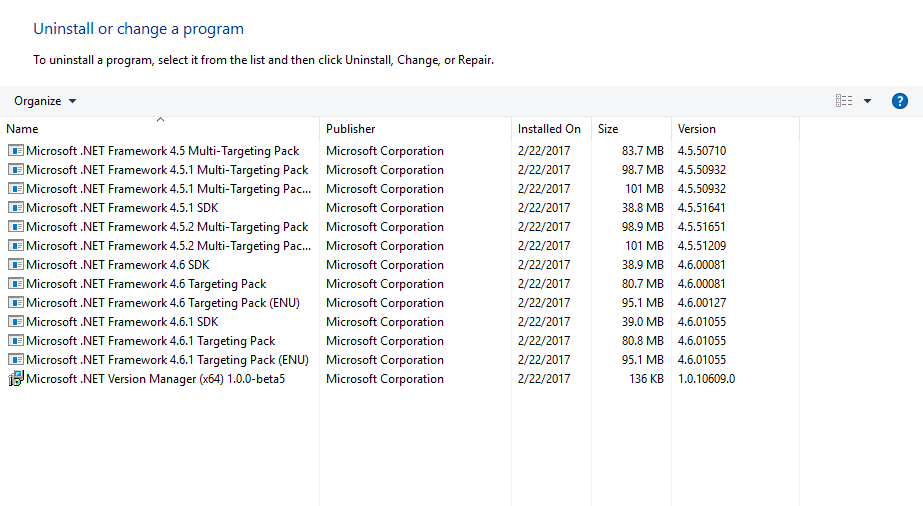
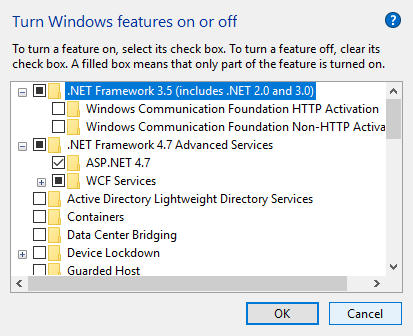
I'll try via powershell shortly (though I've never used powershell before)
Yeah, I'm very unfamiliar with PowerShell myself, and it may not make a difference, but I believe I did first try with elevated command prompt and it did not work for me. So maybe I was having the same issue as you...
In any case, you should just be able to search PowerShell from start menu, run as Admin, then cd <Extracted_Zip_Location>, and finally just .\build.cmd.
I hope it works for ya!

Yeah, it seems like package manager can't even get the required packages in the first place.
I'll try pulling the zip again and rerunning on my machine to see if I get any additional / relevant logs.
While the package versions are pretty old, they still exist on nuget.org, for example: https://www.nuget.org/packages/Exceptionless/3.0.1337
Some other things you might try in the meantime:
- You might be able to try manual install (or at least troubleshoot more locally) via bundled
nuget.exeIn PowerShell, I navigated toC:\Users\USER\Downloads\SnagitImgur-FixedWindows10Crash (1)\SnagitImgur-FixedWindows10Crash\src\.nugetThen, running help command, shows version up at the top:
PS C:\Users\static\Downloads\SnagitImgur-FixedWindows10Crash (1)\SnagitImgur-FixedWindows10Crash\src\.nuget> .\NuGet.exe help
NuGet Version: 2.8.50126.400
So obviously out of date compared to most recent.
However, you can use this to try and pull packages to test this functionality:
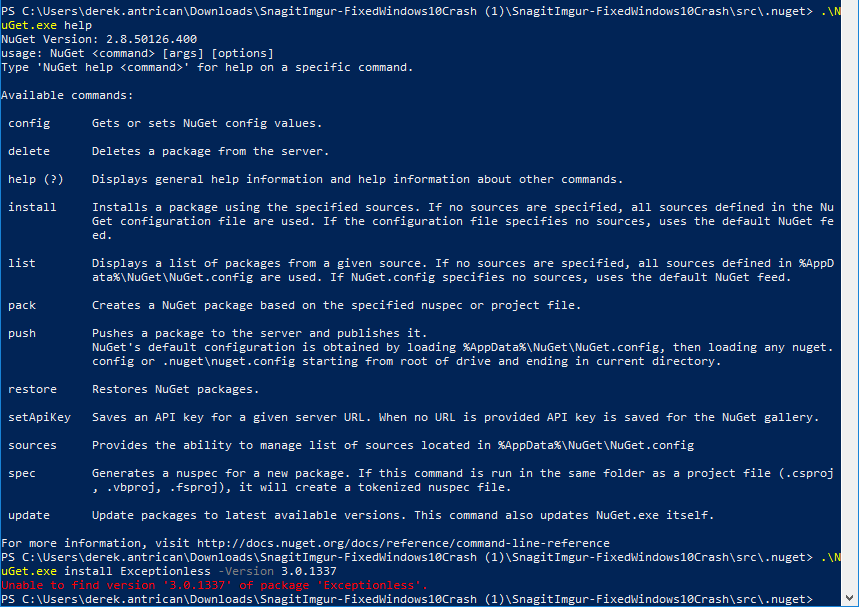
.\NuGet.exe install Exceptionless -Version 3.0.1337
PS C:\Users\USER\Downloads\SnagitImgur-FixedWindows10Crash (1)\SnagitImgur-FixedWindows10Crash\src\.nuget> .\NuGet.exe install Exceptionless -Version 3.0.1337
Attempting to resolve dependency 'Exceptionless.Portable (= 3.0.1337)'.
Installing 'Exceptionless.Portable 3.0.1337'.
Successfully installed 'Exceptionless.Portable 3.0.1337'.
Installing 'Exceptionless 3.0.1337'.
Successfully installed 'Exceptionless 3.0.1337'.
The packages will be put in the same dir, i.e. src\.nuget\Exceptionless.3.0.1337.
Screenshot: https://i.imgur.com/w0KkHuS.png
Try copying these directories over to where they're expected:
C:\Users\USER\Downloads\SnagitImgur-FixedWindows10Crash (1)\SnagitImgur-FixedWindows10Crash\src\packages
Here is a tree of my src directory for your reference:
PS C:\Users\static\Downloads\SnagitImgur-FixedWindows10Crash (1)\SnagitImgur-FixedWindows10Crash\src> tree
├───.nuget
├───packages
│   ├───Exceptionless.3.0.1337
│   │   ├───lib
│   │   │   ├───net40
│   │   │   └───net45
│   │   └───tools
│   ├───Exceptionless.Portable.3.0.1337
│   │   ├───lib
│   │   │   └───portable-net40+sl50+win+wpa81+wp80
│   │   └───tools
│   ├───JsonFx.2.0.1209.2802
│   │   └───lib
│   │       ├───net20
│   │       ├───net35
│   │       ├───net40
│   │       ├───sl35
│   │       ├───sl40
│   │       ├───sl40-wp
│   │       └───wp40
│   └───RestSharp.105.1.0
│       └───lib
│           ├───net35
│           ├───net35-client
│           ├───net4
│           ├───net4-client
│           ├───net45
│           ├───net45-client
│           ├───net451
│           ├───net451-client
│           ├───net452
│           ├───net452-client
│           ├───sl4
│           └───windowsphone8
└───SnagitImgur
    ├───Dialogs
    ├───OAuth
    ├───obj
    │   └───Release
    ├───Plugin
    │   ├───Extensions
    │   └───ImageService
    ├───Properties
    └───Resources
So I think we've decided that the problem is something with the NuGet.exe:
I just tested a manual install that should hopefully work for you.
You'll want to manually download the packages from nuget.org to C:\Users\...\src\.nuget
https://www.nuget.org/api/v2/package/Exceptionless.Portable/3.0.1337
https://www.nuget.org/api/v2/package/Exceptionless/3.0.1337
https://www.nuget.org/api/v2/package/JsonFx/2.0.1209.2802
https://www.nuget.org/api/v2/package/RestSharp/105.1.0
These should all be filename format such as <package>.<version>.nupkg
Then you should be able to do local (offline) install manually by pointing to each config file downloaded from links above:
PS C:\Users\...\src\.nuget> .\nuget install exceptionless.3.0.1337.nupkg
Ref: https://docs.microsoft.com/en-us/nuget/tools/cli-ref-install
NB: You might need to still specify version, e.g. .\nuget.exe install exceptionless.3.0.1337.nupkg -Version 3.0.1337 ... this is the one step I haven't tested
Once installed, I'm assuming the packages will produce directories in src\.nuget, as discussed previously, move these folders to src\packages\<install_package_dir> (the src\packages directory probably doesn't exist, so you'll have to create it.)
Then finally go back to main directory and re-run the .\build.cmd.
You will still probably see lots of errors, but at the top the packages should have a message such as Package ... already installed.

EDIT: You'll also need to pull the Exceptionless.Portable package, I left it out in my previous comment (which I updated):
https://www.nuget.org/api/v2/package/Exceptionless/3.0.1337
Does something like this work for you?
.\NuGet.exe install Exceptionless.Portable -Source "C:\Users\USER\Downloads\SnagitImgur-FixedWindows10Crash (1)\SnagitImgur-FixedWindows10Crash\src\.nuget\exceptionless.portable.3.0.1337.nupkg" -Version 3.0.1337
When I run it, I get an "already installed" message (who knows where it's installed...)
PS C:\Users\USER\Downloads\SnagitImgur-FixedWindows10Crash (1)\SnagitImgur-FixedWindows10Crash\src\.nuget> .\NuGet.exe install Exceptionless.Portable -Source "C:\Users\USER\Downloads\SnagitImgur-FixedWindows10Crash (1)\SnagitImgur-FixedWindows10Crash\src\.nuget\src\exceptionless.portable.3.0.1337.nupkg" -Version 3.0.1337
'Exceptionless.Portable 3.0.1337' already installed.
Maybe it will work for you since you don't already have it installed, however, it may just simply return:
Unable to find version '3.0.1337' of package 'Exceptionless.Portable'.
Also, I saw comments about NuGet being installed with Visual Studio, which you mentioned working with.
It looks like the CLI src\.nuget\NuGet.exe still uses things from a global config
So maybe these settings / configs are mismatched since I'm sure whatever NuGet stuff comes with VS will for sure be newer.
For example, when running the cli I get the following files:
%appdata%\Nuget\NuGet.Config with contents:
<?xml version="1.0" encoding="utf-8"?>
<configuration />
However, for you it may be filled out with a lot of stuff by default via VS install.
I also saw users mentioning issues with missing the v2 API source URIs.
Newer versions of NuGet (i.e. that probably come with VS) set the v3 API URIs.
For example, I can use src\.nuget\NuGet.exe to list sources URIs:
PS C:\Users\USER\Downloads\...\src\.nuget> .\NuGet.exe sources list
Registered Sources:

  1.  https://www.nuget.org/api/v2/ [Enabled]
      https://www.nuget.org/api/v2/
Those URIs are set somewhere, and for me they're not in that global config so maybe your VS config has changed them and they're incompatible with the NuGet.exe version 2.8.X, but again I'm just shooting in the dark here... Ref: (2nd Answer) https://stackoverflow.com/questions/38734040/nuget-unable-to-find-version-of-package
FYI: when I install normally via .\build.cmd, src\.nuget\NuGet.exe downloads packages to a cache directory in: %localappdata%\NuGet\Cache.
EDIT: You could also try updating the bundled NuGet.exe:
PS C:\Users\USER\Downloads\...\src\.nuget> .\NuGet.exe update -self