

 hluk
hluk
On copying a single item to the clipboard, CopyQ 4.0 on Windows repeatedly pastes in multiple clipboard items.
CopyQ 4.0 is causing major issues for me on multiple Windows devices and has become very unreliable because of random behavior. Allow me to explain:
On copying anything to the clipboard, and also when scrolling through a CopyQ tab, CopyQ immediately starts pasting multiple items from the tab to the active window as plain text, resulting constant flashing of the CopyQ window and – even worse – a big mess of items being pasted in. Sometimes it pastes in a single item as plain text, sometimes multiple items. I then need to clean up the active window, go back to CopyQ, manually copy the just copied item again, and only then it will paste as image or HTML.
Reverting to CopyQ version 3.13 doesn't fix this issue.
Do we know what causes this? Does anyone have a solution? I rely so much on CopyQ and would really like to fix this.

Started happening to me as well. For images and text. I'm on Ubuntu 20.04 Gnome 3.36.8. It freezes CopyQ for a moment and then paste multiple items.

Anything in logs (F12 shortcut from main window)?
Sounds like something in CopyQ commands might have broken. Can you share the commands you use? (Open Command dialog with F6, click in the command list, Ctrl+A to select all commands, Ctrl+C to copy the code.)

Lukas, let me start with the positive outcome: with the hints from your reply, I was finally, finally able to focus better on the possible causes of the erratic behavior. I'm not entirely sure what had happened or why, but indeed several of my CopyQ commands were misbehaving. As soon as I disabled them all, the erratic behavior stopped. I went over each of them, removed the ones I no longer needed and reinstalled the remaining ones that I did want to keep.
The only command I had to tweak a bit is the very useful and powerful Copy Nth Item command that you make available through your repository. Now that CopyQ 4.* has row numbering start at 1 in the CopyQ interface, the global keyboard shortcuts were fetching the wrong row. I fixed it by lowering the number variable by 1, as marked in the screenshot I inserted below. Maybe this can be something for you to fix in your original script repository as well.
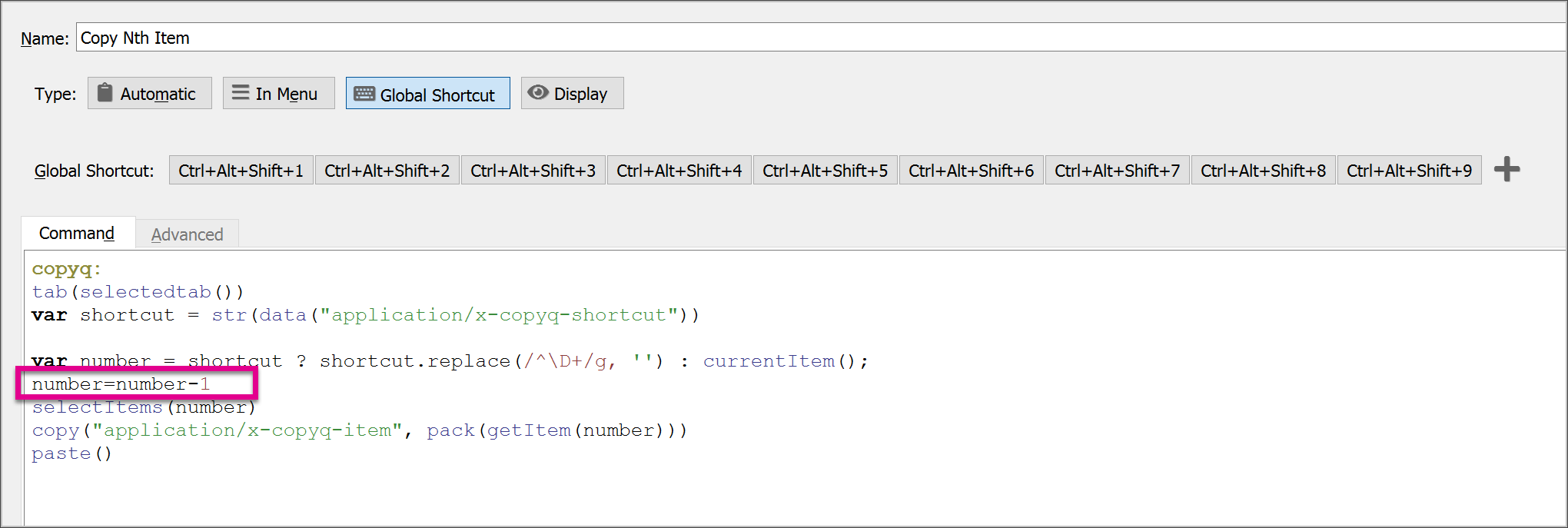
So, all in all: everything's working for me now. Thank you for your support, Lukas.
Now that CopyQ 4.* has row numbering start at 1 in the CopyQ interface, the global keyboard shortcuts were fetching the wrong row.
@CleverClogs Ah, thanks for letting me know about that. I will update the command in the documentation.
Usually, nothing changes for scripts with the different numbering in UI - selectItem(3) would select item with index=3 which is row=4 (index starts at 0, row numbering start at 1 by default now; note about this in API reference).
I'm not entirely sure what had happened or why, but indeed several of my CopyQ commands were misbehaving. As soon as I disabled them all, the erratic behavior stopped.
If you figure out what caused it, please let me know. With the new scripting engine, there could be slight changes in behavior of scripts. I've been testing the behavior for a long time before the new big release but I could have missed something.
I am having the same problem. Whenever I paste from CopyQ it pastes it the content twice. For example, if I paste "hello" it will actually paste "pastepaste".
I am on Linux, PopOs. v 4.1.0
Default settings.
