

 hishamhm
Copying by Cmd+C instead of Ctrl+C on Mac
I work so long on Mac, that I use the clipboard shortcuts Cmd+C and Cmd+V just like I did Ctrl+C and Ctrl+C on Linux and Windows earlier. (Not mentioning Ctrl+Insert and Shift+Insert a lot earlier.)
I looked at bindings/default, which is ready for customisations, but the naive approach replacing CTRL_C Dit_copy with CMD_C Dit_copy would not work, because it would lack support in sources, where macros recognise only CTRL and ALT.
What would be the best approach to get CMD among the supported key modifiers?
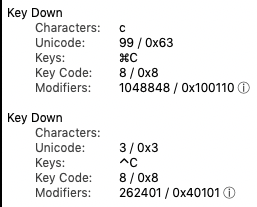
I do not understand autogen/automake, but can code in C/C++.

@prantlf That might be tricky. The terminal gets the keystroke from the OS, then passes it to the CLI process as an escape sequence, which is then digested by Dit via the ncurses library.
I don't know if a Mac terminal will handover Cmd-C to the CLI process. That might even change from terminal to terminal, and it's beyond Dit's powers.
One way to check is to simply type read in your shell, press Enter, and then type Cmd-C. Does it print a weird escape sequence?
If it does, then your terminal is not eating the sequence and it's actually sending it to the CLI processes. Then we have a shot.
The trick is then to teach Dit about it. One hack would be to edit the terminals file for your terminal of choice (Dit uses the $TERM env var to choose which file to load) and fool Dit into thinking that the escape sequence for Cmd-C is actually "ALT_C" and then using that in the bindings file.
If that works you might even want to edit the C sources and teach it about "CMD_*" entries, just search for ALT_ in the sources, and then perhaps create a new terminals file for your $TERM.
I seriously suspect though, that Cmd-C is not exposed by the terminal, at least not in its default configuration. Worth a try, but to get this to work will probably take more Mac knowledge than I have!
