

 hildogjr
DEBUG:Digi-Key API not available (kicost.distributors - log.py:115)
There is a part causing me grief on Digikey, Manf# RMCF0402FT150K [Stackpole Electronics Inc]. KiCost says there is an insufficient quantity. When I check the 150K resistor I see "13,145 In Stock" using the Digikey web portal. This is way more than I need, even for 100 boards, and information wasn't updating even when I set config.yaml cache_ttl to "0".
In a last-ditch effort, I deleted all files in my ~/.cache/kicost/Digi-Key directory. This didn't help and I see that the Digi-key cache entry doesn't repopulate.
The rest of this part's row is empty:

kicost --show_dist_list
Distributor list: arrow digikey farnell lcsc mouser newark rs tme
I set "--debug 8" and get messages like this:
DEBUG:Scrape API list ['Local', 'Digi-Key(Disabled)', 'Mouser', 'Element14', 'TME', 'Octopart(Disabled)', 'KitSpace'] (kicost - log.py:115)
Yet some Digikey parts are populating in my KiCost generated XLSX file. I'll guess this is thanks to KitSpace.
>kicost -w -i "USB-C PWR.xml" --eda kicad --include digikey --debug 8
  ...
DEBUG:Digi-Key API not available (kicost.distributors - log.py:115)
  ...
I also tried the KiCost GUI and get the same results.
The command line I usually use is:
>kicost -w -i "USB-C PWR.xml" --eda kicad -e lcsc
Issue / Problem report
-
kicost --version KiCost v1.1.11
-
Add a terminal error report / txt, use
--debugoption on KiCost call; kicost -w -i %YOUR_FILE% --debug 8 -
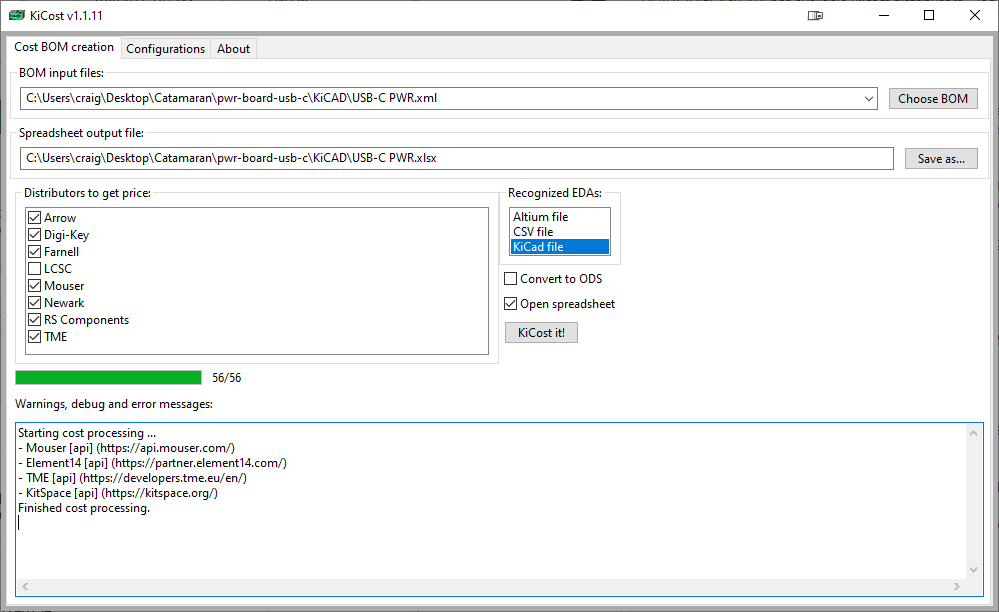
-
One BoM to reproduce the error (with the EDA version). I can email this to interested parties on the dev team, but can't post it publically
-
KiCAD version info
Application: KiCad Schematic Editor (64-bit)

Version: (6.0.7), release build

Libraries:
	wxWidgets 3.1.7
	libcurl/7.83.1-DEV Schannel zlib/1.2.12

Platform: Windows 10 (build 19044), 64-bit edition, 64 bit, Little endian, wxMSW

Build Info:
	Date: Jul 26 2022 02:49:38
	wxWidgets: 3.1.7 (wchar_t,wx containers)
	Boost: 1.79.0
	OCC: 7.6.0
	Curl: 7.83.1-DEV
	ngspice: 37
	Compiler: Visual C++ 1929 without C++ ABI

Build settings:
	KICAD_USE_OCC=ON
	KICAD_SPICE=ON
I also checked to make sure I am running the latest 1.1.11 KiCost code, and it appears I am:
C:\Users\craig\Desktop\Catamaran\pwr-board-usb-c\KiCAD>pip install git+https://github.com/hildogjr/KiCost.git
Defaulting to user installation because normal site-packages is not writeable
Collecting git+https://github.com/hildogjr/KiCost.git
  Cloning https://github.com/hildogjr/KiCost.git to c:\users\craig\appdata\local\temp\pip-req-build-cr2yqx1h
  Running command git clone --filter=blob:none --quiet https://github.com/hildogjr/KiCost.git 'C:\Users\craig\AppData\Local\Temp\pip-req-build-cr2yqx1h'
  Resolved https://github.com/hildogjr/KiCost.git to commit 4182a7a3c57c6a8b37557a1cd74ddb094fd66627
  Preparing metadata (setup.py) ... done
Requirement already satisfied: beautifulsoup4>=4.3.2 in c:\users\craig\documents\kicad\6.0\3rdparty\python39\site-packages (from kicost==1.1.11) (4.11.1)
Requirement already satisfied: lxml>=3.7.2 in c:\users\craig\documents\kicad\6.0\3rdparty\python39\site-packages (from kicost==1.1.11) (4.9.1)
Requirement already satisfied: XlsxWriter>=0.7.3 in c:\users\craig\documents\kicad\6.0\3rdparty\python39\site-packages (from kicost==1.1.11) (3.0.3)
Requirement already satisfied: tqdm>=4.30.0 in c:\users\craig\documents\kicad\6.0\3rdparty\python39\site-packages (from kicost==1.1.11) (4.64.0)
Requirement already satisfied: requests>=2.18.4 in c:\program files\kicad\6.0\bin\lib\site-packages (from kicost==1.1.11) (2.28.1)
Requirement already satisfied: validators>=0.14.2 in c:\users\craig\documents\kicad\6.0\3rdparty\python39\site-packages (from kicost==1.1.11) (0.20.0)
Requirement already satisfied: wxPython>=3.0.2 in c:\users\craig\documents\kicad\6.0\3rdparty\python39\site-packages (from kicost==1.1.11) (4.1.1)
Requirement already satisfied: colorama in c:\users\craig\documents\kicad\6.0\3rdparty\python39\site-packages (from kicost==1.1.11) (0.4.4)
Requirement already satisfied: pyyaml in c:\users\craig\documents\kicad\6.0\3rdparty\python39\site-packages (from kicost==1.1.11) (6.0)
Requirement already satisfied: kicost-digikey-api-v3 in c:\users\craig\documents\kicad\6.0\3rdparty\python39\site-packages (from kicost==1.1.11) (0.1.1)
Requirement already satisfied: soupsieve>1.2 in c:\users\craig\documents\kicad\6.0\3rdparty\python39\site-packages (from beautifulsoup4>=4.3.2->kicost==1.1.11) (2.3.2.post1)
Requirement already satisfied: certifi>=2017.4.17 in c:\program files\kicad\6.0\bin\lib\site-packages (from requests>=2.18.4->kicost==1.1.11) (2022.6.15)
Requirement already satisfied: charset-normalizer<3,>=2 in c:\program files\kicad\6.0\bin\lib\site-packages (from requests>=2.18.4->kicost==1.1.11) (2.1.0)
Requirement already satisfied: idna<4,>=2.5 in c:\program files\kicad\6.0\bin\lib\site-packages (from requests>=2.18.4->kicost==1.1.11) (3.3)
Requirement already satisfied: urllib3<1.27,>=1.21.1 in c:\program files\kicad\6.0\bin\lib\site-packages (from requests>=2.18.4->kicost==1.1.11) (1.26.11)
Requirement already satisfied: decorator>=3.4.0 in c:\users\craig\documents\kicad\6.0\3rdparty\python39\site-packages (from validators>=0.14.2->kicost==1.1.11) (5.1.1)
Requirement already satisfied: pillow in c:\program files\kicad\6.0\bin\lib\site-packages (from wxPython>=3.0.2->kicost==1.1.11) (9.2.0)
Requirement already satisfied: numpy in c:\program files\kicad\6.0\bin\lib\site-packages (from wxPython>=3.0.2->kicost==1.1.11) (1.23.1)
Requirement already satisfied: six in c:\program files\kicad\6.0\bin\lib\site-packages (from wxPython>=3.0.2->kicost==1.1.11) (1.16.0)
Requirement already satisfied: setuptools in c:\program files\kicad\6.0\bin\lib\site-packages (from kicost-digikey-api-v3->kicost==1.1.11) (58.1.0)
Requirement already satisfied: inflection>=0.3.1 in c:\users\craig\documents\kicad\6.0\3rdparty\python39\site-packages (from kicost-digikey-api-v3->kicost==1.1.11) (0.5.1)
Requirement already satisfied: pyopenssl in c:\users\craig\documents\kicad\6.0\3rdparty\python39\site-packages (from kicost-digikey-api-v3->kicost==1.1.11) (22.0.0)
Requirement already satisfied: python-dateutil in c:\users\craig\documents\kicad\6.0\3rdparty\python39\site-packages (from kicost-digikey-api-v3->kicost==1.1.11) (2.8.2)
Requirement already satisfied: tldextract in c:\users\craig\documents\kicad\6.0\3rdparty\python39\site-packages (from kicost-digikey-api-v3->kicost==1.1.11) (3.3.1)
Requirement already satisfied: cryptography>=35.0 in c:\users\craig\documents\kicad\6.0\3rdparty\python39\site-packages (from pyopenssl->kicost-digikey-api-v3->kicost==1.1.11) (37.0.4)
Requirement already satisfied: filelock>=3.0.8 in c:\users\craig\documents\kicad\6.0\3rdparty\python39\site-packages (from tldextract->kicost-digikey-api-v3->kicost==1.1.11) (3.7.1)
Requirement already satisfied: requests-file>=1.4 in c:\users\craig\documents\kicad\6.0\3rdparty\python39\site-packages (from tldextract->kicost-digikey-api-v3->kicost==1.1.11) (1.5.1)
Requirement already satisfied: cffi>=1.12 in c:\users\craig\documents\kicad\6.0\3rdparty\python39\site-packages (from cryptography>=35.0->pyopenssl->kicost-digikey-api-v3->kicost==1.1.11) (1.15.1)
Requirement already satisfied: pycparser in c:\users\craig\documents\kicad\6.0\3rdparty\python39\site-packages (from cffi>=1.12->cryptography>=35.0->pyopenssl->kicost-digikey-api-v3->kicost==1.1.11) (2.21)

[notice] A new release of pip available: 22.2.1 -> 22.2.2
[notice] To update, run: python.exe -m pip install --upgrade pip

Hi @craigarno !
kicost -w -i "USB-C PWR.xml" --eda kicad --include digikey --debug 8 ... DEBUG:Digi-Key API not available (kicost.distributors - log.py:115) ...
This is a problem importing the Digi-Key plug-in, which contradicts:
Requirement already satisfied: kicost-digikey-api-v3 in c:\users\craig\documents\kicad\6.0\3rdparty\python39\site-packages (from kicost==1.1.11) (0.1.1)
Do you know how to open the KiCad Python console? (Tools|Scripting console in pcbnew). Try pasting the following line of code there:
from kicost_digikey_api_v3 import by_digikey_pn, by_manf_pn, by_keyword, DigikeyError, DK_API
I guess you'll get some ImportError, please post here what Python says.

Py 0.9.8
Python 3.9.10 (main, Jul 19 2022, 05:36:50) [MSC v.1932 64 bit (AMD64)] on win32
Type "help", "copyright", "credits" or "license" for more information.
Startup script executed: C:\Users\craig\AppData\Roaming\kicad\6.0\PyShell_pcbnew_startup.py
>>>
>>> from kicost_digikey_api_v3 import by_digikey_pn, by_manf_pn, by_keyword, DigikeyError, DK_API
Traceback (most recent call last):
  File "<input>", line 1, in <module>
  File "C:\Users\craig\Documents\KiCad\6.0\3rdparty\Python39\site-packages\kicost_digikey_api_v3\__init__.py", line 2, in <module>
    from kicost_digikey_api_v3.v3.api import (keyword_search, product_details, digi_reel_pricing, suggested_parts,
  File "C:\Users\craig\Documents\KiCad\6.0\3rdparty\Python39\site-packages\kicost_digikey_api_v3\v3\api.py", line 4, in <module>
    import kicost_digikey_api_v3.oauth.oauth2
  File "C:\Users\craig\Documents\KiCad\6.0\3rdparty\Python39\site-packages\kicost_digikey_api_v3\oauth\oauth2.py", line 23, in <module>
    from kicost_digikey_api_v3.certauth.certauth import CertificateAuthority
  File "C:\Users\craig\Documents\KiCad\6.0\3rdparty\Python39\site-packages\kicost_digikey_api_v3\certauth\certauth.py", line 6, in <module>
    from OpenSSL import crypto
  File "C:\Users\craig\Documents\KiCad\6.0\3rdparty\Python39\site-packages\OpenSSL\__init__.py", line 8, in <module>
    from OpenSSL import crypto, SSL
  File "C:\Users\craig\Documents\KiCad\6.0\3rdparty\Python39\site-packages\OpenSSL\crypto.py", line 8, in <module>
    from cryptography import utils, x509
  File "C:\Users\craig\Documents\KiCad\6.0\3rdparty\Python39\site-packages\cryptography\x509\__init__.py", line 6, in <module>
    from cryptography.x509 import certificate_transparency
  File "C:\Users\craig\Documents\KiCad\6.0\3rdparty\Python39\site-packages\cryptography\x509\certificate_transparency.py", line 10, in <module>
    from cryptography.hazmat.bindings._rust import x509 as rust_x509
ImportError: DLL load failed while importing _rust: The specified module could not be found.
>>>
I tried importing rust using pip as Admin, and that failed.
6.0
************************************
* KiCad 6.0 Command Prompt
************************************
You may now invoke python or pip targeting kicad's install

C:\Users\craig\Documents\KiCad\6.0>pip install rust
Collecting rust
  Using cached RUST-0.1.1.tar.gz (13 kB)
  Preparing metadata (setup.py) ... done
Collecting matplotlib
  Using cached matplotlib-3.5.2-cp39-cp39-win_amd64.whl (7.2 MB)
Collecting biopython
  Using cached biopython-1.79-cp39-cp39-win_amd64.whl (2.3 MB)
Collecting pysam
  Using cached pysam-0.19.1.tar.gz (3.9 MB)
  Preparing metadata (setup.py) ... error
  error: subprocess-exited-with-error

  × python setup.py egg_info did not run successfully.
  │ exit code: 1
  ╰─> [24 lines of output]
      # pysam: no cython available - using pre-compiled C
      # pysam: htslib mode is shared
      # pysam: HTSLIB_CONFIGURE_OPTIONS=None
      '.' is not recognized as an internal or external command,
      operable program or batch file.
      '.' is not recognized as an internal or external command,
      operable program or batch file.
      Traceback (most recent call last):
        File "<string>", line 2, in <module>
        File "<pip-setuptools-caller>", line 34, in <module>
        File "C:\Users\craig\AppData\Local\Temp\pip-install-ppk90ewr\pysam_37676cdf2a5a40d9846eef1239189e54\setup.py", line 375, in <module>
          htslib_make_options = run_make_print_config()
        File "C:\Users\craig\AppData\Local\Temp\pip-install-ppk90ewr\pysam_37676cdf2a5a40d9846eef1239189e54\setup.py", line 74, in run_make_print_config
          stdout = subprocess.check_output(["make", "-s", "print-config"])
        File "C:\Program Files\KiCad\6.0\bin\Lib\subprocess.py", line 424, in check_output
          return run(*popenargs, stdout=PIPE, timeout=timeout, check=True,
        File "C:\Program Files\KiCad\6.0\bin\Lib\subprocess.py", line 505, in run
          with Popen(*popenargs, **kwargs) as process:
        File "C:\Program Files\KiCad\6.0\bin\Lib\subprocess.py", line 951, in __init__
          self._execute_child(args, executable, preexec_fn, close_fds,
        File "C:\Program Files\KiCad\6.0\bin\Lib\subprocess.py", line 1420, in _execute_child
          hp, ht, pid, tid = _winapi.CreateProcess(executable, args,
      FileNotFoundError: [WinError 2] The system cannot find the file specified
      # pysam: htslib configure options: None
      [end of output]

  note: This error originates from a subprocess, and is likely not a problem with pip.
error: metadata-generation-failed

× Encountered error while generating package metadata.
╰─> See above for output.

note: This is an issue with the package mentioned above, not pip.
hint: See above for details.

[notice] A new release of pip available: 22.2.1 -> 22.2.2
[notice] To update, run: python.exe -m pip install --upgrade pip

C:\Users\craig\Documents\KiCad\6.0>
C:\Users\craig\Documents\KiCad\6.0>python --version
Python 3.9.10

C:\Users\craig\Documents\KiCad\6.0>pip --version
pip 22.2.1 from C:\Program Files\KiCad\6.0\bin\Lib\site-packages\pip (python 3.9)
Hi @craigarno !
I have no idea about this dependency problem. And this is why I kept the Digi-Key plug-in separated from KiCost: too much dependencies.
Try upgrading (or reinstalling) the criptography module.
I installed cython manually to remove the first error. Most of my experience follows this posting https://stackoverflow.com/questions/60197890/why-does-installing-pysam-python-package-fail
Most of the solutions I can find with Google are quite complex, requiring installing large packages like Anaconda, to untangle the dependencies, which I won't use after. I found another link that says Linux and OS X don't experience this issue, just Windows, specifically Windows 10. All evidence supports your statement that this (installing pysam) is a large and complex dependency issue, which unfortunately is a weakness in Python.
pysam looks like it is used to read/write different format files https://pysam.readthedocs.io/en/latest/api.html I'm not sure the best way around this; untangle the dependencies, or if a specific format is required, is there a better way to handle this than pysam with its dependencies?
I tried your cryptography suggestion and it looks like it is already satisfied:
C:\Users\craig\Documents\KiCad\6.0>pip install cryptography
Requirement already satisfied: cryptography in c:\users\craig\documents\kicad\6.0\3rdparty\python39\site-packages (37.0.4)
Requirement already satisfied: cffi>=1.12 in c:\users\craig\documents\kicad\6.0\3rdparty\python39\site-packages (from cryptography) (1.15.1)
Requirement already satisfied: pycparser in c:\users\craig\documents\kicad\6.0\3rdparty\python39\site-packages (from cffi>=1.12->cryptography) (2.21)
This is where I have to leave it today:
C:\Users\craig\Documents\KiCad\6.0>pip install pysam
Collecting pysam
  Using cached pysam-0.19.1.tar.gz (3.9 MB)
  Preparing metadata (setup.py) ... error
  error: subprocess-exited-with-error

  × python setup.py egg_info did not run successfully.
  │ exit code: 1
  ╰─> [24 lines of output]
      # pysam: cython is available - using cythonize if necessary
      # pysam: htslib mode is shared
      # pysam: HTSLIB_CONFIGURE_OPTIONS=None
      '.' is not recognized as an internal or external command,
      operable program or batch file.
      '.' is not recognized as an internal or external command,
      operable program or batch file.
      Traceback (most recent call last):
        File "<string>", line 2, in <module>
        File "<pip-setuptools-caller>", line 34, in <module>
        File "C:\Users\craig\AppData\Local\Temp\pip-install-1l9x71s1\pysam_83c7371759b64e5fbd5888cd496ee7c4\setup.py", line 375, in <module>
          htslib_make_options = run_make_print_config()
        File "C:\Users\craig\AppData\Local\Temp\pip-install-1l9x71s1\pysam_83c7371759b64e5fbd5888cd496ee7c4\setup.py", line 74, in run_make_print_config
          stdout = subprocess.check_output(["make", "-s", "print-config"])
        File "C:\Program Files\KiCad\6.0\bin\Lib\subprocess.py", line 424, in check_output
          return run(*popenargs, stdout=PIPE, timeout=timeout, check=True,
        File "C:\Program Files\KiCad\6.0\bin\Lib\subprocess.py", line 505, in run
          with Popen(*popenargs, **kwargs) as process:
        File "C:\Program Files\KiCad\6.0\bin\Lib\subprocess.py", line 951, in __init__
          self._execute_child(args, executable, preexec_fn, close_fds,
        File "C:\Program Files\KiCad\6.0\bin\Lib\subprocess.py", line 1420, in _execute_child
          hp, ht, pid, tid = _winapi.CreateProcess(executable, args,
      FileNotFoundError: [WinError 2] The system cannot find the file specified
      # pysam: htslib configure options: None
      [end of output]

  note: This error originates from a subprocess, and is likely not a problem with pip.
error: metadata-generation-failed

× Encountered error while generating package metadata.
╰─> See above for output.

note: This is an issue with the package mentioned above, not pip.
hint: See above for details.
From KiPython, the latest run after installing cython:
 >>> from kicost_digikey_api_v3 import by_digikey_pn, by_manf_pn, by_keyword, DigikeyError, DK_API
Traceback (most recent call last):
  File "<input>", line 1, in <module>
  File "C:\Users\craig\Documents\KiCad\6.0\3rdparty\Python39\site-packages\kicost_digikey_api_v3\__init__.py", line 2, in <module>
    from kicost_digikey_api_v3.v3.api import (keyword_search, product_details, digi_reel_pricing, suggested_parts,
  File "C:\Users\craig\Documents\KiCad\6.0\3rdparty\Python39\site-packages\kicost_digikey_api_v3\v3\api.py", line 4, in <module>
    import kicost_digikey_api_v3.oauth.oauth2
  File "C:\Users\craig\Documents\KiCad\6.0\3rdparty\Python39\site-packages\kicost_digikey_api_v3\oauth\oauth2.py", line 23, in <module>
    from kicost_digikey_api_v3.certauth.certauth import CertificateAuthority
  File "C:\Users\craig\Documents\KiCad\6.0\3rdparty\Python39\site-packages\kicost_digikey_api_v3\certauth\certauth.py", line 6, in <module>
    from OpenSSL import crypto
  File "C:\Users\craig\Documents\KiCad\6.0\3rdparty\Python39\site-packages\OpenSSL\__init__.py", line 8, in <module>
    from OpenSSL import crypto, SSL
  File "C:\Users\craig\Documents\KiCad\6.0\3rdparty\Python39\site-packages\OpenSSL\crypto.py", line 8, in <module>
    from cryptography import utils, x509
  File "C:\Users\craig\Documents\KiCad\6.0\3rdparty\Python39\site-packages\cryptography\x509\__init__.py", line 6, in <module>
    from cryptography.x509 import certificate_transparency
  File "C:\Users\craig\Documents\KiCad\6.0\3rdparty\Python39\site-packages\cryptography\x509\certificate_transparency.py", line 10, in <module>
    from cryptography.hazmat.bindings._rust import x509 as rust_x509
ImportError: DLL load failed while importing _rust: The specified module could not be found.

=======Namespace=======
locals()

Type: <class 'dict'>

Value: {'__name__': '__main__', '__doc__': None, '__package__': None, '__loader__': None, '__spec__': None, '__builtins__': <module 'builtins' (built-in)>, 'shell': <wx.py.shell.ShellFacade object at 0x000001C5549FF040>, 'f': <_io.TextIOWrapper name='C:\\Users\\craig\\AppData\\Roaming\\kicad\\6.0\\PyShell_pcbnew_startup.py' mode='r' encoding='cp65001'>, 'notebook': <wx._core.Notebook object at 0x000001C5007D6A60>, 'filling': <wx.py.filling.Filling object at 0x000001C5007D6940>, 'pp': <bound method Display.setItem of <wx.py.crust.Display object at 0x000001C5007D0280>>}

Docstring:

"""dict() -> new empty dictionary
dict(mapping) -> new dictionary initialized from a mapping object's
    (key, value) pairs
dict(iterable) -> new dictionary initialized as if via:
    d = {}
    for k, v in iterable:
        d[k] = v
dict(**kwargs) -> new dictionary initialized with the name=value pairs
    in the keyword argument list.  For example:  dict(one=1, two=2)"""
Rust is what it complains about, so try reinstalling Rust...
C:\Users\craig\Documents\KiCad\6.0>pip install rust
Collecting rust
  Using cached RUST-0.1.1.tar.gz (13 kB)
  Preparing metadata (setup.py) ... done
Collecting matplotlib
  Using cached matplotlib-3.5.2-cp39-cp39-win_amd64.whl (7.2 MB)
Collecting biopython
  Using cached biopython-1.79-cp39-cp39-win_amd64.whl (2.3 MB)
Collecting pysam
  Using cached pysam-0.19.1.tar.gz (3.9 MB)
  Preparing metadata (setup.py) ... error
  error: subprocess-exited-with-error

  × python setup.py egg_info did not run successfully.
  │ exit code: 1
  ╰─> [24 lines of output]
      # pysam: cython is available - using cythonize if necessary
      # pysam: htslib mode is shared
      # pysam: HTSLIB_CONFIGURE_OPTIONS=None
      '.' is not recognized as an internal or external command,
      operable program or batch file.
      '.' is not recognized as an internal or external command,
      operable program or batch file.
      Traceback (most recent call last):
        File "<string>", line 2, in <module>
        File "<pip-setuptools-caller>", line 34, in <module>
        File "C:\Users\craig\AppData\Local\Temp\pip-install-89d7maxl\pysam_12be5eddf38146779cf894088d6e5daa\setup.py", line 375, in <module>
          htslib_make_options = run_make_print_config()
        File "C:\Users\craig\AppData\Local\Temp\pip-install-89d7maxl\pysam_12be5eddf38146779cf894088d6e5daa\setup.py", line 74, in run_make_print_config
          stdout = subprocess.check_output(["make", "-s", "print-config"])
        File "C:\Program Files\KiCad\6.0\bin\Lib\subprocess.py", line 424, in check_output
          return run(*popenargs, stdout=PIPE, timeout=timeout, check=True,
        File "C:\Program Files\KiCad\6.0\bin\Lib\subprocess.py", line 505, in run
          with Popen(*popenargs, **kwargs) as process:
        File "C:\Program Files\KiCad\6.0\bin\Lib\subprocess.py", line 951, in __init__
          self._execute_child(args, executable, preexec_fn, close_fds,
        File "C:\Program Files\KiCad\6.0\bin\Lib\subprocess.py", line 1420, in _execute_child
          hp, ht, pid, tid = _winapi.CreateProcess(executable, args,
      FileNotFoundError: [WinError 2] The system cannot find the file specified
      # pysam: htslib configure options: None
      [end of output]

  note: This error originates from a subprocess, and is likely not a problem with pip.
error: metadata-generation-failed

× Encountered error while generating package metadata.
╰─> See above for output.

note: This is an issue with the package mentioned above, not pip.
hint: See above for details.
The StackOverflow link above mentions that pysam dependency checking is done with Unix tools, which Linux and OS X have natively and Windows doesn't. With this information, I moved KiCost to my Ubuntu 20.04 Linux platform and it now installs correctly and numbers appear more accurate.
It is a minor inconvenience to SFTP the .XML to Linux, run KiCost, and SFTP the .XLSX back. This is much less inconvenient than not having a working KiCost setup. I'm back in business for now.
I tried WSL2 (Windows Subsystem for Linux) and it won't work with Ubuntu 20.04 or Ubuntu 22.04. The issue appears to be no ability to run/install WxGTK libraries. WSL seems to be okay as long as you're limiting to command line and stay away from graphics. I can't spend more time on WSL. in WSL, FWIW, I get this messsage (which is enough to stop me from pursuing this direction):
root@DESKTOP-K6M8S5I:~# kicost --version
Traceback (most recent call last):
  File "/usr/local/bin/kicost", line 8, in <module>
    sys.exit(main())
  File "/usr/local/lib/python3.8/dist-packages/kicost/__main__.py", line 487, in main
    main_real()
  File "/usr/local/lib/python3.8/dist-packages/kicost/__main__.py", line 194, in main_real
    version=kicost_version_info(),
  File "/usr/local/lib/python3.8/dist-packages/kicost/__main__.py", line 89, in kicost_version_info
    import wx
  File "/usr/local/lib/python3.8/dist-packages/wx/__init__.py", line 12, in <module>
    __version__ = wx.__version__.VERSION_STRING
AttributeError: partially initialized module 'wx' has no attribute '__version__' (most likely due to a circular import)
Hi @craigarno ! I never tried WSL myself, but I know some KiBot users are using it. KiCost is just one of the many tools used by KiBot, so I think you can setup a WSL2 system that runs KiCost pretending to be Linux. But don't ask me how ;-)
Another thing you could try is to use docker. I know the Windows version of docker can run Linux images, I think they transparently use VirtualBox or something similar. The setsoft/kicad_auto:ki6 image contains KiCost, and the setsoft/kicad_auto:dev_k6 usually contains unreleased KiCost (from git).
I don't currently have enough time to dig into Windows specific problems. Is a surprise to me that you have problems with Python modules, the Python comunity solves the binary dependencies issues much better on Windows. They encourage to include MSVC compiled binaries in PyPi, and for Linux they force people to compile things from sources (which is far more complex, even when pip tries to automate it).
Looks like KiBot is back at KiCost 1.0.8 https://pypi.org/project/kibot/ Maybe older KiCost version (no graphics) is why it works in WSL. I didn't know about KiBot before. Will look into it later. I like going straight to vendor's DB through their API much better [KiCost 1.1.11], I suspect more reliable, less cached data. As for how to install WSL2 https://www.windowscentral.com/how-install-wsl2-windows-10 I think Docker requires Hyper-V to be enabled in Windows and requires you to decide at installation if your Docker Containers are native Windows containers or Linux containers. There is a difference. Hyper-V comes with it's own set of problems. Doable, yes, easy, no is my recollection from a few years ago.
Hi @craigarno !
Looks like KiBot is back at KiCost 1.0.8 https://pypi.org/project/kibot/ Maybe older KiCost version (no graphics) is why it works in WSL.
Nope, the setsoft/kicad_auto:ki6 image contains KiCost 1.1.10 (last release) and the setsoft/kicad_auto:dev_k6 contains 1.1.11 (current git code). You are confusing the dependencies, you need KiCost 1.1.8 or newer for KiBot, older versions aren't supported.
I didn't know about KiBot before. Will look into it later.
KiBot's internal BoM is much more flexible and generates separated sheets for the BoM (without the prices), it can also collect data (specs) and generate an additional sheet with this information. This is in addition to what KiCost generates (integrated in the internal BoM). Here is an example
I think Docker requires Hyper-V to be enabled in Windows
Most probably because it uses a virtual machine to run Linux.
if your Docker Containers are native Windows containers or Linux containers.
Both are supported transparently according to the documentation.
I'm closing this issue. Current KiCost is 1.1.18, if you find problems using it open a new issue.