

 hidetatz
After entering kubectl - N and adding tab, the following syntax error will appear
K8s version: v1.23.7 Kubecolor version: 0.0.20
Fault description: After entering kubectl - N and adding tab, the following syntax error will appear


I believe its related to having kubectl autocomplete enabled and there are a few other reports with the same issue so this is likely a duplicate of #78
If the following line is in your ~/.bashrc (or appropriate shell initialization script for your environment ~/.bash_profile ) commenting it out will stop the autocomplete from working and prevent the error.
# source <(kubectl completion bash)
Take a look at the README.md section on configuring autocompletion for kubecolor if this is the issue.
Putting the following into my ~/.bashrc solved the issue for me
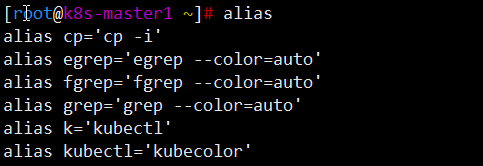
alias kubectl='kubecolor'
source <(kubectl completion bash)
complete -o nospace -F __start_kubectl kubectl

This is fixed in the new clone of the project. Get it at https://github.com/kubecolor/kubecolor or brew install kubecolor/tap/kubecolor

First of all, thank you for your reply. I just tested and failed. The same error is reported.
------------------ 原始邮件 ------------------ 发件人: "hidetatz/kubecolor" @.>; 发送时间: 2022年8月24日(星期三) 下午5:27 @.>; @.@.>; 主题: Re: [hidetatz/kubecolor] After entering kubectl - N and adding tab, the following syntax error will appear (Issue #107)
I believe its related to having kubectl autocomplete enabled and there are a few other reports with the same issue so this is likely a duplicate? If the following line is in you ~/.bashrc (or appropriate shell initialization script for your environment ~/.zshrc ~/.bash_profile ) commenting it out will stop the autocomplete from working and prevent the error.
source <(kubectl completion bash)
Take a look at the README.md section on configuring autocompletion for kubecolor if this is the issue.
— Reply to this email directly, view it on GitHub, or unsubscribe. You are receiving this because you authored the thread.Message ID: @.***>
Can you please give the full output of:
k version(that should return the kubectl version)k --kubecolor-version(that should return the kubecolor version)alias | grep "k=alias | grep "kubectl="which kubectlwhich kubecolor
Try to use kubectl version v1.25.2 or higher... I also had issue with some 1.23 versions.
kubecolor -n
default                  istio-system              kube-public               opencost               kube-system               ops                       user-history-debugger
Also, please specify your OS version/distro.
On Ubuntu, I'm using kubectl version v1.23.11 installed from gcloud without any problem.
Thanks