

 hicetnunc2000
User initiated downloads within iframe
Currently, iframes don't allow users to initiate a download. To test, open the following URL in Chrome and try clicking the save icon. https://www.hicetnunc.xyz/objkt/125274
You should see the following warning in the console:
Download is disallowed. The frame initiating or instantiating the download is sandboxed, but the flag ‘allow-downloads’ is not set. See https://www.chromestatus.com/feature/5706745674465280 for more details.
Adding the allow-downloads flag to the sandbox attribute should enable user-initiated downloads.
Here is the MDN doc for more info. https://developer.mozilla.org/en-US/docs/Web/HTML/Element/iframe

Hi @DaneLyons. I think one of the reasons the team took the conscious dicision around sandboxing the iframe was due to security concerns for the users. There are a couple of restrictions in place in order to allow for the maximum creativity whilst also providing the users with security and trust in the platform.
Some might argue that allowing for download from within an interactive OBJKT might give a false sense of security, in the sense that "If its on the platform, it must be okay to download and install". But in reality anyone can mint a interactive OBJKT and place a trojan or any other type of malicious script. I think that was the main reason the team took the conscious decision NOT to allow that.
However, we're happy to revise this decision and listen to your point of view or maybe work together to allow you to achieve your creative goals without compromising security in the platform.
CC: @pichiste @veqtor and @crzypatchwork

Hey @andrevenancio. Thanks for the thoughtful reply. I'm certainly not trying to push something that would be beneficial to me at the expense of introducing a security hole. Here are a few thoughts...
- The iframe doesn't prevent people from creating malicious NFTs. It could mitigate some risk but fundamentally, security checks should happen prior to minting.
- If an NFT does have a malicious payload to download, then the approach of requiring a user-triggered action is less risky than adding a flag for
allow-downloads-without-user-activation. - Not an ideal solution but applications triggering a download could have warning messages for the user. I'd actually prefer not to go too far down that route though because warning messages here could have a negative impact of causing distrust.
- Would it be feasible to add some sort of a flag for malicious/copyrighted content? Users who abuse the marketplace and add malicious content should ideally be restricted. The whole idea of policing from a centralized authority might not be ideal if you want to build a truly decentralized marketplace...so maybe the community can decide what is malicious and gets filtered from the marketplace.
Hopefully, user-triggered downloads are possible. If not, I'll understand the trade-off and figure out another approach given the constraints.
Thanks, Dane
Taking a step back for a second. What I'd really like from a functionality POV is the ability for viewers of the NFT to interact with the app and create art. Owners of the NFT would have the additional capability to save and export their art. That would give people an added incentive to actually buy an edition rather than just use an NFT someone else owns.
Is it possible to introduce that sort of restriction?
The downloading/exporting actually doesn't have to happen the way I've built it in this NFT. I could have a remote server that builds and temporarily hosts the images for viewers/owners. That could be a more secure approach.
So you want people to be able to create art and download the PNG/JPG?
@andrevenancio exactly.
I'll see if I can find more info on security risks associated with downloading from iframe and strategies to be more secure. But I still believe locking down the iframe is really the last line of defense. Ideally, there is an automated security check in the minting process. If a user views the app outside of an iframe, then preventing downloads no longer works. If you go directly to the ipfs page for my NFT, you can download the image. https://ipfs.io/ipfs/QmT7Ja9gNENs1PCKFs9aJEiWugJ4vQbEA3T1ydjjL7PdNM/
I think I have a workable solution that is much more secure than downloading directly from the iframe. Once the user generates art, the save button could redirect to a web page where the user can download the file. This isn't a perfect solution UX wise but it might be a decent compromise.
It looks like we'd need to add this flag to the sandbox to allow users to click links within the iframe. allow-top-navigation-by-user-activation
@DaneLyons how about a "copy link" button or textarea instead of the redirect? This would avoid having to relax the iframe sandbox restrictions and it's a pattern people are pretty used to.
I can definitely see the utility of being able to redirect to another page, but not ideal that any user gesture can trigger the redirect. @veqtor any thoughts?

I have an objkt which offers a zip download. Just clicking it to download doesn't work and neither does adding target="_blank", but ctrl-click to open in a new tab does, so you could ask the user to do that as a quick workaround.

@pichiste adding a copy link in a textarea is a little clunky but potentially doable. If someone wants to download the asset, they'd have to copy a URL, paste it into a new tab, then right-click on the image to save. That workflow could work for some people but isn't super intuitive.
I'm actually warming up to the idea of enabling target="_blank" with allow-top-navigation-by-user-activation. That seems like a good compromise. If the actual downloading is happening off-site, then the issue of creating a false sense of trust from downloading in-app goes away. Also, the landing page for the actual downloading can include additional instructions/tips that you really wouldn't want to distract from the NFT. So that workflow is potentially better.
I'm going to change this PR to use the allow-top-navigation-by-user-activation flag since I think that is more likely to get merged at this stage. If you decide that flag also can't be merged, I'll try the textarea approach. That option is viable, just slightly tricky to get the UX right.
I don't know if it's worth mentioning here, but some of my works can already do this. Specifically the Pico8 emulator lets you download a gif of the last 8 seconds of the visualization by pressing ctrl+9. You can see it working here: https://www.hicetnunc.xyz/objkt/127402
I didn't expect it to work, but after reading this I tried it and it seems to work fine!
@atomoton for me when I click ctrl+9 on that NFT, it displays a little window that says "right-click to save". Using right-click or ctrl-click and selecting save to image works in certain cases. If you are generating art with an HTML canvas, then it should work.
Unfortunately, I've found that a canvas interface for pixelated art to have pros and cons. In some ways, it works great. But I've found that an SVG canvas to be more responsive and there are other UX benefits. But, you can't right-click an SVG and save it as a PNG in most browsers. So my download approach is to convert it to a PNG, put it in a hidden tag, then trigger a download on the image.
It's also nice to have a more explicit <Download> button rather than expecting users to realize they can right-click and save their creation. Some people, especially developers will get that, but a lot of users won't realize that is an option. I could just have text below the canvas saying "right-click to save" if I go with a canvas interface. That is fairly minimal and gets the idea across.
@pichiste adding a copy link in a textarea is a little clunky but potentially doable. If someone wants to download the asset, they'd have to copy a URL, paste it into a new tab, then right-click on the image to save. That workflow could work for some people but isn't super intuitive.
I'm actually warming up to the idea of enabling
target="_blank"withallow-top-navigation-by-user-activation. That seems like a good compromise. If the actual downloading is happening off-site, then the issue of creating a false sense of trust from downloading in-app goes away. Also, the landing page for the actual downloading can include additional instructions/tips that you really wouldn't want to distract from the NFT. So that workflow is potentially better.I'm going to change this PR to use the
allow-top-navigation-by-user-activationflag since I think that is more likely to get merged at this stage. If you decide that flag also can't be merged, I'll try the textarea approach. That option is viable, just slightly tricky to get the UX right.
Hey @DaneLyons what I meant more is having a "Copy Link" button (with optional textarea for display) that programmatically copies the link to the clipboard, much like the "Copy Link" action you can do for this comment:
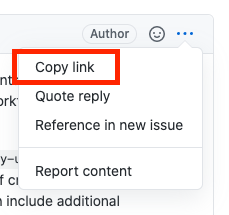
Basically like this.
Feels like a very common UI pattern for "sharing" across different platforms, though I do get that it involves some extra steps. Maybe the "right click to save" is actually better / simpler. Why wouldn't the latter work with your setup? There ought to be a way.
Personally I feel uneasy about allowing NFTs to redirect the page anywhere with allow-top-navigation-by-user-activation but not really my call. Perhaps @crzypatchwork or @veqtor have some thoughts on this?
@pichiste I think your workflow works in cases where you just need to copy and paste a URL say if you want to embed the image in a blog post or social media. The use case, I'd really like to explore is giving people tools to design art to be minted as an NFT. For that use case, you actually need to download the actual file. It is still possible with your workflow, you could copy the URL, paste it into another tab, then save the image to be minted. It's just not quite as intuitive as clicking a <Download> button to save the file.
What are the concerns with allowing a user to click on a link in the iframe to open in a new tab? That seems far less risky than triggering the download in the iframe and also more useful for other use cases.