

 heroku
Heroku container:release gets stuck
This project is for the Heroku CLI only. Use https://help.heroku.com for anything that is not specific to the CLI itself.
Do you want to request a feature or report a bug?
bug/issue/question
What is the current behavior?
I'm trying to automate building a container, then pushing it to Heroku and then running it. I've done this using the following .travis.yml file:
# Verifying yaml files: http://www.yamllint.com/ or https://github.com/adrienverge/yamllint

env:
  HEROKU_API_KEY:
    secure: ****

branches:
  only:
  - master

services:
  - docker

matrix:
  include:
    - mono: none
      os: linux
      dist: trusty # Ubuntu 14.04

script:
  - docker build -f src/DeveMazeGeneratorWeb/Dockerfile -t devedse/devemazegeneratorcore:latest .;
  - if [[ $TRAVIS_BRANCH == 'master' ]]; then
      docker login -u="$DOCKER_USERNAME" -p="$DOCKER_PASSWORD";
      docker image tag devedse/devemazegeneratorcore:latest "devedse/devemazegeneratorcore:$TRAVIS_BUILD_NUMBER";
      docker images;
      docker push devedse/devemazegeneratorcore;
    fi
  - heroku container:login;
  - docker image tag devedse/devemazegeneratorcore:latest "registry.heroku.com/devemazegeneratorcore/release";
  - docker push registry.heroku.com/devemazegeneratorcore/release;
  #- heroku container:push devedse/devemazegeneratorcore --app devemazegeneratorcore
  - heroku container:release release --app devemazegeneratorcore

notifications:
  email: false
Travis-CI however get's stuck on the heroku container:release command. It seems to start the container and show the output of the container starting, but it doesn't continue: https://travis-ci.org/github/devedse/DeveMazeGeneratorCore/builds/702204522
Eventually it times out and the build fails.
I also tried running this locally and this resulted in the same issue:
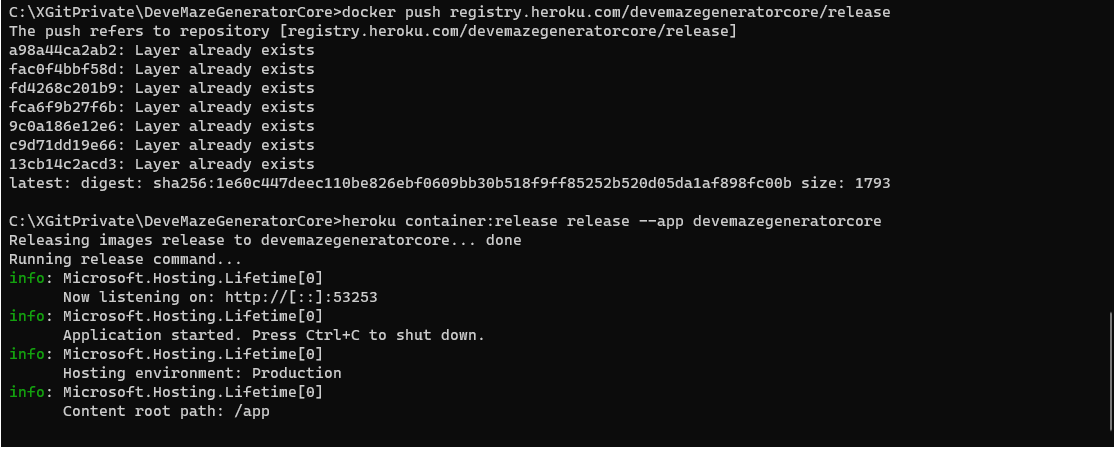
When I access the application itself (https://devemazegeneratorcore.herokuapp.com/) I just see this:

What is the expected behavior?
I would expect Heroku to launch the container and then simply complete the release step. I'm probably doing something wrong, but I haven't been able to figure out what 😄

Hi all, I was wondering if this issue list is being monitored, or is there another way to get support on this?
Haven't been able to reproduce this. Closing this for now. If you continue to experience issues with container:release please feel free to reopen, perhaps with more log output (try using DEBUG=* heroku container:release when you run the command).
