
react-native-date-picker
 react-native-date-picker copied to clipboard
 henninghall
method '+UIDatePickerMode:' in category from "..." conflicts with same method from another category when archiving on IOS/xcode
Describe the bug I am trying to archive my project using fastlane (gym) on circleCI. I'm getting the following error:
 ld: method '+UIDatePickerMode:' in category from /Users/distiller/Library/Developer/Xcode/DerivedData/myapp-afcitdfwjbmwxbbbhpiatfbfkjkg/Build/Intermediates.noindex/ArchiveIntermediates/myapp/BuildProductsPath/Staging-iphoneos/react-native-date-picker/libreact-native-date-picker.a(RNDatePickerManager.o) conflicts with same method from another category
...
Running script 'Bundle React Native code and images'
▸ Generating 'myapp.app.dSYM'
** ARCHIVE FAILED **

The following build commands failed:
    PhaseScriptExecution Bundle\ React\ Native\ code\ and\ images /Users/distiller/Library/Developer/Xcode/DerivedData/myapp-afcitdfwjbmwxbbbhpiatfbfkjkg/Build/Intermediates.noindex/ArchiveIntermediates/myapp/IntermediateBuildFilesPath/myapp.build/Staging-iphoneos/myapp.build/Script-00DD1BFF1BD5951E006B06BC.sh (in target 'myapp' from project 'myapp')
(1 failure)
[14:26:45]: Exit status: 65
Building locally is fine. I've tried Xcode cleans, plus my pods are re-installing fresh each time.
Expected behavior The project should archive successfully
To Reproduce The fastlane gym/build config I'm using is
    xcversion(version: "13.4.1")
    cocoapods(
      clean_install: true,
      podfile: "./ios/Podfile"
    )

    gymOptions = ({
      silent: true,
      clean: true,
      configuration: ENV['BUILD_CONFIGURATION'],
      export_team_id: ENV['IOS_TEAM_ID'],
      export_options: {
        signingStyle: "manual",
        provisioningProfiles: {
          ENV['IOS_APP_ID'] => ENV[profile_env_name],
          ENV['PUSH_INTERCEPTOR_BUNDLE_ID'] => ENV[push_interceptor_profile_env_name],
          ENV['WIDGETS_BUNDLE_ID'] => ENV[widgets_profile_env_name],
        }
      }
    }).merge(
      File.directory?("../#{xcworkspace}") ?
        {workspace: xcworkspace} :
        {project: xcodeproj}
    )
    gym(gymOptions)
Smartphone (please complete the following information):
- OS: iOS
- React Native version 0.63 (but also tried on 0.66 and had the same issue)
- react-native-date-picker version 4.2.5 (I previously was on version 3.2.5 and had the same issue)
- Fastlane 2.208.0
Any ideas on things I can try? From reading around on similar issues this looks like something the library author usually needs to fix, but it seems odd no one else has experienced this.


No - just this one. If I search in the ios folder for that method I do find something in React though:
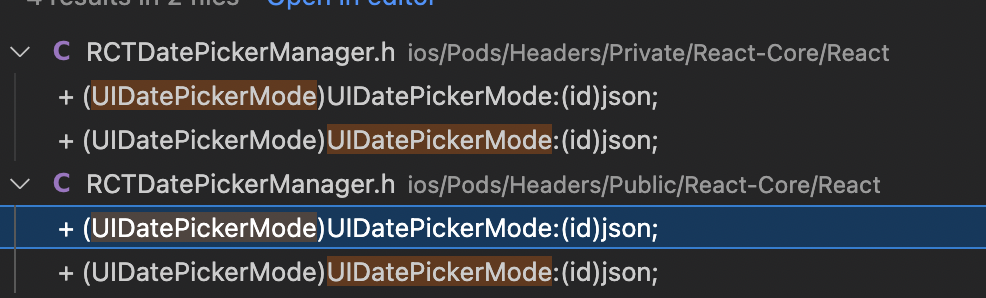
Could that be causing the clash? Currently this is React 16.13 (although I did also try on a branch with React 17 installed and had the same issue)

I had the same issue. Turns out I had to scroll further up in the Xcode error logs. The error was actually unrelated to this library, but was instead an error in my RN code. However, it was failing right at the point of linking this library, which is why this error appeared.
Hope this helps someone!

I didn't manage to reproduce this. Would be great if someone could share a repo where this is reproducible and I can have a look.