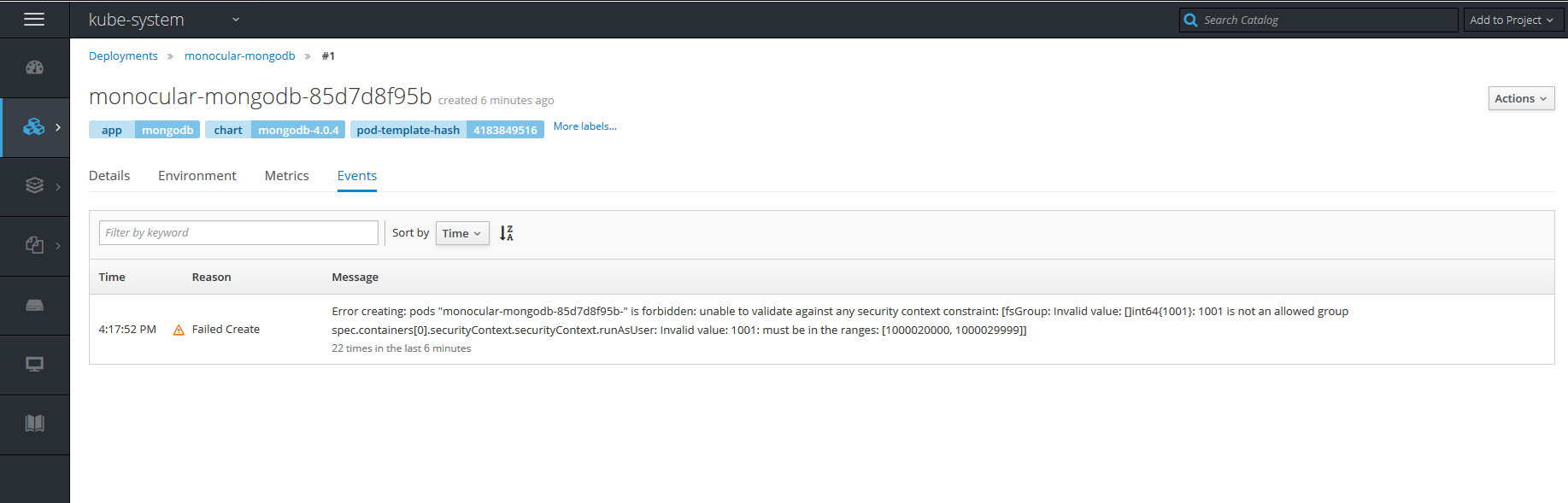
helm
helm
On openshift getting secrets is forbidden.
When i try to install monocular i get the following error.
helm install monocular/monocular
Error: release measly-seal failed: secrets is forbidden: User "system:serviceaccount:tiller:tiller" cannot create secrets in the namespace "tiller": User "system:serviceaccount:tiller:tiller" cannot create secrets in project "tiller"
Also it can not delete.
helm delete monocular
helm delete monocular
Error: deletion completed with 13 error(s): ingresses.extensions "monocular-monocular" is forbidden: User "system:serviceaccount:tiller:tiller" cannot delete ingresses.extensions in the namespace "monocular": User "system:serviceaccount:tiller:tiller" cannot delete ingresses.extensions in project "monocular"; services "monocular-mongodb" is forbidden: User "system:serviceaccount:tiller:tiller" cannot delete services in the namespace "monocular": User "system:serviceaccount:tiller:tiller" cannot delete services in project "monocular"; services "monocular-monocular-api" is forbidden: User "system:serviceaccount:tiller:tiller" cannot delete services in the namespace "monocular": User "system:serviceaccount:tiller:tiller" cannot delete services in project "monocular"; services "monocular-monocular-prerender" is forbidden: User "system:serviceaccount:tiller:tiller" cannot delete services in the namespace "monocular": User "system:serviceaccount:tiller:tiller" cannot delete services in project "monocular"; services "monocular-monocular-ui" is forbidden: User "system:serviceaccount:tiller:tiller" cannot delete services in the namespace "monocular": User "system:serviceaccount:tiller:tiller" cannot delete services in project "monocular"; deployments.extensions "monocular-monocular-prerender" is forbidden: User "system:serviceaccount:tiller:tiller" cannot get deployments.extensions in the namespace "monocular": User "system:serviceaccount:tiller:tiller" cannot get deployments.extensions in project "monocular"; deployments.extensions "monocular-monocular-ui" is forbidden: User "system:serviceaccount:tiller:tiller" cannot get deployments.extensions in the namespace "monocular": User "system:serviceaccount:tiller:tiller" cannot get deployments.extensions in project "monocular"; deployments.extensions "monocular-mongodb" is forbidden: User "system:serviceaccount:tiller:tiller" cannot get deployments.extensions in the namespace "monocular": User "system:serviceaccount:tiller:tiller" cannot get deployments.extensions in project "monocular"; deployments.extensions "monocular-monocular-api" is forbidden: User "system:serviceaccount:tiller:tiller" cannot get deployments.extensions in the namespace "monocular": User "system:serviceaccount:tiller:tiller" cannot get deployments.extensions in project "monocular"; configmaps "monocular-monocular-api-config" is forbidden: User "system:serviceaccount:tiller:tiller" cannot delete configmaps in the namespace "monocular": User "system:serviceaccount:tiller:tiller" cannot delete configmaps in project "monocular"; configmaps "monocular-monocular-ui-config" is forbidden: User "system:serviceaccount:tiller:tiller" cannot delete configmaps in the namespace "monocular": User "system:serviceaccount:tiller:tiller" cannot delete configmaps in project "monocular"; configmaps "monocular-monocular-ui-vhost" is forbidden: User "system:serviceaccount:tiller:tiller" cannot delete configmaps in the namespace "monocular": User "system:serviceaccount:tiller:tiller" cannot delete configmaps in project "monocular"; secrets "monocular-mongodb" is forbidden: User "system:serviceaccount:tiller:tiller" cannot delete secrets in the namespace "monocular": User "system:serviceaccount:tiller:tiller" cannot delete secrets in project "monocular"

@thatsk looks like you need to give Tiller greater privileges. Check out https://github.com/helm/helm/blob/master/docs/rbac.md for more info.

I have understood some role. and I have gone through bitnami doc https://docs.bitnami.com/kubernetes/how-to/configure-rbac-in-your-kubernetes-cluster/ i have used use case 2 and deployed successfully. but somehow api container is giving crashloopback
root@master: ~# oc get pods
NAME                                                    READY     STATUS             RESTARTS   AGE
docker-registry-3-qt4jt                                 1/1       Running            0          13h
hoping-angelfish-monocular-api-86d9fd9c69-dxvv2         0/1       CrashLoopBackOff   5          6m
hoping-angelfish-monocular-api-86d9fd9c69-vwbd6         0/1       CrashLoopBackOff   5          6m
hoping-angelfish-monocular-prerender-5cbb5847b8-jx96z   1/1       Running            0          6m
hoping-angelfish-monocular-ui-84b4f545d8-gxlqp          1/1       Running            0          6m
hoping-angelfish-monocular-ui-84b4f545d8-phvlw          1/1       Running            0          6m
registry-console-1-k2skc                                1/1       Running            0          1d
router-4-g8xtq                                          1/1       Running            0          13h
When i going to describe these are logs.
root@master: ~# oc describe pod hoping-angelfish-monocular-api-86d9fd9c69-dxvv2
Name:           hoping-angelfish-monocular-api-86d9fd9c69-dxvv2
Namespace:      default
Node:           master/10.174.180.27
Start Time:     Thu, 20 Sep 2018 03:10:27 +0000
Labels:         app=hoping-angelfish-monocular-api
                pod-template-hash=4285985725
Annotations:    checksum/config=b724a8a2712dc2586cd63b1f5943c63d2b02ffed95991e259631b14ab5de7618
                openshift.io/scc=restricted
Status:         Running
IP:             10.130.0.22
Controlled By:  ReplicaSet/hoping-angelfish-monocular-api-86d9fd9c69
Containers:
  monocular:
    Container ID:   docker://d1f0f0f371f53f6762ad7f1d8e54a4058eeb1dfc6a1fb7349085abf6ebf3021c
    Image:          bitnami/monocular-api:v0.7.3
    Image ID:       docker-pullable://docker.io/bitnami/monocular-api@sha256:e759e97e68ae67857f83e7e7125b76efd1c3cf6217ac8c79d830f54d95c63f95
    Port:           8081/TCP
    State:          Waiting
      Reason:       CrashLoopBackOff
    Last State:     Terminated
      Reason:       Error
      Exit Code:    1
      Started:      Thu, 20 Sep 2018 03:18:39 +0000
      Finished:     Thu, 20 Sep 2018 03:18:59 +0000
    Ready:          False
    Restart Count:  6
    Limits:
      cpu:     200m
      memory:  512Mi
    Requests:
      cpu:      100m
      memory:   256Mi
    Liveness:   http-get http://:8081/healthz delay=180s timeout=10s period=10s #success=1 #failure=3
    Readiness:  http-get http://:8081/healthz delay=30s timeout=5s period=10s #success=1 #failure=3
    Environment:
      MONOCULAR_HOME:  /monocular
    Mounts:
      /monocular from cache (rw)
      /monocular/config from config (rw)
      /var/run/secrets/kubernetes.io/serviceaccount from default-token-fg8qp (ro)
Conditions:
  Type           Status
  Initialized    True
  Ready          False
  PodScheduled   True
Volumes:
  config:
    Type:      ConfigMap (a volume populated by a ConfigMap)
    Name:      hoping-angelfish-monocular-api-config
    Optional:  false
  cache:
    Type:    EmptyDir (a temporary directory that shares a pod's lifetime)
    Medium:
  default-token-fg8qp:
    Type:        Secret (a volume populated by a Secret)
    SecretName:  default-token-fg8qp
    Optional:    false
QoS Class:       Burstable
Node-Selectors:  <none>
Tolerations:     node.kubernetes.io/memory-pressure:NoSchedule
Events:
  Type     Reason                 Age               From                                      Message
  ----     ------                 ----              ----                                      -------
  Normal   Scheduled              10m               default-scheduler                         Successfully assigned hoping-angelfish-monocular-api-86d9fd9c69-dxvv2 to master
  Normal   SuccessfulMountVolume  10m               kubelet, master MountVolume.SetUp succeeded for volume "cache"
  Normal   SuccessfulMountVolume  10m               kubelet, master  MountVolume.SetUp succeeded for volume "config"
  Normal   SuccessfulMountVolume  10m               kubelet, master  MountVolume.SetUp succeeded for volume "default-token-fg8qp"
  Normal   Pulled                 8m (x4 over 9m)   kubelet,  master successfully pulled image "bitnami/monocular-api:v0.7.3"
  Normal   Created                8m (x4 over 9m)   kubelet, master  Created container
  Normal   Started                8m (x4 over 9m)   kubelet, master  Started container
  Normal   Pulling                5m (x6 over 10m)  kubelet, master  pulling image "bitnami/monocular-api:v0.7.3"
  Warning  BackOff                0s (x38 over 9m)  kubelet, inocn01p1.infra.sre.smf1.mobitv  Back-off restarting failed container
not sure what goes wrong.
Hmm, it's possible that the cluster-admin ClusterRole in OpenShift doesn't support creating/reading secrets. You could try to configure a Role just for reading secrets in that tiller namespace and assign it to the serviceaccount in addition to the ClusterRole you've already assigned.
@prydonius So i have created again. cat tiller-role.yaml
kind: Role
apiVersion: rbac.authorization.k8s.io/v1beta1
metadata:
   namespace: kube-system
   name: all
rules:
 - apiGroups: ["*"]
   resources: ["*"]
   verbs: ["*"]
cat tiller-rolebinding.yaml
kind: RoleBinding
apiVersion: rbac.authorization.k8s.io/v1beta1
metadata:
  name: tiller-clusterrolebinding
subjects:
- kind: ServiceAccount
  name: tiller
  namespace: kube-system
roleRef:
  kind: Role
  name: all
  apiGroup: "rbac.authorization.k8s.io"
helm init --service-account tiller --upgrade
oc get pods
NAME                                                          READY     STATUS             RESTARTS   AGE
altered-wallaby-monocular-api-5bf556c47b-92x8c                0/1       CrashLoopBackOff   4          5m
altered-wallaby-monocular-api-5bf556c47b-c4pbk                0/1       Running            5          5m
altered-wallaby-monocular-prerender-546856cdbf-bq72f          1/1       Running            0          5m
altered-wallaby-monocular-ui-5b96456d89-kjkqn                 1/1       Running            0          5m
altered-wallaby-monocular-ui-5b96456d89-rk7r7                 1/1       Running            0          5m
kubeapps-84bf67c978-f9gbb                                     1/1       Running            0          2d
kubeapps-internal-apprepository-controller-7bc57bf789-97b94   1/1       Running            0          2d
kubeapps-internal-chartsvc-6df4cd6477-5vs9w                   0/1       CrashLoopBackOff   881        2d
kubeapps-internal-dashboard-5cdc786d85-7vwmz                  1/1       Running            0          2d
kubeapps-internal-tiller-proxy-55d9558c78-k8fg8               1/1       Running            0          2d
oc describe pod altered-wallaby-monocular-api-5bf556c47b-92x8c
Name:           altered-wallaby-monocular-api-5bf556c47b-92x8c
Namespace:      kubeapps
Node:           node/10.174.180.34
Start Time:     Sat, 22 Sep 2018 10:25:39 +0000
Labels:         app=altered-wallaby-monocular-api
                pod-template-hash=1691127036
Annotations:    checksum/config=19326ebbcb8cf9d20a7caf3f0f2389e7777fd17140287cc8cbe32295f30b89d7
                openshift.io/scc=restricted
Status:         Running
IP:             10.131.0.32
Controlled By:  ReplicaSet/altered-wallaby-monocular-api-5bf556c47b
Containers:
  monocular:
    Container ID:   docker://3d654b8bff16a406477a05fa6a7513382c5e8eed95b46338cd458eae93406b73
    Image:          bitnami/monocular-api:v0.7.3
    Image ID:       docker-pullable://docker.io/bitnami/monocular-api@sha256:e759e97e68ae67857f83e7e7125b76efd1c3cf6217ac8c79d830f54d95c63f95
    Port:           8081/TCP
    State:          Waiting
      Reason:       CrashLoopBackOff
    Last State:     Terminated
      Reason:       Error
      Exit Code:    1
      Started:      Sat, 22 Sep 2018 10:30:42 +0000
      Finished:     Sat, 22 Sep 2018 10:31:01 +0000
    Ready:          False
    Restart Count:  5
    Limits:
      cpu:     200m
      memory:  512Mi
    Requests:
      cpu:      100m
      memory:   256Mi
    Liveness:   http-get http://:8081/healthz delay=180s timeout=10s period=10s #success=1 #failure=3
    Readiness:  http-get http://:8081/healthz delay=30s timeout=5s period=10s #success=1 #failure=3
    Environment:
      MONOCULAR_HOME:  /monocular
    Mounts:
      /monocular from cache (rw)
      /monocular/config from config (rw)
      /var/run/secrets/kubernetes.io/serviceaccount from default-token-r7mln (ro)
Conditions:
  Type           Status
  Initialized    True
  Ready          False
  PodScheduled   True
Volumes:
  config:
    Type:      ConfigMap (a volume populated by a ConfigMap)
    Name:      altered-wallaby-monocular-api-config
    Optional:  false
  cache:
    Type:    EmptyDir (a temporary directory that shares a pod's lifetime)
    Medium:
  default-token-r7mln:
    Type:        Secret (a volume populated by a Secret)
    SecretName:  default-token-r7mln
    Optional:    false
QoS Class:       Burstable
Node-Selectors:  node-role.kubernetes.io/compute=true
Tolerations:     node.kubernetes.io/memory-pressure:NoSchedule
Events:
  Type     Reason                 Age               From                                      Message
  ----     ------                 ----              ----                                      -------
  Normal   Scheduled              5m                default-scheduler                         Successfully assigned altered-wallaby-monocular-api-5bf556c47b-92x8c to   node
 Normal   SuccessfulMountVolume  5m                kubelet, node     MountVolume.SetUp succeeded for volume "cache"
  Normal   SuccessfulMountVolume  5m                kubelet, node    MuntVolume.SetUp succeeded for volume "config"
  Normal   SuccessfulMountVolume  5m                kubelet, node  MountVolume.SetUp succeeded for volume "default-token-r7mln"
  Normal   Pulled                 3m (x4 over 5m)   kubelet, node  Successfully pulled image "bitnami/monocular-api:v0.7.3"
  Normal   Created                3m (x4 over 5m)   kubelet, node Created container
  Normal   Started                3m (x4 over 5m)   kubelet, node  Started container
  Warning  BackOff                2m (x6 over 4m)   kubelet, node  Back-off restarting failed container
  Normal   Pulling                34s (x6 over 5m)  kubelet, node  pulling image "bitnami/monocular-api:v0.7.3"
Also when i am looking at logs of pods its trying to connect to monogodb
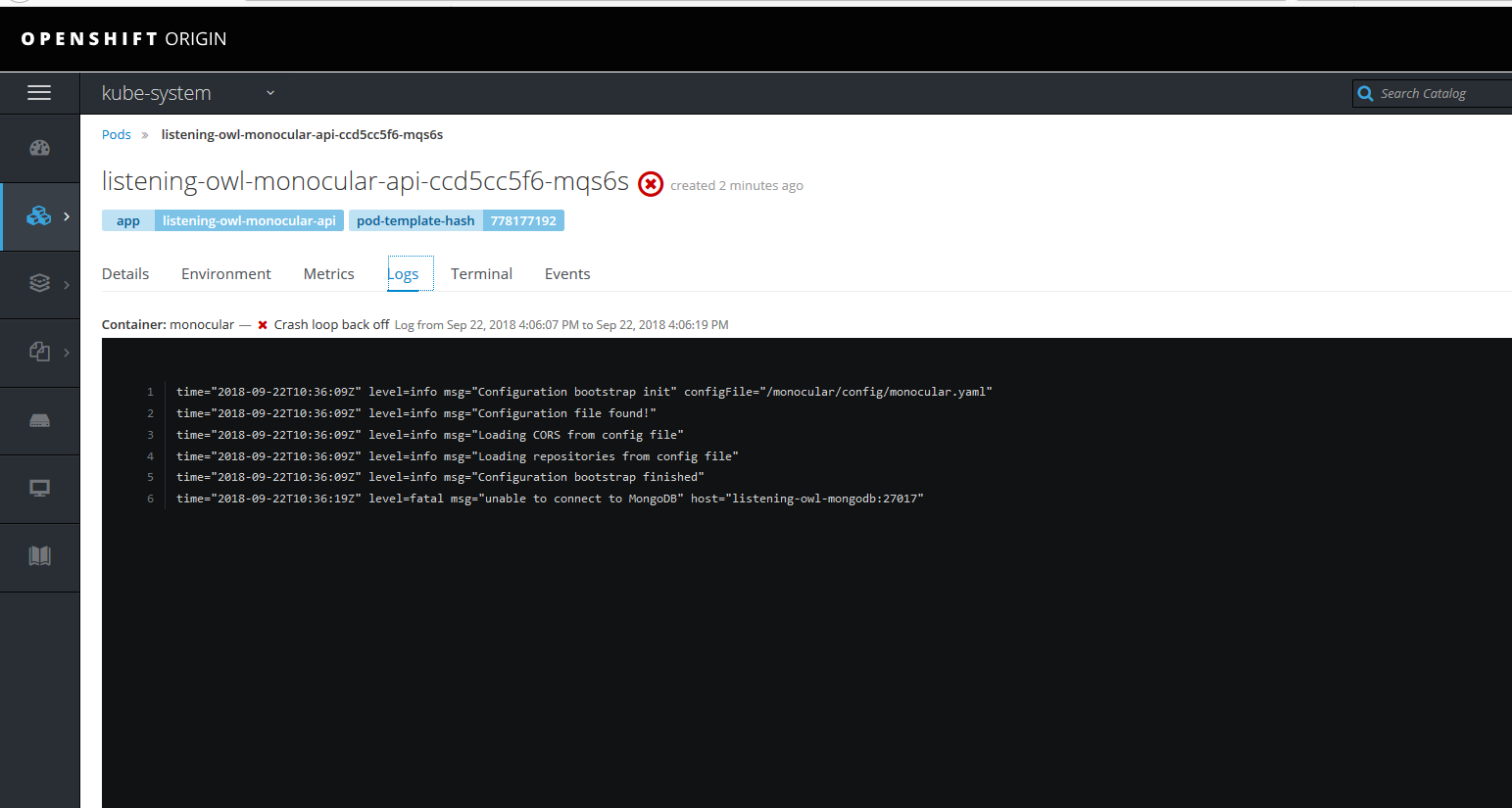
and in the pods i don't see any monogodb container unning?
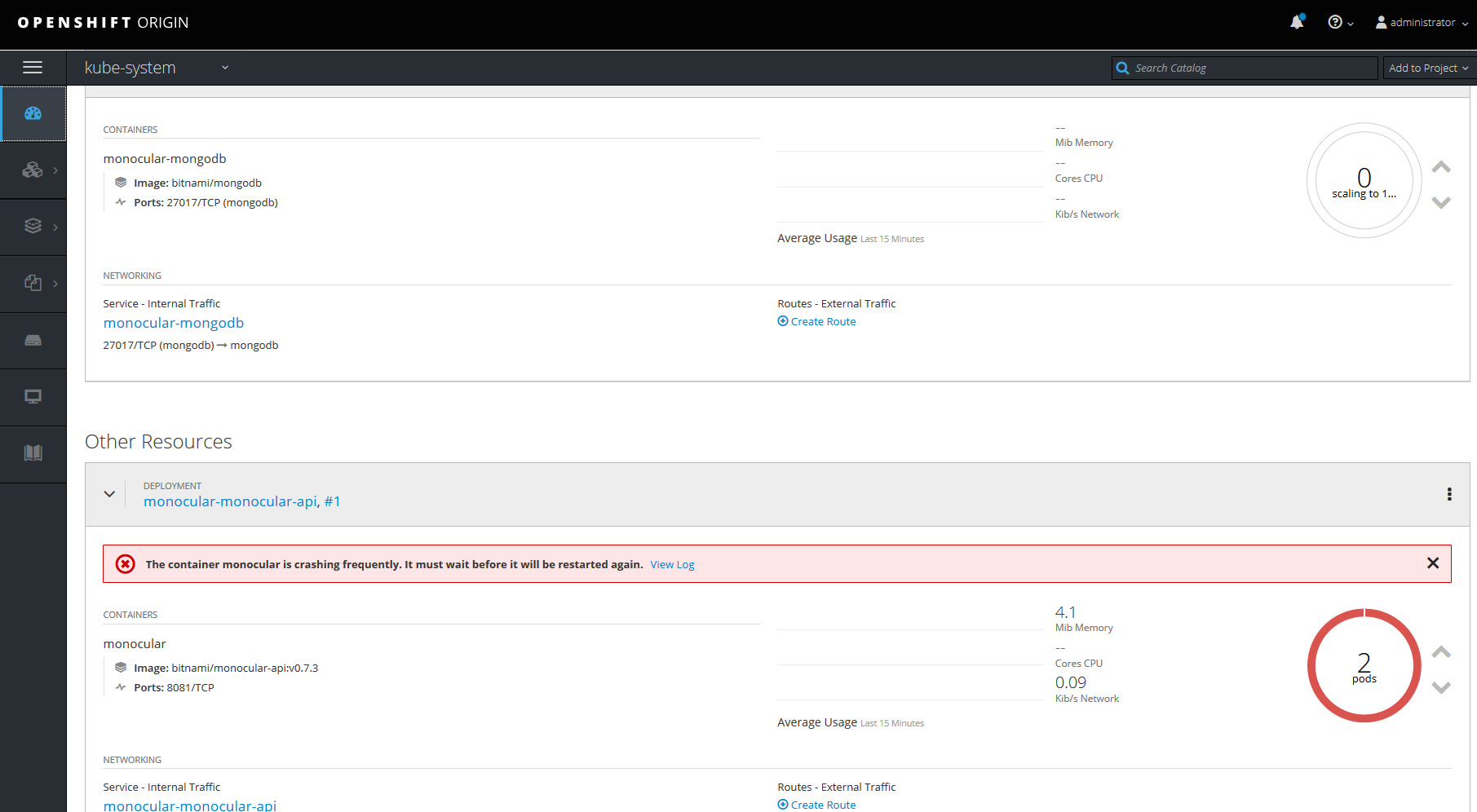
https://blog.openshift.com/deploy-monocular-openshift/ i have follow this link also but no luck