

 helloSystem
Instead of Ctrl-C print ⌘C in the Menu
We want as proper Command Key in the menu.
Is there a way to globally make Qt shortcuts use ⌘+... instead of Ctrl+...?


It's much easier to type with your thumb on Alt than on Ctrl. Also, it just feels natural for switchers coming from the Mac, where the Apple key is the key on the left to the space bar. (It's also what Haiku uses, and it makes it instantly more Mac-like.)
It's much easier to type with your thumb on Alt than on Ctrl. Also, it just feels natural for switchers coming from the Mac, where the Apple key is the key on the left to the space bar. (It's also what Haiku uses, and it makes it instantly more Mac-like.)
Just wondering, why not make it super/cmd instead of alt?

This is a Mac keyboard:

This is a Raspberry Pi keyboard:

The objective is to get the button that is left to the space bar to work like on the Mac.
Actually the objective is that the button that is left to the space bar will work like on the Mac for both generic (e.g., Raspberry) and Apple keyboards.
https://twitter.com/threedeyes/status/1329958188242841603:
@threedeyes says:
I swapped the ALT and CTRL modifier codes in Haiku's QPA. For macosx I think it will be here - https://github.com/qt/qtbase/blob/dev/src/plugins/platforms/cocoa/qcocoakeymapper.mm#L68
So far we have https://github.com/helloSystem/QtPlugin (Qt platform plugin and style), but it seems we would need a patched version of the qxcb QXcbIntegrationPlugin for X Window System (X11) support?
Wow, I was hoping not having to patch Qt itself.
https://github.com/qt/qtbase/blob/ae2c30942086bd0387c6d5297c0cb85b505f29a0/src/plugins/platforms/cocoa/qcocoakeymapper.mm#L71 is interesting in that it says:
{ NSEventModifierFlagCommand, Qt::MetaModifier },
Looks like the Apple key on the Mac keyboard is actually a Meta key (like the Windows/Raspberry key) but its physical location is different than the Meta key on PC/Raspberry Pi keyboards. Also, there is no Windows/Raspberry key on the right-hand side of the keyboard.
It will be an interesting challenge to get this right both for original Apple keyboards and for generic (e.g., Raspberry Pi) keyboards.
The relevant code seems to be in
https://github.com/qt/qtbase/blob/5.14/src/plugins/platforms/xcb/qxcbkeyboard.cpp
Search for rmod_masks.alt, it appears in multiple places in that file.
Is there a way to compile only https://github.com/qt/qtbase/blob/5.14/src/plugins/platforms/xcb without the rest of Qt?

So far we have https://github.com/helloSystem/QtPlugin (Qt platform plugin and style), but it seems we would need a patched version of the
qxcbQXcbIntegrationPlugin for X Window System (X11) support?Wow, I was hoping not having to patch Qt itself.
After the patch, you can always request to push it upstream so it makes it available everywhere. I'd love to have that option on KDE settings, not just hello.
Haiku has this:

but I don't know whether/how it interacts with the Qt side of things.
Is it possible to build just the xcb QPA (Qt Platform Abstraction) platform plugin without having to build all of Qt?
pkg which /usr/local/lib/qt5/plugins/platforms/libqxcb.so
/usr/local/lib/qt5/plugins/platforms/libqxcb.so was installed by package qt5-gui-5.15.0_1
Is it possible to build just the xcb QPA (Qt Platform Abstraction) platform plugin without having to build all of Qt?
Yes of course. You can take xcb qpa plugin (https://github.com/qt/qtbase/tree/dev/src/plugins/platforms/xcb) and some fix * .pro files to build separately of Qt.

cd /tmp
git clone https://github.com/qt/qtbase --branch 5.15 --depth 1 # 60 MB
cd qtbase/src/plugins/platforms/xcb
qmake
Works! If we use a version matching to the Qt on the system, then it compiles
/tmp/qtbase/lib/libQt5XcbQpa.so
/tmp/qtbase/lib/libQt5XcbQpa.so.5
/tmp/qtbase/plugins/platforms/libqxcb.so
/tmp/qtbase/plugins/xcbglintegrations/libqxcb-egl-integration.so
/tmp/qtbase/plugins/xcbglintegrations/libqxcb-glx-integration.so
Now, where does Haiku speficy to use Alt instead of Ctrl?
qhaikurasterwindow.cpp has
Qt::KeyboardModifiers HaikuViewProxy::keyStateToModifiers(uint32 keyState) const
{
    Qt::KeyboardModifiers modifiers(Qt::NoModifier);

    if (keyState & B_SHIFT_KEY)
        modifiers |= Qt::ShiftModifier;
    if (keyState & B_CONTROL_KEY)
        modifiers |= Qt::AltModifier;
    if (keyState & B_COMMAND_KEY)
        modifiers |= Qt::ControlModifier;

    return modifiers;
}
B_CONTROL_KEY being mentioned alongside Qt::AltModifier looks interesting.
What is that B_COMMAND_KEY that get associated with Qt::ControlModifier?
Where can I do the same for XCB?
qxcbkeyboard.cpp has
Qt::KeyboardModifiers QXcbKeyboard::translateModifiers(int s) const
{
    Qt::KeyboardModifiers ret = Qt::NoModifier;
    if (s & XCB_MOD_MASK_SHIFT)
        ret |= Qt::ShiftModifier;
    if (s & XCB_MOD_MASK_CONTROL)
        ret |= Qt::ControlModifier;
    if (s & rmod_masks.alt)
        ret |= Qt::AltModifier;
    if (s & rmod_masks.meta)
        ret |= Qt::MetaModifier;
    if (s & rmod_masks.altgr)
        ret |= Qt::GroupSwitchModifier;
    return ret;
}
What happens if we change this to
Qt::KeyboardModifiers QXcbKeyboard::translateModifiers(int s) const
{
    Qt::KeyboardModifiers ret = Qt::NoModifier;
    if (s & XCB_MOD_MASK_SHIFT)
        ret |= Qt::ShiftModifier;
    if (s & rmod_masks.alt)
        ret |= Qt::ControlModifier;
    if (s & XCB_MOD_MASK_CONTROL)
        ret |= Qt::AltModifier;
    if (s & rmod_masks.meta)
        ret |= Qt::MetaModifier;
    if (s & rmod_masks.altgr)
        ret |= Qt::GroupSwitchModifier;
    return ret;
}
Install the modified version:
sudo mv /usr/local/lib/qt5/plugins/platforms/libqxcb.so /usr/local/lib/qt5/plugins/platforms/libqxcb.so.original
sudo cp /tmp/qtbase/plugins/platforms/libqxcb.so /usr/local/lib/qt5/plugins/platforms/libqxcb.so
sudo mv /usr/local/lib/qt5/libQt5XcbQpa.so.5.15.0 /usr/local/lib/qt5/libQt5XcbQpa.so.5.15.0.original
sudo cp /tmp/qtbase/lib/libQt5XcbQpa.so.5 /usr/local/lib/qt5/libQt5XcbQpa.so.5.15.0
At this point, we can use Alt+Letter instead of Ctrl+Letter to invoke shortcuts, but the menu still says "Ctrl+..." rather than "Alt+...".
How can we change the text in the menu from "Ctrl+..." to "Alt+..."?
Haiku seems to do it...
https://user-images.githubusercontent.com/2480569/102916058-34aba200-4483-11eb-82db-4c76c8f7e61a.mp4
Additional considerations:
-
Could we turn this into our own platform plugin that we could load, with a fallback to the unmodified
xcbone, e.g., usingexport QT_QPA_PLATFORM=hello;xcb? This way applications that are bundling their own Qt might possibly still use our modified platform theme? -
Does Haiku have a solution for Gtk, too?
Maybe the correct way would be to use the Super (Windows/Raspberry Pi) key as the key for invoking menu shortcuts instead. And then, on PC keyboards, switch the Super and the Alt key to that Super is to the left of spacebar like on the Mac. For Apple keyboards, the Super key should be the "Command" or "Apple" key.
https://en.wikipedia.org/wiki/Super_key_(keyboard_button)
If a Windows keyboard is connected to macOS it will use the Windows key as the Command key, therefore Super is still on the Windows key for macOS.
Maybe the correct way would be to use the Super (Windows/Raspberry Pi) key as the key for invoking menu shortcuts instead. And then, on PC keyboards, switch the Super and the Alt key to that Super is to the left of spacebar like on the Mac. For Apple keyboards, the Super key should be the "Command" or "Apple" key.
https://en.wikipedia.org/wiki/Super_key_(keyboard_button)
If a Windows keyboard is connected to macOS it will use the Windows key as the Command key, therefore Super is still on the Windows key for macOS.
That’s is the correct logic 👍
https://www.emacswiki.org/emacs/SwapControlAltAndCapsLock
Keyboard shortcuts seem to have been written with old Unix and Sun keyboards in mind, where Control and Alt were reversed. Since resoldering a keyboard isn’t an option for most people, why not just swap Control and Alt programatically to use the keyboard the way it was meant to be used?
Yes, wholesale swapping Ctrl and Alt on PC keyboards feels right, given that this is how the keys used to be positioned:

Symbolics's Lisp Machine keyboard PN 365407 Rev C. (Photo by Joey Devilla, source: http://xahlee.info/kbd/keyboard_hardware_and_key_choices.html)
Turns out that the Ctrl key used to be exactly where the Apple/Command key is...!
Yes, wholesale swapping Ctrl and Alt on PC keyboards means that it will work in Qt, Gtk, and whatnot. But we still need to find a way to fix what gets written in the menu...
TBH, I could best describe my initial reaction when I just read this (after seeing your comment on Twitter) would be "horrified revulsion". I think I actually swore out loud.
The use of Alt for keyboard shortcuts is 100% definitely certainly my single most-hated thing about GNUstep and it is what stops me using GNUstep apps.
I strongly dispute your reasoning, and will do so point-by-point below.
But thank you for explaining why; I have never understood this.
It's much easier to type with your thumb on Alt than on Ctrl.
No, not really, it isn't. Secondly, muscle memory is the by far the most important thing here, not learning a new pattern to slightly shorten finger-travel. The cast-iron proof of this is that the world does not type with Dvorak.
Also, it just feels natural for switchers coming from the Mac
Hi. Professional Linux wrangler here. Been using Windows since v2 in 1988 and MacOS since System 6.
No, it does not.
This may be your personal feeling but it is 100% NOT universal.
I have used 30+ different operating systems on 15-20 different makes of computer with different keyboard layouts. How one does this is that one learns the keyboard layout of that machine and mentally switches maps. Many of these did not have the ability to reassign keys so there was no choice.
where the Apple key is the key on the left to the space bar.
This is absolute positioning. What is more important is spatial reasoning and memory, which is relative.
This is perhaps the definitive article on spatial memory: https://arstechnica.com/gadgets/2003/04/finder/
(It's also what Haiku uses, and it makes it instantly more Mac-like.)
Also something I absolutely hate about Haiku and reassign when I first install it.
I use Mac keyboards on Macs and PC keyboards on PCs. I could not tell you which key was where, but when my fingers feel a Mac keyboard (I am typing on a 1989 Apple Extended II mechanical-keyswitch ADB keyboard right now, on MacOS 10.14 on a Retina iMac), then I use Mac shortcuts.
When I type on a PC, I use PC shortcuts, on orignal IBM Model M mechanical keyboards. I don't like Linux WMs that don't use standard PC shortcuts. I dislike KDE, for instance. It doesn't respect the keyboard shortcuts. GNOME 3 is also poor at this. Windows sets the standard; Linux should follow.
On a PC, Alt-F opens the File menu. Alt-space opens the window control menu. Alt-tab is the task switcher. Do not even think of remapping this away! It would be a usability disaster.
PCs use Ctrl for actions; Ctrl is short for Control, the verb meaning to make something behave as desired. Ctrl-C = Copy, Ctrl-S = Save, Ctrl-P = Print, etc. In the DOS command line, Ctrl-C means Cancel, a CP/M keystroke I've been using since 1985, but it's easy to remember that it does different things in command-line mode and in the GUI.
Alt opens menus, switches windows and so on. Alt alters the state of a program. Similarly AltGr alters the graphic you get when you type a key.
I switch between Macs and Linux daily and my only problem is when I run Windows or Linux on a Mac: then my fingers get confused because I have to use the wrong keystrokes for the keyboard I feel.
Some people really like that MacOS uses Cmd for things and so there is no overlap between Cmd-C to Copy and Ctrl-C to Cancel. I don't care myself; I learned which is which 30Y ago and need no conscious thought. Others want the same on Linux, and it is doable -- see:
- https://github.com/rbreaves/kinto
- https://github.com/samfpetersen/ubuntu-macos-keys
In other words, there are tools for this already. The Mac Cmd key is the Windows key on a PC. If you want Mac-like keystrokes, which personally I strongly do not, then use Windows=Cmd. Command means much the same as Control: "do this now".
But do not confuse the purpose of function of Alt and Cmd; they are totally different modifiers and all you will create is a hideous evil mismatch which destroys the muscle memory of experienced users and drives people away from your OS.

Wow. Looks like we need to somehow make this configurable since people seem to have different preferences?
The way I look at it:
- Without looking at the keyboard, for me the location of the keys matters. Especially I want the key to the left of the spacebar to invoke shortcuts from the menus. (This is the design goal; the question is how to best implement this.)
- When helloSystem is running on a Mac (keyboard), then the Apple key should act as the key to invoke shortcuts (I think we can all agree on this?) (Technically the Apple key may be mapped as a Meta key, but it is physically swapped with the Alt keys on Mac keyboards.)
- When helloSystem is running on a PC keyboard, then I would still like to have the same haptic feel (I guess @lproven wouldn't want that.) Reason being, I want the key to the left of the spacebar to do the same regardless of whether I am using an Apple keyboard or a PC keyboard.
One of my top tips for people interested in usability and accessibility is to use a desktop PC, and unplug the mouse. Try to operate it with keyboard only. Windows is very good for this, Linux much poorer, and macOS quite poor because Apple don't use keyboard shortcuts for much, so there is a whole new set, disjoint with normal operation, for people with disabilities.
I highly recommend trying this. Not for half an hour, for a day or 2 at least. Time to get used to it and for it to feel somewhat natural. When I worked as a consultant, I often got comments from people who were amazed at how fast I operate a Windows PC. Windows fly open, move, and close again without me touching the mouse or clicking on anything, and most Windows techies don't even know this is possible, let alone that it's faster and more efficient than trying to click on tiny on-screen controls.
The WWW is a pain without a pointing device because you have to step through hundreds of links, but the rest of Windows is highly usable. You can move and resize windows, open/close/save/print documents, switch apps and docs, control menus, all with standard keyboard shortcuts which are near-universal: most Linux desktops understand them too.
My muscle memory knows where Ctrl and Alt and Win/Cmd are on Macs and on PCs, and I use all of them, all the time, appropriately for what they are for. Where they are relative to other keys is irrelevant to this. If you try to redefine what a physical key does then you are forcing people to learn your preferred keymap, and redefining the one that their computer has always used. At least with Dvorak, everything has moved and you have to start over. I did, and learned it, and it was horrible. It felt like I'd had a stroke. I knew what I wanted to do but my fingers were paralysed and would not move -- I knew intellectually where to go but my muscle memory was gone. It was a very unpleasant experience and not worth it; after just under 2 months, I switched back to QWERTY.
It sounds to me like you are not an efficient user of keyboard shortcuts, and as such you don't see the problem with re-defining them. May I ask: do you drive a car?
If you do, imagine that you got into your car and I mentioned to you that I'd redefined the controls in a more efficient way. Brake was now a steering-wheel lever, the right pedal was for changing gear, and the middle pedal was the accelerator. The left pedal was now for flashing the headlights.
Do you think you could drive it?
I don't. In fact I think you'd crash the car in seconds.
This is what you want to do to me, because of some strange feeling that you have that I should use an Apple keymap on an x86 PC.
PCs have a Command key. It's the Windows key. If you want to use Mac-type keystrokes, use Windows, then Apple users will be able to use it.
I mentioned that I use a 31-year-old keyboard on my 5-year-old Mac. Consider: this was not merely an intentional choice, but it meant that I had to keep a preferred around for decades, and I had to source expensive specialised hardware to connect it to a modern computer.
I also mentioned that I use a nearly 29-year-old keyboard on my work PC. It, too, I've had for decades. I write my own keymaps to be able to use a Windows key on a 1980s keyboard that just has a gap between Alt and Ctrl.
I take keyboards very *very seriously. It would be a lot less work to use a cheap modern USB keyboard. I don't. When I emigrated in 2014, in my luggage was an IBM Model M and a PS/2-to-USB convertor so I'd be able to work in my new job efficiently from Day 1.
I put it to you that I take keyboards and keyboard shortcuts a lot more seriously than you do. Remember me explaining to you the origin of the Slash key for opening menus? https://medium.com/@lproven/as-it-happens-the-slash-key-was-how-you-operated-the-menu-system-in-the-original-lotus-1-2-3-bcb23d95a645
Or that I wrote the Wikipedia article on IBM Common User Access? https://en.wikipedia.org/wiki/IBM_Common_User_Access
I have no clue where Cmd and Alt are relative to Space. I just had to get up and walk into another room to look at my work PC to see where that gap was.
Yet I have been touch-typing for over 4 decades and use a multiplicity of keyboard shortcuts every waking hour.
I implore you, I beg you, do not do this. Do not copy this disastrous, project-destroying mistake. It was a terrible idea when GNUstep did it and they had a reason -- PC keyboards did not have a Windows key until after Windows 95. IBM dropped the Super key from the UNIX keyboard design they copied from DEC for the IBM PC-AT.
It doesn't matter where the physical key is. What matters is what the key does, and you do not have freedom to redefine that. Function is more important than form. Form is mere appearance.
One of my top tips for people interested in usability and accessibility is to use a desktop PC, and unplug the mouse.
Have you seen the "search in menu" feature (also known as Action Search) in the global menu of helloSystem? It goes a lot into this direction. Also, I wonder whether we could re-implement the Leap functionality (e.g, putting it on the otherwise largely useless caps lock key).
My muscle memory knows where Ctrl and Alt and Win/Cmd are on Macs and on PCs, and I use all of them, all the time, appropriately for what they are for. Where they are relative to other keys is irrelevant to this.
You are making great points, and
I take keyboards very *very seriously.
this is exactly why I am asking you for your opinion :-)
Keep in mind that helloSystem is designed to be welcoming to switchers from the Mac. Most Linux desktops are appealing to Switchers from Windows, with things like Alt+F4 that a Mac user would never dream of (Command-Q is in our muscle memory).
If my goal is to make something that works like a Mac shortcut-wise on both Apple and non-Apple keyboards (with the Raspberry Pi keyboard being my reference hardware), what is your recommendation then?
I have no clue where Cmd and Alt are relative to Space.
This is a bit surprising for me. Shouldn't it be a noble goal to make the keyboard work without the need to look at the print on the keys at all?
It doesn't matter where the physical key is.
It does matter a lot to me:
I have been using a Raspberry Pi keyboard with swapped Ctrl/Alt keys for a day now, and it feels much more "Mac-like" to me. Being able to do Command-C with your thumb and index finger just feels worlds better than having to use your pinkie finger and index finger. At least to me.
I can put a different label on the key if I am really bothered by the wrong print. But I cannot swap out my thumb and my pinkie finger. See?
What matters is what the key does, and you do not have freedom to redefine that. Function is more important than form. Form is mere appearance.
So given that my objective is not to be welcoming to switchers from Windows but to switchers from the Mac, would your recommend to
- Use the Ctrl key for the shortcuts (because this is how "PC keyboards" operate), or
- Use the Meta (Windows/Raspberry Pi) key for the shortcuts (because the Apple key, on a Mac keyboard, is technically a Meta key)?
Would you be less opposed to this if the keys (including their labels) were physically swapped in this way?
The subject line worries me.
https://github.com/helloSystem/hello/issues/46#issuecomment-731550605 and other references to Meta are somewhat reassuring.
switchers from the Mac,
If that's a strict focus then (strictly) I should expect these macOS people to use Mac keyboards.
Less strictly: given the reality that users will have diverse backgrounds, expect some of these users to have keyboards that suit FreeBSD or Linux or Windows or whatever.
The subject line worries me because if you create a system in which Alt as a supposed norm appears in menus, in integral help, in help elsewhere and in conversation:
- you'll create a system that's somewhat alien to all audiences, and maintenance e.g. documentation will be a chore.
It might help to think binary about one aspect of this discussion:
- most users will want either ⌘ or Control
Recalling my switch away from Apple after twenty-something years of addiction to Mac keyboard shortcuts:
- I found the switch to using Control strange, ergonomically, but not for too long.
Critically: in retrospect, the Mac had caused me to adopt some weird habits. Like, for bold (emphasis):
- curling my left thumb into my palm then crossing over with my index finger then thumbing ⌘ then fingering B then releasing then uncurling.
Thumb-curlingly weird, in retrospect.
Much to think about in this issue :-)

Let's see whether we can make https://github.com/rbreaves/kinto work for helloSystem. Please see https://github.com/helloSystem/hello/issues/8.
If you could guarantee that all apps will respect a global menu then you could really mask the modifiers however you’d want & remap everything to satisfy literally anyone. What will be difficult is the variety of differing menus & documented hotkeys per app may no longer follow.
The benefit of me breaking out Kinto into its own project vs integrating into a transformation pack of some kind or enabled in a distro by default is that people better understand what they’re getting into. Clearly some people are equally passionate about their Windows hotkey placements lol. I’d still love to see Kinto becoming a default in a distro though!
Kinto actually follows the Lisp style layout during normal GUI apps.. terminals though return Ctrl to the physical Ctrl key & the Cmd/Alt location converts to Ctrl+Shift.
A global menu or modified Vala-Appmenu that would swap modifier names or symbols would be very interesting indeed imo. Just because other OS’s haven’t addressed it I don’t think that means we shouldn’t - whether masking keys or making the Alt position a primary modifier is the right approach? Perhaps that’s for users to decide during setup but Alt/Cmd being the primary (Ctrl) might not always be maskable from the user depending on the program imo.
I’m writing something similar to what I’m suggesting for Vala right now but for Windows.

A global menu or modified Vala-Appmenu that would swap modifier names or symbols would be very interesting indeed imo.
NOW you are saying something. This is quite the idea! But hold on... this wouldn't catch context menus that don't go through the global menu.
We also need to take care of places like
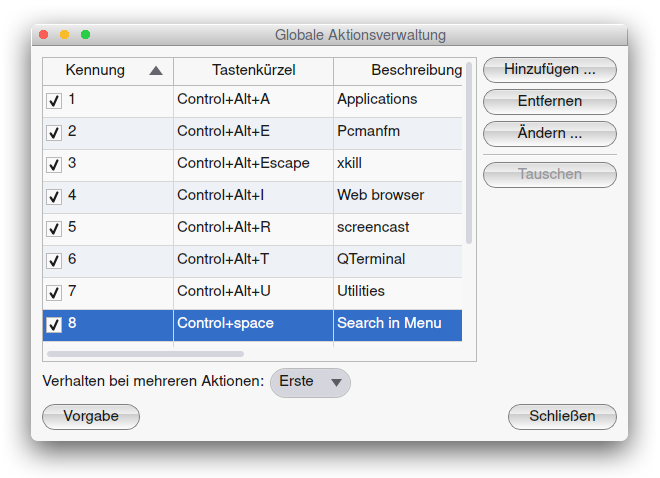
So we need to hook this in somewhere deeper in Qt I think. Maybe @threedeyes has an idea.
True, taking care of context menus will be important. On Windows hooking into some sort of rundll32 I think can help fix menus of all sorts, no idea about Linux.
Let's say I want to replace "Ctrl", "Control" and its translations (like "Strg") with "⌘". Can I somehow override
QKeySequence::toString
toString(QKeySequence::NativeText)
in a Qt platform plugin (style, theme)? Or via LD_PRELOAD?
https://code.qt.io/cgit/qt/qtbase.git/tree/src/gui/kernel/qkeysequence.cpp?h=dev seems to have to do with it.