helix-toolkit
Why perspective camera does not change to orthographic?
I have a very strange Camera comportment in my application. Basically, application contain TabControl element. Number of tabs is specified dynamically and bounded to ObservableCollection. Everything works fine, besides of Viewport3DX Camera. I Specified that there should be orthographic camera and default camera, also orthographic. But as result is a Perspective camera.
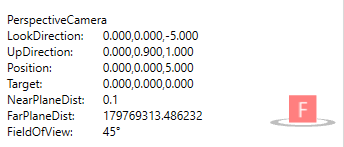
Here is my complete code:
<TabControl ItemsSource="{Binding Box.Stages}">
  <TabControl.Resources>
    <DataTemplate DataType="{x:Type m:StageModel}">
      <Grid>
        <Grid.ColumnDefinitions>
	        <ColumnDefinition Width="Auto"></ColumnDefinition>
	        <ColumnDefinition Width="*"></ColumnDefinition>
        </Grid.ColumnDefinitions>
        <contr:StageModificationsContainer HorizontalAlignment="Left" VerticalAlignment="Top" />
        <Border BorderThickness="1"
		        BorderBrush="Transparent"
		        Grid.Column="2">
          <ScrollViewer HorizontalScrollBarVisibility="Auto">
            <ItemsControl ItemsSource="{Binding Geometries}" Focusable="False">
              <ItemsControl.ItemsPanel>
                <ItemsPanelTemplate>
                  <StackPanel Orientation="Horizontal" CanHorizontallyScroll="True" />
                </ItemsPanelTemplate>
              </ItemsControl.ItemsPanel>
                <ItemsControl.ItemTemplate>
                  <DataTemplate>
                    <hx:Viewport3DX Name="viewPort"
                                                Title="{Binding LabelTag}"
                                                TitleSize="14"
                                                MinWidth="348"
                                                BorderBrush="LightGray"
                                                BorderThickness="1"
                                                Grid.Column="1"
                                                Margin="3"
                                                ShowCameraInfo="True"
                                                IsRotationEnabled="False"
                                                MSAA="Four">
                      <hx:Viewport3DX.Camera>
                        <hx:OrthographicCamera x:Name="Camera1"
                                                                UpDirection="0.000,0.9,1"
                                                                NearPlaneDistance="-1.7976931348623157E+4"
                                                                FarPlaneDistance="1.7976931348623157E+8 " />
                      </hx:Viewport3DX.Camera>
                      <hx:Viewport3DX.DefaultCamera>
                        <hx:OrthographicCamera x:Name="Camera"
                                                                UpDirection="0.000,0.9,1"
                                                                NearPlaneDistance="-1.7976931348623157E+4"
                                                                FarPlaneDistance="1.7976931348623157E+8 " />
                        </hx:Viewport3DX.DefaultCamera>
                        <hx:LineGeometryModel3D Geometry="{Binding CoordinatesGeometry}"
						                    IsRendering="True"
						                    Smoothness="-1"
						                    Thickness="0.6" />
                    </hx:Viewport3DX>
                  </DataTemplate>
                </ItemsControl.ItemTemplate>
              </ItemsControl>
            </ScrollViewer>
          </Border>
        </Grid>
      </DataTemplate>
    </TabControl.Resources>
  <TabControl.ItemTemplate>
    <DataTemplate>
      <TextBlock Text="{Binding StageNumber, StringFormat=Stage {0}}"></TextBlock>
    </DataTemplate>
  </TabControl.ItemTemplate>
</TabControl>
What am I doing wrong? I will appreciate any help.

Probably you can just bind the Viewport3DX.Camera to a camera in view model?

I am not able to reproduce the issue. Also notice your camera NearPlaneDistance and FarPlaneDistance are way too big.
I wonder whether the viewport from your screenshot is actually the one from the data template, since the viewport in your data template does not have the EffectsManager binding. Without EffectsManager binding, the viewport will not be able to display anything.
The screenshot seems coming from Viewport3D from HelixToolkit.Wpf. And the Viewport3DX is coming from HelixToolkit.SharpDX.Wpf.
That is sad that you are not able to reproduce it. If there is something I can additionally provide for help in reproduction - I will gladly do it.
NearPlaneDistance and FarPlaneDistance does not affect in this case.
Indeed I use Viewport3DX and screenshot made by myself not from Viewport3D.
The screenshot is definitely coming from Viewpor3D. Only Viewport3D camera information shows which type of camera it is using.
Viewport3DX camera info is rendered like this:
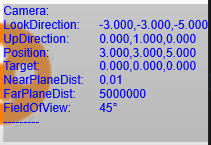
Is there a way that you and I are both right? How can I prove you that I use Viewport3DX?
Move mouse over the ViewBox in Viewport3DX, and it should show 4 corners, and you should be able to click the corner to move the viewbox position to viewport corners. This only available in Viewport3DX, not in Viewport3D.