

 helgoboss
The web app doesn't refresh itself for feedback
When a control element's Label 1 position is Above top AND Label 1 sized is checked, the element is refreshed for the feedback automatically.
However, when the label 1's setting is other than the above specific setting, the element's visual isn't updated at all by itself. It is updated when another element's visual is updated -- if that one meets that specific condition.
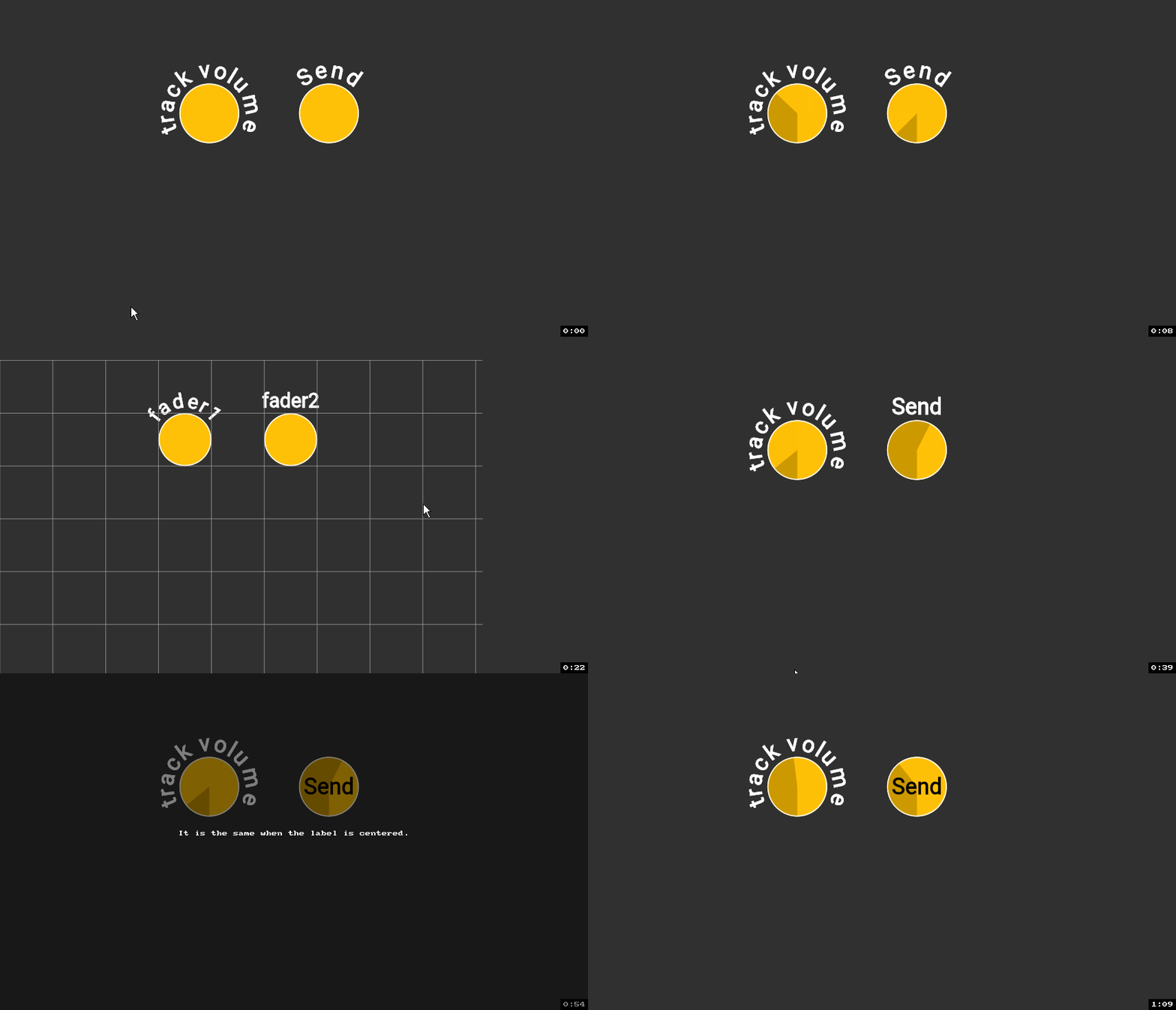
OS is Windows 10 and the browser is Chrome. Tested with realearn 2.9.1 and 2.10.0-pre.2.

Are you sure that's not related to a ReaLearn target which doesn't support automatic feedback? Please check first, thanks.

Are you sure that's not related to a ReaLearn target which doesn't support automatic feedback? Please check first, thanks.
Yes, I am. Maybe it wasn't obvious from the screencast that I shared above. I haven't changed the target at all during my recording. The only thing that I changed was the Label 1 position and Label 1 sized checkbox. Initially, when they were default values, the elements update their states immediately as I move the midi controller. However, after changing the Label 1 position or Label 1 sized checkbox, that element won't update its visual at all by itself.
This should clarify the precise conditions related to the bug.
My environment: ReaLearn v2.12.0/x86_64 rev df8fc-dirty (2022-03-21 17:21:04 UTC) Reaper v6.58 (win10)
I also tested this in ReaLearn v2.13.0-pre.4, with the same results.
The essence of this bug is that change to the feedback value(s) of circular projected control element(s) with horizontal text fails to trigger projection display updates.
- The bug is independent of projection destination. Projection via android tablet gives identical results to projection via web browser.
- The bug only affects the projected control element's display. Synchronization between associated physical controller(s) and target parameter(s) continues to operate correctly.
- The update of any unaffected control element in a projection triggers a display update including an update of the affected control element(s) to the correct feedback value(s).
- Only circular control elements where the text is either centered or not "Sized" are affected. In other words, if a circular control element has text following the circular outline, display update will not be affected, whereas if the text is horizontal then display update will always be bugged. Above/below top/bottom is irrelevant.
As an example, I had a correctly working projection involving several rectangular control elements representing motorized faders. After changing 2 of these elements to circular with horizontal text, altering the feedback value either by moving the physical fader or by adjusting the target parameter failed to trigger a display update but the physical fader and target parameter continued to be synchronized. Changing the feedback value of any control element with a rectangular display resulted in a display update, with the 2 affected control elements then updating to their current feedback value.

Hi! I'm stuck now with the same bug.
Interesting, but when you choose square shape(For fader projection) and straight text - it works.
Round shape(For encoder projection) and straight text - does not work, updates position after turning other mapping parameter, which is currently working.
Would be cool to have encoders projection and straight text, it's much easier to read :)
