

 hediet
Existing diagrams XML version is not unpacked initially
I understand draw.io saves its xml source as compressed XML.
2 questions actually:
- Is it by design that an existing drawing, created with draw.io, doesn't have its xml initially unpacked when viewed as text?
- Is it by design that the XML view has a drawio file type rather than XML, by default?
Thanks


Is it by design that an existing drawing, created with draw.io, doesn't have its xml initially unpacked when viewed as text?
There once was a bug that draw.io file created in VS Code with this extension had this behavior, but I thought I fixed it. All .drawio/.dio files created with this extension should be decompressed.
If you use the official draw.io website/desktop app, you can configure whether you want to compress or not.
Is it by design that the XML view has a drawio file type rather than XML, by default?
Which xml view do you mean?
Draw.io are usually xml documents, saved as *.dio or *.drawio file, so that editors can recognize such files.
Which xml view do you mean?
I mean this: https://github.com/hediet/vscode-drawio#editing-the-diagram-and-its-xml-side-by-side
In the GIF, the xml view has the "XML" type
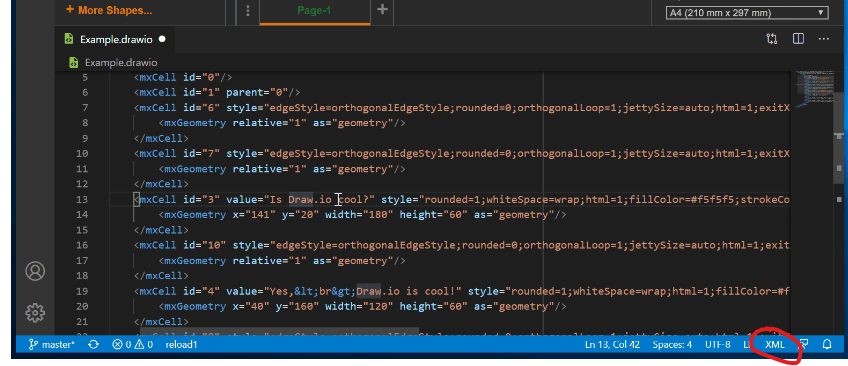
By me, it is a "drawio" type, with no xml capabilities, ie plain text, by default