

 haydenull
A few enhancement suggestions
Hi! I want to thank you first for this awesome plugin. It is my favorite LogSeq plugin and the most helpful for me.
For the same reason, I wanted to give you some suggestions for a few enhancements. And I just want to suggest you, I understand that you may or may not want to work on any/all of these. No hard feelings if none of these are something that you want to work on :)
1. Duplicate tasks in calendar view
When you create a task on 26th June 2022, you will see it in the calendar only at one place i.e. 26th June. If you do not complete it, then the next day you will see it on 26th June with 🔥 sign indicating that it is overdue. It will also be present on 27th June. So we have it on two dates now. This makes the calendar cluttered.
Suggestion:
I suggest that the task be shown only on the original date with the overdue 🔥 emoji. If the user moves it to another date, then it should be shown only on the new date.
2. Drag task property
Currently, if you drag a task on the calendar view from a date to another date, the plugin adds two block properties to that task which are start and end which is set to the date in string format
The way I manage my tasks, I keep my own date property on all TODOs and link it to the journal date. Example date:: [[Jun 26th, 2022]]
Then I query for all the tasks due today or before today.
Suggestion:
I suggest that you provide a configuration option to set the property and the value of a task in the calendar view.
Example:
start property= [choice for user to fill, string type] default "start"
end property= [choice for user to fill, string type] default "end"`
I have not thought about the time property though. I think keeping it in the task title is also fine.
3. Turn off journal tasks
Currently, I have two projects shown in the sidebar of calendar view. One of them is the default Journal project. If I uncheck them both, I still have some tasks left on the calendar.
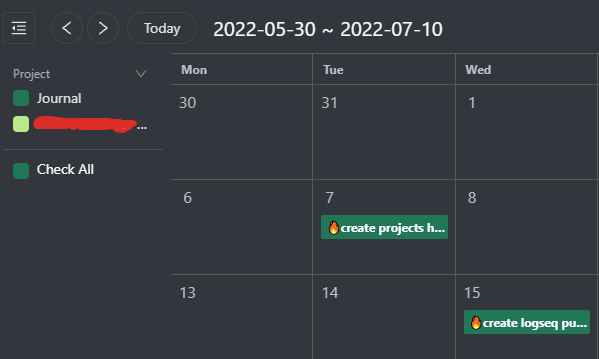
I have a custom query in the Journal project.
Suggestion:
I suggest that unchecking all projects should not leave any other tasks on the calendar.
These are the only suggestions I have for now. I understand that it is difficult to make a plugin work for everyone and it is fine if you do not want to work on these. I really appreciate your work!
Please do let me know if you will or will not work on any of these suggestions. As I said, no hard feelings on whatever decision you make.

Thank you for your feedback
- I think this is a good suggestion and will be added to the development plan.
- I think this is a bug, the correct representation of the task of moving the Journal is to move the block to the Journal page.
- The new version uses the page name as the project name, If the page is not added to the Project Settings, it will not appear in the calendar sidebar, so this happens. A new option will be added later to control the remaining tasks that are not in the Project Settings.
I have a custom query in the Journal project.
Did you create a custom calendar named Journal? Could you please tell me what aspects of the default Journal fails to meet your requirements?

Did you create a custom calendar named Journal?
I just saw that this is not a default now. I remember it being a mandatory calendar in the custom calendar list in the earlier version of the plugin.
There were four queries there, I modified one of those (the third one):
[:find (pull
  ?block
  [:block/uuid
    :db/id
    :block/parent
    :block/left
    :block/collapsed?
    :block/format
    :block/_refs
    :block/path-refs
    :block/tags
    :block/content
    :block/marker
    :block/priority
    :block/properties
    :block/pre-block?
    :block/scheduled
    :block/deadline
    :block/repeated?
    :block/created-at
    :block/updated-at
    :block/file
    :block/heading-level
    {:block/page
    [:db/id :block/name :block/original-name :block/journal-day :block/journal?]}])
  :where
  [?block :block/page ?page]
  [?page :block/journal? true]
  [?block :block/properties ?refs]
  (not [(contains? ?refs "[[HabitTracker]]")])
  [?block :block/marker ?marker]
  [(contains? #{"TODO" "DOING" "NOW" "LATER" "WAITING"} ?marker)]
  [(missing? $ ?block :block/scheduled)]
  [(missing? $ ?block :block/deadline)]]
I have the following template for my tasks
TODO task name
date:: [[linked reference to date]]
project:: [[Reference to project]]
I query my tasks by the date property of the tasks and not the journal page they are present on.
So I can create a task on 27th June journal page but its date property can be set to 30th June. This means that I have to do it on 30th June and not on 27th.
I have noticed that I can set the Schedule Start option of custom calendar to block.dodate but that does not work very well. And if I drag the task to some other date, I would like the dodate property to change but it sets the start and end property
For ease of administration and use, Journal and Project are built into the new version, but custom Queries are not supported. They support the use of date References as dates. There is the document.
To be compatible with previous Settings, we have retained the Custom Calendar configuration, but it only supports displaying in the calendar, not direct editing, etc.
For tasks on the Journal page, the plugin checks them in the following order: Date Reference, Scheduled, Deadline, Agenda Link, Start and end property. When none of these is present, the journal's date is used as the time of the task.
So you can turn off the Journal in the Custom Calendar if you don't have to.
For tasks on the Journal page, the plugin checks them in the following order: Date Reference, Scheduled, Deadline, Agenda Link, Start and end property. When none of these is present, the journal's date is used as the time of the task.
Then the way I use the date should work as well, correct? TODO do something date:: [[Jun 28th, 2022]]
This has a Date Reference.
I even tried the other way
TODO do something [[Jun 28th, 2022]]
Then I moved the task to 29th June in calendar view but its start and end date are set instead.
TODO do something [[Jun 28th, 2022]]
start:: 2022-06-29
end:: 2022-06-29
Is this the bug you were referring to in this comment?
- I think this is a bug, the correct representation of the task of moving the Journal is to move the block to the Journal page.
If that bug is fixed, will my usage (using the property) be supported too?
Is this the bug you were referring to in https://github.com/haydenull/logseq-plugin-agenda/issues/71#issuecomment-1166742237?
Yes
If that bug is fixed, will my usage (using the property) be supported too?
The correct behavior is that the plug-in moves the block to the new Journal page. However, I was a little hesitant to keep the block in place and just update its date.
Understood.
I was just trying to imitate the functionality of Notion's calendar. There the date property itself changes when you move a block. I thought I could try doing the same here on LogSeq
Can you also point me to where this functionality is implemented in the code? I can try implementing it in a fork and see if it is a good idea I think it starts from here Calendar.tsx#L195?
Can you also point me to where this functionality is implemented in the code? I can try implementing it in a fork and see if it is a good idea I think it starts from here Calendar.tsx#L195?
Yes, here is the code for modifying the block after dragging.
I have recently reconsidered it, and I think it is possible to modify only the date attribute of the block after changing the date.
However, it may take some time, because I'm trying to integrate todoist into the plugin now.
I will spend some time modifying the block's behavior when this job is finished.
Hi @haydenull, any plans on working on these suggestions? :)
I tried working on suggestion 2 "Drag task property" but being a newbie in TS was facing some bugs. Meaning sometimes it changed the property but sometimes it did not do anything
Hi There! 👋
This issue has been marked as stale due to inactivity for 40 days.
We would like to inquire if you still have the same problem or if it has been resolved.
If you need further assistance, please feel free to respond to this comment within the next 7 days. Otherwise, the issue will be automatically closed.
We appreciate your understanding and would like to express our gratitude for your contribution to Agenda. Thank you for your support. 🙏
![github-actions[bot] avatar](https://avatars.githubusercontent.com/in/15368?v=4 "Published by a pub.dev verified publisher")