

 hawtim
How to write a custom ESLint Rule?
How to write a custom ESLint Rule?
Background
Recently we do some refactoring about our system, and we found that we need to control the store dispatch direction, which is right from the sub-application to the main application.
And therefore, dispatching an action from the main application to the sub-application is not allowed because this will couple the applications.
After we discussed this problem, we found that one way to do this is to implement lexical analysis to check the dispatch/commit direction and give an error to our system's developers.
We found that ESLint is a great tool to achieve this. So our topic today is about how to create a custom ESLint rule.
I'll walk you through writing a rule step by step so that you can create your own rules.
Get Started
For writing custom ESLint rules for your project, you will need to do the following things:
- Integrated eslint-plugin-local-rules
- Create your custom rules
- Update configurations
- Run Command:
eslint --ext .js,.vue ./srcto check your code
Looks quite simple, let's check it step by step.
Integrated eslint-plugin-local-rules
First, we need to install the eslint-plugin-local-rules package. The package allows you to create local ESlLint rules for your project and debug easily.
yarn add eslint-plugin-local-rules --save-dev
Create your custom rules
Define your custom rules and export them in eslint-local-rules/index.js file.
Define your custom rules
At /eslint-local-rules folder
// /eslint-local-rules/disallow-empty-catch.js
'use strict';

module.exports = {
  meta: {
    messages: {
      emptyCatch: 'Empty catch block is not allowed.',
    },
  },
  create(context) {
    return {
      CatchClause(node) {
        if (node.body.body.length === 0) {
          context.report({ node: node.body, messageId: 'emptyCatch' });
        }
      }
    }
  }
}
Import the rule into the eslint-local-rules/index.js file
// /eslint-local-rules/index.js
'use strict';

const disallowEmptyCatch = require('./disallow-empty-catch');

module.exports = {
  "disallow-empty-catch": disallowEmptyCatch,
};
Update ESLint configuration
// .eslintrc.js
module.exports = {
  // ...
  "plugins": [
    "eslint-plugin-local-rules",
  ],
  "rules": {
    "local-rules/disallow-empty-catch": 2,
  }
}
Okay, now you may have a question, how do I know that I need to use node.body.body.length to decide whether the catch block is empty or not?
The answer is that you need to read the AST of the code.
AST is a tree representation of the source code that tells us about the code structure. And tools like ESLint will parser a given piece of code to AST and execute rules on it.
To figure out specific instructions for our custom rule, we need to inspect AST manually.
You can use AST explorer to check the AST of your code. Let's check the AST of the following code:
try {
  // some code may throw an error
  throw new Error('error');
} catch (error) {}
In this case, if we leave the catch block empty, it will silently swallow an error, and such an error is very hard to trace.
Let's have a look at the AST of the above code: Link
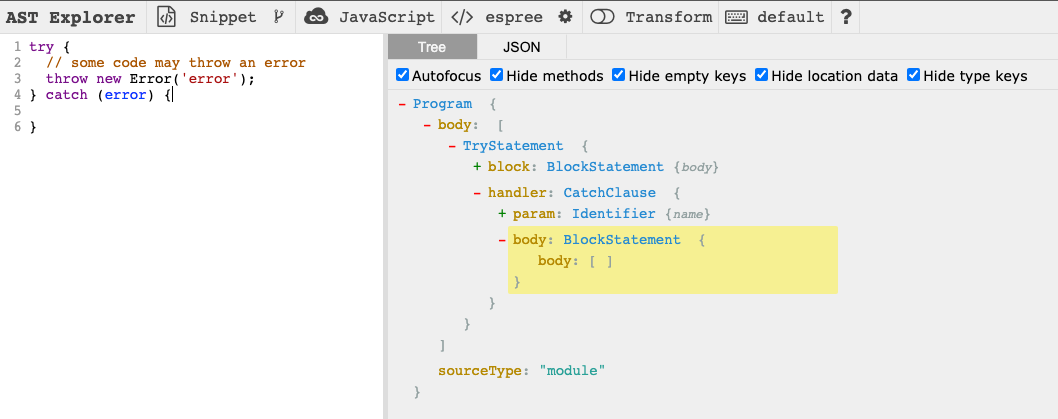
As you can see, the tree has a root called Program.
We could traverse the tree starting from the top-level Program node to find the specific node we want.
But starting from the root the traverse performance could be low, we can start at the closest node, CatchClause
Then we run yarn lint, it will give us an error message:
error: Empty catch block is not allowed (local-rules/disallow-empty-catch) at src/main.js:13:14:
> 13 | } catch (error) {}
  14 |
Vuex Case
let's take another look at the case we mentioned in the background part.
We want some vuex modules that can only be dispatched from the sub-application to the main application. Following the statement above, we can write a custom rule like this:
// context.options
"rules": {
  "local-rules/disallow-some-module": [
    2,
    [
      'aModule',
    ]
  ]
}
// /eslint-local-rules/disallow-some-module.js
module.exports = {
  create(context) {
    const options = context.options[0] || [];
    return {
      'CallExpression[callee.type="Identifier"][callee.name="mapGetters"]': function (node) {
        const arg = node.arguments[0];
        if (options.includes(arg.value)) {
          context.report({
            node: node.arguments[0],
            message: `mapGetters: not allowed to use ${arg.value}`,
          });
        }
      },
      'CallExpression[callee.type="Identifier"][callee.name="mapActions"]': function (node) {
        const arg = node.arguments[0];
        const { properties } = arg;
        properties.forEach((property, index) => {
          const { value } = property.value;
          if (options.includes(value.split('/')[0])) {
            context.report({
              node: node.arguments[0].properties[index].value,
              message: `mapActions: not allowed to use ${value.split('/')[0]}`,
            });
          }
        });
      }
    };
  },
};
And then you run yarn lint again, the error messages will be:
error: mapGetters: not allowed to use aModule (local-rules/disallow-some-module) at src/App.vue:13:19:
  11 |   name: 'App',
  12 |   computed: {
> 13 |     ...mapGetters('aModule', ['loadAModuleNumber']),
     |                   ^
  14 |   },
  15 |   async created() {
  16 |     await this.loadAModule();


error: mapActions: not allowed to use aModule (local-rules/disallow-some-module) at src/App.vue:20:20:
  18 |   methods: {
  19 |     ...mapActions({
> 20 |       loadAModule: 'aModule/loadAModule',
     |                    ^
  21 |       loadBModule: 'bModule/loadBModule',
  22 |     }),
  23 |   },
It works! And we can also detect the specific program patterns to provide powerful constraints.
For example:
this.$store.commit('aModule/commitAModule');
this.$store.dispatch('aModule/dispatchAModule');
Conclusion
In this article, we have learned how to use AST explorer to help and finally write a custom ESLint rule for our scenarios.
ESLint shows us a solution to handle some scenarios:
- Enforced some coding styles base on our technical implements and architecture conventions.
- Detected and auto-fixed some specific programming patterns, like the i18n solution in our project.
Further Reading

Demo: https://github.com/hawtim/local-eslint-rule-demo Origin: https://github.com/hawtim/local-eslint-rule-demo/blob/master/INTRO.md