
graphql-engine
 graphql-engine copied to clipboard
Published
20 hours ago •
 hasura
hasura
Some of the Hasura console page's style is broken.
Version Information
Hasura version: v2.8.4
How to reproduce the issue?
- Go to data -> select any table -> click on edit (the label is not shown there. check the screenshot below.)
- Click on events -> click on any event -> click on the edit option at Trigger operations
- Click on events -> any event -> click on invocation logs -> click on retry
Screenshots or Screencast


Hey Folks,
Thanks for reporting the issue @PJijin!
Thanks for volunteering to contribute @sudeshna-22! I'm assigning this issue to you. Here are some suggestions from our end,
- We started using more TailwindCSS and less CSS/SCSS to simplify the UI development, would appreciate if you can follow the pattern.
- Here is a storybook document that explains our latest tooling.
Please reach out to us if you have any doubts, Happy to help :)

A recent commit to the main repo appears to have resolved the problems raised in this issue. However, there are some section that could be improved.
- There is some change in the edit section of the data which does not match other view of the application.
- There is no space between the button and other elements.
I believe I can improve this section.
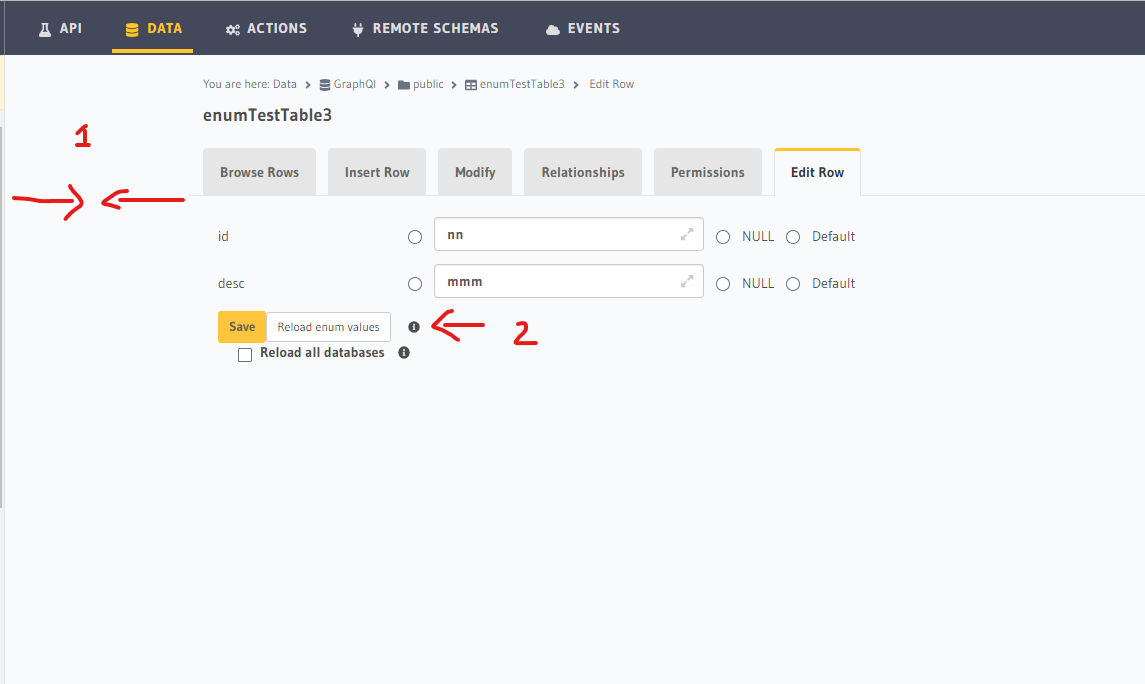
Will be solving this in this issue: The styling of the data table view and edit row sections needs an improvement. #8704
