

 hashicorp
LoginMFA requires excessive access to OKTA API to function
Describe the bug When configuring LoginMFA with OKTA, vault is getting a permission denied error when accessing the okta API. We have narrowed the issue down to permission that the LoginMFA code requires on the okta side. The permission allows the API call to delete the user's MFA configuration from the okta service. I suspect that this is a bug with how vault is using the OKTA golang library or with the OKTA golang library itself. If I grant this excessive permission to the token vault used to access the OKTA API vault and LoginMFA will work as expected. Our Enterprise Security Identity team will not allow us to deploy LoginMFA in production as the excessive permission could be used to invalidate users' MFA config for all services they access.
To Reproduce Steps to reproduce the behavior:
- Setup an OKTA developer account with test users (admin user you get by default, test user & API user)
- Config OKTA Authentication > Sign-On Policy to trigger MFA on login by default
- Config OKTA Multifactor > Okta Verify > Enable Push Notification & Disable number challenge (https://github.com/hashicorp/vault/issues/11329)
- Config OKTA Security > Administrators > Roles > Create New role with only "View users and their details" & "View groups and their details"
- Config OKTA Security > Administrators > create a new user that the API token will be associated with and set the role to the one created above. Also, create a resource set that scopes all test users. Read only admin role.
- Config OKTA Start a separate browser session and login as the new user. (chrome profile or incognito mode)
- Config OKTA Security > API > Tokens > Create Token (while logged in as the new user)
- Config OKTA as the primary OKTA account (not the account used for the token) and set the token user role to the limited one created previously. Security > Administrators > Roles > Admins > Edit the user assignment selecting the new role and resource set previously created. This effectively limits the token to the access granted by the role.
- Config VAULT Setup an auth method like user/pass or okta (we are using okta)
- Config VAULT LoginMFA for use with OKTA
MFA_METHOD_IDS=$(vault write -field method_id identity/mfa/method/okta org_name="$OKTA_ORG" api_token="$OKTA_TOKEN" base_url="$OKTA_BASE_URL" username_format="{{identity.entity.aliases.${OKTA_AUTH_ACCESSOR}.name}}@nachos.com" primary_email=true)
vault write identity/mfa/login-enforcement/nachos auth_method_accessors="$OKTA_AUTH_ACCESSOR" mfa_method_ids="$MFA_METHOD_IDS"
- Login to vault using okta & LoginMFA as the test user
vault login -method okta username=blake
This will result in an error before the MFA push is sent to your authenticator.
Asking Vault to perform MFA validation with upstream service. You should receive a push notification in your authenticator app shortly
Error making API request.

URL: PUT https://vault.nachos.com:8200/v1/sys/mfa/validate
Code: 403. Errors:

* failed to satisfy enforcement nachos. error: 2 errors occurred:
	* the API returned an error: You do not have permission to perform the requested action
	* login MFA validation failed for methodID: [21516e89-2f78-e4e1-189f-9e0000698539]
- Config OKTA Security > Administrators > Roles > Edit the role and add "Reset users' authenticators" permission.
- Login to vault using okta & LoginMFA as the test user
vault login -method okta username=blake
We get the really nice message prompting you to check your authenticator, and then the login succeeds!
Expected behavior Our expectation is that vault would use least privileges when it comes to accessing the OKTA API to do MFA. The "Reset users' authenticators" permission should not be required for this MFA push flow to work.
Environment:
- Vault Server Version (retrieve with
vault status): 1.11.0 - Vault CLI Version (retrieve with
vault version): 1.11.0 - Server Operating System/Architecture: Ubuntu 20.04.4 LTS x86_64
Vault server configuration file(s):
# Full configuration options can be found at https://www.vaultproject.io/docs/configuration
log_level = "trace"
log_format = "json"
ui = true
cluster_name = "nachos"
cluster_addr = "http://10.0.0.62:8202"
api_addr = "http://10.0.0.62:8200"
#mlock = true
#disable_mlock = true

# HTTPS listener
listener "tcp" {
  address       = "10.0.0.62:8200"
  tls_cert_file = "/opt/vault/tls/tls.crt"
  tls_key_file  = "/opt/vault/tls/tls.key"
}

storage "raft" {
  path = "/opt/vault/data"
  node_id = "nachos"
}
Additional context We are blocked from rolling out LoginMFA in production because this excessive permission could be used as a denial of service and remove the authenticator config for any user in our OKTA config. Related hashicorp support case #75411

Hi there! Thanks for this bug report, and thanks for all the detail. It looks legit, and I agree that Okta probably shouldn't need the "Reset users' authenticators" permission.
I can't promise release timelines etc here, but know that it's in our bug tracker as VAULT-6561 and we'll get to it when we can, and will close the loop here when we do.

Hi there, sorry to get back to you after so long on this. I've been testing this issue myself locally and so far I've been unable to reproduce the issue on both 1.10.x and 1.11.x.
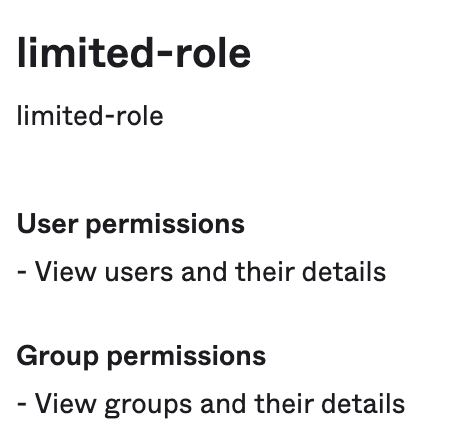
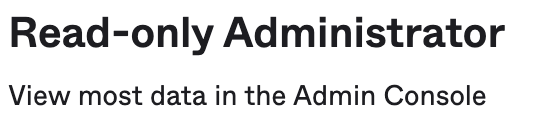
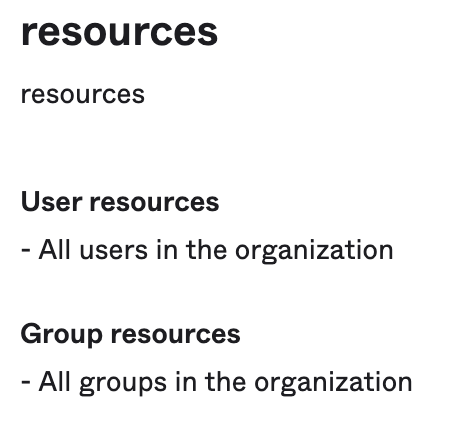
I have a Read-Only Admin who has the following roles and resources - notably, no roles contain the "Reset users' authenticators" permission:
I generated a token from the read-only admin:
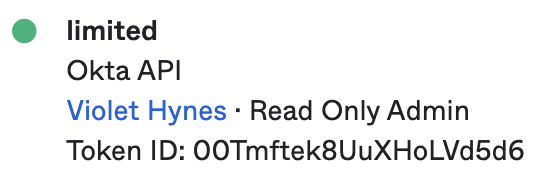
I used that token to configure login MFA for userpass (setting up the MFA method using a username_format that'd point it to the right user, and the token generated from the admin listed above) and my login worked fine:
violet@violet-TX54KFJWXM vault % vault login -method=userpass username=violet
Password (will be hidden):
Asking Vault to perform MFA validation with upstream service. You should receive a push notification in your authenticator app shortly
Key                    Value
---                    -----
token                  REDACTED
token_accessor         REDACTED
token_duration         768h
token_renewable        true
token_policies         ["default"]
identity_policies      []
policies               ["default"]
token_meta_username    violet
I'm going to keep digging into this because I know this is an important issue and there must be a reason we're seeing different behaviour, but I wanted to make a comment with what I've got so far to both show you that we're looking into it, and also ask if you can see any differences between my workflow and yours that might account for a difference in behaviour.
I recommend creating the least privilege token and re-testing described at 4 in the initial report. I suspect that OKTA read-only admin has some special properties that are not exposed in the UI. I zeroed in on the "reset users authenticator" by trial and error of toggling sets of permissions on/off until the auth worked. We can't use the read-only admin role in production.
Thanks for the response! I managed to have a chat with the support agent on this case yesterday and that filled me in on some things. I'm still looking at this, but I've still not yet reproduced the error you showed.
Curiously, even when I removed "Read Only Admin" from this user, MFA login still seems to work (the user now only has the 'limited-role' role listed above), though notably I needed the Read Only Admin role to be able to create a token - once removing it, this user cannot create a token.
From what I can tell (and I could be mistaken, I'm not an Okta expert), you do need one of the built-in admin roles to be able to create/manage tokens: https://help.okta.com/en-us/Content/Topics/Security/administrators-admin-comparison.htm#API%C2%A0toke - there seems to be no role permission to grant this: https://help.okta.com/en-us/Content/Topics/Security/custom-admin-role/about-role-permissions.htm
Something else that's worth noting: I login fine using both userpass and okta auth methods when configured with MFA, so I've tried both and it's not just that one has a difference.
I'm continuing to dig into this, and I'll let you know when I have further updates.
The OKTA configuration is the big variable here for sure. The dance with changing role from read-only admin down to the least privilege required for auth is painful but understood. Feel free to reach out via the support case if you want to do a call. I have a test environment setup with 3 OKTA backends that can be tested. I'll re-run my tests as OKTA service is a bit of a moving target to confirm nothing has changed.
Thanks, I think that'll likely be my next step. I'm guessing there's something different between Okta configuration as you say and I'm far from an Okta expert. I really appreciate the detail you put into this issue, it made it easy to follow through with.
After opening a support case with OKTA they confirmed that the permission "Reset users' authenticators" is required if you create a custom role and don't use read-only admin. I have only successfully had the MFA api call work when "Reset users' authenticators" is enabled. I suggest that the required permissions be added to the LoginMFA docs to save others from repeating this effort to find the least privilege needed.
OKTA support case #01512500
Thank you very much for your help on this one!