

 hashicorp
Ubuntu machines getting stuck on Windows 10
Vagrant version
Vagrant 2.2.19
Host operating system
Windows 10
Guest operating system
Ubuntu 20.10
Vagrantfile
Vagrant.configure("2") do |config|
  config.vm.box = "generic/ubuntu2010"
  config.vm.network "private_network", ip: "192.168.33.10"

  config.vm.provider "virtualbox" do |vb|
    vb.gui = true
    vb.memory = "1024"
  end
end
Debug output
https://gist.github.com/gokula-krishna-dev/8baff753a842789ae104bbd2192c8802
Expected behavior
Run VM with no error
Actual behavior
Stuck at SSH auth method: private key. When running vagrant up
Note:
- In the above gist you can see the screenshot where it is stuck at different points.
- I tried applying the configuration given in https://github.com/hashicorp/vagrant/issues/11777#issuecomment-661076612. But it doesn't work too.
- Tried increasing the timeout as discussed in https://bugs.launchpad.net/cloud-images/+bug/1874453. But it is not working reliably.
- Is there any way to speed up the boot time?

I'm also having this problem using Vagrant in Windows 10 and 11. In my case, I'm trying to create an Ubuntu 20.04 VM, but I ended up receiving that message. Vagrant gets stuck trying to connect to the VM.
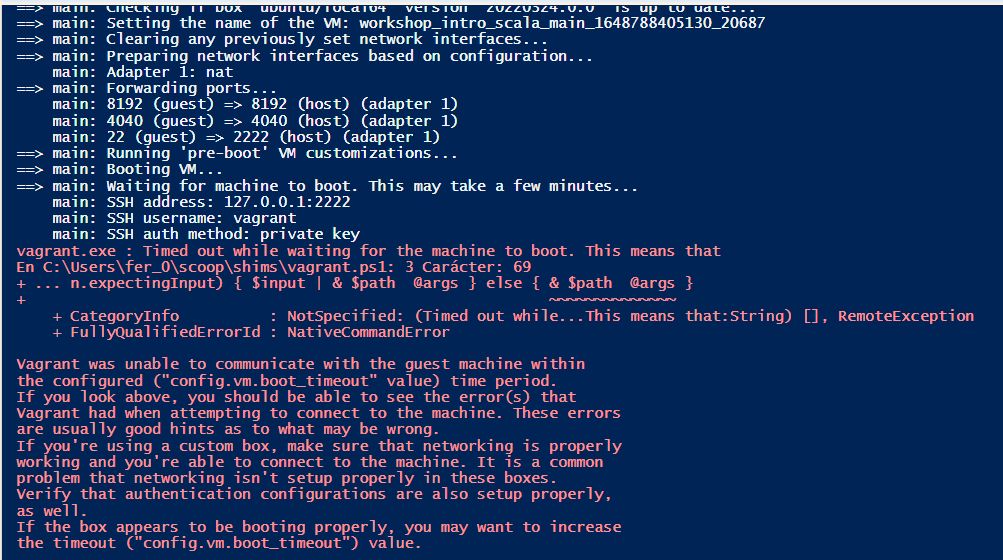
By contrast, Vagrant works fine in macOS Monterey 12.3.1.
I'm using Vagrant 2.2.19 and VirtualBox 6.1.32 r149290 in the three computers (Windows 10 Pro, Windows 11 Pro and macOS Monterey).
(I posted this message in another issue. I hope they take it into account).

I have the same problem on Windows 10.
-
Vagrant version Vagrant 2.2.19
-
virtualbox version 6.1.32r
-
Host Windows 10 pro 21H2
-
Guest Ubuntu20.04(ubuntu/focal64)
-
Vagrantfile
Vagrant.configure("2") do |config|
  config.vm.box = "ubuntu/focal64"
end
It does not start even in "generic/ubuntu2010" or "ubuntu/bionic64". However, "almalinux/8", "debian/jessie64" and centos7 will boot properly.
When "SSH auth method: private key" is displayed, start the virtualbox app, right-click on the machine name in the list and select "show". This will fix the Ubuntu stack and boot the machine.
I don't know why just launching the virtualbox app will fix the stack on the machine and boot the machine 😕

I have forgotten to say it. If you set the number of cpus to 1, the stack will not occur even if you do not start the virtualbox app.
Vagrant.configure("2") do |config|
  config.vm.box = "ubuntu/focal64"
  config.vm.provider "virtualbox" do |vb|
    vb.cpus = 1
  end
end
I have forgotten to say it. If you set the number of cpus to 1, the stack will not occur even if you do not start the virtualbox app.
Vagrant.configure("2") do |config|
  config.vm.box = "ubuntu/focal64"
  config.vm.provider "virtualbox" do |vb|
    vb.cpus = 1
  end
end
I could create the VM by using the second note @gokula-krishna-dev mentioned:
I tried applying the configuration given in https://github.com/hashicorp/vagrant/issues/11777#issuecomment-661076612. But it doesn't work too.
Disabled the following in Windows Features. This booted the machine.
- Hyper-V
- Virtual Machine Platform
- Windows Hypervisor platform
- Container
But that made me give up using WSL2.
Disabled the following in Windows Features. This booted the machine.
- Hyper-V
- Virtual Machine Platform
- Windows Hypervisor platform
- Container
But that made me give up using WSL2.
Hope it could be resolved soon. In this point I'm not sure if it's an issue with Vagrant, VirtualBox or the Ubuntu image.
Hello, I have an error message - vagrant failed to initialize at a very early stage - # accessing "localhost:8080" will access 80 ports on. Not sure the steps I am following are correct. My situation is similar to syagawa (post 3 days ago). We share the same host operating system Windows 10. I am conducting research to fix the problem. Open to any suggestions?

Hello, I have an error message - vagrant failed to initialize at a very early stage - # accessing "localhost:8080" will access 80 ports on. Not sure the steps I am following are correct. My situation is similar to syagawa (post 3 days ago). We share the same host operating system Windows 10. I am conducting research to fix the problem. Open to any suggestions?
Can you show the output of your terminal, please?
Hello, Fernando Gomez Perera, Thank you for the response, here is the terminal output error message (below). The command -line interface that I am using is workstation (chef) There is a syntax error in the following Vagrantfile. The syntax error message is reproduced below for convenience: ‘C:/users/Juili/OneDrive/Desktop/vagrantfile:23: syntax error, unexpected local variable, or method, expecting end. ‘
accessing “localhost:8080” will access port 80 on…
Sincerely, Juilian Hardy
From: Fernando Gomez Perera @.> Sent: Sunday, April 10, 2022 6:05 PM To: hashicorp/vagrant @.> Cc: JuilianHardy @.>; Comment @.> Subject: Re: [hashicorp/vagrant] Ubuntu machines getting stuck on Windows 10 (Issue #12673)
Hello, I have an error message - vagrant failed to initialize at a very early stage - # accessing "localhost:8080" will access 80 ports on. Not sure the steps I am following are correct. My situation is similar to syagawa (post 3 days ago). We share the same host operating system Windows 10. I am conducting research to fix the problem. Open to any suggestions?
Can you show the output of your terminal, please?
— Reply to this email directly, view it on GitHubhttps://nam12.safelinks.protection.outlook.com/?url=https%3A%2F%2Fgithub.com%2Fhashicorp%2Fvagrant%2Fissues%2F12673%23issuecomment-1094439144&data=04%7C01%7C%7Cea77d4fd29e8474dd63d08da1b577057%7C84df9e7fe9f640afb435aaaaaaaaaaaa%7C1%7C0%7C637852359610478913%7CUnknown%7CTWFpbGZsb3d8eyJWIjoiMC4wLjAwMDAiLCJQIjoiV2luMzIiLCJBTiI6Ik1haWwiLCJXVCI6Mn0%3D%7C3000&sdata=%2F79lINjV7qn%2FNtLbmdvYZuNBRTX86ZXe2ss27OO8bLo%3D&reserved=0, or unsubscribehttps://nam12.safelinks.protection.outlook.com/?url=https%3A%2F%2Fgithub.com%2Fnotifications%2Funsubscribe-auth%2FAYDUJKNGPF7A3Q3ZNSFDUALVEN3HLANCNFSM5NU2GAQA&data=04%7C01%7C%7Cea77d4fd29e8474dd63d08da1b577057%7C84df9e7fe9f640afb435aaaaaaaaaaaa%7C1%7C0%7C637852359610478913%7CUnknown%7CTWFpbGZsb3d8eyJWIjoiMC4wLjAwMDAiLCJQIjoiV2luMzIiLCJBTiI6Ik1haWwiLCJXVCI6Mn0%3D%7C3000&sdata=vh8vpJVDU%2B0IlWQk7YbMABoaY61iottJ9s9u%2Bn8e1ng%3D&reserved=0. You are receiving this because you commented.Message ID: @.***>
Hello, Fernando Gomez Perera, Thank you for the response, here is the terminal output error message (below). The command -line interface that I am using is workstation (chef) There is a syntax error in the following Vagrantfile. The syntax error message is reproduced below for convenience: ‘C:/users/Juili/OneDrive/Desktop/vagrantfile:23: syntax error, unexpected local variable, or method, expecting end. ‘ # accessing “localhost:8080” will access port 80 on… Sincerely, Juilian Hardy
I think you have a syntax error in your Vagrantfile. Maybe not related to this thread. But no problem :) Share here your Vagrantfile, so I can check where is the syntax error.
How do I share my Vagrantfile?
From: Fernando Gomez Perera @.> Sent: Monday, April 11, 2022 1:44 PM To: hashicorp/vagrant @.> Cc: JuilianHardy @.>; Comment @.> Subject: Re: [hashicorp/vagrant] Ubuntu machines getting stuck on Windows 10 (Issue #12673)
Hello, Fernando Gomez Perera, Thank you for the response, here is the terminal output error message (below). The command -line interface that I am using is workstation (chef) There is a syntax error in the following Vagrantfile. The syntax error message is reproduced below for convenience: ‘C:/users/Juili/OneDrive/Desktop/vagrantfile:23: syntax error, unexpected local variable, or method, expecting end. ‘ # accessing “localhost:8080” will access port 80 on… Sincerely, Juilian Hardy
I think that you have a syntax error in your Vagrantfile. Maybe not related to this thread. But no problem :) share your Vagrantfile, so I can check where is the syntax error.
— Reply to this email directly, view it on GitHubhttps://nam12.safelinks.protection.outlook.com/?url=https%3A%2F%2Fgithub.com%2Fhashicorp%2Fvagrant%2Fissues%2F12673%23issuecomment-1095548222&data=04%7C01%7C%7Cd6bf069fc656410c3dcd08da1bfc08ac%7C84df9e7fe9f640afb435aaaaaaaaaaaa%7C1%7C0%7C637853066534995476%7CUnknown%7CTWFpbGZsb3d8eyJWIjoiMC4wLjAwMDAiLCJQIjoiV2luMzIiLCJBTiI6Ik1haWwiLCJXVCI6Mn0%3D%7C3000&sdata=uiFNacpC9WnjRbrUcVLLO89zU3APbV3RNKbXSnT5jkk%3D&reserved=0, or unsubscribehttps://nam12.safelinks.protection.outlook.com/?url=https%3A%2F%2Fgithub.com%2Fnotifications%2Funsubscribe-auth%2FAYDUJKNJFDB26OL3M5UPFJLVESFJVANCNFSM5NU2GAQA&data=04%7C01%7C%7Cd6bf069fc656410c3dcd08da1bfc08ac%7C84df9e7fe9f640afb435aaaaaaaaaaaa%7C1%7C0%7C637853066534995476%7CUnknown%7CTWFpbGZsb3d8eyJWIjoiMC4wLjAwMDAiLCJQIjoiV2luMzIiLCJBTiI6Ik1haWwiLCJXVCI6Mn0%3D%7C3000&sdata=IU5XH2onKsTipoL7KXPbPqZioem2ikymgTkK5DVw8VI%3D&reserved=0. You are receiving this because you commented.Message ID: @.***>
How do I share my Vagrantfile?
Just Drag & Drop the file inside the comment using the GitHub interface. Not sure if this works using email.
Here is my Vagrantfile, attach to this email.
Sincerely, Juilian
From: Fernando Gomez Perera @.> Sent: Monday, April 11, 2022 3:03 PM To: hashicorp/vagrant @.> Cc: JuilianHardy @.>; Comment @.> Subject: Re: [hashicorp/vagrant] Ubuntu machines getting stuck on Windows 10 (Issue #12673)
How do I share my Vagrantfile?
Just Drag & Drop the file inside the comment using the GitHub interface. Not sure if this works using email.
— Reply to this email directly, view it on GitHubhttps://nam12.safelinks.protection.outlook.com/?url=https%3A%2F%2Fgithub.com%2Fhashicorp%2Fvagrant%2Fissues%2F12673%23issuecomment-1095615341&data=04%7C01%7C%7Cf8af8a5e38cc4d34890508da1c072048%7C84df9e7fe9f640afb435aaaaaaaaaaaa%7C1%7C0%7C637853114172543898%7CUnknown%7CTWFpbGZsb3d8eyJWIjoiMC4wLjAwMDAiLCJQIjoiV2luMzIiLCJBTiI6Ik1haWwiLCJXVCI6Mn0%3D%7C3000&sdata=43mXMy5DRlnha%2F3e807%2BERAySMMJHaDDnVtepctWWw4%3D&reserved=0, or unsubscribehttps://nam12.safelinks.protection.outlook.com/?url=https%3A%2F%2Fgithub.com%2Fnotifications%2Funsubscribe-auth%2FAYDUJKMIRDPOASZTKHAPWZLVESOTPANCNFSM5NU2GAQA&data=04%7C01%7C%7Cf8af8a5e38cc4d34890508da1c072048%7C84df9e7fe9f640afb435aaaaaaaaaaaa%7C1%7C0%7C637853114172543898%7CUnknown%7CTWFpbGZsb3d8eyJWIjoiMC4wLjAwMDAiLCJQIjoiV2luMzIiLCJBTiI6Ik1haWwiLCJXVCI6Mn0%3D%7C3000&sdata=Vt%2BFJGutT0pE7WpSXwGHi%2B%2FrKFieCPrDuJZwla8DtCY%3D&reserved=0. You are receiving this because you commented.Message ID: @.***>
Here is my Vagrantfile, attach to this email. Sincerely, Juilian
Hey Juilian.
I didn't received the Vagrantfile. As I mentioned earlier, I think you need to attach the file inside GitHub, not by email. Or if it's easier for you just copy and paste the text of the Vagrantfile in the email.
Hello,
Here is a copy of the Vagrantfile contexts copy from word and paste into the email.
-- mode: ruby --
vi: set ft=ruby :
All Vagrant configuration is done below. The "2" in Vagrant.configure
configures the configuration version (we support older styles for
backwards compatibility). Please don't change it unless you know what
you're doing.
Vagrant.configure("2") do |config|
The most common configuration options are documented and commented below.
For a complete reference, please see the online documentation at
https://docs.vagrantup.com.
Every Vagrant development environment requires a box. You can search for
boxes at https://vagrantcloud.com/search.
config.vm.box = "hashicorp/bionic64"
The url from where the 'config.vm.box' box will be fetched if it
doesn't already exist on the user's system.
config.vm.box_url = ""
Create a forwarded port mapping which allows access to a specific port
within the machine from a port on the host machine. In the example below,
accessing "localhost:8080" will access port 80 on the guest machine.
NOTE: This will enable public access to the opened port
config.vm.network "forwarded_port", guest: 80, host: 8080
Create a forwarded port mapping which allows access to a specific port
within the machine from a port on the host machine and only allow access
via 127.0.0.1 to disable public access
config.vm.network "forwarded_port", guest: 80, host: 8080, host_ip: "127.0.0.1"
Create a private network, which allows host-only access to the machine
using a specific IP.
config.vm.network "private_network", ip: "192.168.33.10"
Create a public network, which generally matched to bridged network.
Bridged networks make the machine appear as another physical device on
your network.
config.vm.network "public_network"
Share an additional folder to the guest VM. The first argument is
the path on the host to the actual folder. The second argument is
the path on the guest to mount the folder. And the optional third
argument is a set of non-required options.
config.vm.synced_folder "../data", "/vagrant_data"
Provider-specific configuration so you can fine-tune various
backing providers for Vagrant. These expose provider-specific options.
Example for VirtualBox:
config.vm.provider "virtualbox" do |vb|
# Display the VirtualBox GUI when booting the machine
vb.gui = true
# Customize the amount of memory on the VM:
vb.memory = "1024"
end
View the documentation for the provider you are using for more
information on available options.
Enable provisioning with a shell script. Additional provisioners such as
Ansible, Chef, Docker, Puppet and Salt are also available. Please see the
documentation for more information about their specific syntax and use.
config.vm.provision "shell", inline: <<-SHELL
apt-get update
apt-get install -y apache2
SHELL
end
Sincerely,
Juilian
From: Fernando Gomez Perera @.> Sent: Monday, April 11, 2022 4:18 PM To: hashicorp/vagrant @.> Cc: JuilianHardy @.>; Comment @.> Subject: Re: [hashicorp/vagrant] Ubuntu machines getting stuck on Windows 10 (Issue #12673)
Here is my Vagrantfile, attach to this email. Sincerely, Juilian
Hey Juilian.
I didn't received the Vagrantfile. As I mentioned, I think you need to attach the file inside GitHub, not by email. Or if it's easier for you just copy and paste the text of the Vagrantfile in the email.
— Reply to this email directly, view it on GitHubhttps://nam12.safelinks.protection.outlook.com/?url=https%3A%2F%2Fgithub.com%2Fhashicorp%2Fvagrant%2Fissues%2F12673%23issuecomment-1095683803&data=04%7C01%7C%7Cfa34260f6d5f4f5771eb08da1c11a21e%7C84df9e7fe9f640afb435aaaaaaaaaaaa%7C1%7C0%7C637853159315735959%7CUnknown%7CTWFpbGZsb3d8eyJWIjoiMC4wLjAwMDAiLCJQIjoiV2luMzIiLCJBTiI6Ik1haWwiLCJXVCI6Mn0%3D%7C3000&sdata=MpkFiHB77wFflhiad1zTEVkz3kL0Hjsd9aGvXovH6oI%3D&reserved=0, or unsubscribehttps://nam12.safelinks.protection.outlook.com/?url=https%3A%2F%2Fgithub.com%2Fnotifications%2Funsubscribe-auth%2FAYDUJKJDTRXVXFDSUEKT6IDVESXNPANCNFSM5NU2GAQA&data=04%7C01%7C%7Cfa34260f6d5f4f5771eb08da1c11a21e%7C84df9e7fe9f640afb435aaaaaaaaaaaa%7C1%7C0%7C637853159315735959%7CUnknown%7CTWFpbGZsb3d8eyJWIjoiMC4wLjAwMDAiLCJQIjoiV2luMzIiLCJBTiI6Ik1haWwiLCJXVCI6Mn0%3D%7C3000&sdata=IEzqxj4o0cOA%2FMKqjNPhic%2BgreXvDetyDM9nZXqsyt4%3D&reserved=0. You are receiving this because you commented.Message ID: @.***>
Hello, Here is a copy of the Vagrantfile contexts copy from word and paste into the email. # -- mode: ruby -- # vi: set ft=ruby : # All Vagrant configuration is done below. The "2" in Vagrant.configure # configures the configuration version (we support older styles for # backwards compatibility). Please don't change it unless you know what # you're doing. Vagrant.configure("2") do |config| # The most common configuration options are documented and commented below. # For a complete reference, please see the online documentation at # https://docs.vagrantup.com. # Every Vagrant development environment requires a box. You can search for # boxes at https://vagrantcloud.com/search. config.vm.box = "hashicorp/bionic64" # The url from where the 'config.vm.box' box will be fetched if it # doesn't already exist on the user's system. config.vm.box_url = "" # Create a forwarded port mapping which allows access to a specific port # within the machine from a port on the host machine. In the example below, # accessing "localhost:8080" will access port 80 on the guest machine. # NOTE: This will enable public access to the opened port # config.vm.network "forwarded_port", guest: 80, host: 8080 # Create a forwarded port mapping which allows access to a specific port # within the machine from a port on the host machine and only allow access # via 127.0.0.1 to disable public access # config.vm.network "forwarded_port", guest: 80, host: 8080, host_ip: "127.0.0.1" # Create a private network, which allows host-only access to the machine # using a specific IP. # config.vm.network "private_network", ip: "192.168.33.10" # Create a public network, which generally matched to bridged network. # Bridged networks make the machine appear as another physical device on # your network. # config.vm.network "public_network" # Share an additional folder to the guest VM. The first argument is # the path on the host to the actual folder. The second argument is # the path on the guest to mount the folder. And the optional third # argument is a set of non-required options. # config.vm.synced_folder "../data", "/vagrant_data" # Provider-specific configuration so you can fine-tune various # backing providers for Vagrant. These expose provider-specific options. # Example for VirtualBox: # # config.vm.provider "virtualbox" do |vb| # # Display the VirtualBox GUI when booting the machine # vb.gui = true # # # Customize the amount of memory on the VM: # vb.memory = "1024" # end # # View the documentation for the provider you are using for more # information on available options. # Enable provisioning with a shell script. Additional provisioners such as # Ansible, Chef, Docker, Puppet and Salt are also available. Please see the # documentation for more information about their specific syntax and use. # config.vm.provision "shell", inline: <<-SHELL # apt-get update # apt-get install -y apache2 # SHELL end Sincerely, Juilian … ________________________________ From: Fernando Gomez Perera @.> Sent: Monday, April 11, 2022 4:18 PM To: hashicorp/vagrant @.> Cc: JuilianHardy @.>; Comment @.> Subject: Re: [hashicorp/vagrant] Ubuntu machines getting stuck on Windows 10 (Issue #12673) Here is my Vagrantfile, attach to this email. Sincerely, Juilian Hey Juilian. I didn't received the Vagrantfile. As I mentioned, I think you need to attach the file inside GitHub, not by email. Or if it's easier for you just copy and paste the text of the Vagrantfile in the email. — Reply to this email directly, view it on GitHubhttps://nam12.safelinks.protection.outlook.com/?url=https%3A%2F%2Fgithub.com%2Fhashicorp%2Fvagrant%2Fissues%2F12673%23issuecomment-1095683803&data=04%7C01%7C%7Cfa34260f6d5f4f5771eb08da1c11a21e%7C84df9e7fe9f640afb435aaaaaaaaaaaa%7C1%7C0%7C637853159315735959%7CUnknown%7CTWFpbGZsb3d8eyJWIjoiMC4wLjAwMDAiLCJQIjoiV2luMzIiLCJBTiI6Ik1haWwiLCJXVCI6Mn0%3D%7C3000&sdata=MpkFiHB77wFflhiad1zTEVkz3kL0Hjsd9aGvXovH6oI%3D&reserved=0, or unsubscribehttps://nam12.safelinks.protection.outlook.com/?url=https%3A%2F%2Fgithub.com%2Fnotifications%2Funsubscribe-auth%2FAYDUJKJDTRXVXFDSUEKT6IDVESXNPANCNFSM5NU2GAQA&data=04%7C01%7C%7Cfa34260f6d5f4f5771eb08da1c11a21e%7C84df9e7fe9f640afb435aaaaaaaaaaaa%7C1%7C0%7C637853159315735959%7CUnknown%7CTWFpbGZsb3d8eyJWIjoiMC4wLjAwMDAiLCJQIjoiV2luMzIiLCJBTiI6Ik1haWwiLCJXVCI6Mn0%3D%7C3000&sdata=IEzqxj4o0cOA%2FMKqjNPhic%2BgreXvDetyDM9nZXqsyt4%3D&reserved=0. You are receiving this because you commented.Message ID: @.***>
Hey Juilian.
I think I found the issue.
Find this lines inside your Vagrantfile
# The url from where the 'config.vm.box' box will be fetched if it
# doesn't already exist on the user's system.
config.vm.box_url = "\"
My linter marks as a syntax error the config.vm.box_url = "\".
You are declaring that you need the Ubuntu Bionic image few lines before:
# Every Vagrant development environment requires a box. You can search for
# boxes at https://vagrantcloud.com/search.
config.vm.box = "hashicorp/bionic64"
So you don't need to declare the config.vm.box_url = "\" Just comment it by putting a # before the function call.
Hope it helps!
Okay, I will try this right now
From: Fernando Gomez Perera @.> Sent: Monday, April 11, 2022 3:03 PM To: hashicorp/vagrant @.> Cc: JuilianHardy @.>; Comment @.> Subject: Re: [hashicorp/vagrant] Ubuntu machines getting stuck on Windows 10 (Issue #12673)
How do I share my Vagrantfile?
Just Drag & Drop the file inside the comment using the GitHub interface. Not sure if this works using email.
— Reply to this email directly, view it on GitHubhttps://nam12.safelinks.protection.outlook.com/?url=https%3A%2F%2Fgithub.com%2Fhashicorp%2Fvagrant%2Fissues%2F12673%23issuecomment-1095615341&data=04%7C01%7C%7Cf8af8a5e38cc4d34890508da1c072048%7C84df9e7fe9f640afb435aaaaaaaaaaaa%7C1%7C0%7C637853114172543898%7CUnknown%7CTWFpbGZsb3d8eyJWIjoiMC4wLjAwMDAiLCJQIjoiV2luMzIiLCJBTiI6Ik1haWwiLCJXVCI6Mn0%3D%7C3000&sdata=43mXMy5DRlnha%2F3e807%2BERAySMMJHaDDnVtepctWWw4%3D&reserved=0, or unsubscribehttps://nam12.safelinks.protection.outlook.com/?url=https%3A%2F%2Fgithub.com%2Fnotifications%2Funsubscribe-auth%2FAYDUJKMIRDPOASZTKHAPWZLVESOTPANCNFSM5NU2GAQA&data=04%7C01%7C%7Cf8af8a5e38cc4d34890508da1c072048%7C84df9e7fe9f640afb435aaaaaaaaaaaa%7C1%7C0%7C637853114172543898%7CUnknown%7CTWFpbGZsb3d8eyJWIjoiMC4wLjAwMDAiLCJQIjoiV2luMzIiLCJBTiI6Ik1haWwiLCJXVCI6Mn0%3D%7C3000&sdata=Vt%2BFJGutT0pE7WpSXwGHi%2B%2FrKFieCPrDuJZwla8DtCY%3D&reserved=0. You are receiving this because you commented.Message ID: @.***>