

 hashicorp
Vagrant up results in mount.nfs: Connection timed out Mac Mojave
I am facing the exact same issue as #11209, and I have tried giving full disk access to iterm, terminal, mount_nfs, nfsd, turning nfs_export: false, restarting NFS, put only one line in /etc/exports file, turning firewall off but still facing the problem. Any guideline will be very much apprecitaed.

Hey there,
thanks for submitting an issue. Could you provide a bit more information about your issue. It seems like there should be a fix for this issue in the current release of vagrant (2.2.7). What version of vagrant are you currently running (vagrant -v)? Could you also provide a debug gist (https://www.vagrantup.com/docs/other/debugging.html)?

I'm seeing the same problem. The problem happens on macOS Catalina 10.15.4, the most two recent versions of VirtualBox 6.1.4 and 6.1.6, and version 2.2.7 and 2.2.8 of vagrant.
It is the same problem as described in https://github.com/hashicorp/vagrant/issues/11234#issue-532686899 and related issues... Essentially, config.vm.synced_folder ".", '/vagrant', type: 'nfs' will sometimes works, but most often won't. It is inconsistent. You can purge /etc/export and restart the nfsd, you can add /sbin/nfsd to Full Disk Access or not, toggling the firewall off gives you false hope too. You can reboot and roll the dice and it appears to work mounting the share, but the configuration of the box will fail on OS package update of a centos/7 box. Again, inconsistent. If you switch to config.vm.synced_folder '.', '/vagrant', owner: 'vagrant', group: 'vagrant', mount_options: ['dmode=775,fmode=664'] all my automation works, but I need nfs.

Hello @soapy1 , thanks for your comment and apologies for my delay. My vagrant version is 2.2.7, VirtualBox version is 6.1.4, and the debug logfile has 1000+ lines. Is there any way to upload the debug log file somewhere, please?
Last few lines from the logfile are:
10226 /opt/vagrant/embedded/gems/2.2.7/gems/vagrant-2.2.7/lib/vagrant/machine.rb:195:inaction'
10227 /opt/vagrant/embedded/gems/2.2.7/gems/vagrant-2.2.7/lib/vagrant/batch_action.rb:86:in block (2 levels) in run' 10228 INFO interface: error: The following SSH command responded with a non-zero exit status. 10229 Vagrant assumes that this means the command failed! 10230 10231 mount -o vers=3,udp 192.168.50.1:/Volumes/code/salt /srv/salt 10232 10233 Stdout from the command: 10234 10235 10236 10237 Stderr from the command: 10238 10239 mount.nfs: Connection timed out 10240 10241 The following SSH command responded with a non-zero exit status. 10242 Vagrant assumes that this means the command failed! 10243 10244 mount -o vers=3,udp 192.168.50.1:/Volumes/code/salt /srv/salt 10245 10246 Stdout from the command: 10247 10248 10249 10250 Stderr from the command: 10251 10252 mount.nfs: Connection timed out 10253 INFO interface: Machine: error-exit ["Vagrant::Errors::NFSMountFailed", "The following SSH command responded with a non-zero exit status.\nVagrant assumes that this means the command failed!\n\nmount -o vers=3,udp 192.168.50.1:/Volumes/code/salt /srv/salt\n\nStdout from the command:\n\n\n\nStderr from the command:\n\nmount.nfs: Connection timed out\n"]
@tshahed, thanks for the extra information! If you could share the full debug log in a public gist (https://gist.github.com/) that would be awesome 😃
@soapy1 Just uploaded the file here - https://gist.github.com/tshahed/0721e7a13fe2eecc43427e1ab665f917 Please let me know if anything else will help to solve this problem!
I just tried to bring my vagrant machine up with virtual box 5.2.42 but it's giving me the same result, stuck at NFS mount. Screenshots showing the full disk access I have provided in my Mac have also been attached.
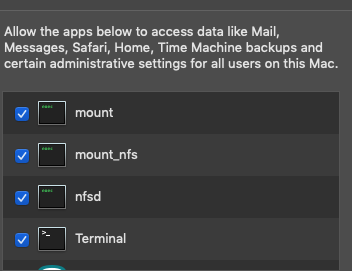
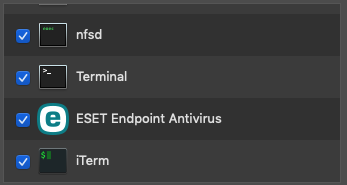
@tshahed could you also share the Vagrantfile used to produce this error? Thanks!
Hi @soapy1 , as the vagrant file belongs to my company, can I please only share how NFS share has been configured in the file, as that's where the problem is? Meanwhile, I have tried the same vagrant file for virtual box 5.2.42 and earlier version of 6, but the result is same.
master_config.vm.synced_folder "#{synced_folder}", "/srv/salt", :nfs => true
Hi @soapy1 I'm getting a timeout on nfs mount. Vagrant 2.2.9 Virtualbox: 6.1.10 r138449 (Qt5.6.3) Host: MacOs 10.15.5 Guest Os: Ubuntu 18.04.4 LTS (GNU/Linux 4.15.0-76-generic x86_64)
Vagrant log: https://gist.github.com/pasankg/c7fea5df203f1149bd6ce8e4da1ebc77 VagrantFile: https://gist.github.com/pasankg/59a337e87cbc1f417cfed48cdbac1ade
Would really appreciate if someone could help. Thank you

Is your firewall enabled? Try disabling it and then try again.
On Mon, Jun 29, 2020, 1:11 AM Pasan Gamage [email protected] wrote:
Hi @soapy1 https://github.com/soapy1 I'm getting a timeout on nfs mount. Vagrant 2.2.9 Virtualbox: 6.1.10 r138449 (Qt5.6.3) Host: MacOs 10.15.5 Guest Os: Ubuntu 18.04.4 LTS (GNU/Linux 4.15.0-76-generic x86_64)
Vagrant log: https://gist.github.com/pasankg/c7fea5df203f1149bd6ce8e4da1ebc77 VagrantFile: https://gist.github.com/pasankg/59a337e87cbc1f417cfed48cdbac1ade
Would really appreciate if someone could help. Thank you
— You are receiving this because you commented. Reply to this email directly, view it on GitHub https://github.com/hashicorp/vagrant/issues/11555#issuecomment-650908598, or unsubscribe https://github.com/notifications/unsubscribe-auth/AABLAGHKYH3SDAI6ZCU4S2TRZAPAHANCNFSM4MRXXBJA .
Vagrant sync folder on the recent OS X Catalina has been problematic for me too. Both NFS and the default manner. Sometimes both will just stop working. Uninstalling and re-installing VirtualBox has helped.
Have you tried... and I dunno why this has worked... But toggling the firewall on and then back off as vagrant appears stuck at nfs sync folder operation.
On Mon, Jun 29, 2020, 10:49 PM Pasan Gamage [email protected] wrote:
@nemonik https://github.com/nemonik I've tried that as well. Pretty much cornered now :(
— You are receiving this because you were mentioned. Reply to this email directly, view it on GitHub https://github.com/hashicorp/vagrant/issues/11555#issuecomment-651490548, or unsubscribe https://github.com/notifications/unsubscribe-auth/AABLAGDNNSIC6RVNOTMZNWTRZFHC3ANCNFSM4MRXXBJA .
I cannot toggle the Firewall on my office mac, it shows as off. I think there is a different firewall overriding the default
Since the mount command is timing out, it seems like this may be a networking issue. This guide https://github.com/hashicorp/vagrant/blob/80e94b5e4ed93a880130b815329fcbce57e4cfed/website/pages/docs/synced-folders/nfs.mdx#troubleshooting-nfs-issues (still under development) lists out some thing to check for to identify what the issue might be.
Hi @soapy1 I followed the options listed in the link. I didn't managed to get pass the initial error after going through the options in the link
The only options that I couldn't do are as below;
- Ensure the guest has access to the mounts. This can be done using something like the rpcinfo or showmount commands. For example rpcinfo -u
nfs or showmount -e .
I have given a static IP from the config.yml file for the environment and used that ip to run the command
vagrant_ip: 192.168.200.190
rpcinfo -u 192.168.200.190 nfs
rpcinfo: RPC: Timed out
program 100003 version 0 is not available
rpcinfo: RPC: Timed out
program 100003 version 4294967295 is not available
- Try manually mounting the folder, enabling verbose output:
Not sure the options I should use for <mount options> and <mountpoint>
Thank you
Right, from the logs above it looks like the IP you want to use is 192.168.200.1. So, you can check if that nfs folder is available on the guest by running a showmount -e 192.168.200.1. The result should be something like:
Export list for 192.168.200.1:
/System/Volumes/Data/Users/pasgamag/www/estate 192.168.200.190
You should also be able to run that on the host system and get similar results
Since the share is not available on the guest but is available on the host, it seems like this is probably a networking issue. Please ensure that the ports for nfs are not being blocked by a firewall on the guest. The ports that should be available 111, 2049 and 33333
Hi @soapy1 The firewall is disabled on the host.
I checked the ports via Network Utility and here is what I got;
Port Scanning host: 192.168.200.1

	 Open TCP Port: 	22     		ssh
	 Open TCP Port: 	111    		sunrpc
	 Open TCP Port: 	999    		garcon
	 Open TCP Port: 	1017
	 Open TCP Port: 	1021   		exp1
	 Open TCP Port: 	1023
	 Open TCP Port: 	2049   		nfsd
	 Open TCP Port: 	5001   		commplex-link
I didn't get 33333 in the results
And no results came back when scanning 192.168.200.190
Thank you
Hi @soapy1 Is it possible to set the ports manually via a configuration file ? If so could you let me know how to do it ? Thank you
@pasankg Vagrant doesn't have configuration options to change firewall rules on your host or guest. You may find the shell provisioner useful for doing this after boot. However, a more simple option might be to change boxes (if the problem seems to be with the guest not allowing traffic on the required ports).
For me same issue, and problem solved.
Vagrant Version: 2.2.19 OS Version: macOS Big Sur 11.6.1 Virtualbox Version: 6.1.32
Host Machine: 192.168.56.1 Guest Macine: 192.168.56.123
Here are my situation:
- On guest, run
sudo mount -o vers=3,udp 192.168.56.1:/Users/zqq/Desktop/openstack/kolla-ansible /home/vagrant/kolla-ansiblecommand hangs - Use wireshark to capture flow, I fount udp packet from guest to udp://192.168.56.1:2049
- On host, run
rpcinfo -p | grep nfs, I fount 2049 tcp port !! - On guest, re-run
sudo mount -o vers=3,tcp 192.168.56.1:/Users/zqq/Desktop/openstack/kolla-ansible /home/vagrant/kolla-ansible, just change udp to tcp, problem solved.

References:
https://www.vagrantup.com/docs/synced-folders/nfs#troubleshooting-nfs-issues

In my case, suddenly it started to stop working..
after trying, on Windows 10, Windows Defender Firewall for Public network wat the culprit.
after turned off it, vagrant up + NFS sharing started to work again..
