

 hashicorp
Terraform version takes 5 minutes on windows
Terraform Version
Terraform v0.14.0
Debug Output
Crash Output
Expected Behavior
Actual Behavior
Steps to Reproduce
Any command issued on terraform takes like 5 minutes of hang before starting.
Additional Context
That happened for the first time after installing GIT for Windows. 2 colleagues are having that issue on their laptop also. I upgraded to latest terraform, and tried also to remove GIT for Windows (full version with git bash) and issue remains.
References
- #26131

Hi @loicvolle,
The other issue you mentioned (#26131) seemed to get stuck because we could not reproduce it locally, suggesting that it was something unique to the requester's system rather than a general bug with Terraform on Windows.
Given that, I don't think we'll be able to make progress on this issue unless you have some additional context you can add about anything that might be special about your system that could lead to this bug. That includes, for example, if you are running software firewalls or virus scanners that could be blocking Terraform from starting up, or any software that "hooks in" to all running processes to change their behavior or attempt to monitor them.
If Terraform's behavior is conflicting somehow with some other software on your system and we can understand why that is then we might be able to adjust Terraform to not conflict in that way, though that will depend on what exactly is going wrong.
One example of such a conflict we've seen in the past is a bug in Trend Micro Antivirus which changes the behavior of Windows system calls in such a way that it can cause a deadlock, as discussed in #25133. We previously observed that in a provider rather than in Terraform CLI, but since the underlying conflict seems to come from the Go language runtime it is possible that the same problem could occur with any other software written in Go, which includes Terraform CLI itself.

I am also experiencing the same issue. I am not one of those 2 colleagues of the poster. :-) Disabling (real-time) virusprotection didn't help.
The same terraform version v0.12.29 worked for me earlier on a different machine. The only difference around this context I am aware of is that the working version was with an earlier git-bash version. I am now on:
~
$ git --version
git version 2.29.2.windows.3

~
$ bash --version
GNU bash, version 4.4.23(1)-release (x86_64-pc-msys)
Copyright (C) 2016 Free Software Foundation, Inc.
License GPLv3+: GNU GPL version 3 or later <http://gnu.org/licenses/gpl.html>

This is free software; you are free to change and redistribute it.
There is NO WARRANTY, to the extent permitted by law.

~

Same problem here. Not sure, when this happened, since I did not use terraform for quite a while. It was running fine in the past.
I was on version 0.13.3 and it was slow. Now I upgraded to 0.14.4 and its still an issue.
Have nothing "exciting" running on my machine. Windows Defender as my Anti Virus.
Running terraform in a WSL2 Ubuntu environment on the same machine is just fine.
Running terraform -version in git bash gives me this:
$ time terraform -version
Terraform v0.14.4

real    2m20.216s
user    0m0.015s
sys     0m0.000s

Terraform hangs suddenly started here too 1-2 weeks ago. It might be started around the same time where I upgraded Git for Windows here.
It still happened here - rarely with terraform --version but much more often with terraform plan or terraform apply

Seeing this too with v1.0.4 and 1.0.5 on windows 10 21H1 19043.1165
This is slowing down the terraform language server in vscode, because it's calling terraform version -json.
I can also see that terraform version -json calls another child terraform version -json process. Very strange. 🤔
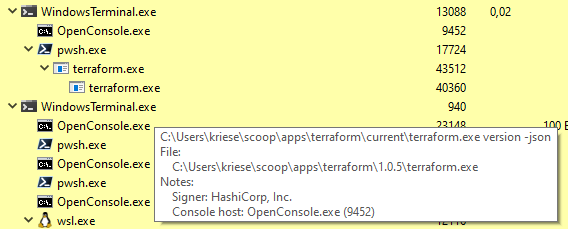
It's not the scoop shim!

Terraform is unuseable under Windows in moment - it hangs too often.
We built a debian container in the mean while and do use it under Windows.
Windows Server 2016 10.0.14393.0
> Measure-Command { terraform version | out-host }
2021-09-03T11:16:21.818+0200 [DEBUG] Adding temp file log sink: C:\Users\<user>\AppData\Local\Temp\2\terraform-log499287743
2021-09-03T11:16:21.819+0200 [INFO]  Terraform version: 1.0.5
2021-09-03T11:16:21.819+0200 [INFO]  Go runtime version: go1.16.4
2021-09-03T11:16:21.819+0200 [INFO]  CLI args: []string{"C:\\Users\\<user>\\scoop\\apps\\terraform\\current\\terraform.exe", "version"}
2021-09-03T11:16:21.821+0200 [TRACE] Stdout is not a terminal
2021-09-03T11:16:21.821+0200 [TRACE] Stderr is a terminal of width 190
2021-09-03T11:16:21.821+0200 [TRACE] Stdin is a terminal
2021-09-03T11:16:21.822+0200 [DEBUG] Attempting to open CLI config file: C:\Users\<user>\AppData\Roaming\terraform.rc
2021-09-03T11:16:21.822+0200 [DEBUG] File doesn't exist, but doesn't need to. Ignoring.
2021-09-03T11:16:21.823+0200 [DEBUG] checking for credentials in "C:\\Users\\<user>\\AppData\\Roaming\\terraform.d\\plugins"
2021-09-03T11:16:21.824+0200 [DEBUG] checking for credentials in "C:\\Users\\<user>\\AppData\\Roaming\\terraform.d\\plugins\\windows_amd64"
2021-09-03T11:16:21.825+0200 [DEBUG] ignoring non-existing provider search directory terraform.d/plugins
2021-09-03T11:16:21.825+0200 [DEBUG] will search for provider plugins in C:\Users\<user>\AppData\Roaming\terraform.d\plugins
2021-09-03T11:16:21.828+0200 [DEBUG] ignoring non-existing provider search directory C:\Users\<user>\AppData\Roaming\HashiCorp\Terraform\plugins
2021-09-03T11:16:21.828+0200 [INFO]  CLI command args: []string{"version"}
Terraform v1.0.5
on windows_amd64

Days              : 0
Hours             : 0
Minutes           : 0
Seconds           : 1
Milliseconds      : 219
Ticks             : 12192119
TotalDays         : 1,41112488425926E-05
TotalHours        : 0,000338669972222222
TotalMinutes      : 0,0203201983333333
TotalSeconds      : 1,2192119
TotalMilliseconds : 1219,2119
Windows 10 21H1 10.0.19043.0
> Measure-Command { terraform version | out-host }
2021-09-03T11:21:17.732+0200 [DEBUG] Adding temp file log sink: C:\Users\<user>\AppData\Local\Temp\terraform-log938763175
2021-09-03T11:21:17.760+0200 [INFO]  Terraform version: 1.0.5
2021-09-03T11:21:17.760+0200 [INFO]  Go runtime version: go1.16.4
2021-09-03T11:21:17.760+0200 [INFO]  CLI args: []string{"C:\\Users\\<user>\\scoop\\apps\\terraform\\current\\terraform.exe", "version"}
2021-09-03T11:21:17.760+0200 [TRACE] Stdout is not a terminal
2021-09-03T11:21:17.760+0200 [TRACE] Stderr is a terminal of width 209
2021-09-03T11:21:17.760+0200 [TRACE] Stdin is a terminal
2021-09-03T11:21:17.763+0200 [DEBUG] Attempting to open CLI config file: C:\Users\<user>\AppData\Roaming\terraform.rc
2021-09-03T11:21:17.763+0200 [DEBUG] File doesn't exist, but doesn't need to. Ignoring.
2021-09-03T11:21:17.768+0200 [DEBUG] checking for credentials in "C:\\Users\\<user>\\AppData\\Roaming\\terraform.d\\plugins"
2021-09-03T11:21:17.768+0200 [DEBUG] checking for credentials in "C:\\Users\\<user>\\AppData\\Roaming\\terraform.d\\plugins\\windows_amd64"
2021-09-03T11:21:17.768+0200 [DEBUG] ignoring non-existing provider search directory terraform.d/plugins
2021-09-03T11:21:17.768+0200 [DEBUG] will search for provider plugins in C:\Users\<user>\AppData\Roaming\terraform.d\plugins
2021-09-03T11:21:17.769+0200 [DEBUG] ignoring non-existing provider search directory C:\Users\<user>\AppData\Roaming\HashiCorp\Terraform\plugins
2021-09-03T11:21:17.770+0200 [INFO]  CLI command args: []string{"version"}
Terraform v1.0.5
on windows_amd64

Days              : 0
Hours             : 0
Minutes           : 1
Seconds           : 24
Milliseconds      : 349
Ticks             : 843498745
TotalDays         : 0,000976271695601852
TotalHours        : 0,0234305206944444
TotalMinutes      : 1,40583124166667
TotalSeconds      : 84,3498745
TotalMilliseconds : 84349,8745
Maybe thats a go issue, as i saw that recently on an older version of kubectl too
I'm suffering from the same inexplicable 5 minute lag before commands are processed. I wouldn't think --version would even put anything over the wire after I added SET CHECKPOINT_DISABLE=TRUE Did anyone find a solution?
C:\S\terraform-tm>time /T && terraform --version && time /T
04:18 PM
2022-08-03T16:23:44.714-0500 [DEBUG] Adding temp file log sink: C:\TEMP\terraform-log019394831
2022-08-03T16:23:44.715-0500 [INFO]  Terraform version: 1.0.6
2022-08-03T16:23:44.715-0500 [INFO]  Go runtime version: go1.16.4
2022-08-03T16:23:44.715-0500 [INFO]  CLI args: []string{"C:\\ProgramData\\chocolatey\\lib\\terraform\\tools\\terraform.exe", "--version"}
2022-08-03T16:23:44.717-0500 [TRACE] Stdout is a terminal of width 292
2022-08-03T16:23:44.717-0500 [TRACE] Stderr is a terminal of width 292
2022-08-03T16:23:44.717-0500 [TRACE] Stdin is a terminal
2022-08-03T16:23:44.723-0500 [DEBUG] Attempting to open CLI config file: C:\Users\XXXXXXXXX\AppData\Roaming\terraform.rc
2022-08-03T16:23:44.724-0500 [DEBUG] File doesn't exist, but doesn't need to. Ignoring.
2022-08-03T16:23:44.725-0500 [DEBUG] ignoring non-existing provider search directory terraform.d/plugins
2022-08-03T16:23:44.725-0500 [DEBUG] ignoring non-existing provider search directory C:\Users\XXXXXXXXX\AppData\Roaming\terraform.d\plugins
2022-08-03T16:23:44.727-0500 [DEBUG] ignoring non-existing provider search directory C:\Users\XXXXXXXXX\AppData\Roaming\HashiCorp\Terraform\plugins
2022-08-03T16:23:44.728-0500 [INFO]  CLI command args: []string{"version", "--version"}
Terraform v1.0.6
on windows_amd64
04:23 PM

@paladinu do you still suffer from this issue? it is surprising that it takes 5 minutes for the first log message to appear.

i see this still too sometimes, but not 5min, only ~1min delay until first output.
We do see it, but think it is probably mostly to do with our Global Protect VPN. For whatever reason, when we are connected to the VPN it takes extremely long. We've learned to work around it by just disconnecting when it's time for Terraform. It's a pain.
Maybe it is the virus scanner? I have seen this in the past when using the az cli. Upstream the vpn provider had to update the virus scanner profiles.
Op wo 21 jun. 2023 17:10 schreef Loïc VOLLE @.***>:
We also have Global Protect as VPN. That can be a thing !
— Reply to this email directly, view it on GitHub https://github.com/hashicorp/terraform/issues/27170#issuecomment-1601023009, or unsubscribe https://github.com/notifications/unsubscribe-auth/ABPIYJDWK4RZINU3EG4CZI3XMMFFLANCNFSM4UQXMCRQ . You are receiving this because you commented.Message ID: @.***>
It's a good thought, but, for us at least, it did not appear to be malware/virus scan. We turned that all off and had the same result. I'm more inclined to pin it on the VPN, but I haven't been able to figure out why. I tried to do some packet capture etc, but probably don't have enough skill to figure out what to look for.
Are you on windows? I believe there is a sysinternals tool that logs all windows tcp events: https://learn.microsoft.com/en-us/sysinternals/downloads/tcpview
Op ma 26 jun. 2023 19:29 schreef Uriah Blatherwick @.***
:
It's a good thought, but, for us at least, it did not appear to be malware/virus scan. We turned that all off and had the same result. I'm more inclined to pin it on the VPN, but I haven't been able to figure out why. I tried to do some packet capture etc, but probably don't have enough skill to figure out what to look for.
— Reply to this email directly, view it on GitHub https://github.com/hashicorp/terraform/issues/27170#issuecomment-1607918466, or unsubscribe https://github.com/notifications/unsubscribe-auth/ABPIYJC5KGQYMIXZSJ4DXU3XNHBGLANCNFSM4UQXMCRQ . You are receiving this because you commented.Message ID: @.***>