
terraform-provider-azurerm
 terraform-provider-azurerm copied to clipboard
 hashicorp
azurerm_windows_web_app -> application_stack ->current_stack = dotnetcore not working correctly
Is there an existing issue for this?
- [X] I have searched the existing issues
Community Note
- Please vote on this issue by adding a :thumbsup: reaction to the original issue to help the community and maintainers prioritize this request
- Please do not leave "+1" or "me too" comments, they generate extra noise for issue followers and do not help prioritize the request
- If you are interested in working on this issue or have submitted a pull request, please leave a comment
Terraform Version
1.2.0
AzureRM Provider Version
3.6.0
Affected Resource(s)/Data Source(s)
azurerm_windows_web_app
Terraform Configuration Files
resource "azurerm_windows_web_app" "as" {
  name                = xxx
  location            = data.azurerm_resource_group.rg.location
  resource_group_name = data.azurerm_resource_group.rg.name
  service_plan_id     = module.plan.id

  enabled    = true
  https_only = true

  site_config {
    application_stack {
      current_stack  = "dotnetcore"
      dotnet_version = "v3.0"

      # Setting the version to v4.0 works ??
      #dotnet_version = "v4.0"
    }
  }
  identity {
    type = "SystemAssigned"
  }
}
Debug Output/Panic Output
Everything deploys with out errors, and everything looks correct in Azure Portal.
Expected Behaviour
As expected in Azure Portal the webapps stack is set to .Net and the .Net version is set to .Net Core (3.1,2.1).
The expectation is that the deployed website that is running .Net Core 3.1 should startup.
Actual Behaviour
The webapp does not start and only result in a "Service unavailable" response.
If I go into Azure Portal and change the .Net version to .Net 6 without saving and then change it back to .Net Core and save the changes, the website response as expected.
When running terraform plan again the .Net version has changes to v4.0 in Azure and terraform will try to update the version back to v3.0 and the website will again be offline.
Setting the .Net version to v4.0 looks like it solves the issue, but the documentation states that if current_stack is dornetcore, then the dotnet_version should be v3.0
"The value of dotnetcore is for use in combination with dotnet_version set to v3.0 only."
Steps to Reproduce
1: Create a azurerm_windows_web_app resource with:
site_config { application_stack { current_stack = "dotnetcore" dotnet_version = "v3.0" }
2: After deploy the website does not start correctly.
3: Go to Azure portal and change the .Net version to something other then .Net Core and change it back and save. The website will now start correctly.
4: Run terraform plan and then the version will be updated from v4.0 back to v3.0 (this is expected)
Important Factoids
No
References
No response

@soelgaard I do not see such behavior, the web app is started as expected.
api response:
{
    "value": [
        {
            "id": "/subscriptions/xxx/resourceGroups/xiaxintestrg-windows-app/providers/Microsoft.Web/sites/xiaxintestwwp/config/web",
            "name": "xiaxintestwwp",
            "type": "Microsoft.Web/sites/config",
            "location": "East US",
            "tags": {},
            "properties": {
                "numberOfWorkers": 1,
                "defaultDocuments": [
                    "Default.htm",
                    "Default.html",
                    "Default.asp",
                    "index.htm",
                    "index.html",
                    "iisstart.htm",
                    "default.aspx",
                    "index.php",
                    "hostingstart.html"
                ],
                "netFrameworkVersion": "v3.0",
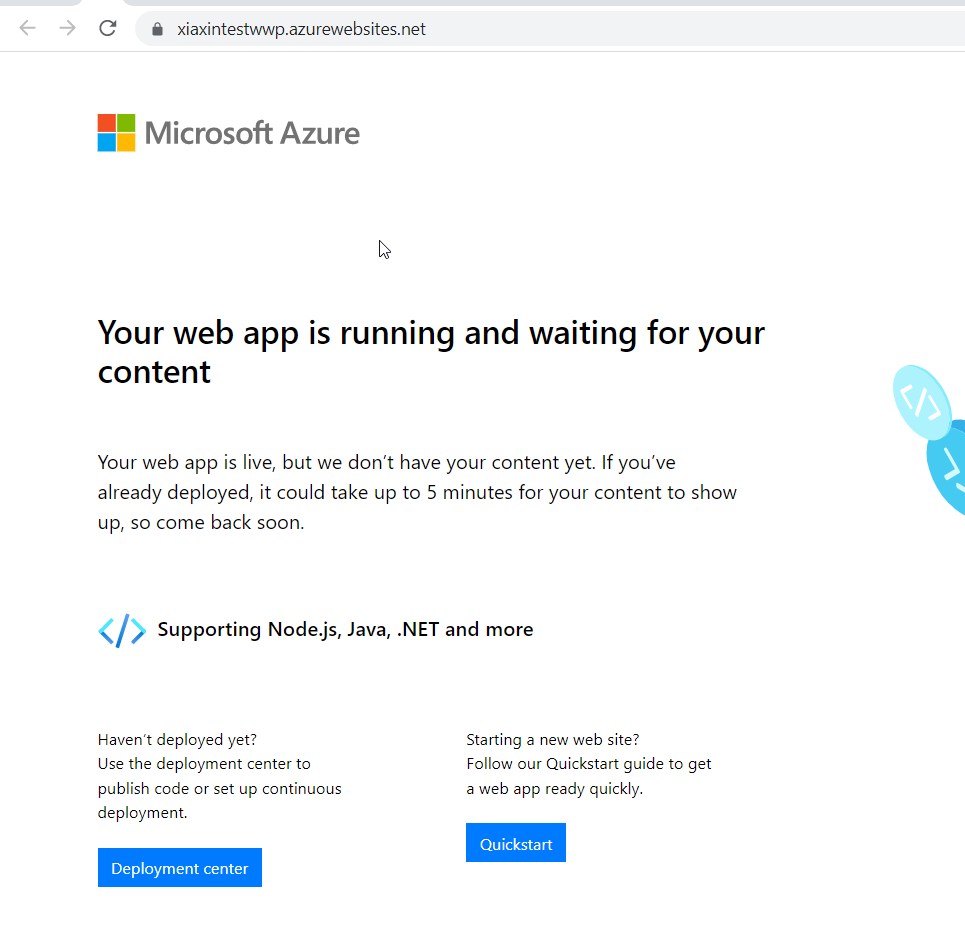
Can you share the whole TF script with me?

I have that same issue which is causing problems (service unavailable HTTP error) in customer environments after apply. This problem seems to appear after running terraform apply the second time. It seems that the dotnet_version needs to be v4.0 instead of v3.0 . This bug is apparent when comparing the Export template json file before and after.
AzureRM versions: 3.6.X, 3.7.X, 3.8.X and 3.9.X Terraform versions: Terraform v1.2.X on windows_amd64
resource "azurerm_windows_web_app" "wwa" {

  site_config {
    current_stack    = "dotnetcore"
    dotnet_version = "v3.0"

    #current_stack    = "dotnet"
    #dotnet_version = "v4.0"
  }
}
Actual Bug

Expected result
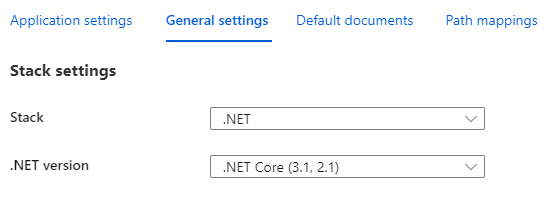
Export template comparison


@soelgaard @woowil The underlying server has all the dotnet core runtime installed, so any versions of dotnet web app are supported. The dotnet core web app is not controlled by this property, instead, is controlled by current stack and this can be retrieved by calling the api:[https://docs.microsoft.com/en-us/rest/api/appservice/web-apps/list-metadata](POST https://management.azure.com/subscriptions/{subscriptionId}/resourceGroups/{resourceGroupName}/providers/Microsoft.Web/sites/{name}/config/metadata/list?api-version=2021-02-01)
The netframeworkVersion is for asp.net web app and the valid values are v2.0, 4.0, 5.0, 6.0 (5, 6 is for integrated .NET).
@soelgaard @woowil Hey Guys, good day! Can you do me a favor which is to confirm if the dotnet core app deployment is functioning well now? Thanks a lot!
@xiaxyi I have just provisioned a Web App using .net core 3.1 and updated to .net 6 It works!
Terraform v1.2.6 on windows_amd64 Azurerm v3.18.0
hey @soelgaard, good day. Do you mind sharing the current behavior that you are experiencing with me so I can check if there is anything I need to take from my side? Thanks
This functionality has been released in v3.21.0 of the Terraform Provider. Please see the Terraform documentation on provider versioning or reach out if you need any assistance upgrading.
For further feature requests or bug reports with this functionality, please create a new GitHub issue following the template. Thank you!
![github-actions[bot] avatar](https://avatars.githubusercontent.com/in/15368?v=4 "Published by a pub.dev verified publisher")
I'm going to lock this issue because it has been closed for 30 days ⏳. This helps our maintainers find and focus on the active issues. If you have found a problem that seems similar to this, please open a new issue and complete the issue template so we can capture all the details necessary to investigate further.