
terraform-provider-azurerm
 terraform-provider-azurerm copied to clipboard
 hashicorp
azurerm_windows_web_app - current_stack
Is there an existing issue for this?
- [X] I have searched the existing issues
Community Note
- Please vote on this issue by adding a :thumbsup: reaction to the original issue to help the community and maintainers prioritize this request
- Please do not leave "+1" or "me too" comments, they generate extra noise for issue followers and do not help prioritize the request
- If you are interested in working on this issue or have submitted a pull request, please leave a comment
Terraform Version
1.1.7
AzureRM Provider Version
3.0.2
Affected Resource(s)/Data Source(s)
azurerm_windows_web_app
Terraform Configuration Files
provider "azurerm" {
  features {}
}

resource "azurerm_resource_group" "rg" {
  name     = var.global_name_app
  location = var.llsappservice_location
}

resource "azurerm_service_plan" "sp" {
  name                = var.global_name_app
  resource_group_name = var.global_name_app
  location            = var.llsappservice_location
  sku_name            = "F1"
  os_type             = "Windows"

  depends_on = [ azurerm_resource_group.rg ]
}

resource "azurerm_windows_web_app" "wwa" {
  name                = var.global_name_app
  resource_group_name = var.global_name_app
  location            = var.llsappservice_location
  service_plan_id     = azurerm_service_plan.sp.id

  site_config {
      always_on         = false
      use_32_bit_worker = true
      ip_restriction {
        action      = "Deny"
        ip_address  = var.appservice_ip_block
        name        = "internet"
        priority    = 101
      }
      ip_restriction {
        action      = "Allow"
        ip_address  = var.appservice_ip_allow
        name        = "myip"
        priority    = 100
      }
      application_stack {
          current_stack   = "dotnet"
          dotnet_version  = "v3.0"
      }

  }

  depends_on = [ azurerm_service_plan.sp ]
}
Debug Output/Panic Output
# azurerm_windows_web_app.wwa will be updated in-place
  ~ resource "azurerm_windows_web_app" "wwa" {
        id                                = "/subscriptions/xx-xx-xx-xxxxxx/resourceGroups/llsappservice/providers/Microsoft.Web/sites/llsappservice"
        name                              = "llsappservice"
        tags                              = {}
        # (18 unchanged attributes hidden)


      ~ site_config {
            # (23 unchanged attributes hidden)

          ~ application_stack {
              ~ current_stack  = "dotnetcore" -> "dotnet"
                # (1 unchanged attribute hidden)
            }

          - virtual_application {
              - physical_path = "site\\wwwroot" -> null
              - preload       = false -> null
              - virtual_path  = "/" -> null
            }
        }
        # (1 unchanged block hidden)
    }
Expected Behaviour
The terraform needs to deploy a dotnetcore version 3.1 on the App Service
Actual Behaviour
It is creating the appservice with the version of the dotnetcore blank, with that situation the app service application couldn`t start, we need a manual interversion to add the correct option.
Steps to Reproduce
No response
Important Factoids
No response
References
Looks like the azure api is expecting dotnetcore value on the current_stack field. After the deployment, you can run a plan to validate this information.

I am getting a similar issue where it is not relating to just dot net core.
resource "azurerm_windows_web_app" "app-service" { name = "cliffenettesttesting" location = "uksouth" resource_group_name = azurerm_resource_group.rg.name service_plan_id = module.appservice-plan[0].appservice-plan-id #app_settings = var.app-settings tags = var.tags https_only = true site_config {
  always_on                     = true

  application_stack  {
      current_stack             = "dotnet"
      dotnet_version            = "5.0"

    }
} }
this results in the following on the portal...
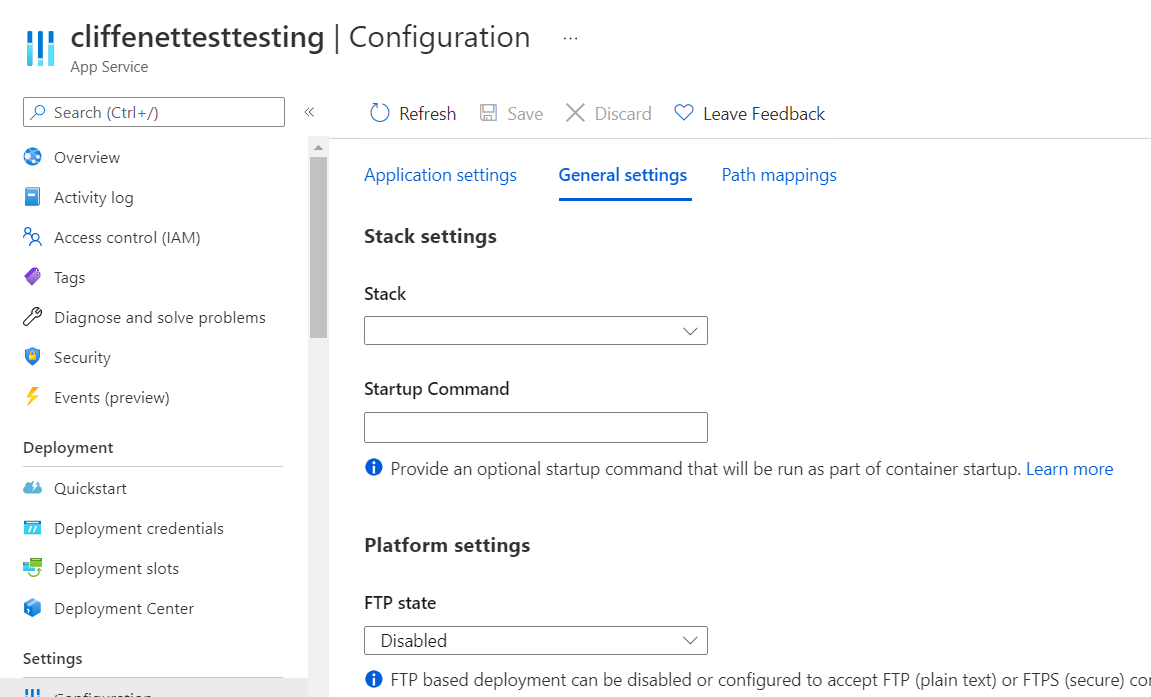

Same with
application_stack  {
      current_stack             = "dotnet"
      dotnet_version            = "4.0"

    }
The Azure Portal UI is blank and consequental apply detects configuration drift and tries to set current_stack again and again but nothing happens.

@cliffey272 dotnet + 5.0 works fine from my side, but I .netcore + v3.0 is not behaving as expected and I'm having a future confirmation about it.

Hi everyone, i am also having problem with docker for the application stack, with this settings:
    `application_stack = {
     docker_container_name = "aci-helloworld"
     docker_container_registry = "${module.acr.loginServer}"
     docker_container_tag = "latest"
    }`
it seems the application_stack does not saved in the TF state file correctly. So everytime, i run TF plan, it gives me changes.
Has anyone the same problem? Thank you very much

@leandroscardua The version v3.0 is for dotnetcore runtime, not for .net. However, as there is no 3.0 version of .net, we will fix it in the mentioned pr.
Hey @leandroscardua , good day! Can you do me a favor which is to confirm if the DotNet Core app deployment is functioning well for you now? Thanks a lot!
Hi @xiaxyi ,
Really sorry about the delay to answer you here. I'm planning to test it on Sunday, I`ll provide an update soon about it
Thank you and again sorry
HI @xiaxyi ,
I just finished the test, take a look on the results.
possible value, based on the terraform output: Error: expected site_config.0.application_stack.0.dotnet_version to be one of [v2.0 v3.0 core3.1 v4.0 v5.0 v6.0], Error: expected site_config.0.application_stack.0.current_stack to be one of [dotnet dotnetcore node python php java],
.dotnet
Version 6 (OK)
  application_stack {
      current_stack   = "dotnet"
      dotnet_version  = "v6.0"
  }
Version 5 ( OK,) but show the information related to the The selected version 'v5.0' is deprecated. Please consider updating it.
  application_stack {
      current_stack   = "dotnet"
      dotnet_version  = "v5.0"
  }
Version 4 ( OK )
  application_stack {
      current_stack   = "dotnet"
      dotnet_version  = "v4.0"
  }
Version 3 ( That is the very weired part, when I setup with that option, we still seeing the issue to setup the version 3.
  application_stack {
      current_stack   = "dotnet"
      dotnet_version  = "v3.0"
  }
Version 2 ( to be able to setup the version 3.5, you need to user version the number v2.0 on the manifest,) a bit weird to use on that away.
  application_stack {
      current_stack   = "dotnet"
      dotnet_version  = "v2.0"
  }
.dotnetcore
Version 3.1 ( OK )
  application_stack {
      current_stack   = "dotnetcore"
      dotnet_version  = "core3.1"
  }
Version 5 ( when we set version 5 and dotnetcore, the final configuration will be dotnetcore 3.1 ), a bit weird to use on that away.
  application_stack {
      current_stack   = "dotnetcore"
      dotnet_version  = "v5.0"
  }
Version 6 ( when we set version 6 and dotnetcore, the final configuration will be dotnetcore 3.1 ), a bit weird to use on that away.
  application_stack {
      current_stack   = "dotnetcore"
      dotnet_version  = "v5.0"
  }
I`m not able to use .NET 7 (Preview), and ther version are not matching with the value on the config.
possible value, based on the terraform output: expected site_config.0.application_stack.0.dotnet_version to be one of [v2.0 v3.0 core3.1 v4.0 v5.0 v6.0], expected site_config.0.application_stack.0.current_stack to be one of [dotnet dotnetcore node python php java],
Thanks @leandroscardua for the feedbacks. version 3.1 is only for dotnet core runtime. I think we better not use it for dotnet framework app:
  application_stack {
      current_stack   = "dotnetcore"
      dotnet_version  = "v5.0"
  }
You may find more dotnot runtime related information in this doc
For higher version, we need to specify the stack as dotnet
I'm going to lock this issue because it has been closed for 30 days ⏳. This helps our maintainers find and focus on the active issues. If you have found a problem that seems similar to this, please open a new issue and complete the issue template so we can capture all the details necessary to investigate further.
![github-actions[bot] avatar](https://avatars.githubusercontent.com/in/15368?v=4 "Published by a pub.dev verified publisher")