

 hashcat
OSX MBA Fails to Crack Some SHA256 (-m 1400)
MacBook Air with 2.2 GHz Dual-Core Intel Core i7 and Intel HD Graphics 6000 1536 MB fails to crack hashes when running on GPU, but succeeds on CPU.
Case in point:
hashcat -v -a 3 -m 1400 ad10683a9821292be7236ff9686c6fab750f583312ac54d918e7296a01c4ba68 "?d?d.1?d?d.1?d?d" -O -D 2 --potfile-disable
Results in
hashcat (v6.1.1) starting...

OpenCL API (OpenCL 1.2 (Jul  5 2020 01:14:53)) - Platform #1 [Apple]
====================================================================
* Device #1: Intel(R) Core(TM) i7-5650U CPU @ 2.20GHz, skipped
* Device #2: Intel(R) Iris(TM) Graphics 6100, 1472/1536 MB (384 MB allocatable), 48MCU

Minimum password length supported by kernel: 0
Maximum password length supported by kernel: 55

Hashes: 1 digests; 1 unique digests, 1 unique salts
Bitmaps: 16 bits, 65536 entries, 0x0000ffff mask, 262144 bytes, 5/13 rotates

Applicable optimizers applied:
* Optimized-Kernel
* Zero-Byte
* Precompute-Init
* Early-Skip
* Not-Salted
* Not-Iterated
* Single-Hash
* Single-Salt
* Brute-Force
* Raw-Hash

Watchdog: Hardware monitoring interface not found on your system.
Watchdog: Temperature abort trigger disabled.

Host memory required for this attack: 169 MB

The wordlist or mask that you are using is too small.
This means that hashcat cannot use the full parallel power of your device(s).
Unless you supply more work, your cracking speed will drop.
For tips on supplying more work, see: https://hashcat.net/faq/morework

Approaching final keyspace - workload adjusted.

Session..........: hashcat
Status...........: Exhausted
Hash.Name........: SHA2-256
Hash.Target......: ad10683a9821292be7236ff9686c6fab750f583312ac54d918e...c4ba68
Time.Started.....: Thu Aug  6 22:56:42 2020 (0 secs)
Time.Estimated...: Thu Aug  6 22:56:42 2020 (0 secs)
Guess.Mask.......: ?d?d.1?d?d.1?d?d [10]
Guess.Queue......: 1/1 (100.00%)
Speed.#2.........: 45605.9 kH/s (3.74ms) @ Accel:64 Loops:25 Thr:8 Vec:1
Recovered........: 0/1 (0.00%) Digests
Progress.........: 1000000/1000000 (100.00%)
Rejected.........: 0/1000000 (0.00%)
Restore.Point....: 10000/10000 (100.00%)
Restore.Sub.#2...: Salt:0 Amplifier:75-100 Iteration:0-25
Candidates.#2....: 46.119.123 -> 68.164.173
As opposed to forcing the workload onto the CPU:
hashcat -v -a 3 -m 1400 ad10683a9821292be7236ff9686c6fab750f583312ac54d918e7296a01c4ba68 "?d?d.1?d?d.1?d?d" -O -D 1 --potfile-disable
which results in this:
hashcat (v6.1.1) starting...

OpenCL API (OpenCL 1.2 (Jul  5 2020 01:14:53)) - Platform #1 [Apple]
====================================================================
* Device #1: Intel(R) Core(TM) i7-5650U CPU @ 2.20GHz, 8128/8192 MB (2048 MB allocatable), 4MCU
* Device #2: Intel(R) Iris(TM) Graphics 6100, skipped

Minimum password length supported by kernel: 0
Maximum password length supported by kernel: 55

Hashes: 1 digests; 1 unique digests, 1 unique salts
Bitmaps: 16 bits, 65536 entries, 0x0000ffff mask, 262144 bytes, 5/13 rotates

Applicable optimizers applied:
* Optimized-Kernel
* Zero-Byte
* Precompute-Init
* Early-Skip
* Not-Salted
* Not-Iterated
* Single-Hash
* Single-Salt
* Brute-Force
* Raw-Hash

Watchdog: Hardware monitoring interface not found on your system.
Watchdog: Temperature abort trigger disabled.

Host memory required for this attack: 65 MB

ad10683a9821292be7236ff9686c6fab750f583312ac54d918e7296a01c4ba68:35.182.128

Session..........: hashcat
Status...........: Cracked
Hash.Name........: SHA2-256
Hash.Target......: ad10683a9821292be7236ff9686c6fab750f583312ac54d918e...c4ba68
Time.Started.....: Thu Aug  6 22:58:47 2020 (0 secs)
Time.Estimated...: Thu Aug  6 22:58:47 2020 (0 secs)
Guess.Mask.......: ?d?d.1?d?d.1?d?d [10]
Guess.Queue......: 1/1 (100.00%)
Speed.#1.........: 18634.0 kH/s (10.59ms) @ Accel:512 Loops:100 Thr:1 Vec:4
Recovered........: 1/1 (100.00%) Digests
Progress.........: 614400/1000000 (61.44%)
Rejected.........: 0/614400 (0.00%)
Restore.Point....: 4096/10000 (40.96%)
Restore.Sub.#1...: Salt:0 Amplifier:0-100 Iteration:0-100
Candidates.#1....: 12.139.125 -> 68.105.109
So it succeeded on the CPU, but failed on the GPU.
Some more details, I found this occurred with some masks, but not others.
The following masks and hashes, worked as expected:
- HASH:TEXT
aabc1f190e5e5ff7c0bab36f506aeadb9ef89d85bf352ae021568c7c0a475e45:35.182.12MASK?d?d.1?d?d.1?d - HASH:TEXT
eca8d36f122dc5cc8379e26baa218c0a4e9ce9d7f37cbf6b7957e8ca46e22191:35.182MASK?d?d.1?d?d - HASH:TEXT
a9f47c1fb46a162cd4dbf2ffc9c73d8386d2b9da2aae16cda14ee74d51d8f743:35182128MASK?d?d?d?d?d?d?d?d - HASH:TEXT
c073c0a0b7b5fef2690d0c279c0026be2da813358b199703bc66423269083df8:11.111.111MASK?d?d.1?d?d.1?d?d - HASH:TEXT
c073c0a0b7b5fef2690d0c279c0026be2da813358b199703bc66423269083df8:11.111.111MASK?d?d.?d?d?d.?d?d?d
Here are some cases that don't work as expected on the GPU
-
HASH:TEXT
fc9429cf86ea2cd2af756d8fffa859e23808fed5d36db3d31a0b393568ad94fe:35.182.128.188MASK?d?d.1?d?d.1?d?d.1?d?d -
HASH:TEXT
ad10683a9821292be7236ff9686c6fab750f583312ac54d918e7296a01c4ba68:35.182.128MASK?d?d.1?d?d.1?d?d -
HASH:TEXT
ad10683a9821292be7236ff9686c6fab750f583312ac54d918e7296a01c4ba68:35.182.128MASK?d?d.?d?d?d.?d?d?d -
HASH:TEXT
d775695094e4c100996a4df6a571757c187ac3dc81d7767e59442aefd65b49d6:35.182.127MASK?d?d.1?d?d.1?d?d
I am wondering if this is related to #1348.

I have no issues on my Macbook Pro with Intel Iris Plus GPU, but I did notice my OpenCL 1.2 date is June 8, 2020. What version of MacOS are you running?

Hi,
$ ./hashcat -I
hashcat (v6.1.1-122-g68edafad7+) starting...

OpenCL Info:
============

OpenCL Platform ID #1
  Vendor..: Apple
  Name....: Apple
  Version.: OpenCL 1.2 (May  7 2020 00:10:14)

  Backend Device ID #1
    Type...........: CPU
    Vendor.ID......: 4
    Vendor.........: Intel
    Name...........: Intel(R) Core(TM) i7-4578U CPU @ 3.00GHz
    Version........: OpenCL 1.2
    Processor(s)...: 4
    Clock..........: 3000
    Memory.Total...: 8192 MB (limited to 2048 MB allocatable in one block)
    Memory.Free....: 8128 MB
    OpenCL.Version.: OpenCL C 1.2
    Driver.Version.: 1.1

  Backend Device ID #2
    Type...........: GPU
    Vendor.ID......: 4
    Vendor.........: Intel
    Name...........: Iris
    Version........: OpenCL 1.2
    Processor(s)...: 40
    Clock..........: 1200
    Memory.Total...: 1536 MB (limited to 384 MB allocatable in one block)
    Memory.Free....: 0 MB
    OpenCL.Version.: OpenCL C 1.2
    Driver.Version.: 1.2(Aug 31 2020 23:17:26)
$ i=10; while [ $((--i)) -ge 0 ]; do echo -n "$i : "; ./hashcat -v -a 3 -m 1400 ad10683a9821292be7236ff9686c6fab750f583312ac54d918e7296a01c4ba68 "?d?d.1?d?d.1?d?d" -D 2 --potfile-disable --force -O --quiet; echo; done | grep -v ^$
9 : ad10683a9821292be7236ff9686c6fab750f583312ac54d918e7296a01c4ba68:35.182.128
8 : ad10683a9821292be7236ff9686c6fab750f583312ac54d918e7296a01c4ba68:35.182.128
7 :
6 :
5 :
4 :
3 : ad10683a9821292be7236ff9686c6fab750f583312ac54d918e7296a01c4ba68:35.182.128
2 :
1 :
0 : ad10683a9821292be7236ff9686c6fab750f583312ac54d918e7296a01c4ba68:35.182.128
Also without '-O'
$ i=10; while [ $((--i)) -ge 0 ]; do echo -n "$i : "; ./hashcat -v -a 3 -m 1400 ad10683a9821292be7236ff9686c6fab750f583312ac54d918e7296a01c4ba68 "?d?d.1?d?d.1?d?d" -D 2 --potfile-disable --force --quiet; echo; done | grep -v ^$
9 : ad10683a9821292be7236ff9686c6fab750f583312ac54d918e7296a01c4ba68:35.182.128
8 : ad10683a9821292be7236ff9686c6fab750f583312ac54d918e7296a01c4ba68:35.182.128
7 :
6 : ad10683a9821292be7236ff9686c6fab750f583312ac54d918e7296a01c4ba68:35.182.128
5 : ad10683a9821292be7236ff9686c6fab750f583312ac54d918e7296a01c4ba68:35.182.128
4 :
3 : ad10683a9821292be7236ff9686c6fab750f583312ac54d918e7296a01c4ba68:35.182.128
2 :
1 : ad10683a9821292be7236ff9686c6fab750f583312ac54d918e7296a01c4ba68:35.182.128
0 : ad10683a9821292be7236ff9686c6fab750f583312ac54d918e7296a01c4ba68:35.182.128
Looks like a bug and it only appears using gpu devices.

I have no issues on my Macbook Pro with Intel Iris Plus GPU, but I did notice my OpenCL 1.2 date is June 8, 2020. What version of MacOS are you running?
MacOS 10.15 on a MacBook Air.
@TheMatt2, mask are good. The problem is most likely in Apple's GPU driver (one of many).
$ i=10; while [ $((--i)) -ge 0 ]; do echo -n "$i : "; ./hashcat --quiet -a 3 "?d?d.1?d?d.1?d?d" -D2 --stdout|grep 35.182.128 ; echo ; done | grep -v ^$
9 : 35.182.128
8 : 35.182.128
7 : 35.182.128
6 : 35.182.128
5 : 35.182.128
4 : 35.182.128
3 : 35.182.128
2 : 35.182.128
1 : 35.182.128
0 : 35.182.128
$ i=10; while [ $((--i)) -ge 0 ]; do echo -n "$i : "; ./hashcat --quiet -a 3 "?d?d.1?d?d.1?d?d" -D2 --stdout|wc -l ; echo ; done | grep -v ^$
9 :  1000000
8 :  1000000
7 :  1000000
6 :  1000000
5 :  1000000
4 :  1000000
3 :  1000000
2 :  1000000
1 :  1000000
0 :  1000000
Luckily, increasing the workloads (look at the mask below) doesn't happen :)
$ i=10; while [ $((--i)) -ge 0 ]; do echo -n "$i : "; ./hashcat --quiet -a 3 -m 1400 ad10683a9821292be7236ff9686c6fab750f583312ac54d918e7296a01c4ba68 "?d?d?s1?d?d?s1?d?d" -D 2 --potfile-disable --force; echo ; done | grep -v ^$
9 : ad10683a9821292be7236ff9686c6fab750f583312ac54d918e7296a01c4ba68:35.182.128
8 : ad10683a9821292be7236ff9686c6fab750f583312ac54d918e7296a01c4ba68:35.182.128
7 : ad10683a9821292be7236ff9686c6fab750f583312ac54d918e7296a01c4ba68:35.182.128
6 : ad10683a9821292be7236ff9686c6fab750f583312ac54d918e7296a01c4ba68:35.182.128
5 : ad10683a9821292be7236ff9686c6fab750f583312ac54d918e7296a01c4ba68:35.182.128
4 : ad10683a9821292be7236ff9686c6fab750f583312ac54d918e7296a01c4ba68:35.182.128
3 : ad10683a9821292be7236ff9686c6fab750f583312ac54d918e7296a01c4ba68:35.182.128
2 : ad10683a9821292be7236ff9686c6fab750f583312ac54d918e7296a01c4ba68:35.182.128
1 : ad10683a9821292be7236ff9686c6fab750f583312ac54d918e7296a01c4ba68:35.182.128
0 : ad10683a9821292be7236ff9686c6fab750f583312ac54d918e7296a01c4ba68:35.182.128
Is this still relevant? I had this tested on AMD Radeon Pro W5700X Compute Engine and no problems:
Mac-Pro:hashcat$ i=10; while [ $((--i)) -ge 0 ]; do echo -n "$i : "; ./hashcat -v -a 3 -m 1400 ad10683a9821292be7236ff9686c6fab750f583312ac54d918e7296a01c4ba68 "?d?d.1?d?d.1?d?d" -D 2 --potfile-disable --force -O --quiet; echo; done | grep -v ^$
9 : ad10683a9821292be7236ff9686c6fab750f583312ac54d918e7296a01c4ba68:35.182.128
8 : ad10683a9821292be7236ff9686c6fab750f583312ac54d918e7296a01c4ba68:35.182.128
7 : ad10683a9821292be7236ff9686c6fab750f583312ac54d918e7296a01c4ba68:35.182.128
6 : ad10683a9821292be7236ff9686c6fab750f583312ac54d918e7296a01c4ba68:35.182.128
5 : ad10683a9821292be7236ff9686c6fab750f583312ac54d918e7296a01c4ba68:35.182.128
4 : ad10683a9821292be7236ff9686c6fab750f583312ac54d918e7296a01c4ba68:35.182.128
3 : ad10683a9821292be7236ff9686c6fab750f583312ac54d918e7296a01c4ba68:35.182.128
2 : ad10683a9821292be7236ff9686c6fab750f583312ac54d918e7296a01c4ba68:35.182.128
1 : ad10683a9821292be7236ff9686c6fab750f583312ac54d918e7296a01c4ba68:35.182.128
0 : ad10683a9821292be7236ff9686c6fab750f583312ac54d918e7296a01c4ba68:35.182.128

Hi, yes is relevant. Also the following fail:
$ ./hashcat --potfile-disable --runtime 400 --hwmon-disable -D 2 --backend-vector-width 1 -a 3 -m 1400 '698b9fc71671b145ee218d238fae754a40f09cbdf51f6e19617deeda197bca52' ?d?d?d?d?d?d?d?d89168308736199811536950
[...]
Session..........: hashcat
Status...........: Exhausted
Hash.Name........: SHA2-256
Works fine here:
698b9fc71671b145ee218d238fae754a40f09cbdf51f6e19617deeda197bca52:8591218989168308736199811536950

Session..........: hashcat
Status...........: Cracked
Hash.Name........: SHA2-256
So we have an issue only with Intel Iris, and not only with sha256.
$ ./hashcat --potfile-disable --runtime 400 --hwmon-disable -D 2 --backend-vector-width 1 -a 3 -m 100 '22abae427c7f4b6738866ba670e607ceaa4b1187' ?d?d?d?d?d?d?d?d18385567694620593727005
[...]
Session..........: hashcat
Status...........: Exhausted
Hash.Name........: SHA1
Hash.Target......: 22abae427c7f4b6738866ba670e607ceaa4b1187
So we have an issue only with Intel Iris, and not only with sha256.
$ ./hashcat --potfile-disable --runtime 400 --hwmon-disable -D 2 --backend-vector-width 1 -a 3 -m 100 '22abae427c7f4b6738866ba670e607ceaa4b1187' ?d?d?d?d?d?d?d?d18385567694620593727005
[...]
Session..........: hashcat
Status...........: Exhausted
Hash.Name........: SHA1
Hash.Target......: 22abae427c7f4b6738866ba670e607ceaa4b1187
With --markov-disable and SHA1 the password is found, but not with SHA256 ...
That means that work item ID has an influence. Maybe -T 1 will fix it?
No :|
With -S it works, is it probably something to do with the gpu generator?
$ ./hashcat --potfile-disable --hwmon-disable --backend-vector-width 8 -a 3 -m 1400 '698b9fc71671b145ee218d238fae754a40f09cbdf51f6e19617deeda197bca52' ?d?d?d?d?d?d?d?d89168308736199811536950 -D2 -S
[...]
Session..........: hashcat
Status...........: Cracked
Hash.Name........: SHA2-256
Works also with --markov-classic
$ ./hashcat --potfile-disable --hwmon-disable --backend-vector-width 8 -a 3 -m 1400 '698b9fc71671b145ee218d238fae754a40f09cbdf51f6e19617deeda197bca52' ?d?d?d?d?d?d?d?d89168308736199811536950 -D2 --markov-classic
[...]
Session..........: hashcat
Status...........: Cracked
Hash.Name........: SHA2-256
Problem still relevant.
Running the test case on my machine creates the following output.
Desktop % i=10; while [ $((--i)) -ge 0 ]; do echo -n "$i : "; hashcat -v -a 3 -m 1400 ad10683a9821292be7236ff9686c6fab750f583312ac54d918e7296a01c4ba68 "?d?d.1?d?d.1?d?d" -D 2 --potfile-disable --force -O --quiet; echo; done | grep -v ^$
9 :
8 :
7 :
6 :
5 :
4 :
3 :
2 :
1 :
0 :
Using -T 1 does not change the result.
Desktop % i=10; while [ $((--i)) -ge 0 ]; do echo -n "$i : "; hashcat -T 1 -v -a 3 -m 1400 ad10683a9821292be7236ff9686c6fab750f583312ac54d918e7296a01c4ba68 "?d?d.1?d?d.1?d?d" -D 2 --potfile-disable --force -O --quiet; echo; done | grep -v ^$
9 :
8 :
7 :
6 :
5 :
4 :
3 :
2 :
1 :
0 :
I also reran the original hashes, and they all report the same thing.
The following cases work as expected, and find the correct results (both on GPU and CPU):
hashcat --quiet -v -a 3 -m 1400 aabc1f190e5e5ff7c0bab36f506aeadb9ef89d85bf352ae021568c7c0a475e45 "?d?d.1?d?d.1?d" -O -D 2 --potfile-disable
hashcat --quiet -v -a 3 -m 1400 eca8d36f122dc5cc8379e26baa218c0a4e9ce9d7f37cbf6b7957e8ca46e22191 "?d?d.1?d?d" -O -D 2 --potfile-disable
hashcat --quiet -v -a 3 -m 1400 a9f47c1fb46a162cd4dbf2ffc9c73d8386d2b9da2aae16cda14ee74d51d8f743 "?d?d?d?d?d?d?d?d" -O -D 2 --potfile-disable
hashcat --quiet -v -a 3 -m 1400 c073c0a0b7b5fef2690d0c279c0026be2da813358b199703bc66423269083df8 "?d?d.1?d?d.1?d?d" -O -D 2 --potfile-disable
hashcat --quiet -v -a 3 -m 1400 c073c0a0b7b5fef2690d0c279c0026be2da813358b199703bc66423269083df8 "?d?d.?d?d?d.?d?d?d" -O -D 2 --potfile-disable
These cases do not work on the GPU, but work on the CPU.
hashcat --quiet -v -a 3 -m 1400 ad10683a9821292be7236ff9686c6fab750f583312ac54d918e7296a01c4ba68 "?d?d.1?d?d.1?d?d" -O -D 2 --potfile-disable
hashcat --quiet -v -a 3 -m 1400 fc9429cf86ea2cd2af756d8fffa859e23808fed5d36db3d31a0b393568ad94fe "?d?d.1?d?d.1?d?d.1?d?d" -O -D 2 --potfile-disable
hashcat --quiet -v -a 3 -m 1400 ad10683a9821292be7236ff9686c6fab750f583312ac54d918e7296a01c4ba68 "?d?d.1?d?d.1?d?d" -O -D 2 --potfile-disable
hashcat --quiet -v -a 3 -m 1400 ad10683a9821292be7236ff9686c6fab750f583312ac54d918e7296a01c4ba68 "?d?d.?d?d?d.?d?d?d" -O -D 2 --potfile-disable
hashcat --quiet -v -a 3 -m 1400 d775695094e4c100996a4df6a571757c187ac3dc81d7767e59442aefd65b49d6 "?d?d.1?d?d.1?d?d" -O -D 2 --potfile-disable
As time has passed, here is all specs again: MacBook Air, 13-inch 2017
- 2.2 GHz Dual-Core Intel Core i7
- Intel HD Graphics 6000 1536 MB
- macOS Big Sur Version 11.4
- hashcat v6.1.1 (installed using Homebrew 3.2.0)
- OpenCL API (OpenCL 1.2 (May 8 2021 03:14:28)) - Platform
#1[Apple]
@jsteube Perhaps this is specific to MacOS drivers and Intel Graphics cards?
Yeah there's also newer hashcat verison, but I doubt it has an influence. This is why we added startup warning to Apple + GPU combination. I tried to find workarounds of the driver bugs, but is not always possible.
Hi, with Apple Intel it still doesn't work, but with M1 it does
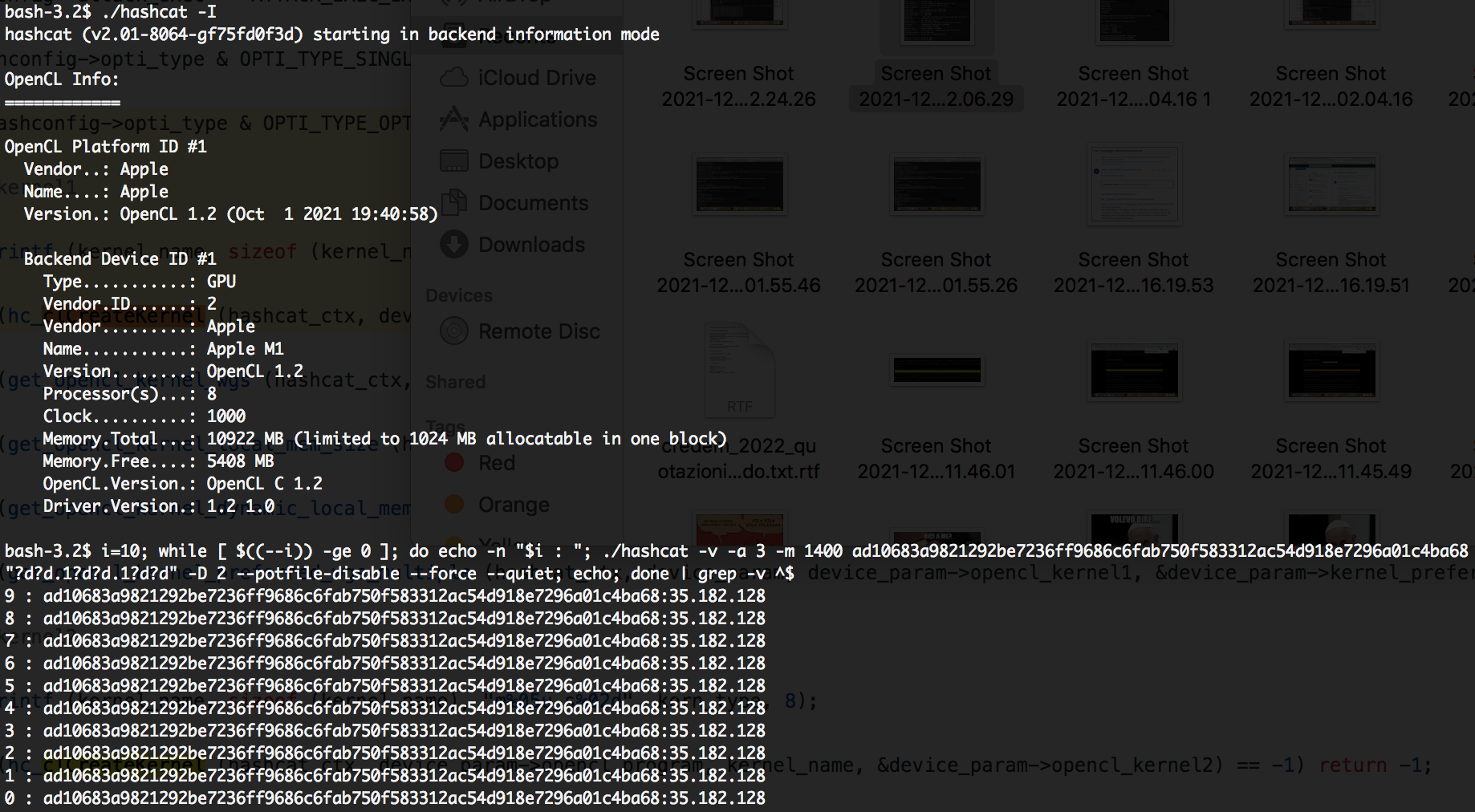
(tested with master + last open PR on Apple Silicon)