

 hardpixel
Decorations are not removed on some SSD applications
Currently, to decide when to handle a window, unite checks the initial MOTIF_HINTS, which are in the format of 0x2, 0x0, 0x0, 0x0, 0x0.
If the 3rd value of the hints is different from 0x2 and 0x0, then the window has decorations and unite handles it, as can be seen here and here. This check is needed to avoid showing duplicate decorations on Firefox/Chrome.
Some applications, like the ones reported in #180 and #168, have hints that do not match the rule above and still have decorations. The application reported in #180 (Ensemble) has hints 0x1, 0x3e, 0x0, 0x0, 0x0.
So there are other combinations of MOTIF_HINTS that indicate the window has decorations. The problem is, I can't find any documentation about this and help is needed to resolve the issue.

I sometimes get this on JetBrains products. Most of the time unite works with them correctly, but if I open a second window or restart the app then it shows decorated until I turn Unite off and on again. Is this the same issue, or is it something different?

Hi @graynk, sorry for the late response. Your issue might be related to this or to #173. Do you use "Auto Move Windows" extension?
Hi @graynk, sorry for the late response. Your issue might be related to this or to #173. Do you use "Auto Move Windows" extension?
Yes, I do. I'll try disabling it to see if it helps, I don't use it that much anyway
I can confirm that disabling Auto Move Windows extension resolves the problem
Compatibility issue with "Auto Move Windows" has been fixed in master branch. I will release a new version soon.
Issue reproduced again with "Auto Move WIndows" disabled. Again, on JetBrains products (this time PyCharm specifically). I can minimize-maximize however many times I want, but it's not removing decorations. But if I close PyCharm and then open it again, the decorations do get removed
When it happens again, open a terminal, type xprop, click the window and provide the output or only the value of _MOTIF_WM_HINTS. Thanks!
Here's the output:
_MOTIF_WM_HINTS(_MOTIF_WM_HINTS) = 0x3, 0x1, 0x1, 0x0, 0x0
I figured out when it happens. JetBrains IDE's take some time to open. If I click on the shortcut, wait until the splash screen shows up, then focus some other window on my second monitor (which does not have a top bar), then after IDE is done loading it opens up without decorations removed. If I keep focus on the main monitor, the decorations are removed normally
The title bar is not removed on Firefox 82.0.3 on Ubuntu 20.04 too. Here is the xprop output:
_MOTIF_WM_HINTS(_MOTIF_WM_HINTS) = 0x2, 0x0, 0x1, 0x0, 0x0

_MOTIF_WM_HINTS(_MOTIF_WM_HINTS) = 0x2, 0x0, 0x1, 0x0, 0x0
Works for me. Firefox 82.0.3 on Ubuntu 20.04. _MOTIF_WM_HINTS are same.

@lepa22 works for me too. Try restarting Firefox. Also see https://github.com/hardpixel/unite-shell/issues/201#issuecomment-697957246

Wine decorations are not removed here, on Fedora 33 x86-54.
_MOTIF_WM_HINTS(_MOTIF_WM_HINTS) = 0x3, 0x3e, 0x7a, 0x0, 0x0

@eduararley wine applications are recognized correctly by unite as decorated. The problem is that when you remove the decorations from a wine app they are automatically re-decorated.
You can see this by using xprop from a terminal using:
xprop -id wine_window_xid -f _MOTIF_WM_HINTS 32c -set _MOTIF_WM_HINTS "0x2, 0x0, 0x2, 0x0, 0x0"
So, I don't think there is a way to undecorate wine applications.
What about Chromium based browsers? Buttons are not removed when maximized on Edge and Chromium.
WM_NORMAL_HINTS(WM_SIZE_HINTS):
program specified location: 64, 55
program specified minimum size: 578 by 158
_MOTIF_WM_HINTS(_MOTIF_WM_HINTS) = 0x2, 0x0, 0x0, 0x0, 0x0
WM_NAME(UTF8_STRING) = "Decorations are not removed on some SSD applications · Issue #183 · hardpixel/unite-shell and 1 more page - Personal - Microsoft Edge"
_NET_WM_NAME(UTF8_STRING) = "Decorations are not removed on some SSD applications · Issue #183 · hardpixel/unite-shell and 1 more page - Personal - Microsoft Edge"

@AI-ien Have you tried going to your browser's Settings → Appearacne and enable Use system title bar and borders?
@AI-ien chrome v94 has a bug that is fixed in later versions as you can see on #254. If you version is higher than 94, please open a new issue and provide full info about unite, distro, gnme and chrome versions.
@jonian, unfortunately this is happening with latest builds, for Edge version 98.0.1108.56 and Chromium version 96.0.4664.110. I will open new bug then.
i am using chrome 103.0.5060.114 on ubuntu 20.04 and i have double icon problem. is this problem solved?

@rodrigoGA the issue on chrome has been fixed, Make sure you have enabled Use system titlebars and borders.
same problem.
if I open the app called extensions from the launcher it also has the same problem (gnome tweaks display correctly)

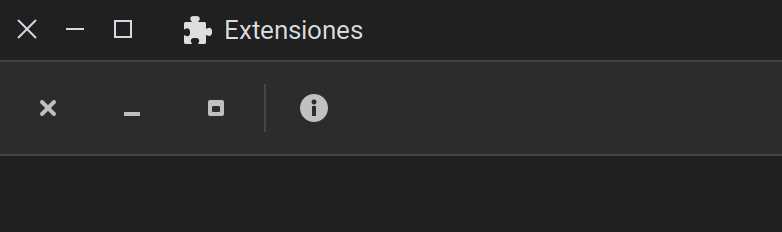
@rodrigoGA the issue on chrome has been fixed, Make sure you have enabled
Use system titlebars and borders.
Microsoft Edge Version 103.0.1264.62 (Official build) (64-bit)
Problem still persists.