

 hardbyte
Vector CAN not able to communicate
Hello all,
I have installed Python can on Windows 10. This machine has a vector CAN (VN5620) XL driver and VN5620 drivers installed.
This is my can.conf file

This is my channel mapping in vector Canoe tool
I use CAN1 VN5620 1 Channel 5 in my Canoe
When I run this command:
with can.Bus() as bus: ... for msg in bus: ... print(msg.data)
I get error:
Traceback (most recent call last):
File "
Can anyone help me resolve this issue ?
Note I have installed all the vector can drivers on this machine. Thanks

This is the output of the below command: can.detect_available_configs(interfaces=["vector"])
[{'interface': 'vector', 'channel': 4, 'serial': 2483, 'hw_type': <XL_HardwareType.XL_HWTYPE_VN5620: 66>, 'hw_index': 0, 'hw_channel': 4, 'supports_fd': True, 'vector_channel_config': VectorChannelConfig(name='VN5620 Channel 5', hw_type=<XL_HardwareType.XL_HWTYPE_VN5620: 66>, hw_index=0, hw_channel=4, channel_index=4, channel_mask=16, channel_capabilities=<XL_ChannelCapabilities.XL_CHANNEL_FLAG_CANFD_ISO_SUPPORT|XL_CHANNEL_FLAG_CMACTLICENSE_SUPPORT|XL_CHANNEL_FLAG_CANFD_BOSCH_SUPPORT|33554432|16|4|2|XL_CHANNEL_FLAG_TIME_SYNC_RUNNING: 3791650839>, channel_bus_capabilities=<XL_BusCapabilities.XL_BUS_ACTIVE_CAP_CAN|XL_BUS_COMPATIBLE_CAN: 65537>, is_on_bus=True, connected_bus_type=<XL_BusTypes.XL_BUS_TYPE_CAN: 1>, bus_params=VectorBusParams(bus_type=<XL_BusTypes.XL_BUS_TYPE_CAN: 1>, can=VectorCanParams(bitrate=500000, sjw=32, tseg1=127, tseg2=32, sam=1, output_mode=<XL_OutputMode.XL_OUTPUT_MODE_NORMAL: 1>, can_op_mode=<XL_CANFD_BusParams_CanOpMode.4|XL_BUS_PARAMS_CANOPMODE_CANFD: 6>), canfd=VectorCanFdParams(bitrate=500000, data_bitrate=2000000, sjw_abr=32, tseg1_abr=127, tseg2_abr=32, sam_abr=1, sjw_dbr=12, tseg1_dbr=27, tseg2_dbr=12, output_mode=<XL_OutputMode.XL_OUTPUT_MODE_NORMAL: 1>, can_op_mode=<XL_CANFD_BusParams_CanOpMode.4|XL_BUS_PARAMS_CANOPMODE_CANFD: 6>)), serial_number=2483, article_number=7192, transceiver_name='On board CAN 1057G (Highspeed)')}, {'interface': 'vector', 'channel': 5, 'serial': 2483, 'hw_type': <XL_HardwareType.XL_HWTYPE_VN5620: 66>, 'hw_index': 0, 'hw_channel': 5, 'supports_fd': True, 'vector_channel_config': VectorChannelConfig(name='VN5620 Channel 6', hw_type=<XL_HardwareType.XL_HWTYPE_VN5620: 66>, hw_index=0, hw_channel=5, channel_index=5, channel_mask=32, channel_capabilities=<XL_ChannelCapabilities.XL_CHANNEL_FLAG_CANFD_ISO_SUPPORT|XL_CHANNEL_FLAG_CMACTLICENSE_SUPPORT|XL_CHANNEL_FLAG_CANFD_BOSCH_SUPPORT|33554432|16|4|2|XL_CHANNEL_FLAG_TIME_SYNC_RUNNING: 3791650839>, channel_bus_capabilities=<XL_BusCapabilities.XL_BUS_ACTIVE_CAP_CAN|XL_BUS_COMPATIBLE_CAN: 65537>, is_on_bus=True, connected_bus_type=<XL_BusTypes.XL_BUS_TYPE_CAN: 1>, bus_params=VectorBusParams(bus_type=<XL_BusTypes.XL_BUS_TYPE_CAN: 1>, can=VectorCanParams(bitrate=500000, sjw=2, tseg1=5, tseg2=2, sam=1, output_mode=<XL_OutputMode.XL_OUTPUT_MODE_NORMAL: 1>, can_op_mode=<XL_CANFD_BusParams_CanOpMode.4|XL_BUS_PARAMS_CANOPMODE_CAN20: 5>), canfd=VectorCanFdParams(bitrate=500000, data_bitrate=0, sjw_abr=2, tseg1_abr=5, tseg2_abr=2, sam_abr=1, sjw_dbr=0, tseg1_dbr=0, tseg2_dbr=0, output_mode=<XL_OutputMode.XL_OUTPUT_MODE_NORMAL: 1>, can_op_mode=<XL_CANFD_BusParams_CanOpMode.4|XL_BUS_PARAMS_CANOPMODE_CAN20: 5>)), serial_number=2483, article_number=7192, transceiver_name='On board CAN 1057G (Highspeed)')}, {'interface': 'vector', 'channel': 0, 'serial': 100, 'hw_type': <XL_HardwareType.XL_HWTYPE_VIRTUAL: 1>, 'hw_index': 0, 'hw_channel': 0, 'supports_fd': True, 'vector_channel_config': VectorChannelConfig(name='Virtual Channel 1', hw_type=<XL_HardwareType.XL_HWTYPE_VIRTUAL: 1>, hw_index=0, hw_channel=0, channel_index=9, channel_mask=512, channel_capabilities=<XL_ChannelCapabilities.XL_CHANNEL_FLAG_CANFD_ISO_SUPPORT|XL_CHANNEL_FLAG_CANFD_BOSCH_SUPPORT|4|2|XL_CHANNEL_FLAG_TIME_SYNC_RUNNING: 2684354567>, channel_bus_capabilities=<XL_BusCapabilities.XL_BUS_ACTIVE_CAP_CAN|XL_BUS_COMPATIBLE_CAN: 65537>, is_on_bus=False, connected_bus_type=<XL_BusTypes.XL_BUS_TYPE_NONE: 0>, bus_params=VectorBusParams(bus_type=<XL_BusTypes.XL_BUS_TYPE_CAN: 1>, can=VectorCanParams(bitrate=500000, sjw=1, tseg1=4, tseg2=3, sam=1, output_mode=<XL_OutputMode.XL_OUTPUT_MODE_NORMAL: 1>, can_op_mode=<XL_CANFD_BusParams_CanOpMode.XL_BUS_PARAMS_CANOPMODE_CAN20: 1>), canfd=VectorCanFdParams(bitrate=500000, data_bitrate=0, sjw_abr=1, tseg1_abr=4, tseg2_abr=3, sam_abr=1, sjw_dbr=0, tseg1_dbr=0, tseg2_dbr=0, output_mode=<XL_OutputMode.XL_OUTPUT_MODE_NORMAL: 1>, can_op_mode=<XL_CANFD_BusParams_CanOpMode.XL_BUS_PARAMS_CANOPMODE_CAN20: 1>)), serial_number=100, article_number=7000, transceiver_name='Virtual CAN')}, {'interface': 'vector', 'channel': 1, 'serial': 100, 'hw_type': <XL_HardwareType.XL_HWTYPE_VIRTUAL: 1>, 'hw_index': 0, 'hw_channel': 1, 'supports_fd': True, 'vector_channel_config': VectorChannelConfig(name='Virtual Channel 2', hw_type=<XL_HardwareType.XL_HWTYPE_VIRTUAL: 1>, hw_index=0, hw_channel=1, channel_index=10, channel_mask=1024, channel_capabilities=<XL_ChannelCapabilities.XL_CHANNEL_FLAG_CANFD_ISO_SUPPORT|XL_CHANNEL_FLAG_CANFD_BOSCH_SUPPORT|4|2|XL_CHANNEL_FLAG_TIME_SYNC_RUNNING: 2684354567>, channel_bus_capabilities=<XL_BusCapabilities.XL_BUS_ACTIVE_CAP_CAN|XL_BUS_COMPATIBLE_CAN: 65537>, is_on_bus=False, connected_bus_type=<XL_BusTypes.XL_BUS_TYPE_NONE: 0>, bus_params=VectorBusParams(bus_type=<XL_BusTypes.XL_BUS_TYPE_CAN: 1>, can=VectorCanParams(bitrate=500000, sjw=1, tseg1=4, tseg2=3, sam=1, output_mode=<XL_OutputMode.XL_OUTPUT_MODE_NORMAL: 1>, can_op_mode=<XL_CANFD_BusParams_CanOpMode.XL_BUS_PARAMS_CANOPMODE_CAN20: 1>), canfd=VectorCanFdParams(bitrate=500000, data_bitrate=0, sjw_abr=1, tseg1_abr=4, tseg2_abr=3, sam_abr=1, sjw_dbr=0, tseg1_dbr=0, tseg2_dbr=0, output_mode=<XL_OutputMode.XL_OUTPUT_MODE_NORMAL: 1>, can_op_mode=<XL_CANFD_BusParams_CanOpMode.XL_BUS_PARAMS_CANOPMODE_CAN20: 1>)), serial_number=100, article_number=7000, transceiver_name='Virtual CAN')}]
Vector HW Config: Channel '5' of application 'python-can' is not assigned to any interface
That's your problem. With vector interface you have three options:
- Connect via the global channel index:
channel=4, app_name=None - Connect via Vector HW Config channel assignment:
channel=0, app_name="python-can. But here you need to assign Channel 1 of app 'python-can' to VN5620 Channel 5 - Connect via serial:
channel=4, serial=2483

Hello,
Thanks for the feedback, I did not understand your solution. Sorry. I want to transmit and receive some data on this and be able to see the CAN bits in the Canoe simulation.
Channel Mapping [https://pasteboard.co/qpGityy3OFys.png]
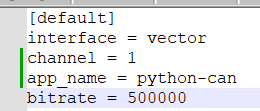
I changed the can.conf and still see the same error.
try this
[default]
interface = vector
channel = 4
serial = 2483
app_name = python-can
bitrate = 500000
Does not work, sorry
Screenshot : Error_Screenshot
Edit:
I tried with all channels, none of them are working :(
Can you show a screenshot of your Vector Hardware Config? Was your VN5620 connected during your last test?
Yes, it was connected during the last test. The Canoe was running. I always run the Canoe and execute these scripts. Pardon me, I am new to this and do not know stuffs.
Your traceback shows, that serial 2483 was not found. I asked for a screenshot of your Vector HW configuration to be sure that it is connected as you say.
It's a remote setup located outside my scope. However we can still debug. Will post screenshots next week. Thanks a lot for support.
@zariiii9003 - I think I understood the problem. This is my can.conf file.
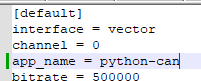
I created a python-can application in vector hardware config and assigned CAN1 to it. Below screenshot. Vector-hardware-config
After this step. I sent some data on the CAN bus and it says the message was sent on CAN1. CAN1_msg_sent But now, how do I validate what ever I have sent is being sent on CAN1.
CANOE is not running now.
I ran this program, but its still waiting for some thing :(
with can.Bus() as bus: for msg in bus: print(msg.data)