

 hanatos
Tagging
vkdt is more than promising on the development side but I miss some tagging features on lighttable.
My workflow is the following:
- Import. Today I use memory card import with renaming but I would afford to do that externally and import files where they are.
- Culling, sorting on lighttable
- Development
- Tagging on lighttable
At this stage I don't care of any of the "standardized" metadata. I only care about information I want to associate to my images:
- author, description
- place (country, region, city, location, ...)
- people (private tags)
- taxonomic classification if applicable (mainly plants and animals). I don't use the full hierarchy but I still could simplify a bit the structure. I use synonyms to keep local and scientific names.
- usage. For example, I've a piwigo site and I keep here the piwigo destination of images. Later on, I can rework that collection and refresh the piwigo images/metadata.
- Export. I always export on disk and hardly bear the other built-in exporters. Part of that step is the choice of the metadata I want to associate with the images, depending on their destination:
- exif or not.
- geotagged or not
- here I associate my personal metadata (tags) to any of the standardized ones (note here that tags set as category are never exported): iptc: that's the info that piwigo understands for example: - country, region, ... - description, ... - keywords (synonyms or not) xmp: - rights - hierarchical tags (if I want to share the full metadata).
- Outside the end to end workflow, I can easily find my images based on any of those tags to reuse or rework them.
Here is an example of metadata export settings:
$(CATEGORYn(tag)) is the way to pick up the right tag.
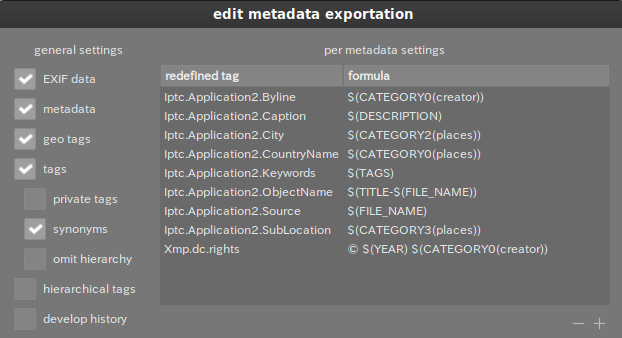

I don't know how relevant that is but I very much like that darktable autocompletes tags with the most common (and counted) tags.
My personal use-case simply involves tagging pictures and gathering them by tag in darktable (and I wouldn't mind switching to an external browser which can access these tags).
More precisely I tag most pictures with Wikimedia Commons categories which are then parsed by the dtmediawiki export plugin (which I would probably rewrite for vkdt once I start using it). For example "Category:Pacific Spirit Park" (which ends up on https://commons.wikimedia.org/wiki/Category:Pacific_Spirit_Park ). And some personal pictures have other keywords.
I think that would be covered by the above use-case and it seems nice to export files with standard (iptc/xmp) tags. I don't know what vkdt already has implemented and/or planned.

thanks for the detailed explanation, that sounds like a valid workflow to me :)
vkdt has simple means to assign a tag by ctrl-t:
https://github.com/hanatos/vkdt/blob/master/src/gui/api.hh#L26
it only remembers the last tag you typed in the same session. i suppose it would be good/easy to extend it to something with filtering/almost autocompletion like there is for presets:
https://github.com/hanatos/vkdt/blob/master/src/gui/api.hh#L329
(the code lists all presets in the preset ~/.config/vkdt/presets/ directory, it will translate pretty much as-is to listing tags in the tag directory ~/.config/vkdt/tags/. maybe it can be refactored to allow reuse)
following your explanations, i don't see the need to ingest exif/xmp/etc data into vkdt's brain. i can see, however, that it may make sense to manage this stuff from source file to exported file. i suppose that could be a post process/done in a script that is tied to the export or so. for such a process it would be simple to pick up the tags from vkdt.db if we decide we want to write it to this file (along with star rating and colour labels which are already in it). there's the caveat though that vkdt has per-folder ratings and labels (seemed useful to be able to organise tag collections with a different set of stars/labels, independent of the original folder). that means we'd need to be careful to not tag symlinks/images in a tag folder.
as to your step 1, vkdt should now be able to mount/unmount usb storage and copy/move the images over to the hard drive (works for me (tm)).

following your explanations, i don't see the need to ingest exif/xmp/etc data into vkdt's brain.
Agreed, until export time... I need to understand better what can be done there and how. Should I have to configure the metadata to be exported outside vkdt ?
there's the caveat though that vkdt has per-folder ratings and labels
I have missed that, interesting. I guess that tags attached to images should be added in folder's vkdt.db as well, right ? But is there a list of all folders somewhere (if a tag is deleted, it should be removed everywhere, shouldn't be) ? Or you may want to have a global vkdt.db for that. What's you view ?
that means we'd need to be careful to not tag symlinks/images in a tag folder.
Disable ctrl-t and 'assign tag' button if it's a tag collection should be enough.
vkdt should now be able to mount/unmount usb storage
Great, I'll make a try.
Back to tags, if to create working collections this simple tag system is perfect, I don't see (maybe yet) how I could manage nearly 3000 hierarchical tags. First, the size: you expect 8 characters. Then the current design may suffer of such a high number of tags. Finally it seems I'll have to manage the tag dictionary (hierarchy, categories, synonyms, ...) outside vkdt.
just a few quick comments:
- tags are not limited to 8 characters but to 255 (because that's a file entry in a directory)
- i don't manage tags, they don't exist inside vkdt's brain. they are just folders in
~/.config/vkdt/tags/ - don't know how well it scales to many thousands of directory entries in the same parent. that's up to the file system.
but yes, having many thousands of tags i don't see how they help you organise things. it seems having many thousands of images with many thousands of tags attached does not achieve a lot of information reduction. also the use case inside vkdt remained vague to me so far. i gather mostly you want to be able to attach and organise tags in a visual manner (while looking at images) so you can later do "things" with it (outside vkdt).
Thanks for your comments. I understand your arguments.
you can later do "things" with it (outside vkdt)
The lighttable, inside vkdt, is just about organization and navigation inside that organization. You have few requirements about it, always performance in mind, I understand that very well. However I feel myself strongly limited.
outside vkdt would imply to code another lighttable outside vkdt with other features (but still with the same core functions, 80% ?)... of course we could still use vkdt (darkroom) to edit a single image.
i don't see how they help you organise things
We can imaging tags just being another folder/files organization. For example, folders organize your files by dates (years, months, ...). It can be useful to have at the same time a classification by places (country, city, ...) or by projects and sub-projects, whatever,...
If the tags folders could be organized hierarchically (as file folders) we would already have hierarchical tags! Today vkdt browses tags as folders, except it's limited to one level.
The second point, probably less important, which applies to folders, but could apply to hierarchical tags as well, is the possibility to select a node of folders instead of a single folder. But let's keep this for a future discussion. :)