

 ham-radio-software
Macbook install
As I got a Macbook air M1 i am trying to have D-Rats onto it.
First steps were download code and try run it from terminal. as expected i quickly ended with missing dependencies (time being it's "gi" module from gobject)
first check to solve this is that it requires to be installed via PIP, which should be at first updated maybe with "brew" or maybe pkg-install... all stuff which seems not present on my mac, which I suspect will then imply a cascade of other dependencies and modules...
i suspect the matter for me here is more to cope with understanding how to properly manage a python3 env on a mac (not being much able to do the same on win or on linux) rather then solely install d-rats
having said this, and provided that i am quite new to this platform and would like to avoid messing it up, anybody has any suggestion or links to proceed with a clean setup ?

I went on trying to make d-rats run on Mac. - this is the logging of my efforts so far, I am placing here so to share and have it as a base for a future help. UNLIKELY AT TIME BEING I AM STUCK, SEE AT THE END OF THE STORY BELOW.
----Install D-Rats on Apple Macbook Air M1 --- Version of Mac OS: Ventura 13.3.1
-
Download the drats source code as zip file from the github https://github.com/ham-radio-software/D-Rats.git
-
Unzip the file
-
Open a Terminal and change directory to the folder of the unzipped D-Rats % cd Users/maurizio/Downloads % cd D-Rats-master
-
Launch ./d-Rats.py % ./d-rats.py
-
At this point the system will ask you to install developer tools – lets proceed with this install (note: just the download of this can take a couple of hours): xcode-select: note: No developer tools were found, requesting install. If developer tools are located at a non-default location on disk, use
sudo xcode-select --switch path/to/Xcode.appto specify the Xcode that you wish to use for command line developer tools, and cancel the installation dialog. Seeman xcode-selectfor more details. -
Relaunch d-rats, …. Error at import gi ModuleNotFoundError: No module named 'gi'
As from internet search seems to be part of gobject, lets try install this component.
To install gobject: pip3 install gobject pygobject error: missing pycairo
so to install pycairo: % pip3 install pycairo … 'pkg-config' not found.
(break)
After a while I was getting a “permission denied” if i was tryng to access (i.e. executing the ls command) on the download folder by the terminal… not sure why It suddenly started complaining also if I was doing an “ls” of the download directory.
To solve this I had to go into system menu “apple->system config->privacy setting -> Developer tools” and enable Terminal app permission to execute software from unreliable sources ( yes for running “ls” on the download folder…)
(break)
From another internet site I understand that I need “brew” to install pygobject and also pkg-config. Let’s Install homebrew: /bin/bash -c "$(curl -fsSL https://raw.githubusercontent.com/Homebrew/install/HEAD/install.sh)" Which will run from /opt/homebrew/bin/brew So let’s fix it make the shell found it: eval $(/opt/homebrew/bin/brew shellenv)
And also Install pygobject as indicated here: https://pygobject.readthedocs.io/en/latest/getting_started.html % /opt/homebrew/bin/brew install pygobject3
I would have expected that at this point the error of “missing gi” was gone, but no, it still is not.
After closing and reopening the termina went back to having “pkg-config” missing, but brew was telling me I had it, so I guessed path issue. Fixing path to have pkg-config found by the shell: eval $(/opt/homebrew/bin/pkg-config shellenv)
Time to relaunch d-rats and get a new error: % cd /Users/maurizio/Downloads/D-Rats-master % ./d-rats.py
Traceback (most recent call last):
File "/Users/maurizio/Downloads/D-Rats-master/./d-rats.py", line 34, in
So this time let’s install gtk3: brew install gtk+3
and lets’ rerun drats to see that some other python3 modules are required % pip3 install lxml feedparser serial
and lets’ rerun drats again:
./d-rats.py
04/14/2023 16:11:05:INFO:D-Rats:main: re-config option found -- Reconfigure D-rats
04/14/2023 16:11:05:INFO:D-Rats:main: args.config = /Users/maurizio/.d-rats-ev
Traceback (most recent call last):
File "/Users/maurizio/Downloads/D-Rats-master/./d-rats.py", line 240, in
Checking the serial module version:
% pip3 install serial
Requirement already satisfied: serial in /opt/homebrew/lib/python3.11/site-packages (0.0.97)
Requirement already satisfied: future>=0.17.1 in /opt/homebrew/lib/python3.11/site-packages (from serial) (0.18.3)
Requirement already satisfied: pyyaml>=3.13 in /opt/homebrew/lib/python3.11/site-packages (from serial) (6.0)
Requirement already satisfied: iso8601>=0.1.12 in /opt/homebrew/lib/python3.11/site-packages (from serial) (1.1.0)
maurizio@Air-di-maurizio D-Rats-master %
@wb8tyw I am quite stuck, just look at the end of the story... am i importing the wrong serial module ?
pyproject.toml has a section in it with the python modules that need to be installed for running D-Rats.
dependencies = [ "lxml", "pycairo", "PyGObject", "pyserial", "Pillow", "geopy", "feedparser" ]
No idea what the PyPi 'serial' module does

This is a similar issue to what Microsoft users have to deal with. D-Rats needs: A Python3 environment with the above dependencies.
It may be possible to find a GTK3 pre-built for MAC-OS, that is what we are missing on Microsoft Windows.
Then we need packages for pyGobject that are compatible with the Python3 for Mac and the pre-built GTK3. So that is something to hunt for.
You want to use PIP installed modules as a last resort, as I have stated multiple times, and then PIP installed modules should be in a virtual env or similar sandbox.
Previous conversations with Mac users indicates some of them are using the ActiveState Python package, which is free for non-commercial use, which may have the GTK+ library with it.
I am not sure that we can distribute a D-Rats package that has ActiveState Python embedded in it.
With linux systems and linux environments like ANTI-X or Ubuntu, all the python add on modules needed for running D-RATS are available from the same source as the python3 installed on the system. If those are not available for MAC OS, then the default python environment is incompete.
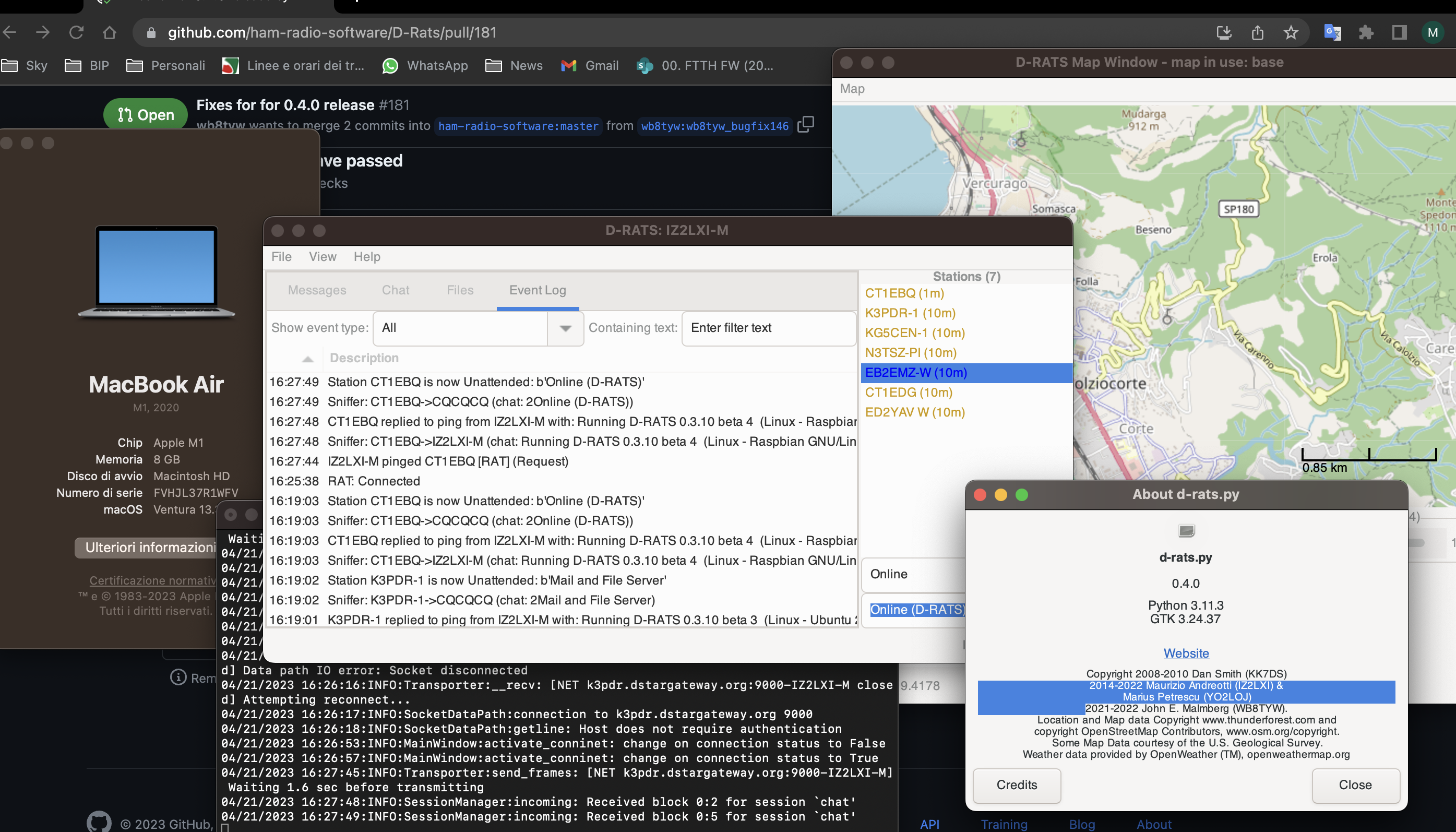
@wb8tyw I went on looking into the mac install. for time being i keep the install i did, with this few pip installed modules. let's see how far i can arrive before looking for another way. "serial" issue "solved": it was just matter of deinstalling it so to avoid it override pyserial .
now i got to a new showstopper, which i see from the notes in the code it's probably something to be sorted at programming side:
% ./d-rats.py
04/18/2023 10:53:25:INFO:D-Rats:main: re-config option found -- Reconfigure D-rats
04/18/2023 10:53:25:INFO:D-Rats:main: args.config = /Users/maurizio/.d-rats-ev
Traceback (most recent call last):
File "/Users/maurizio/Downloads/D-Rats-0.4.0.dev1/./d-rats.py", line 240, in
Related to:
Sound configuration issues with getting all the packages installed. https://github.com/ham-radio-software/D-Rats/issues/195
Application launching may have bugs in some Mac OS library versions. https://github.com/ham-radio-software/D-Rats/pull/193