
xamarin-range-slider
 xamarin-range-slider copied to clipboard
Published
20 hours ago •
 halkar
halkar
[Android] Object disposed exception
IMPORTANT
If you are reporting a bug and want it to be fixed as soon as posible don't forget to provide a sample project.
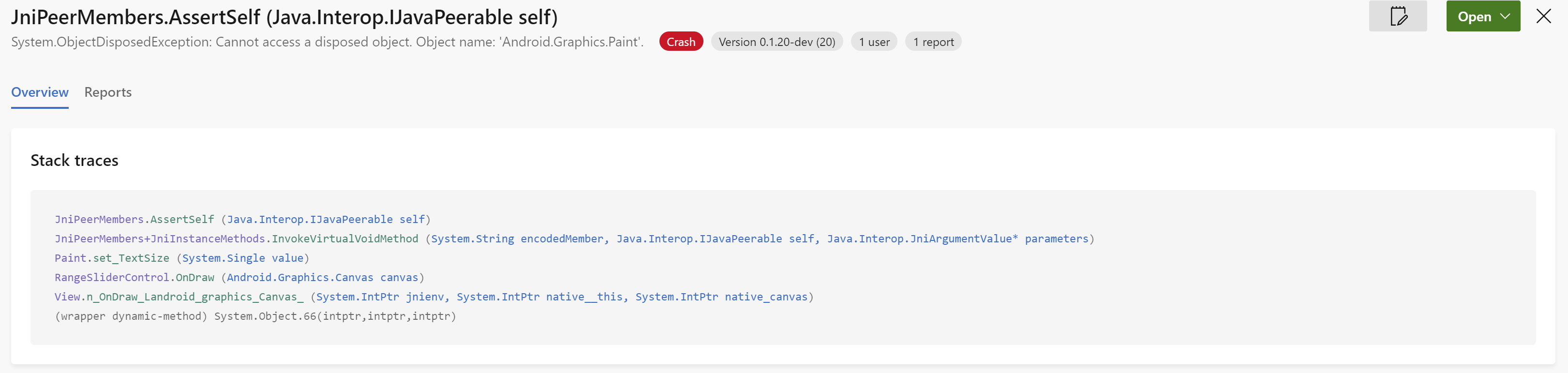
My RangeSliderControl settings is below
Code
ratingSlider = FindViewById<RangeSliderControl>(Resource.Id.rating);
ratingSlider.ShowTextAboveThumbs = true;
ratingSlider.StepValueContinuously = true;
ratingSlider.StepValue = 1f;
ratingSlider.ActivateOnDefaultValues = true;
ratingSlider.MaterialUI = true;
ratingSlider.ShowLabels = true;
ratingSlider.SetRangeValues(0f, 5f);
ratingSlider.SetSelectedMinValue(0f);
ratingSlider.SetSelectedMaxValue(5f);
ratingSlider.FormatLabel = FormaLabel;
ratingSlider.TextAboveThumbsColor = Android.Graphics.Color.Black;

var density = Resources.DisplayMetrics.Density;
ratingSlider.SetBarHeight(density * 2);
XML
<xamarin.rangeslider.RangeSliderControl
                android:id="@+id/rating"
                android:layout_width="match_parent"
                android:layout_height="wrap_content"
                app:absoluteMinValue="0"
                app:absoluteMaxValue="5"
                app:showRangeLabels="true"
                app:barHeight="1dp" />
RangeSliderControl throws System.ObjectDisposedException: Cannot access a disposed object. Object name: 'Android.Graphics.Paint' When load view
I want to know why is throw this exception. Did I put the wrong value? or RangeSliderControls's bug?
Thank you for reading this issue :)


