

 halirutan
Needs to understand the context better otherwise many suggestions aren't helpful
Quite often a keyboard shortcut is suggested that you couldn't have used because the current focus was wrong, its just that as you got the focus to the right place, there was a keyboard shortcut you could use, but since you right clicked to get there, the menu entry is already open and the action is a click away and the shortcut would actually be more effort to use. So a big part of why you use the mouse is to get the focus to a certain location at which point the mouse is much quicker. It would be more useful if it kind of understood this and suggested how you could have navigated to get the focus to the correct spot using the keyboard. For example quite often you are in the editor and need to get to something in some tool window (sometimes jetbrains don't provide a good way to get there via keyboard)

You are correct. Key Promoter X can only serve as a first helping hand to get used to the most obvious shortcuts. Even more so because some of the actions that are possible in the IDEs are not accessible by the Key Promoter X. For quite some time, I thought about publishing a "Beyond Key Promoter" article/video because I often find myself teaching people how easy some of the things are in the IDE, and unfortunately, many never cross that border where the IDE becomes more than an editor.
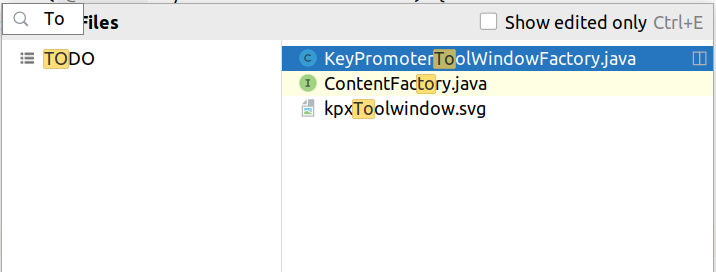
For your specific example with the tool windows: I'm sure you know that the most important tool windows have an Alt+Number shortcut, but did you also know that you can use Ctrl+E to get to the "Recent Files" popup? There you have access to all tool windows even if they don't have a shortcut. And like in many other places (e.g. Project View, Structure, ...) you can just start typing to narrow down what's displayed:
My all-time favorite to just "find stuff you can do in the IDE" is Ctrl+Shift+A for "Find Action". It's perfect because it also shows the shortcut if one is available. Finally, my personal opinion is that you shouldn't aim for 100% mouse-free usage, but to scrape off the things you use the most (especially during coding).
