

 halfnelson
Navigation fails inside a view
I was attempting to call a navigate() from an on:tap event and discovered that whenever the calls originate from within a view, the app crashes with an error stating:
System.err: Calling js method onViewAttachedToWindow failed
System.err: Error: java.lang.IllegalStateException: The specified child already has a parent. You must call removeView() on the child's parent first.
For example, let's say I have a component called NewPage defined as such:
<page>
  <stackLayout>
    <label>I am the new page</label>
  </stackLayout>
</page>
And I wish to navigate to it from this component:
<script lang="ts">
  import NewPage from "./NewPage.svelte";
  import { navigate } from "svelte-native";
</script>
<page>
  <tabView>
    <tabViewItem title="Tab 1" height="100%">
      <stackLayout>
        <button
          class="-outline -rounded-lg m-t-20"
          on:tap={() => navigate({ page: NewPage })}>+</button>
      </stackLayout>
    </tabViewItem>
    <tabViewItem title="Tab 2">
      <stackLayout><label class="h2">Tab 2</label></stackLayout>
    </tabViewItem>
  </tabView>
</page>
This causes the app to crash when the button is pressed, however, if I instead move the offending navigate() in the on:tap even handler outside of the <tabView>, the app no longer crashes and everything goes on it's marry way. Any insides, suggestions, or new found bugs?
Much appreciated!

I was testing a bit more and I found a workaround in case anybody is having this same issue. All I had to do was wrap the <tabView> element in an if block and unmount the <tabView element before calling navigate().
For example:
<script lang="ts">
  import { navigate } from "svelte-native";
  import NewPage from "./NewPage.svelte";

  let tabView = true;
</script>

{#if tabView}
    <tabView>
      <tabViewItem title="Tab 1">
        <button
          class="-outline -rounded-lg m-t-20 m-b-20"
          on:tap={() => {
            tabView = false;
            navigate({ page: NewPage});
          }}>Navigate to New Page</button>
      </tabViewItem>
      <tabViewItem title="Tab 2">
        <label>Tab 2</label>
      </tabViewItem>
    </tabView>
  {/if}
As to why this happens, I'd only be guessing, but given the error mentions calling removeView() on child's parent, this would be pretty equivalent, since when tabView becomes false, it would unmount the <tabView> element...
Thanks for this report, I am looking into it.
I notice you are using tab view. There are 2 newer components that replace tabView https://nativescript.org/blog/tabs-and-bottomnavigation-nativescripts-two-new-components/#

I might need more information. Are you using the latest version of nativescript and svelte native (0.9.5)?
I couldn't reproduce with
ns create --svelte broken-app
replacing App.svelte with
<script lang="ts">
  import NewPage from "./NewPage.svelte";
  import { navigate } from "svelte-native";
</script>

<page>
  <tabView>
    <tabViewItem title="Tab 1" height="100%">
      <stackLayout>
        <button
          class="-outline -rounded-lg m-t-20"
          on:tap={() => navigate({ page: NewPage })}>+</button>
      </stackLayout>
    </tabViewItem>
    <tabViewItem title="Tab 2">
      <stackLayout><label class="h2">Tab 2</label></stackLayout>
    </tabViewItem>
  </tabView>
</page>
and creating NewPage.svelte
<page>
  <stackLayout><label>I am the new page</label></stackLayout>
</page>
when I run with ns run android
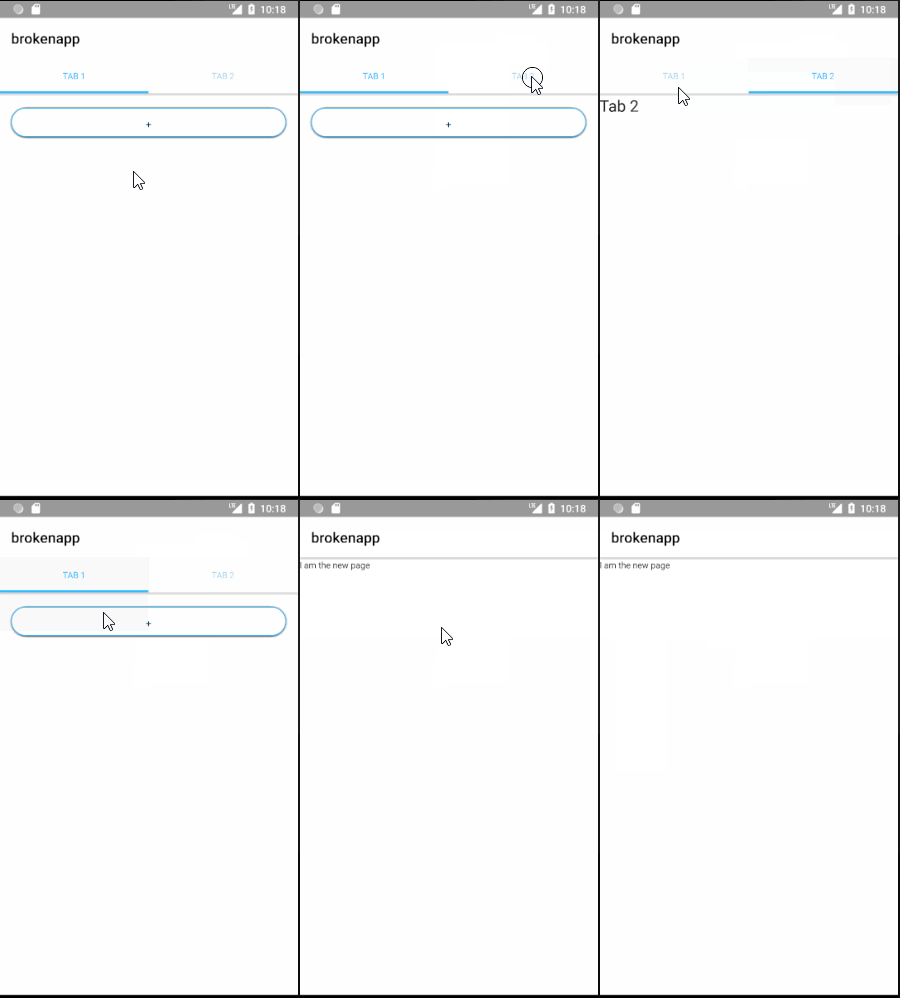
I get no crash when opening the page:
Yes sir, you are correct about the <tabs> component, and I get the same issue with both. There were many more nested layouts than what I let on in my example above. I'll make a branch on my project so you can reproduce, as soon as I can, a bit later this week since I have a school project due ASAP. I am using the latest versions of both svelte-native and nativescript.
P.S. I convinced my school (FAU) to use Svelte and svelte-native for mobile app development classes. 😉